
【Scala】在IDEA中右键没有添加scala object和class的选项
首先要确保在Add Framework Supprt中添加了scala(选中项目根目录)

然后在File -> Project Structure...中选择Libraries


最后是关键,要选择Source Root文件夹上级目录,一般是xxx.main
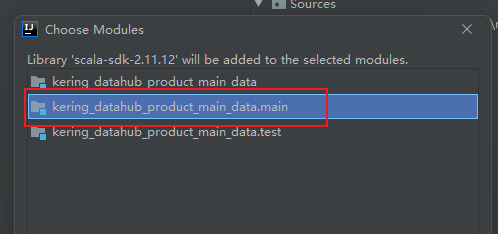
在source root文件夹上右击,New里就有了Scala Class

首先要确保在Add Framework Supprt中添加了scala(选中项目根目录)
然后在File -> Project Structure...中选择Libraries
最后是关键,要选择Source Root文件夹上级目录,一般是xxx.main
在source root文件夹上右击,New里就有了Scala Class

 浙公网安备 33010602011771号