


VUE + Nginx + Traefik 项目的发布与反向代理
VUE + Nginx + Traefik 项目的发布与反向代理
环境 :
项目框架 : vue 2
发布环境:nginx-1.29.1
反向代理:traefik v3.4.5
目的:
项目启动时:http://localhost:8005/railfore
项目发布后:http://localhost:30000/railfore
项目反代后:http://localhost:3147/railfore
1. 项目配置
在配置文件 .env.working 中使用
NODE_ENV=working
VUE_APP_PREVIEW=true
在 package.json文件中使用以下命令,发布时加载环境变量
  "scripts": {
    "serve": "vue-cli-service serve","build:work": "vue-cli-service build --max_old_space_size=8192 --mode working"
  },
在 vue.config.js 文件中 ,配置
const isProd = process.env.NODE_ENV === 'production';
const isDev = process.env.NODE_ENV === 'development';
const isWorking = process.env.NODE_ENV === 'working';

const vueConfig = {
  outputDir: isWorking ? "dist/railfore/" : 'dist/',
  publicPath: isWorking ? '/railfore/' : "/", //这个必须,引入静态资源需要从根路径引入,否则会找不到静态资源
};

module.exports = vueConfig;
在路由文件 中 使用:
const router = new Router({
  base: process.env.BASE_URL,
  scrollBehavior: () => ({ y: 0 }),
  mode: 'history',
  routes: constantRouterMap,
});
项目启动后 :http://localhost:8005/railfore
项目发布
yarn build:work
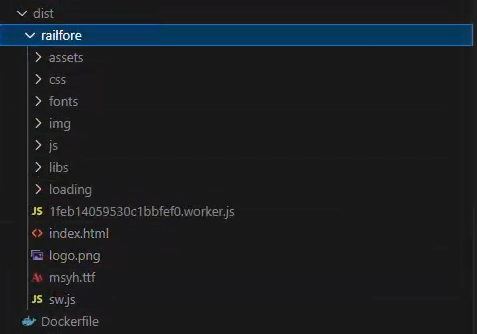
发布目录应如下
2. nginx 配置
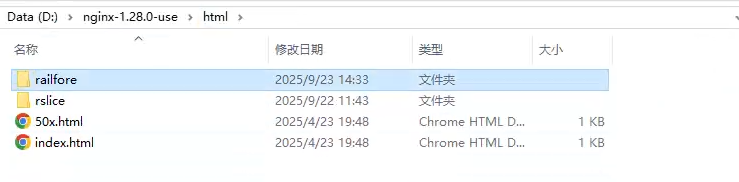
把railfore文件放在 nginx 下的 html 目录下
配置 nginx.conf
文件目录:D:\nginx-1.28.0-use\conf\nginx.conf
    server {
        listen       30000;
        server_name  railfore;

        # 禁用自动重定向
        absolute_redirect off;
        server_name_in_redirect off;
        port_in_redirect off;

        # 主应用路径 - 使用root指令
        location /railfore/ {
            root   html;
            index  index.html index.htm;

            # 处理Vue Router的history模式
            try_files $uri $uri/ /railfore/index.html;
        }

        # 处理不带斜杠的访问
        location = /railfore {
            return 301 /railfore/;
        }

        # 根路径重定向到railfore
        location = / {
            return 301 /railfore/;
        }

        error_page   500 502 503 504  /50x.html;
        location = /50x.html {
            root   html;
        }
    }
3. traefik 配置
traefik 反向代理配置(这里粘贴的是linux 环境下的配置,可以参考)
traefik.toml 文件配置:
[ping]
  entryPoint = "web"

[entryPoints]
  [entryPoints.web]
    address = ":3147"
  [entryPoints.websecure]
    address = ":8444"

[log]
  level = "DEBUG"
  filePath = "/data/winstall/traefik/traefik.log"

[accessLog]
  filePath = "/data/winstall/traefik/access.log"

[api]
  insecure = true
  dashboard = true

[providers.file]
  filename = "/data/winstall/traefik/dynamic_conf.toml"
  watch = true
dynamic_conf.toml 文件配置
  [http.routers.railfore]
    entryPoints = ["web"]
    rule = "PathPrefix(`/railfore`)"
    service = "railfore-svc"
    priority = 10
  [http.services]
    [http.services.railfore-svc]
      [http.services.railfore-svc.loadBalancer]
        [[http.services.railfore-svc.loadBalancer.servers]]
          url = "http://10.5.84.11:7700/"
或者:traefik_dynamic.yml文件配置
http:
  routers:
    railfore:
      rule: "PathPrefix(`/railfore`)"
      entryPoints:
        - web
      service: railfore-svc
  services:
    railfore-svc:
      loadBalancer:
        servers:
          - url: "http://localhost:30000/"
项目访问:http://localhost:3147/railfore
end.

 浙公网安备 33010602011771号