


今天上午上了计算机网络课程,学习了相关知识做了测试
今天是周五调试代码作业上交的时间
下午和晚上调试好了代码,终于有了个差不多的界面和相应功能
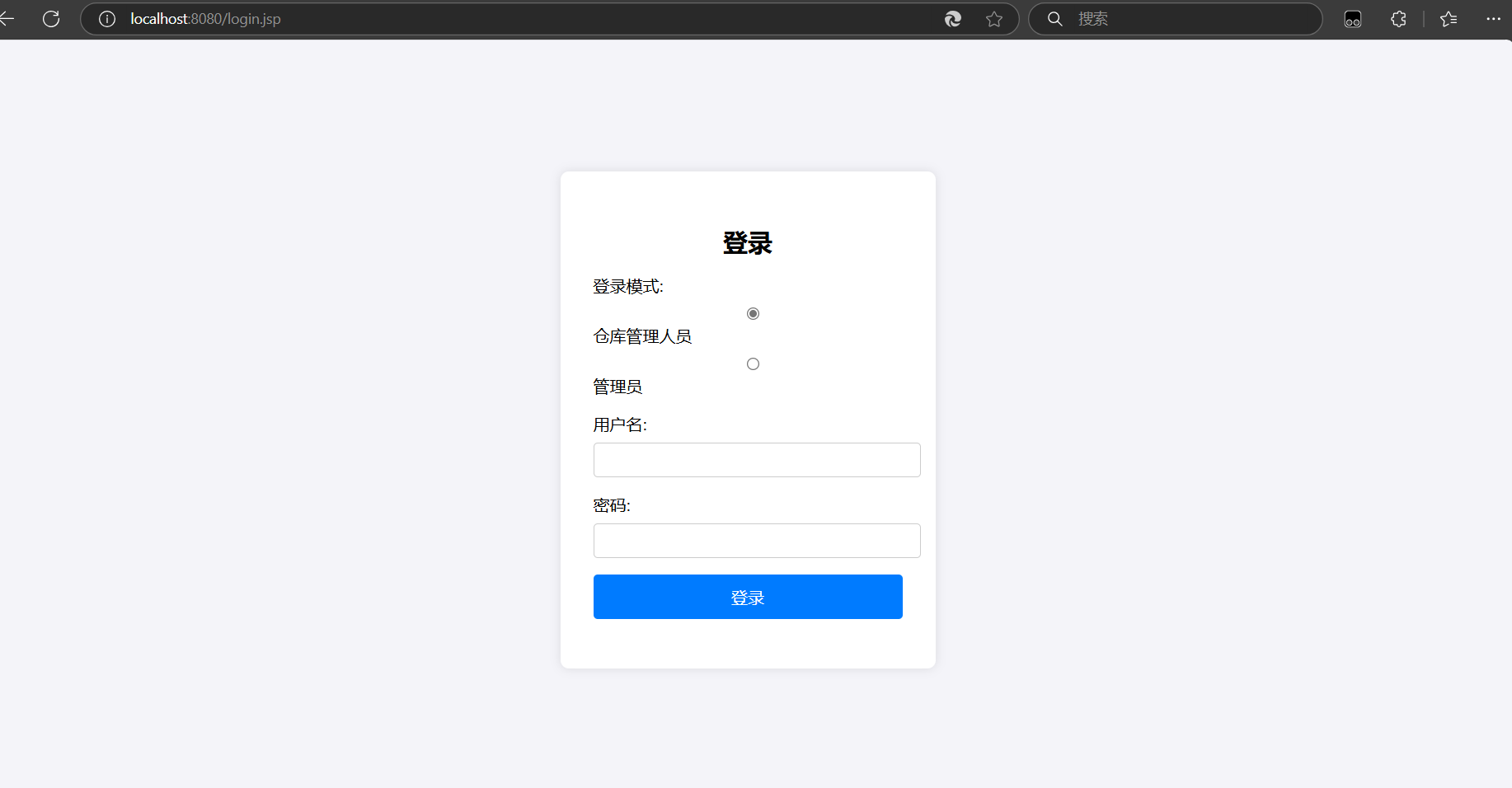
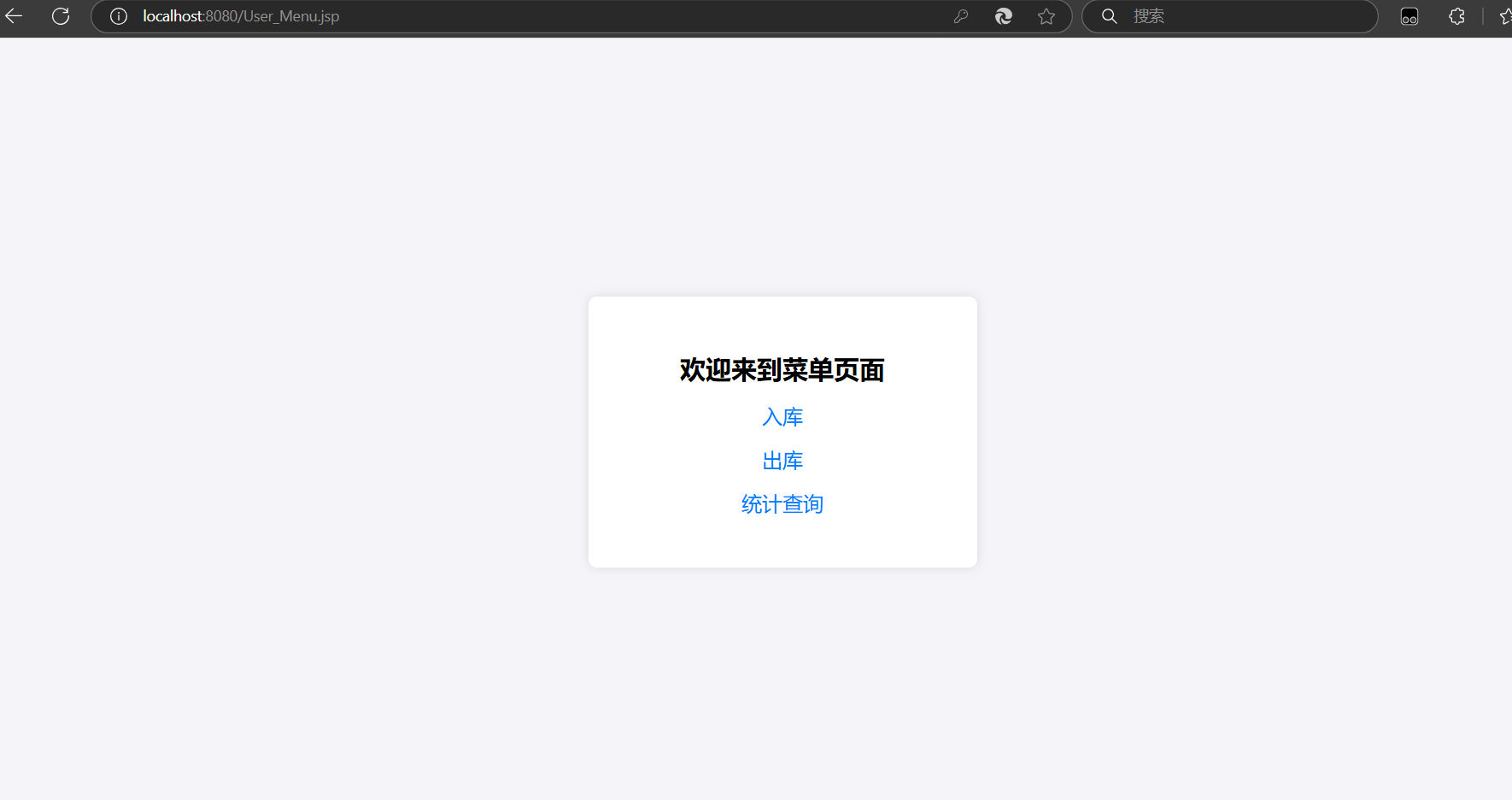
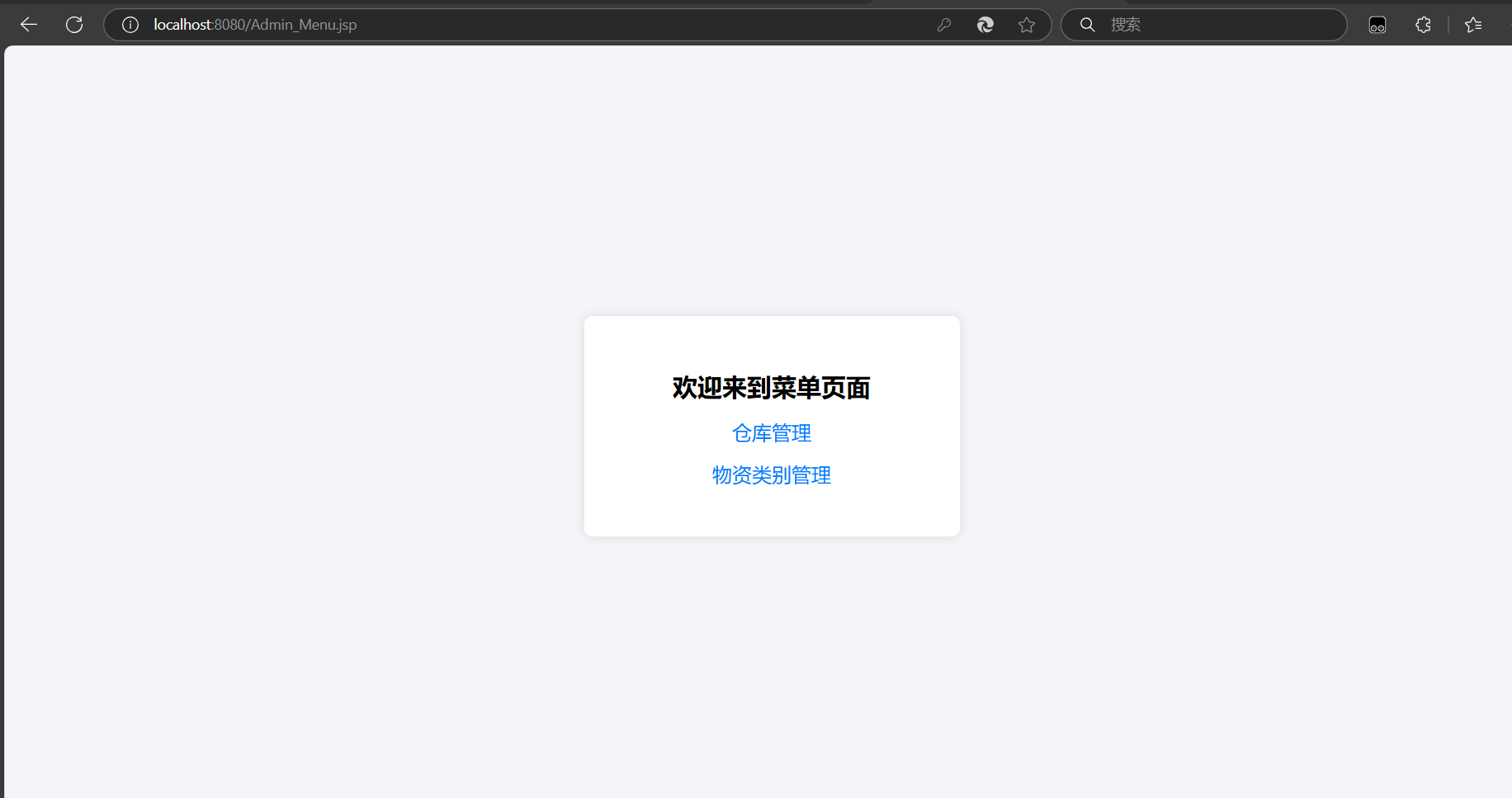
效果:
登陆界面
不同角色登录后的菜单界面
今日代码:
物资管理:
package com.warehouse.model;

public class MaterialCategory {
    private int categoryId;
    private String categoryCode;
    private String categoryName;
    private String description;

    // Constructors, getters, and setters
    public MaterialCategory() {}

    public MaterialCategory(String categoryCode, String categoryName, String description) {
        this.categoryCode = categoryCode;
        this.categoryName = categoryName;
        this.description = description;
    }

    public int getCategoryId() {
        return categoryId;
    }

    public void setCategoryId(int categoryId) {
        this.categoryId = categoryId;
    }

    public String getCategoryCode() {
        return categoryCode;
    }

    public void setCategoryCode(String categoryCode) {
        this.categoryCode = categoryCode;
    }

    public String getCategoryName() {
        return categoryName;
    }

    public void setCategoryName(String categoryName) {
        this.categoryName = categoryName;
    }

    public String getDescription() {
        return description;
    }

    public void setDescription(String description) {
        this.description = description;
    }
}
连接数据库:
package com.warehouse.controller;

import com.google.gson.Gson;
import com.warehouse.dao.MaterialCategoryDAO;
import com.warehouse.model.MaterialCategory;

import javax.servlet.ServletException;
import javax.servlet.annotation.WebServlet;
import javax.servlet.http.HttpServlet;
import javax.servlet.http.HttpServletRequest;
import javax.servlet.http.HttpServletResponse;
import java.io.IOException;

@WebServlet("/addMaterialCategory")
public class AddMaterialCategoryController extends HttpServlet {
    private MaterialCategoryDAO materialCategoryDAO = new MaterialCategoryDAO();

    @Override
    protected void doPost(HttpServletRequest request, HttpServletResponse response) throws ServletException, IOException {
        String categoryCode = request.getParameter("categoryCode");
        String categoryName = request.getParameter("categoryName");
        String description = request.getParameter("description");

        MaterialCategory materialCategory = new MaterialCategory(categoryCode, categoryName, description);
        boolean success = materialCategoryDAO.addMaterialCategory(materialCategory);

        if (success) {
            response.getWriter().write("Material category added successfully!");
        } else {
            response.getWriter().write("Failed to add material category.");
        }
    }
}
增删改查操作
package com.warehouse.dao;

import com.warehouse.model.MaterialCategory;
import com.warehouse.util.DBUtil;

import java.sql.*;
import java.util.ArrayList;
import java.util.List;

public class MaterialCategoryDAO {

    public boolean addMaterialCategory(MaterialCategory materialCategory) {
        String sql = "INSERT INTO MaterialCategory (category_code, category_name, description) VALUES (?, ?, ?)";
        try (Connection conn = DBUtil.getConnection();
             PreparedStatement pstmt = conn.prepareStatement(sql)) {
            pstmt.setString(1, materialCategory.getCategoryCode());
            pstmt.setString(2, materialCategory.getCategoryName());
            pstmt.setString(3, materialCategory.getDescription());
            int rowsAffected = pstmt.executeUpdate();
            return rowsAffected > 0;
        } catch (SQLException e) {
            e.printStackTrace();
        }
        return false;
    }

    public boolean deleteMaterialCategory(int categoryId) {
        String sql = "DELETE FROM MaterialCategory WHERE category_id = ?";
        try (Connection conn = DBUtil.getConnection();
             PreparedStatement pstmt = conn.prepareStatement(sql)) {
            pstmt.setInt(1, categoryId);
            int rowsAffected = pstmt.executeUpdate();
            return rowsAffected > 0;
        } catch (SQLException e) {
            e.printStackTrace();
        }
        return false;
    }

    public boolean updateMaterialCategory(MaterialCategory materialCategory) {
        String sql = "UPDATE MaterialCategory SET category_code = ?, category_name = ?, description = ? WHERE category_id = ?";
        try (Connection conn = DBUtil.getConnection();
             PreparedStatement pstmt = conn.prepareStatement(sql)) {
            pstmt.setString(1, materialCategory.getCategoryCode());
            pstmt.setString(2, materialCategory.getCategoryName());
            pstmt.setString(3, materialCategory.getDescription());
            pstmt.setInt(4, materialCategory.getCategoryId());
            int rowsAffected = pstmt.executeUpdate();
            return rowsAffected > 0;
        } catch (SQLException e) {
            e.printStackTrace();
        }
        return false;
    }

    public List<MaterialCategory> getAllMaterialCategories() {
        String sql = "SELECT * FROM MaterialCategory";
        List<MaterialCategory> categories = new ArrayList<>();
        try (Connection conn = DBUtil.getConnection();
             Statement stmt = conn.createStatement();
             ResultSet rs = stmt.executeQuery(sql)) {
            while (rs.next()) {
                MaterialCategory category = new MaterialCategory(
                        rs.getString("category_code"),
                        rs.getString("category_name"),
                        rs.getString("description")
                );
                category.setCategoryId(rs.getInt("category_id"));
                categories.add(category);
            }
        } catch (SQLException e) {
            e.printStackTrace();
        }
        return categories;
    }
}
报表生成:
好的,我们将按照计划逐步完成剩余的功能。接下来,我们将继续实现物资类别管理、物资信息管理和入库出库操作等功能。

### 4. 物资类别管理功能

#### 4.1 新增物资类别

##### 创建 `MaterialCategory.java`


##### 创建 `AddMaterialCategoryController.java`


##### 创建 `MaterialCategoryDAO.java`


##### 更新前端以支持新增物资类别

##### 修改 `admin/dashboard.jsp`


##### 创建 `GetAllMaterialCategoriesController.java`


##### 创建 `DeleteMaterialCategoryController.java`


##### 创建 `UpdateMaterialCategoryController.java`


### 5. 物资信息管理功能

#### 5.1 新增物资信息

##### 创建 `Material.java`


##### 创建 `AddMaterialController.java`


##### 创建 `MaterialDAO.java`


##### 更新前端以支持新增物资信息

##### 修改 `admin/dashboard.jsp`

[<title="管理员菜单页面 - 添加新增物资信息功能">]
```jsp
<!DOCTYPE html>
<html lang="en">
<head>
    <meta charset="UTF-8">
    <meta name="viewport" content="width=device-width, initial-scale=1.0">
    <title>Admin Dashboard</title>
    <link rel="stylesheet" href="https://cdnjs.cloudflare.com/ajax/libs/antd/4.17.0/antd.min.css">
    <style>
        body {
            font-family: Arial, sans-serif;
            background-color: #f0f2f5;
            margin: 0;
        }
        .ant-layout-header {
            background: #fff;
            padding: 0 20px;
            display: flex;
            align-items: center;
        }
        .ant-layout-sider {
            background: #001529;
        }
        .ant-menu-dark.ant-menu-inline-collapsed {
            width: 80px;
        }
        .ant-menu-item-selected {
            background: #1890ff !important;
        }
        .ant-breadcrumb {
            margin: 16px 0;
        }
        .site-layout-background {
            background: #fff;
            padding: 24px;
            min-height: 360px;
        }
        .menu-title {
            color: white;
            margin-left: 10px;
        }
    </style>
</head>
<body>
<div id="app"></div>

<script src="https://cdnjs.cloudflare.com/ajax/libs/react/17.0.2/umd/react.production.min.js"></script>
<script src="https://cdnjs.cloudflare.com/ajax/libs/react-dom/17.0.2/umd/react-dom.production.min.js"></script>
<script src="https://cdnjs.cloudflare.com/ajax/libs/babel-standalone/6.26.0/babel.min.js"></script>
<script type="text/babel">
    const { Layout, Menu, Breadcrumb, Typography, Form, Input, Button, Modal, message, Table, Select } = antd;
    const { Header, Content, Footer, Sider } = Layout;
    const { Title } = Typography;
    const { Option } = Select;

    function AdminDashboard() {
        const [collapsed, setCollapsed] = React.useState(false);
        const [visibleAddWarehouse, setVisibleAddWarehouse] = React.useState(false);
        const [visibleEditWarehouse, setVisibleEditWarehouse] = React.useState(false);
        const [editWarehouseRecord, setEditWarehouseRecord] = React.useState(null);
        const [formAddWarehouse] = Form.useForm();
        const [formEditWarehouse] = Form.useForm();
        const [warehouses, setWarehouses] = React.useState([]);

        const [visibleAddCategory, setVisibleAddCategory] = React.useState(false);
        const [visibleEditCategory, setVisibleEditCategory] = React.useState(false);
        const [editCategoryRecord, setEditCategoryRecord] = React.useState(null);
        const [formAddCategory] = Form.useForm();
        const [formEditCategory] = Form.useForm();
        const [categories, setCategories] = React.useState([]);

        const [visibleAddMaterial, setVisibleAddMaterial] = React.useState(false);
        const [visibleEditMaterial, setVisibleEditMaterial] = React.useState(false);
        const [editMaterialRecord, setEditMaterialRecord] = React.useState(null);
        const [formAddMaterial] = Form.useForm();
        const [formEditMaterial] = Form.useForm();
        const [materials, setMaterials] = React.useState([]);

        React.useEffect(() => {
            fetch('/getWarehouses')
                .then(response => response.json())
                .then(data => setWarehouses(data))
                .catch(error => console.error('Error fetching warehouses:', error));

            fetch('/getAllMaterialCategories')
                .then(response => response.json())
                .then(data => setCategories(data))
                .catch(error => console.error('Error fetching material categories:', error));

            fetch('/getAllMaterials')
                .then(response => response.json())
                .then(data => setMaterials(data))
                .catch(error => console.error('Error fetching materials:', error));
        }, []);

        const showAddWarehouseModal = () => {
            setVisibleAddWarehouse(true);
        };

        const handleAddWarehouseOk = () => {
            formAddWarehouse.validateFields()
                .then(values => {
                    fetch('/addWarehouse', {
                        method: 'POST',
                        headers: {
                            'Content-Type': 'application/x-www-form-urlencoded'
                        },
                        body: Object.keys(values).map(key => encodeURIComponent(key) + '=' + encodeURIComponent(values[key])).join('&')
                    })
                    .then(response => response.text())
                    .then(data => {
                        message.success(data);
                        setVisibleAddWarehouse(false);
                        formAddWarehouse.resetFields();
                        fetch('/getWarehouses')
                            .then(response => response.json())
                            .then(data => setWarehouses(data))
                            .catch(error => console.error('Error fetching warehouses:', error));
                    })
                    .catch(error => {
                        message.error('Error adding warehouse');
                    });
                })
                .catch(errorInfo => {
                    console.log('Validation Failed:', errorInfo);
                });
        };

        const handleAddWarehouseCancel = () => {
            setVisibleAddWarehouse(false);
        };

        const deleteWarehouse = (warehouseId) => {
            fetch(`/deleteWarehouse?id=${warehouseId}`, {
                method: 'DELETE'
            })
            .then(response => response.text())
            .then(data => {
                message.success(data);
                fetch('/getWarehouses')
                    .then(response => response.json())
                    .then(data => setWarehouses(data))
                    .catch(error => console.error('Error fetching warehouses:', error));
            })
            .catch(error => {
                message.error('Error deleting warehouse');
            });
        };

        const showEditWarehouseModal = (record) => {
            formEditWarehouse.setFieldsValue({
                warehouseCode: record.warehouseCode,
                name: record.name,
                location: record.location,
            });
            setEditWarehouseRecord(record);
            setVisibleEditWarehouse(true);
        };

        const handleEditWarehouseOk = () => {
            formEditWarehouse.validateFields()
                .then(values => {
                    fetch(`/updateWarehouse?id=${editWarehouseRecord.warehouseId}`, {
                        method: 'PUT',
                        headers: {
                            'Content-Type': 'application/x-www-form-urlencoded'
                        },
                        body: Object.keys(values).map(key => encodeURIComponent(key) + '=' + encodeURIComponent(values[key])).join('&')
                    })
                    .then(response => response.text())
                    .then(data => {
                        message.success(data);
                        setVisibleEditWarehouse(false);
                        formEditWarehouse.resetFields();
                        fetch('/getWarehouses')
                            .then(response => response.json())
                            .then(data => setWarehouses(data))
                            .catch(error => console.error('Error fetching warehouses
ai生成的原始材料:
“需求描述:
请设计一个仓储管理系统原型系统,该系统支持多个仓库的设立。统一设立物资台账,物资台账需包含物资编码、物资名称、规格、材质、供应商、品牌、物资分类,用户可以自定义物资的物资分类。需限制不同的物资名称、规格、材质的物资不能设立相同的物资编码。仓库人员可进行入库作业、出库作业业务。入库单、出库单的业务单据编码系统自动生成,不能手工录入,可以采用年月日+流水号的方式。系统可查询按物资编码的库存信息、按物资分类汇总的库存信息、入库单信息、出库单信息。
页面要求:要求采用统一模板设计界面
根据以上需求写出登录页面和不同登录角色(管理员、仓库管理人员)后的菜单页面,并完成菜单中的功能进行数据库的相关操作,利用Javascript、java、mysql连接和tomcat实现以上功能的网站,要求在主目录下写数据库连接util、在dao方法中写连接数据库指令,在jsp页面中完成页面的编写,同时用css编写页面格式。”
源代码问题和优化过程:改了不少代码,主要原因是页面不符合我心意改了一些,过程中由于变量名太复杂很困难
今日代码量:没有写但是修改了很多,按100算吧


 浙公网安备 33010602011771号