

HTTP协议抓包工具fidder的使用说明
一、常用的抓包工具:
- fidder抓包工具,是客户端和服务端的HTTP代理,客户端所有的请求都要先经过fidder,到响应服务器;服务器返回所有的数据也都要经过fidder,fidder是在于常用的抓包工具之一
- Charles抓包工具:和fidder相似,请求接口和返回数据的显示不一样,Charles是树状显示,结构比较清晰,fidder是按照时间倒序排序的
- wireshark抓包工具, 抓TCP/IP/SCTP协议常用这个工具,HTTP协议还是用fidder/Charles工具
二、fidder简介:
2.1简介:
fidder可以将网络传输发送与接收的数据进行截获、重复、编辑、转存等操作。也可以用来检测网路安全
2.2 fidder抓取HTTP请求
2.2.1 HTTP代理
Fidder是改写了HTTP代理,让数据从fidder通过,来监控数据。fidder一打开的那瞬间,它就设置好了浏览器代理了,当关闭fidder的时候,它又帮你把代理还原了

2.2.2
Fiddler想要抓到数据包,要确保Capture Traffic是开启,在File –> Capture Traffic
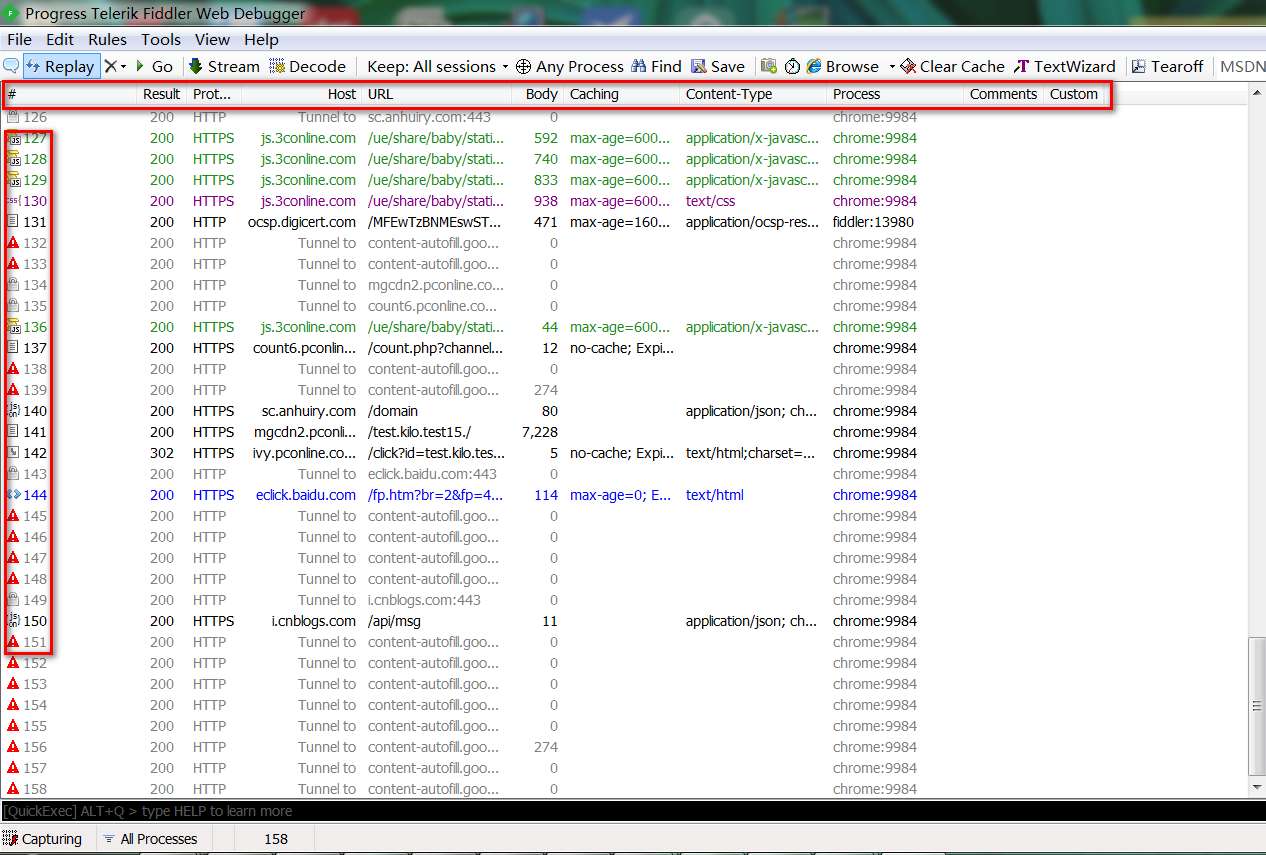
字段说明
| 名称 | 含义 |
| # | 抓取HTTP request的顺序,从1开始,依次递增 |
| Result | HTTP 状态码 |
| Protocal | 请求使用的协议,如HTTP/HTTPS/FTP等 |
| Host | 请求地址的主机名 |
| URL | 请求资源的位置 |
| Body | 该请求的大小 |
| Catching | 请求的缓存过期时间或者缓存的控制值 |
| Content-Type | 请求响应的类型 |
| Process | 发送此请求的进程:进程ID |
| Comments | 允许用户为此回话添加备注 |
| Custom | 允许用户设置自定义值 |
图标含义:
Each session is marked with an icon for quick reference:
![Request Being Sent]() Request is being sent to the server
Request is being sent to the server![Response Being Read]() Response is being read from the server
Response is being read from the server![Request Paused]() Request is paused at a breakpoint
Request is paused at a breakpoint![Response Paused]() Response is paused at a breakpoint
Response is paused at a breakpoint![Request Used HEAD]() Request used HTTP HEAD method; response should have no body
Request used HTTP HEAD method; response should have no body![Request Used POST]() Request used HTTP POST method
Request used HTTP POST method![Request Used CONNECT]() Request used HTTP CONNECT method; this establishes a tunnel used for HTTPS traffic
Request used HTTP CONNECT method; this establishes a tunnel used for HTTPS traffic![HTML]() Response was HTML
Response was HTML![Image]() Response was an image
Response was an image![Script]() Response was a script
Response was a script![CSS]() Response was Cascading Style Sheet
Response was Cascading Style Sheet![XML]() Response was XML
Response was XML![JSON]() Response was JSON
Response was JSON![Audio]() Response was an audio file
Response was an audio file![Video]() Response was a video file
Response was a video file![Silverlight]() Response was a Silverlight applet
Response was a Silverlight applet![Flash]() Response was a Flash applet
Response was a Flash applet![Font]() Response was a font
Response was a font![Successful]() Generic successful response
Generic successful response![Redirect]() Response was HTTP/300,301,302,303 or 307 redirect
Response was HTTP/300,301,302,303 or 307 redirect![Use Cached]() Response was HTTP/304: Use cached version
Response was HTTP/304: Use cached version![Request Client Credentials]() Response was a request for client credentials
Response was a request for client credentials![Server Error]() Response was a server error
Response was a server error![Session Aborted]() Session was aborted by the client, Fiddler, or the Server.
Session was aborted by the client, Fiddler, or the Server.
 Request is being sent to the server
 Response is being read from the server
 Request is paused at a breakpoint
 Response is paused at a breakpoint
 Request used HTTP HEAD method; response should have no body
 Request used HTTP POST method
 Request used HTTP CONNECT method; this establishes a tunnel used for
  Response was HTML
 Response was an image
 Response was a script
 Response was Cascading Style Sheet
 Response was XML
 Response was JSON
 Response was an audio file
 Response was a video file
 Response was a Silverlight applet
 Response was a Flash applet
 Response was a font
 Generic successful response
 Response was HTTP/300,301,302,303 or 307 redirect
 Response was HTTP/304: Use cached version
 Response was a request for client credentials
 Response was a server error
 Session was aborted by the client, Fiddler, or the Server.
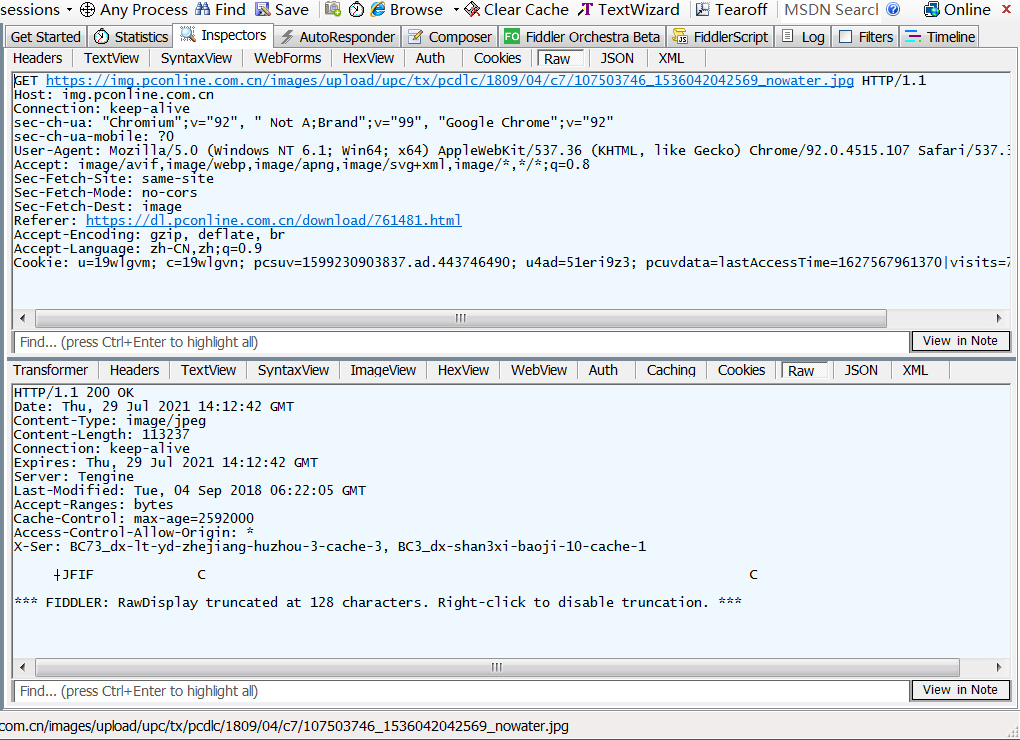
2.2.3Inspectors查看数据内容
Inspectors 是用于查看回话的内容,上半部分是请求的内容,下半部分是响应的内容
参考博客:
https://blog.csdn.net/hongtester/article/details/117353851

 浙公网安备 33010602011771号