

使用PowerShell批量去除文件的前缀
1. 背景
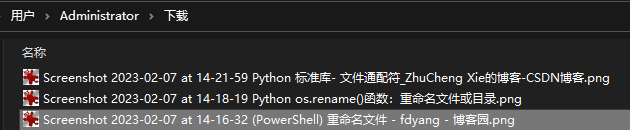
使用firefox的截图工具得到的图片都有时间戳的前缀, 通过使用PowerShell批量去除文件的前缀。
2. 基本原理
获取所有的指定文件,使用Get-ChildItem命令
对文件重命名,使用Rename-Item命令
3. 实现代码
 1 # 例如文件名: Screenshot 2023-02-07 at 14-16-32 重命名文件 - fdyang - 博客园.png
 2
 3 $src = "C:\Users\Administrator\Downloads\xxx"
 4
 5 # 获取目录下满足条件的所有文件
 6 $allfile = Get-ChildItem -Path $src -Filter "Screenshot*.png"
 7
 8 foreach ($f in $allfile)
 9 {
10     # 因为【Screenshot 2023-02-07 at 14-16-32 】是前缀,长度为34.所以采用Substring去除前缀
11     $newName = $f.Name.Substring(34)
12
13     # 重命名,
14     Rename-Item -Path $f.FullName -NewName $newName
15 }


                           ---------------- 勿在浮沙筑高台

 浙公网安备 33010602011771号