
CentOS中Tomcat用mailx(mail)配置outlook SMTP方式发送邮件(sendEmail)
CentOS中Tomcat用mailx(mail)配置outlook SMTP方式发送邮件
1. 环境介绍:
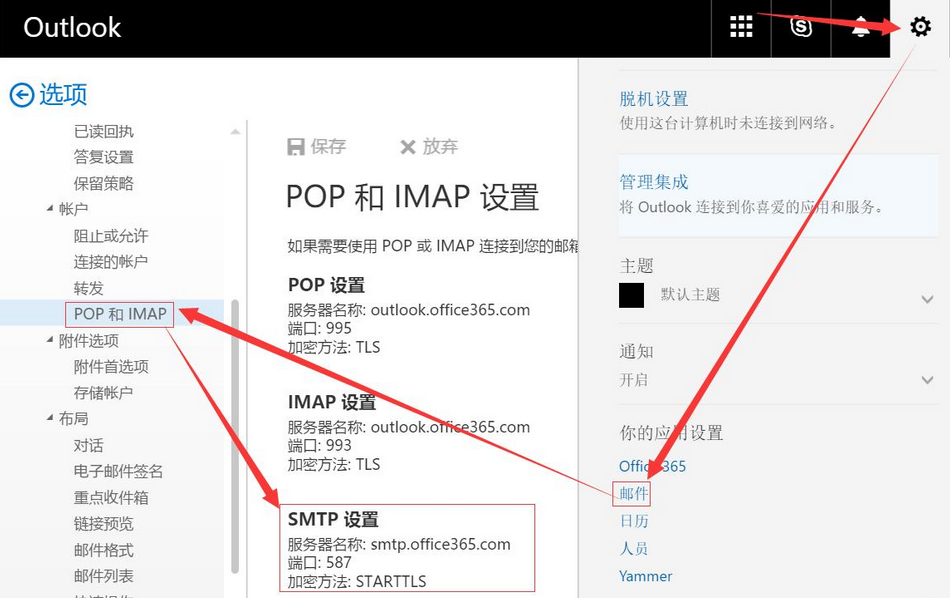
我们用的是微软的邮箱打算用SMTP方式发送邮件。先登录账户看官方给出SMTP信息。
2. 系统mailx(mail)设置
通过命令可以看到,mail实际上是mailx的快捷方式。然后在/etc/mail.rc里加入账号等信息。
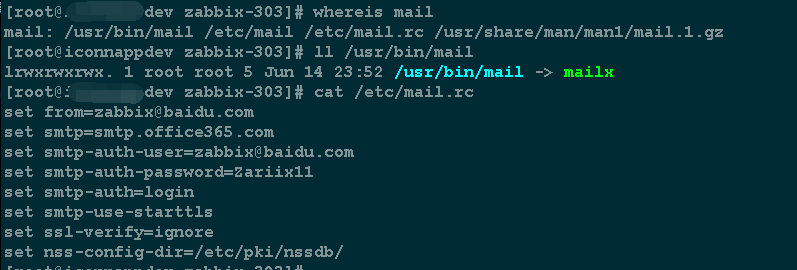
SMTP加密方式是:STARTTLS
|
1 2 3 4 5 6 7 8 |
|
3. 创建存放证书的目录
|
1 |
|
4. 测试mail命令
|
1 |
|
Zabbix test 要发送的邮件内容,多行内容要写""里。
test 发送邮件的标题。
info@ABC.com 是对方接收邮件的账号。
常见问题
A. 邮件发送成功的样例
Resolving host smtp.office365.com . . . done.
Connecting to 40.97.113.2:smtp . . . connected.

220 DM5PR06CA0069.outlook.office365.com Microsoft ESMTP MAIL Service ready at Fri, 16

 Jun 2017 03:16:13 +0000

>>> EHLO iconnappdev.us.wutou.net

250-DM5PR06CA0069.outlook.office365.com Hello [204.246.137.148]

250-SIZE 157286400

250-PIPELINING

250-DSN

250-ENHANCEDSTATUSCODES

250-STARTTLS

250-8BITMIME

250-BINARYMIME

250 CHUNKING

>>> STARTTLS

220 2.0.0 SMTP server ready

Error in certificate: Peer's certificate issuer is not recognized.

Comparing DNS name: "*.clo.footprintdns.com"

Comparing DNS name: "*.hotmail.com"

Comparing DNS name: "*.internal.outlook.com"

Comparing DNS name: "*.live.com"

Comparing DNS name: "*.office.com"

Comparing DNS name: "*.office365.com"

SSL parameters: cipher=AES-256, keysize=256, secretkeysize=256,

issuer=CN=DigiCert Cloud Services CA-1,O=DigiCert Inc,C=US

subject=CN=outlook.com,O=Microsoft Corporation,L=Redmond,ST=Washington,C=US

>>> EHLO appdev.us.wutou..net

250-DM5PR06CA0069.outlook.office365.com Hello [204.246.137.148]

250-SIZE 157286400

250-PIPELINING

250-DSN

250-ENHANCEDSTATUSCODES

250-AUTH LOGIN XOAUTH2

250-8BITMIME

250-BINARYMIME

250 CHUNKING

>>> AUTH LOGIN

334 VXNlcm5hbWU6

>>> emFiYml4QGFyaWl4LmNvbQ==

334 UGFzc3dvcmQ6

>>> WmFyaWl4MTE=

235 2.7.0 Authentication successful target host BN6PR11MB0017.namprd11.prod.outlook.com

>>> MAIL FROM:<wutou@wutou.net>

250 2.1.0 Sender OK

>>> RCPT TO:<wutou@wutou.net>

250 2.1.5 Recipient OK

>>> DATA

354 Start mail input; end with <CRLF>.<CRLF>

>>> .

250 2.6.0 <59434d32.Lx4d3eMhjzYuCHGO%wutou@wutou.net> [InternalId=4849018077783, Hostn

   ame=BN6PR11MB0017.namprd11.prod.outlook.com] 2808 bytes in 0.560, 4.895 KB/sec Queued

   mail for delivery

>>> QUIT

221 2.0.0 Service closing transmission channel
B. 邮件发送失败的样例
邮件发送错误, 邮件没有发送成功说明,这是因为认证方式没有设置对。
[root@appdev zabbix-303]# echo hello | mailx -v -s "test" wutou@wutou.net

Resolving host smtp.office365.com . . . done.

Connecting to 40.97.134.210:smtp . . . connected.

220 MWHPR15CA0065.outlook.office365.com Microsoft ESMTP MAIL Service ready at Fri, 16

   Jun 2017 03:14:01 +0000


250-MWHPR15CA0065.outlook.office365.com Hello [204.246.137.148]

250-SIZE 157286400

250-PIPELINING

250-DSN

250-ENHANCEDSTATUSCODES

250-STARTTLS

250-8BITMIME

250-BINARYMIME

250 CHUNKING

>>> STARTTLS

220 2.0.0 SMTP server ready

Missing "nss-config-dir" variable.

"/root/dead.letter" 11/296

. . . message not sent.
人生只若初见................

 浙公网安备 33010602011771号