
(2)vue基础
(1)vue实例
- 通过new关键字实例化Vue({})构造函数,里面可以传入参数
![]()
- methods选项用来定义方法,通过vue实例可以直接访问。在定义的方法中,this指向vue实例本身。定义在methods选项中的方法可以作为页面中的事件处理函数使用,当事件触发后,执行相应的事件处理函数。
- computed计算属性。计算属性结果会被缓存起来,当依赖的响应式属性发生变化时,才会重新计算,返回最终结果。
- watch是监听实例中数据变化。一般要在数据变化的同时进行异步操作或者比较大的开销时使用。watch是检测data的数据变化,其方法名必须与检测的data的属性名一致。
- filter过滤器。对数据进行格式化,比如字符串首字母变大写,日期格式化等。使用存在两种方法:(1)插值表达式{{ data属性名 | 过滤器名称}}(2)在v-bind属性绑定中使用过滤器。
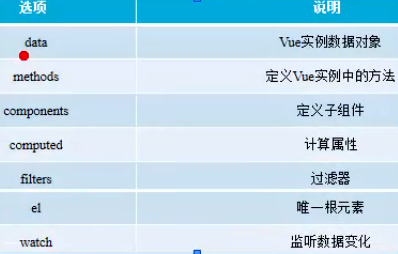
vue实例化的基本案例
<!DOCTYPE html>
<html>
<head>
    <meta charset="utf-8">
    <title>el选项</title>
    <style type="text/css">
        #f0{width:100px; height: 100px; border:1px solid green; background-color: orange;}
    </style>
    <script type="text/javascript" src="./vue/vue.js"></script>
</head>
<body>
    <div id="app">
        <input type="button" name="" value="点击改变内容" @click="changeMsg">
        <p>{{msg}}</p>
        <div class="computed">
            <p>总价格:{{totalPrice}}</p>
            <p>单价:{{price}}</p>
            <p>数量:{{num}}</p>
            <input type="button" name="" value="减少数量" @click="num==0?num=0:num--">
            <input type="button" name="" value="增加数量" @click="num++">
            <!-- 验证缓存 -->
            <input type="button" name="" value="打印总价格" @click="logTotalPrice">
        </div>
        <div class="watch">
            <input type="text" name="" v-model="cityName">
        </div>
        <div class="filter">
            <div>{{message | updateCase}}</div>
            <div v-bind:id="dataId | formatId"></div>
        </div>
    </div>
    <!-- 1.引入vue.js文件
    2.创建DOM结构,id为app的div元素
    3.实例化vue
    4.将数据显示到界面上 -->
    <script type="text/javascript">
        var vm = new Vue({
            // 1、el选项 为一根元素(作为可操作的最外层的节点,最大的父节点)
            // 通过el选项,将vue实例与divDOM结构进行绑定,绑定后,vue就可以操作div及其子元素,并且数据也可以显示到div内部
            el:"#app",
            // 2、data数据
            // vue实例的数据对象为data,vue内部机制会将data的属性转换为getter、setter从而让data的属性能够响应数据的变化
            data:{
                msg:"hello world!",
                price:20,
                num:0,
                cityName:"shanghai",
                message:"helloworld!!",
                dataId:"dff0"
            },
            // 3、定义方法
            methods:{
                changeMsg:function(){
                    this.msg ="点击改变后的内容!"
                },
                changeMsg1(){
                    this.msg="另外的写法!"
                },
                logTotalPrice(){
                    console.log("totalPrice的结果是:"+this.totalPrice)
                }
            },
            //4、计算属性
            computed:{
                // 计算属性虽然叫属性,但其实是一个方法,只不过在用的时候当属性使用
                totalPrice(){
                    console.log("totalPrice计算属性被执行了");
                    return this.price * this.num
                }
            },
            //5、监听属性
            watch:{
                cityName(newValue, oldValue){
                    console.log(newValue,oldValue);
                }
            },
            //过滤器
            filters:{
                updateCase(value){
                    return value ? value.toUpperCase() : "";
                },
                formatId(value){
                    return value ? value.charAt(1)+ value.indexOf("d"):"";
                }
            }
        });
        // console.log(vm.$data.msg);
        // console.log(vm.msg);
    </script>
</body>
</html>
(2)vue数据绑定
- 样式绑定:绑定内联样式,绑定类名
- 内置指令
![]()
![]()
![]()
![]()
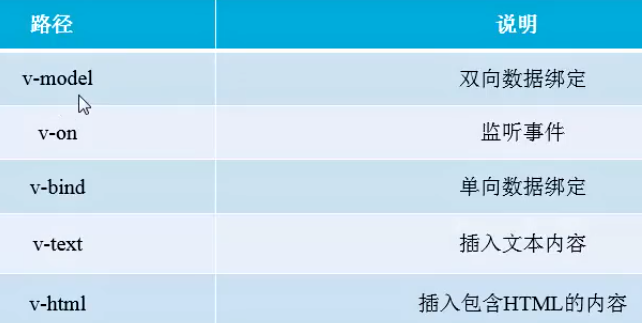

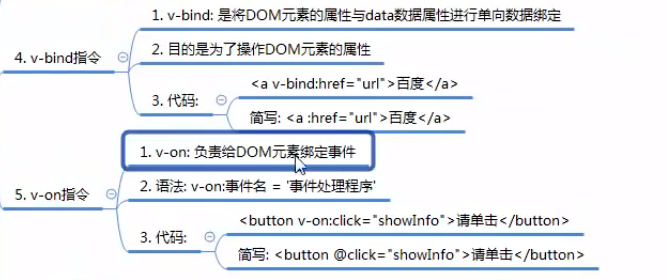

绑定样式基本案例
学生表格案例


<!DOCTYPE html>
<html>
<head>
    <meta charset="utf-8">
    <title>样式绑定</title>
    <script type="text/javascript" src="./vue/vue.js"></script>
    <style type="text/css">
        .box{background-color: orange; width:100%; height: 200px; color:#fff; font-size:16px; font-weight: bold}
        .inner{background-color: green; width:100px; height: 50px;}
        .inner1{ border:2px solid black;}
    </style>
</head>
<body>
    <div id="app">
        <!-- 绑定样式属性值 -->
        <div v-bind:style="{backgroundColor:pink, width:width, height:height}">
            <!-- 绑定样式对象,可以添加多个样式,放在数组 -->
            <div v-bind:style="[myStyle,myDiv]"></div>
        </div>
        <!-- 绑定类名绑定样式 -->
        <div class="box" v-bind:class="box">
            我是box
            <div v-bind:class="[inner,inner1]"></div>
            <div v-bind:class="inner"></div>
        </div>
        <!-- v-model 双向数据绑定 -->
        <div class="vModel">
            <input type="text" v-model="msg">
            <p>{{msg}}</p>
        </div>
        <!-- v-text单向的数据绑定,类似于innerText -->
        <div class="vText">
            <p v-text="msg1"></p>
        </div>
        <!-- v-html,绑定内容里面可含有标签,xaingdangyu innerHtml -->
        <div class="vHtml">
            <p v-html='msg2'></p>
        </div>
        <!-- v-bind属性的单向数据绑定 -->
        <div class="vBand">
            <input v-bind:value="msg3" type="button">
            <a v-bind:href="dataHref">我是一个超链接</a>
        </div>
        <!-- v-on是事件监听指令,负责给DOM元素绑定事件,配合事件类型 可省略为@ -->
        <div class="vOn">
            <p>{{msg4}}</p>
            <input type="button" v-on:click="showInfo" value="请单击">
        </div>
        <!-- v-for一般用来数组循环 -->
        <div class="vFor">
            <div v-for="(item, index) in list">
                索引是:{{index}},元素内容是:{{item}}
            </div>
        </div>
        <!-- v-if和v-show控制元素的显示与隐藏 -->
        <div class="vIf">
            <div v-if="isShow" style="background-color: #ccc;">我是v-if</div>
            <div v-show="isShow" style="background-color: #ccc;">我是v-if</div>
            <button @click="isShow =!isShow">切换显示</button>
        </div>
    </div>

    <script type="text/javascript">
        var vm = new Vue({
            el:"#app",
            data:{
                pink:"pink",
                width:"100%",
                height:"200px",
                myStyle:{
                    backgroundColor:"red",
                    width:"100px",
                    height:"100px"
                },
                myDiv:{
                    border:"1px solid green"
                },
                box:"box",
                inner:"inner",
                inner1:"inner1",
                msg:"v-model指令",
                msg1:"v-text",
                msg2:"<a href='#'>我是一个链接</a>",
                msg3:"点击",
                dataHref:"https://www.baidu.com",
                msg4:"请单击按钮查看内容。",
                list:["lili","wang","ben"],
                isShow:true
            },
            methods:{
                showInfo(){
                    this.msg4 ="我是v-on指令。"
                }
            }

        })
    </script>
</body>
</html>
<!DOCTYPE html>
<html>
<head>
    <meta charset="utf-8">
    <title>学生列表案例</title>
    <script type="text/javascript" src="./vue/vue.js"></script>
    <style type="text/css">
        .student{border-collapse: collapse;}
        .student td, .student th{height: 40px; width:120px; border:1px solid #ccc; text-align: center;line-height: 40px;}
    </style>
</head>
<body>
    <div id="app">
        <div>
            <button @click="add">添加学生</button>
            <button @click="del">删除学生</button>
        </div>
        <table class="student">
            <tr>
                <th>班级</th>
                <th>姓名</th>
                <th>性别</th>
                <th>年龄</th>
            </tr>
            <tr v-for="item in studentList" :ket="item.id">
                <td>{{item.class}}</td>
                <td>{{item.name}}</td>
                <td>{{item.sex}}</td>
                <td>{{item.age}}</td>
            </tr>
        </table>
    </div>

    <script type="text/javascript">
        var vm = new Vue({
            el:"#app",
            data:{
                studentList:[
                {
                    "id":"001",
                    "class":"三年级一班",
                    "name":"张三",
                    "sex":"男",
                    "age":"18"
                },
                {
                    "id":"002",
                    "class":"三年级一班",
                    "name":"李柳",
                    "sex":"女",
                    "age":"18"
                },
                ]
            },
            methods:{
                add(){
                    student ={
                        "id":"003",
                        "class":"三年级二班",
                        "name":"wang",
                        "sex":"男",
                        "age":"20"
                    },
                    this.studentList.push(student)
                },
                del(){
                    this.studentList.pop()
                }

            }
        })
    </script>
</body>
</html>
(3)vue事件
(4)vue组件

 浙公网安备 33010602011771号