


Day2基本数据类型 字节 和类型转换
注释
1.单行注释:// 加内容
2.多行注释:/* 多行注释
*/
3.文档注释: /**
*
*
*/
标识符
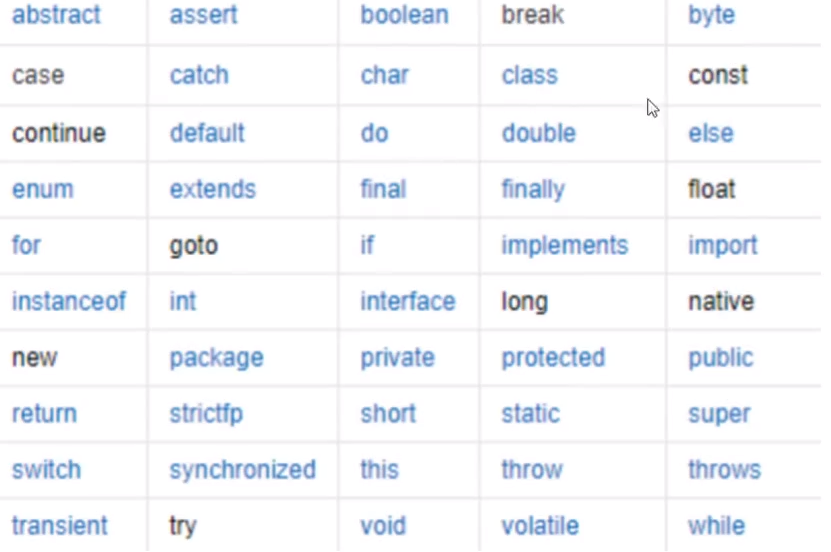
关键字
基本数据类型
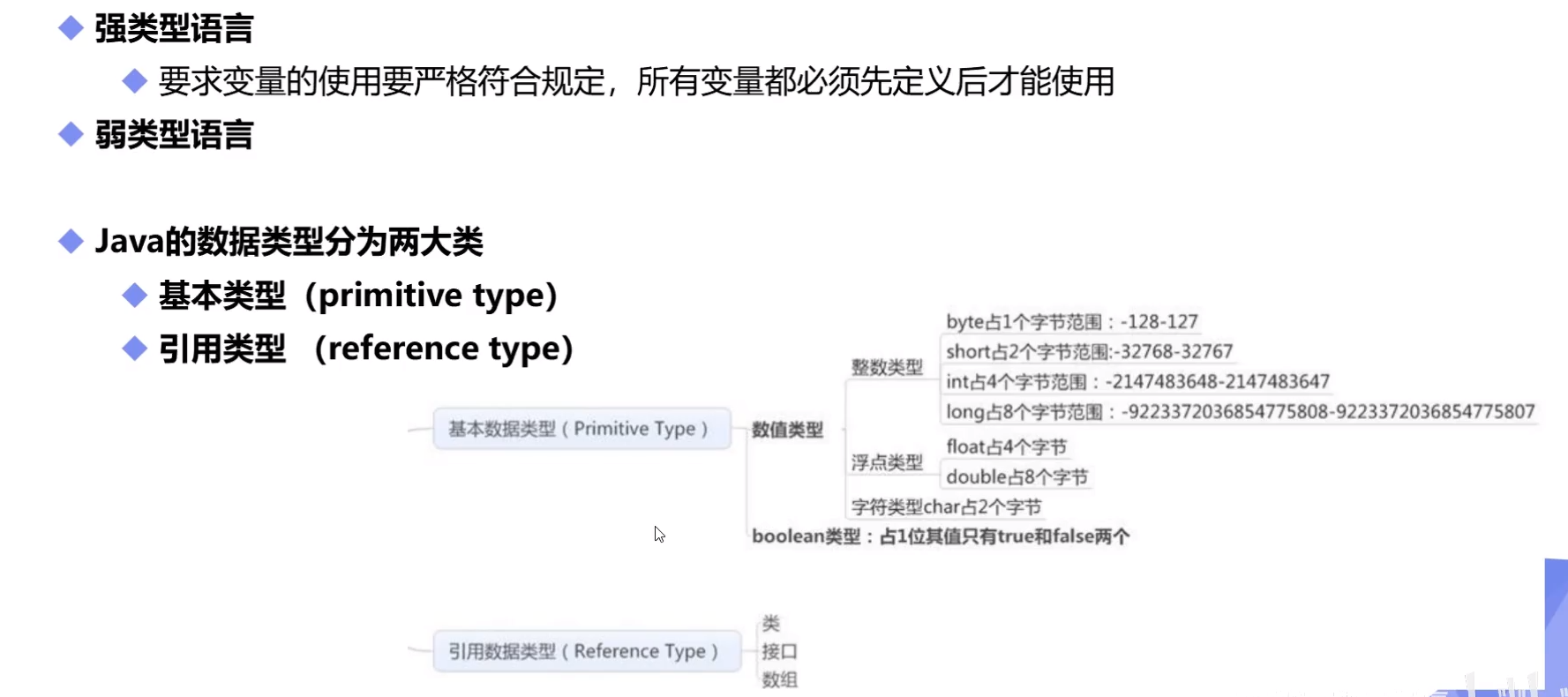
//整数
int num1 = 10; //最常用int
byte num2 = 20;
short num3 = 30;
long num4 = 30L; //long类型要在数字后面加个L
//小数:浮点数
float num5 = 50.1F; //float类型要在后面加个F
double num6 = 3.1415926;
//字符
char name = 'A';
//字符串String不是关键字,类
String namea = "小明";
//布尔值:是非
boolean flag = true;
//boolean flag = false;
注意long型后加L float型后加F
字节
位(bit):计算机内部数据储存的最小单位,11001100是一个八位二进制数。
字节(byte):计算机中处理数据的基本单位,习惯上用大写B来表示。
1B(byte,字节) = 8 bit(位)
字符:是计算机中使用的字母,数字,字和符号
1B=8b
1024B=1KB
1024KB=1M
1024M=1G
类型转换
低--------------------------------------高
byte,short,char->int->long->float->double
强制类型转换(类型)变量名 高-----低 自动转换 低----高
public class Demo04 {
public static void main(String[] args) {
int i = 128;
byte b = (byte)i; // 内存溢出 所以输出b为-128
// 强制类型转换(类型)变量名 高-----低
//自动转换 低----高
double c = i;
System.out.println(c);
System.out.println(i);
System.out.println(b);
/* 注意点:
1.不能对布尔型进行转换
2.不能将对象类型转化为不相干的类型
3.在把高容量转化到低容量时候,强制转换 低到高自动转换
4.转换的时候可能出现内存溢出或者精度问题。
*/
System.out.println("================================");
System.out.println((int)23.7); // 23
System.out.println((int)-48.59f); //48
System.out.println("================================");
char d = 'a';
int e = d+1 ;
System.out.println(e);
System.out.println((char)e);
}
public class Demo06 {
    public static void main(String[] args) {
        //操作比较大的数,注意溢出问题
        //JDK7新特性,数字之间可以用下划线分割
        int money = 10_0000_0000; // 下划线不输出
        int years = 20;
        int total = money*years; // -1474836480 计算的时候溢出了
        long total2 = money*years;
        System.out.println(total);
        System.out.println(total2); //-1474836480 默认是int,转换之前已经存在问题了
        long total3 = money*((long)years); // 先把一个数转化成long型即可
        System.out.println(total3); // 2000000000
    }
}

 浙公网安备 33010602011771号