控制Ribbon菜单权限 通过xml文件
当我们创建一个默认的SharePoint站点的时候,我们通过Site Actions –> Site Permission (站点权限) –> PermissionLevel, 我们可以看到SharePoint默认的几个权限级别: Full Control, Design, Contribute, Read, Limited Access, View Only, 当然你能看到这些权限的级别还跟创建站点时选择的模板有关, 这里的重点不是权限级别, 而且更底层的权限分类. 直接点击上面任何一个权限级别, 以Contribute 为例, 你能看到SharePoint 基本的权限类型.
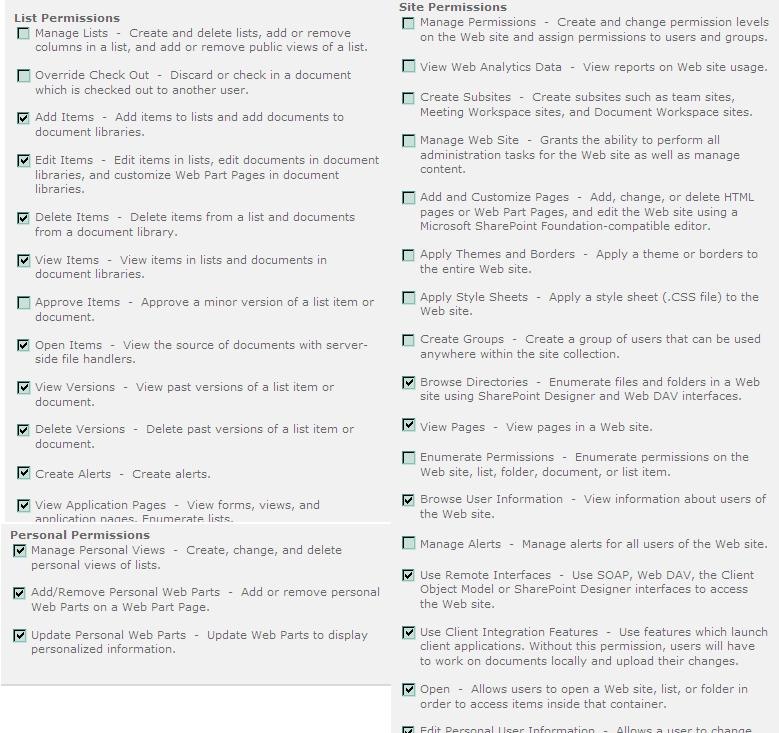
我们可以看下SharePoint SDK SPBasePermission与上图对应的权限类型.
public enum SPBasePermissions
| 成员名称 | 说明 | |
|---|---|---|
| EmptyMask | 在 Web 站点上具有任何权限。通过用户界面不可用。 | |
| ViewListItems | 查看项目在列表中,在文档库中的文档,查看 Web 讨论评论。 | |
| AddListItems | 将项目添加到列表、将文档添加到文档库,以及添加 Web 讨论评论。 | |
| EditListItems | 编辑列表中的项目、编辑文档库中的文档、编辑文档中的 Web 讨论注释,以及自定义文档库中的 Web 部件页。 | |
| DeleteListItems | 删除列表中的项、文档库中的文档以及文档中的 Web 讨论注释。 | |
| ApproveItems | 批准列表项或文档的小版本。 | |
| OpenItems | 使用服务器端文件处理程序查看文档源。 | |
| ViewVersions | 查看列表项或文档的以前版本。 | |
| DeleteVersions | 删除列表项或文档的以前版本。 | |
| CancelCheckout | 放弃或签入已签出给其他用户的文档。 | |
| ManagePersonalViews | 创建、更改以及删除列表的个人视图。 | |
| ManageLists | 创建和删除列表、在列表中添加或移除列以及添加或移除列表的公共视图。 | |
| ViewFormPages | 查看窗体、 视图和应用程序页,并枚举列表。 | |
| AnonymousSearchAccessList | 使匿名用户通过 SharePoint 搜索 retrieveable 列表或文档库的内容。在该网站中的列表权限不会改变。 | |
| Open | 允许用户打开 Web 站点、 列表或文件夹来访问该容器中的项。 | |
| ViewPages | 查看网站中的网页。 | |
| AddAndCustomizePages | 添加、 更改或删除 HTML 页或 Web 部件页,和编辑 Web 站点使用SharePoint Foundation– 兼容的编辑器。 | |
| ApplyThemeAndBorder | 将主题或边框应用到整个网站。 | |
| ApplyStyleSheets | 将样式表(.CSS 文件)应用于网站。 | |
| ViewUsageData | 查看有关网站使用率的报告。 | |
| CreateSSCSite | 使用"自助式网站创建"来创建网站。 | |
| ManageSubwebs | 创建子网站,例如工作组网站、会议工作区网站和文档工作区网站。 | |
| CreateGroups | 创建一个用户组,该用户组可用于网站集中的任何位置。 | |
| ManagePermissions | 创建和更改网站上的权限级别,并为用户和用户组分配权限。 | |
| BrowseDirectories | 枚举中使用Microsoft Office SharePoint Designer 2007和 WebDAV 接口的 Web 站点文件和文件夹。 | |
| BrowseUserInfo | 查看有关网站用户的信息。 | |
| AddDelPrivateWebParts | 添加或删除个人 Web 部件在 Web 部件页上。 | |
| UpdatePersonalWebParts | 更新 Web 部件以显示个性化信息。 | |
| ManageWeb | 授予对 Web 站点执行所有管理任务,以及管理内容的能力。激活、 停用或编辑 Web 站点范围内的功能,通过对象模型或通过用户界面 (UI) 属性。授予在网站集的根网站上,激活、 停用或编辑属性的站点集合范围功能通过对象模型。浏览到网站集功能页并激活或停用网站集范围的通过用户界面功能,您必须是网站集管理员。 | |
| AnonymousSearchAccessWebLists | 如果该列表或文档库具有 AnonymousSearchAccessList 组,将 retrieveable 通过 SharePoint 搜索匿名用户列表和文档库中的 Web 站点的内容。 | |
| UseClientIntegration | 使用功能,启动客户端应用程序 ;否则为用户必须本地处理文档并上载更改。 | |
| UseRemoteAPIs | 使用 SOAP、 WebDAV 还是Microsoft Office SharePoint Designer 2007的接口来访问该 Web 站点。 | |
| ManageAlerts | 管理网站中所有用户的通知。 | |
| CreateAlerts | 创建电子邮件通知。 | |
| EditMyUserInfo | 允许用户更改自己的用户信息,例如添加图片。 | |
| EnumeratePermissions | 枚举网站、列表、文件夹、文档或列表项中的权限。 | |
| FullMask | 在网站上包含所有权限。无法通过用户界面获取权限。 |
#region Assembly Microsoft.SharePoint.dll, v2.0.50727
// C:\Program Files\Common Files\Microsoft Shared\Web Server Extensions\14\ISAPI\Microsoft.SharePoint.dll
#endregion

using System;

namespace Microsoft.SharePoint
{
    // Summary:
    //     Specifies the built-in permissions available in Windows SharePoint Services.
    [Flags]
    public enum SPBasePermissions
    {
        // Summary:
        //     Has no permissions on the Web site. Not available through the user interface.
        EmptyMask = 0,
        //
        // Summary:
        //     View items in lists, documents in document libraries, and view Web discussion
        //     comments.
        ViewListItems = 1,
        //
        // Summary:
        //     Add items to lists, add documents to document libraries, and add Web discussion
        //     comments.
        AddListItems = 2,
        //
        // Summary:
        //     Edit items in lists, edit documents in document libraries, edit Web discussion
        //     comments in documents, and customize Web Part Pages in document libraries.
        EditListItems = 4,
        //
        // Summary:
        //     Delete items from a list, documents from a document library, and Web discussion
        //     comments in documents.
        DeleteListItems = 8,
        //
        // Summary:
        //     Approve a minor version of a list item or document.
        ApproveItems = 16,
        //
        // Summary:
        //     View the source of documents with server-side file handlers.
        OpenItems = 32,
        //
        // Summary:
        //     View past versions of a list item or document.
        ViewVersions = 64,
        //
        // Summary:
        //     Delete past versions of a list item or document.
        DeleteVersions = 128,
        //
        // Summary:
        //     Discard or check in a document which is checked out to another user.
        CancelCheckout = 256,
        //
        // Summary:
        //     Create, change, and delete personal views of lists.
        ManagePersonalViews = 512,
        //
        // Summary:
        //     Create and delete lists, add or remove columns in a list, and add or remove
        //     public views of a list.
        ManageLists = 2048,
        //
        // Summary:
        //     View forms, views, and application pages, and enumerate lists.
        ViewFormPages = 4096,
        //
        // Summary:
        //     Allow users to open a Web site, list, or folder to access items inside that
        //     container.
        Open = 65536,
        //
        // Summary:
        //     View pages in a Web site.
        ViewPages = 131072,
        //
        // Summary:
        //     Add, change, or delete HTML pages or Web Part Pages, and edit the Web site
        //     using a Windows SharePoint Services–compatible editor.
        AddAndCustomizePages = 262144,
        //
        // Summary:
        //     Apply a theme or borders to the entire Web site.
        ApplyThemeAndBorder = 524288,
        //
        // Summary:
        //     Apply a style sheet (.css file) to the Web site.
        ApplyStyleSheets = 1048576,
        //
        // Summary:
        //     View reports on Web site usage.
        ViewUsageData = 2097152,
        //
        // Summary:
        //     Create a Web site using Self-Service Site Creation.
        CreateSSCSite = 4194304,
        //
        // Summary:
        //     Create subsites such as team sites, Meeting Workspace sites, and Document
        //     Workspace sites.
        ManageSubwebs = 8388608,
        //
        // Summary:
        //     Create a group of users that can be used anywhere within the site collection.
        CreateGroups = 16777216,
        //
        // Summary:
        //     Create and change permission levels on the Web site and assign permissions
        //     to users and groups.
        ManagePermissions = 33554432,
        //
        // Summary:
        //     Enumerate files and folders in a Web site using Microsoft Office SharePoint
        //     Designer 2007 and WebDAV interfaces.
        BrowseDirectories = 67108864,
        //
        // Summary:
        //     View information about users of the Web site.
        BrowseUserInfo = 134217728,
        //
        // Summary:
        //     Add or remove personal Web Parts on a Web Part Page.
        AddDelPrivateWebParts = 268435456,
        //
        // Summary:
        //     Update Web Parts to display personalized information.
        UpdatePersonalWebParts = 536870912,
        //
        // Summary:
        //     Grant the ability to perform all administration tasks for the Web site as
        //     well as manage content. Activate, deactivate, or edit properties of Web site
        //     scoped Features through the object model or through the user interface (UI).
        //     When granted on the root Web site of a site collection, activate, deactivate,
        //     or edit properties of site collection scoped Features through the object
        //     model. To browse to the Site Collection Features page and activate or deactivate
        //     site collection scoped Features through the UI, you must be a site collection
        //     administrator.
        ManageWeb = 1073741824,
        //
        // Summary:
        //     Use features that launch client applications; otherwise, users must work
        //     on documents locally and upload changes.
        UseClientIntegration = 68719476736,
        //
        // Summary:
        //     Use SOAP, WebDAV, or Microsoft Office SharePoint Designer 2007 interfaces
        //     to access the Web site.
        UseRemoteAPIs = 137438953472,
        //
        // Summary:
        //     Manage alerts for all users of the Web site.
        ManageAlerts = 274877906944,
        //
        // Summary:
        //     Create e-mail alerts.
        CreateAlerts = 549755813888,
        //
        // Summary:
        //     Allows a user to change his or her user information, such as adding a picture.
        EditMyUserInfo = 1099511627776,
        //
        // Summary:
        //     Enumerate permissions on the Web site, list, folder, document, or list item.
        EnumeratePermissions = 4611686018427387904,
        //
        // Summary:
        //     Has all permissions on the Web site. Not available through the user interface.
        FullMask = 9223372036854775807,
    }
}
了解以上内容后,我们就能快速开发出带有权限控制的菜单了.
1. 创建一个空的SharePoint 2010 项目,项目名:SiteActions Menu
2. 右键点击Feature –> add Features, 添加一个新Feature,更改名称和描述.

3. 右键点击项,添加一个Module, 打开Elements.xml 添加以下代码:
<?xml version="1.0" encoding="utf-8"?>
<Elements xmlns="http://schemas.microsoft.com/sharepoint/">
  <CustomAction
  Id="viewSiteManager"
  GroupId="SiteActions"
  Location="Microsoft.SharePoint.StandardMenu"
  Sequence="1000"
   Title="Owner Menu" Description="control menu with user permission"
  ImageUrl="colleagues_16.png"
   Rights="ManagePermissions">
    <UrlAction Url="~site/_layouts/sitemanager.aspx"/>
  </CustomAction>
</Elements>
4. 代码中的红色部分是比较重要的属性,GroupId 和Location请参阅SDK,这里重点关注Rights, Rights属性的值,就是我们上面的SPbasePermission
的枚举值,可以用逗号隔开,比如 Rights= “ViewListItems,ManagePermissions”.
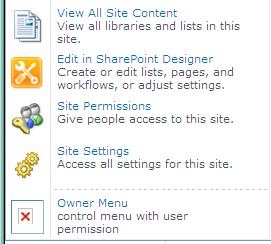
5, 部署运行查看效果.
6

 浙公网安备 33010602011771号