SharePoint 计时器开发及注意事项
1.使用Vs2010创建一个空SharePoint 项目(我的名字:SharePointCusTimer),然后右击项目名添加一个类(我的名字:MyTimerJob.cs),打开该类修改代码如下:
using System;
using Microsoft.SharePoint;//必须命名空间
using Microsoft.SharePoint.Administration;
namespace SharePointCusTimer
{
class MyTimerJob:SPJobDefinition
{
public MyTimerJob() : base() { }
public MyTimerJob(SPWebApplication webApp)
: base("MyTimerJob", webApp, null, SPJobLockType.ContentDatabase)
{
this.Title = "MyCustomTimerJob";
}
public override void Execute(Guid targetInstanceId)
{
SPWebApplication app = this.Parent as SPWebApplication;
SPList announcements = app.Sites[0].RootWeb.Lists["民政局文档库"]; // get reference of the lists
app.Sites[0].RootWeb.AllowUnsafeUpdates = true;
//计时器定时要执行的动作。在指定文本文件里内容
string Path = @"C:\test.txt";
string Strings = string.Format("列表标题{0}----{1}", announcements.Title, DateTime.Now.ToString());
System.IO.StreamWriter f2 = new System.IO.StreamWriter(Path, true, System.Text.Encoding.UTF8);
f2.WriteLine(Strings);
f2.Close();
f2.Dispose();
}
}
}
注意命名空间的引入。
2.右击Feature文件,选择添加功能,然后右击新添的Feature,选择添加事件接收器。将FeatureActivated和FeatureDeactivating里的代码修改如下:
// 取消对以下方法的注释,以便处理激活某个功能后引发的事件。
public override void FeatureActivated(SPFeatureReceiverProperties properties)
{
SPSecurity.RunWithElevatedPrivileges(delegate()
{
SPWebApplication webApp = null;
SPSite site = null;
//webApp = properties.Feature.Parent as SPWebApplication;//老外是这么获取的,激活时报错
site = properties.Feature.Parent as SPSite;
webApp = site.WebApplication; //make sure the job isn't already registered
foreach (SPJobDefinition job in webApp.JobDefinitions)
if (job.Name == "MyTimerJob") job.Delete();
MyTimerJob myJob = new MyTimerJob(webApp);
SPMinuteSchedule schedule1 = new SPMinuteSchedule();//这里是按分钟执行,具体参数说明参考msdn
schedule1.BeginSecond = 0;
//schedule1.EndSecond = 10;
schedule1.Interval = 1;
myJob.Schedule = schedule1;
myJob.Update();
});
}
// 取消对以下方法的注释,以便处理在停用某个功能前引发的事件。
public override void FeatureDeactivating(SPFeatureReceiverProperties properties)
{
SPWebApplication webApp = null;
SPSite site = null;
site = properties.Feature.Parent as SPSite;
webApp = site.WebApplication;
foreach (SPJobDefinition job in webApp.JobDefinitions)
if (job.Name == "MyTimerJob") job.Delete();
}
然后右击项目名称部署,即可。
说明:1,注意相关命名空间的引入。
2.在Feature事件接收器里,注意SPSecurity.RunWithElevatedPrivileges的使用,不然job.Update()时提示拒绝访问。
3.注意SPWebApplication对象的获取。如果部署时提示未将引用对象设置到xxx,那很有可能是webapp对象是null;
4.注意SPMinuteSchedule的使用。参考http://msdn.microsoft.com/zh-cn/library/microsoft.sharepoint.spdailyschedule_members.aspx
如果你想在特定的时间点执行,请使用FromString(),例如
SPSchedule schedule = SPSchedule.FromString("daily at 15:25:00"); // executes at 3:25 pm local time
5.注意,更改Feature的部署范围(我更改了feature的名字,并设置部署范围为Site)
参考:http://www.andrewconnell.com/blog/articles/CreatingCustomSharePointTimerJobs.aspx
http://doitwithsharepoint.blogspot.com/2011/01/create-custom-timer-job-in-sharepoint.html
关于如何调试Feature事件接收器。
在vs里部署,默认会自动激活,可是如果使用这个默认配置,那么自己设置的断点是无法捕获到的,原因很简单。激活事件发生在断点捕获之前。
所以,我们就需要将其配置为安装不激活,然后手动激活,这样断点就可以捕获到了。做法很简单,右击项目名称,选择属性,找到SharePoint选项卡
在活动部署配置下拉框,将Default改成No Activation即可。这样部署就不会激活feature,需要手动激活了。

更多资料参考:
http://blog.sharepointupshot.com/posts/category/developmentguides/403/
http://www.dotnetspark.com/kb/4116-custom-timer-job-sharepoint-2010.aspx
http://www.c-sharpcorner.com/uploadfile/shyjumohan/sharepoint-2010-creating-custom-timer-job/
http://www.wictorwilen.se/Post/Timer-job-changes-and-additions-in-SharePoint-2010.aspx
http://msdn.microsoft.com/en-us/library/hh528519.aspx
添加配置文件:
|
<?xml version="1.0" encoding="utf-8" ?> <configuration> <appSettings> <add key="AAString" value="http://localhost"/> </appSettings> </configuration> |
获取配置文件:
string AAString = ConfigurationManager.AppSettings.Get("AAString");
注:配置文件格式不对的 话,可能造成Timer服务启动错误,所以,可以拷一个控制台程序debug下面的Consoleapp.exe.config文件,然后改成 OWSTIMER.exe.config,然后放到12/bin(C:\Program Files\Common Files\Microsoft Shared\Web Server Extensions\12\BIN)下就可以了
部署TimerJob脚本:
|
@echo off SET TEMPLATE="c:\program files\common files\microsoft shared\web server extensions\12\Template" Echo Copying files to TEMPLATES directory xcopy /e /y 12\TEMPLATE\* %TEMPLATE% Echo Copying TimerJob.dll to GAC "C:\Program Files\Microsoft SDKs\Windows\v6.0A\Bin\gacutil.exe" -if bin\TimerJob.dll iisreset "C:\Program Files\Common Files\Microsoft Shared\Web Server Extensions\12\bin\stsadm" -o installfeature -filename TimerJob\feature.xml -force "C:\Program Files\Common Files\Microsoft Shared\Web Server Extensions\12\bin\stsadm" -o deactivatefeature -filename TimerJob\feature.xml -url http://localhost -force "C:\Program Files\Common Files\Microsoft Shared\Web Server Extensions\12\bin\stsadm" -o activatefeature -filename TimerJob\feature.xml -url http://localhost -force net stop SPTimerV3 net start SPTimerV3 PAUSE |
注:新的TimerJob运行一定要重启SPTimerV3服务,在windows服务里面,如下图:
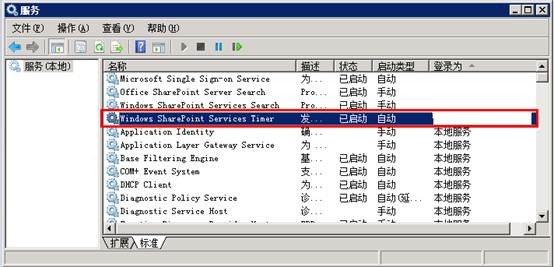
调试:TimerJob程序和WebPart等SharePoint程序,运行的进程不一样,如果需要调试,需要重新安装TimerJob,然后附加到SharePoint计时器进程(下图),进行调试!

在上面的链接中,我写了关于如何自定义一个简单的Timer job。这个是在我自己电脑里完成的,一切都很顺利。可是到客户这里就不行了。
在feature的激活事件里,调用update()时提示拒绝访问。即使我使用SPSecurity.RunWithElevatedPrivileges提升权限也不行。经过google总结如下:
首先,要正确理解SPSecurity.RunWithElevatedPrivileges提升的权限是什么。在sharepoint 2010 提供了两种类型数据库,一种是内容数据库(Content Database),一种是配置数据库,默认名字应该叫Sharepoint_Config。
内容数据库,顾名思义,就是存放sharepoint中的内容的,比如列表数据,上传的文档等。配置数据库就是存放全局配置的,它在安装sharepoint的时候生成,而且就一个。
SPSecurity.RunWithElevatedPrivileges提示的权限指的是往内容数据库写数据的权限。比如,当你更新或添加列表项时,提示拒绝访问,使用该功能提升权限基本都可以解决。但是配置数据库的写入权限则不是该方法可以提升的。而计时器(Timer Job)则需要在配置数据库里写入数据,它也就无能为力了。
对于配置数据的对应的级别是场或应用程序,而内容数据库对应的是网站集或网站。换句话说,最好将timer job对应的feature注册范围设置为场或应用程序级别,这么做可能会解决您的问题。Kaneboy回答我的问题时,曾说说网站集级别的feature事件接收器无法注册计时器。我想就是这个原因。
而我的计时器注册范围是网站集,而且我试图将其设置或场或应用程序级别,仍然不行。那么我只要保持网站集级别的部署范围,然后想办法提示权限了。
经查证:1.在配置数据库里写入数据,需要数据库账号拥有wss_content_application_pools角色,参考:http://www.sharepointsecurity.com/sharepoint/sharepoint-security/fixing-access-denied-errors-with-sharepoint-2010-timer-jobs/
2.还有人建议说将我的应用程序池和管理中心应用程序池账号设为一致,这个方法不适合我,毕竟是在客户环境中,这个是下下策。
微软的一篇文章提到这样的问题,好像是建议用stsadm来部署和激活feature,这个我觉得也不好,有兴趣的可以参考:
http://msdn.microsoft.com/zh-cn/library/cc427068.aspx
3.在微软网站上,还有另外一个解决办法,这个我试了一下完全可以。
可参考http://support.microsoft.com/kb/2564009
4.也是我采用的方法,很简单。在继承SPJobDefinition的类中,重写HasAdditionalUpdateAccess()方法,如下:
protected override bool HasAdditionalUpdateAccess()
{
return true;
}
第二个问题,就是计时器的Execute方法不执行。这个原因很简单,就是对于的计时器服务没有启动。可以再命令提示符里输入:
net start sptimerv4
如图提示,无法启动,那就需要进入:开始--管理工具--服务 找到SharePoint 2010 Timer,在登录选项卡中更改账户,重新启动了。
参考http://technet.microsoft.com/en-us/library/ff182790.aspx
第三个问题,更新计时器后,重新部署,执行结果并不是最新的。这个也简单,重启一下IIS,如果还不行,就重启sptimerv4

 浙公网安备 33010602011771号