
shell脚本进阶和进程和计划任务
一、编写脚本实现登陆远程主机。(使用expect和shell脚本两种形式)。
1.编写expect脚本
#!/usr/bin/expect
spawn ssh 10.0.0.7
expect {
        "yes/no" { send "yes\n";exp_continue }
        "password" { send "hs326vzx018\n" }
}
interact
查询执行结果
[root@centos8 ~]# ./expect.sh
spawn ssh 10.0.0.7
root@10.0.0.7's password:
Last login: Sat Feb 12 22:24:22 2022 from 10.0.0.8
[root@localhost ~]#
2.编写shell脚本
[root@centos8 ~]# cat shell.sh
#!/bin/bash
PASSWORD="hs326vzx018"
sshpass -p "$PASSWORD" ssh root@10.0.0.7
查询执行结果
[root@centos8 ~]# ./shell.sh
Last login: Sat Feb 12 22:31:11 2022 from 10.0.0.8
[root@localhost ~]#
二、生成10个随机数保存于数组中,并找出其最大值和最小值
[root@centos8 ~]# vim max_min.sh
[root@centos8 ~]# cat max_min.sh
#!/bin/bash
declare -i min max
declare -a nums
for ((i=0;i<10;i++));do
	nums[$i]=$RANDOM
	[ $i -eq 0 ] && min=${nums[0]} && max=${nums[0]} && continue
	[ ${nums[$i]} -gt $max ] && max=${nums[$i]} && continue
	[ ${nums[$i]} -lt $min ] && min=${nums[$i]}
done
echo "All numbers are ${nums[*]}"
echo Max is $max
echo Min is $min
[root@centos8 ~]# chmod +x max_min.sh
[root@centos8 ~]# ./max_min.sh
All numbers are 15637 15206 20536 17906 6160 31838 510 27016 27620 24401
Max is 31838
Min is 510
三、输入若干个数值存入数组中,采用冒泡算法进行升序或降序排序
[root@centos8 ~]# vim array.sh
[root@centos8 ~]# cat array.sh
#!/bin/bash
read -p "请输入数值个数:" COUNT
declare -a nums
for ((i=0;i<$COUNT;i++));do
	nums[$i]=$RANDOM
done
echo "排列之前是:${nums[*]}"

declare -i n=$COUNT
for ((i=0;i<n-1;i++));do
	for((j=0;j<n-1-i;j++));do
		let x=$j+1
		if (( ${nums[$j]} < ${nums[$i]} ));then
	#从大到小的排列
		tmp=${nums[$x]}
		nums[$x]=${nums[$j]}
		nums[$j]=$tmp
		fi
        done
done
echo "排序之后:${nums[*]}"
echo "the max integer is $nums,the min integer is ${nums[$((n-1))]}"

[root@centos8 ~]# chmod +x array.sh
[root@centos8 ~]# ./array.sh
请输入数值个数:10
排列之前是:8977 15133 2007 27581 30717 15293 30439 26945 11973 16465
排序之后:30717 15293 15133 8977 27581 30439 26945 11973 16465 2007
the max integer is 30717,the min integer is 2007
四、总结查看系统负载的几种命令,总结top命令的指标大概什么含义(不要求全部写出来)
uptime:系统负载查询
mpstat:显示cpu相关统计
top和htop:查看进程实时状态
free:查看系统内存空间
pmap:进程对应的内存映射
vmstat:虚拟内存信息的查询
iostat:统计cpu和设备IO信息情况
iotop:监视磁盘I/O的情况
iftop:显示网络带宽的使用情况
nload:查看网络实时吞吐量
top命令的指标含义:
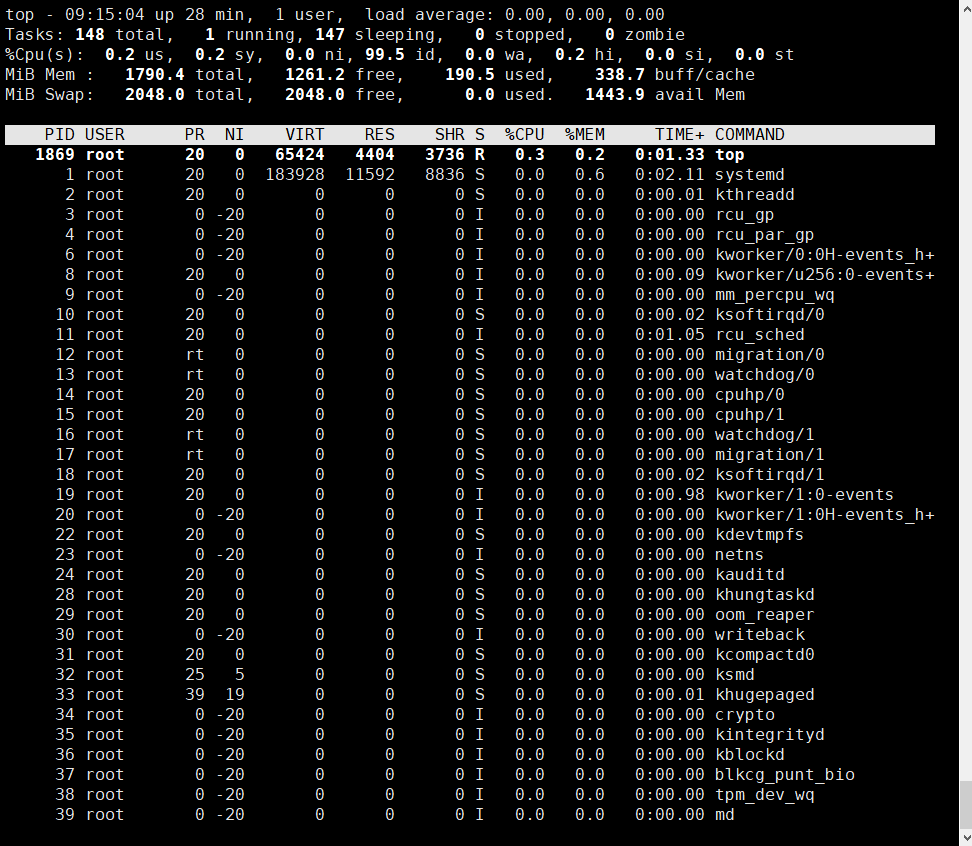
含义:
top - 09:16:44 up 29 min,  1 users, load average: 0.00, 0.00, 0.00
表示:当前时间   机器运行时间  用户数  平均负载均衡   5分钟、10分钟、15分钟

Tasks: 148 total,   1 running, 147 sleeping,   0 stopped,   0 zombie
表示:总的进程数  当前运行的进程  处于睡眠的进程  停止的进程 暂停的进程

%Cpu(s):  0.0 us,  0.2 sy,  0.0 ni, 99.3 id,  0.0 wa,  0.2 hi,  0.0 si,  0.0 st
us:用户空间
sy:内核空间
ni:调整nice时间
id:空闲
wa:等待IO时间
hi:硬中断
si:软中断(模式切换)
st:虚拟机偷走的时间

KiB Mem :  1790.4 total,  1259.5 free,    192.0 used,    339.0 buff/cache
KiB Swap:  2048.0 total,  2048.0 free,      0.0 used.   1442.4 avail Mem
内存和交换分区的使用情况:
total:总大小
free:空闲大小
used:已经使用大小
buff/cache:数据缓存占用的大小
五、编写脚本,使用for和while分别实现192.168.0.0/24网段内,地址是否能够ping通,若ping通则输出"success!",若ping不通则输出"fail!"
for循环:
[root@centos8 ~]# vim for.sh
[root@centos8 ~]# cat for.sh
#!/bin/bash
for ip in `seq 254`;do
	echo -n "ping 192.168.0.$ip....."
	ping 192.168.0.$ip -c 1 -w 1  &> /dev/null
	if [ $? == 0 ];then
	     echo "success!"
	else
	     echo "fail!"
	fi
done
[root@centos8 ~]# chmod +x for.sh
[root@centos8 ~]# ./for.sh
ping 192.168.0.1.....fail!
ping 192.168.0.2.....fail!
ping 192.168.0.3.....fail!
ping 192.168.0.4.....fail!
ping 192.168.0.5.....fail!
ping 192.168.0.6.....fail!
ping 192.168.0.7.....fail!
ping 192.168.0.8.....fail!
ping 192.168.0.9.....fail!
ping 192.168.0.10.....fail!
ping 192.168.0.11.....fail!
while循环:
[root@centos8 ~]# vim while.sh
[root@centos8 ~]# cat while.sh
#!/bin/bash
ip=1
while [ $ip -lt 255 ];do
        echo -n "ping 192.168.0.$ip....."
        ping 192.168.0.$ip -c 1 -w 1  &> /dev/null
        if [ $? == 0 ];then
             echo "success!"
        else
             echo "fail!"
        fi

	let ip++
done
[root@centos8 ~]# chmod +x while.sh
[root@centos8 ~]# ./while.sh
ping 192.168.0.1.....fail!
ping 192.168.0.2.....fail!
ping 192.168.0.3.....fail!
ping 192.168.0.4.....fail!
ping 192.168.0.5.....fail!
ping 192.168.0.6.....fail!
ping 192.168.0.7.....fail!
ping 192.168.0.8.....fail!
ping 192.168.0.9.....fail!
ping 192.168.0.10.....fail!
ping 192.168.0.11.....fail
六、每周的工作日1:30,将/etc备份至/backup目录中,保存的文件名称格式 为“etcbak-yyyy-mm-dd-HH.tar.xz”,其中日期是前一天的时间
[root@centos8 ~]# vim etcbak.sh
[root@centos8 ~]# cat etcbak.sh
#!/bin/bash
DIR=etcbak-`date -d '-1 day' +%Y-%M-%D-%H`
[ -d /backup ] || mkdir /backup
/usr/bin/tar -zcf $DIR.tar.xz /etc &> /dev/null
[root@centos8 ~]# chmod +x etcbak.sh
[root@centos8 ~]# crontab -e
[root@centos8 ~]# crontab -l
30 1 * * 1-5 ./etcback.sh
[root@centos8 ~]# ll /backup
total 0

 浙公网安备 33010602011771号