Matlab---数字图像处理---噪声添加与空域滤波
实验要求如下:
(1) 读入存放在 eight.tif 中的原始图像;
(2) 分别向该图像中添加椒盐噪声;
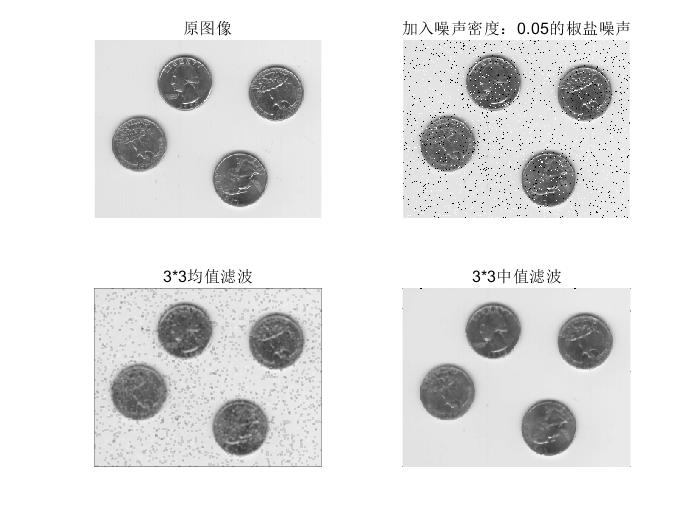
(3) 分别对加噪图像进行 3×3 平均值滤波和中值滤波,并在同一窗口中, 显示原始图像、加噪后的图像和两种滤波结果图像;
(4)将添加的噪声改为均值为 0、方差为 0.001 的高斯噪声(参数 为“gaussian”),显示滤波效果。

eight.tif
1.椒盐噪声
T = imread('eight.tif');
J = imnoise(T,'salt & pepper',0.05);
M1 = fspecial('average',[3,3]);
M2 = imfilter(J,M1);
B = medfilt2(J);

figure
subplot(221);imshow(T);title('原图像');
subplot(222);imshow(J);title('加入噪声密度:0.05的椒盐噪声');
subplot(223);imshow(M2);title('3*3均值滤波');
subplot(224);imshow(B);title('3*3中值滤波');
结果
2.高斯噪声
T = imread('eight.tif');
J = imnoise(T,'gaussian',0,0.001);
M1 = fspecial('average',[3,3]);
M2 = imfilter(J,M1);
B = medfilt2(J);

figure
subplot(221);imshow(T);title('原图像');
subplot(222);imshow(J);title('加入均值为0,方差为0.01的高斯噪声');
subplot(223);imshow(M2);title('3*3均值滤波');
subplot(224);imshow(B);title('3*3中值滤波');
结果


 浙公网安备 33010602011771号