
Hugo 渲染及主页展示白名单
本人通过 Obsidian + Hugo + Github Page + Github Action 来实现文章管理及博客自动化搭建.
Hugo 渲染白名单
因为不想将 Obsidian 仓库中的一些隐私笔记发布到博客上, 于是选择使用 module.mounts 来配置允许 Hugo 渲染的文件夹.
module:
  mounts:
    - source: "content/posts/3. Resources-资源 未来/AI人工智能"
      target: "content/posts/AI人工智能"
    - source: "content/posts/4. Archives-归档/技术类归档"
      target: "content/posts/技术类归档"
	......
    - source: "content/about.md"
      target: "content/about.md"
	......
Hugo 主页展示白名单
因为主要想在博客主页展示技术类相关博文, 所以需要对主页展示内容进行过滤, 在 layouts/_default/list.html 进行配置即可, 具体可参考下面的代码:
{{- if .IsHome }}
{{- $pages = where site.RegularPages "File.Dir" "in" (slice "posts\\AI人工智能\\" "posts\\技术类归档\\") }}
{{- $pages = where $pages "Params.hiddenInHomeList" "!=" "true" }}
{{- end }}
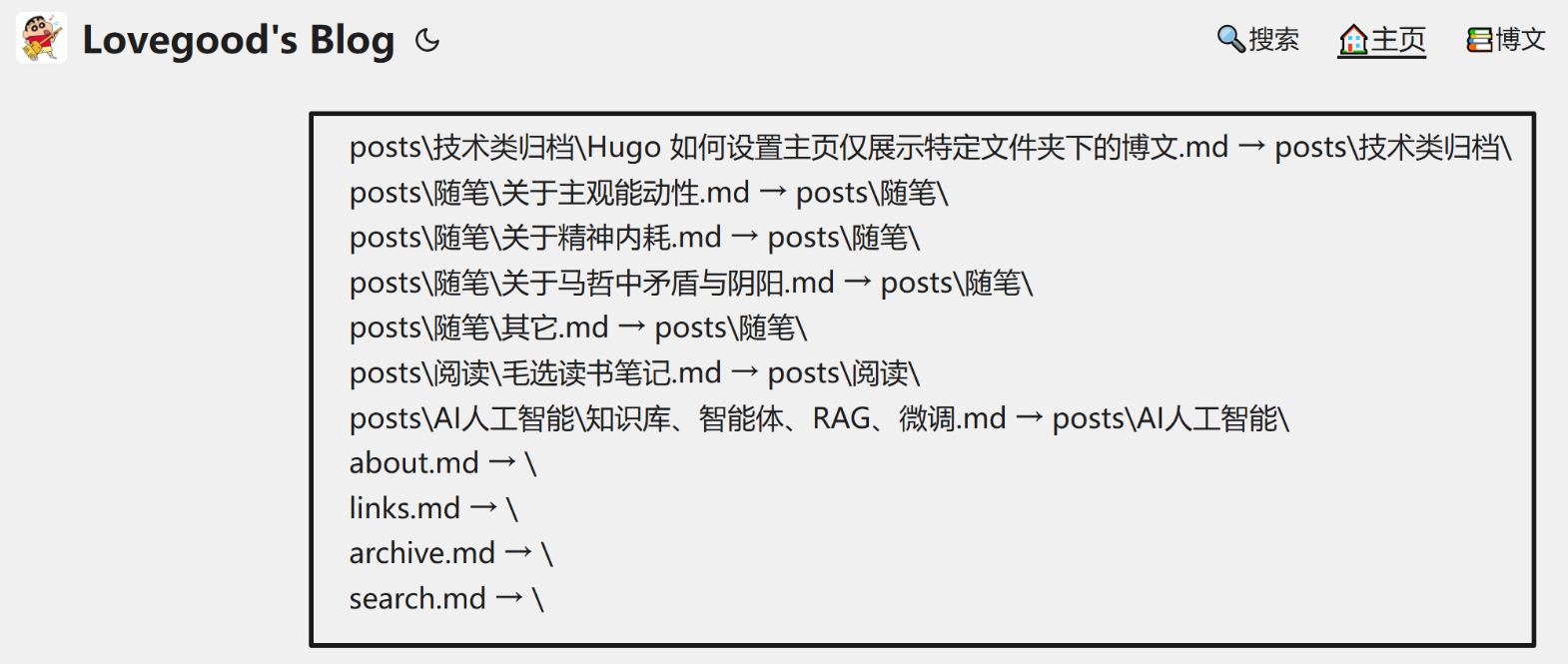
倘若不知道文件夹(File. Dir)路径, 尤其是我这种有 mounts 映射的情况, 可以通过在 layouts/_default/list.html 中添加 {{ range site.RegularPages }} <p>{{ .File.Path }} → {{ .File.Dir }}</p> {{ end }} 代码块, Hugo 会输出文件夹 (File. Dir) 路径 (类似 Python 的 print 函数.), 见下图:
踩坑记录: 一开始以为在 config.yml 里面设置 mainSections 相关参数即可, 折腾半天. 后面静下心来慢慢读 Hugo 的官网网站上的相关教程, 最后也多亏了 GPT 帮忙.
上传 Github 白名单
可通过 .gitignore 文件进行设置.
content/posts/.obsidian/  # .obsidian文件夹内里面有很多杂七杂八的东西
content/posts/-1. Books/  # 这一目录用于存放电子书, 占用空间

.history/  # VSC的自动保存

public  # 无需上传public文件, 因为设置了Github Action自动部署 这个网上很多大佬都有教程

 浙公网安备 33010602011771号