

 cocos2d-x.org开源社区把iPhone上知名的cocos2d游戏引擎翻译成C++语言,并在国产的Uphone平台上运行。本系列教程在Ray Wenderlic的 How To Make A Simple iPhone Game with Cocos2D 基础上,从头到尾解释了如何把Wenderlic的Cocos2DSimpleGame从objective c翻译成C++语言,从cocos2d-iphone移植到cocos2d-x并在uphone上运行,及过程中的细节注意点。
五、射击子弹
首先,我们先让这游戏里唯一的图层可以支持触摸。添加下面一行到init方法:
|
// cpp with cocos2d-x
this->setIsTouchEnabled(true); |
// objc with cocos2d-iphone
self.isTouchEnabled = YES; |
因为图层已经支持触摸,所以我们可以收到触摸事件的回调。现在我们实现ccTouchesEnded方法,只要用户完成触摸,该方法就会被调用。
先在HelloWorldScene.h里增加函数声明 void ccTouchesEnded(cocos2d::NSSet* touches, cocos2d::UIEvent* event);
然后到HelloWorldScene.cpp里增加函数实现
|
// cpp with cocos2d-x
void HelloWorld::ccTouchesEnded(NSSet* touches, UIEvent* event) { // Choose one of the touches to work with CCTouch* touch = (CCTouch*)( touches->anyObject() ); CGPoint location = touch->locationInView(touch->view()); location = CCDirector::getSharedDirector()->convertToGL(location); // Set up initial location of projectile CGSize winSize = CCDirector::getSharedDirector()->getWinSize(); CCSprite *projectile = CCSprite::spriteWithFile("Projectile.png", CGRectMake(0, 0, 20, 20)); projectile->setPosition( ccp(20, winSize.height/2) ); // Determinie offset of location to projectile int offX = location.x - projectile->getPosition().x; int offY = location.y - projectile->getPosition().y; // Bail out if we are shooting down or backwards if (offX <= 0) return; // Ok to add now - we've double checked position this->addChild(projectile); // Determine where we wish to shoot the projectile to int realX = winSize.width + (projectile->getContentSize().width/2); float ratio = (float)offY / (float)offX; int realY = (realX * ratio) + projectile->getPosition().y; CGPoint realDest = ccp(realX, realY); // Determine the length of how far we're shooting int offRealX = realX - projectile->getPosition().x; int offRealY = realY - projectile->getPosition().y; float length = sqrtf((offRealX * offRealX) + (offRealY*offRealY)); float velocity = 480/1; // 480pixels/1sec float realMoveDuration = length/velocity; // Move projectile to actual endpoint projectile->runAction( CCSequence::actions( CCMoveTo::actionWithDuration(realMoveDuration, realDest), CCCallFuncN::actionWithTarget(this, callfuncN_selector(HelloWorld::spriteMoveFinished)), |
// objc with cocos2d-iphone
- (void)ccTouchesEnded:(NSSet *)touches withEvent:(UIEvent *)event { // Choose one of the touches to work with UITouch *touch = [touches anyObject]; CGPoint location = [touch locationInView:[touch view]]; location = [[CCDirector sharedDirector] convertToGL:location]; // Set up initial location of projectile CGSize winSize = [[CCDirector sharedDirector] winSize]; CCSprite *projectile = [CCSprite spriteWithFile:@"Projectile.png" rect:CGRectMake(0, 0, 20, 20)]; projectile.position = ccp(20, winSize.height/2); // Determine offset of location to projectile int offX = location.x - projectile.position.x; int offY = location.y - projectile.position.y; // Bail out if we are shooting down or backwards if (offX <= 0) return; // Ok to add now - we've double checked position [self addChild:projectile]; // Determine where we wish to shoot the projectile to int realX = winSize.width + (projectile.contentSize.width/2); float ratio = (float) offY / (float) offX; int realY = (realX * ratio) + projectile.position.y; CGPoint realDest = ccp(realX, realY); // Determine the length of how far we're shooting int offRealX = realX - projectile.position.x; int offRealY = realY - projectile.position.y; float length = sqrtf((offRealX*offRealX)+(offRealY*offRealY)); float velocity = 480/1; // 480pixels/1sec float realMoveDuration = length/velocity; // Move projectile to actual endpoint [projectile runAction:[CCSequence actions: [CCMoveTo actionWithDuration:realMoveDuration position:realDest], [CCCallFuncN actionWithTarget:self selector:@selector(spriteMoveFinished:)], |
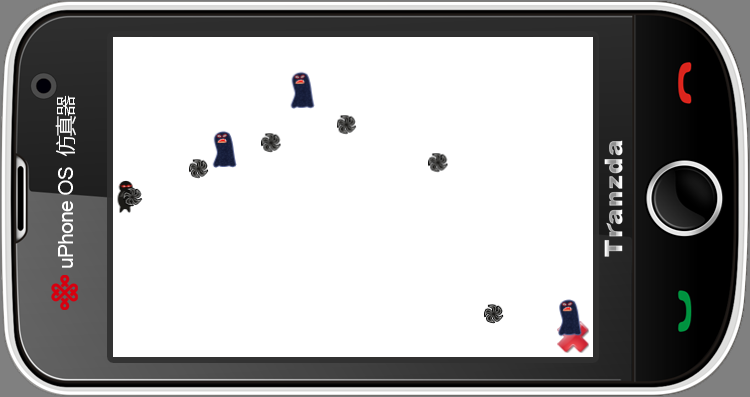
编译后,带头大哥就可以BIU~BIU~地扔飞镖出去了。这里会产生一些float和int隐式转换导致的warning,我们为了和objc代码保持一致而在坐标计算里使用了不少int变量,实际上全部用float会更合适。
六、碰撞检测
光扔飞镖是杀不死人的,我们还需要加入碰撞检测。要做到这一点,首先得在场景中更好地跟踪目标和子弹。
在这个游戏中,我们得为小怪和飞镖两种sprite加入一个tag成员变量,以区分两种不同的游戏物体。tag=1的时候这个CCSprite对象为小怪,tag=2的时候则为飞镖。由于在CCNode里面有m_nTag这个成员变量,并且有setTag和getTag方法,因此CCSprite就继承了这些方法,我们可以利用之。
修改完毕,现在可以专心地跟踪小怪和飞镖了。把以下代码添加到class HelloWorld的声明中
|
// cpp with cocos2d-x
protected: cocos2d::NSMutableArray<cocos2d::CCSprite*> *_targets; cocos2d::NSMutableArray<cocos2d::CCSprite*> *_projectiles; |
// objc with cocos2d-iphone
NSMutableArray *_targets; NSMutableArray *_projectiles; |
在这里,cocos2d-x模拟iOS的SDK实现了NSMutableArray,里面只能放NSObject及其子类。但不同的是,你必须告诉他里面要放的是哪种具体类型。
然后在init方法中初始化这两个数组
|
// cpp with cocos2d-x
// Initialize arrays _targets = new NSMutableArray<CCSprite*>; _projectiles = new NSMutableArray<CCSprite*>; |
// objc with cocos2d-iphone
// Initialize arrays _targets = [[NSMutableArray alloc] init]; _projectiles = [[NSMutableArray alloc] init]; |
同时在类的析构函数里释放之. 严谨地说,我们还应在class HelloWorld的构造函数里初始化_targets和_projectiles两个指针为NULL
|
// cpp with cocos2d-x
HelloWorld::~HelloWorld() { if (_targets) { _targets->release(); _targets = NULL; } if (_projectiles) { _projectiles->release(); _projectiles = NULL; } // cpp don't need to call super dealloc // virtual destructor will do this } HelloWorld::HelloWorld() :_targets(NULL) ,_projectiles(NULL) { } |
// objc with cocos2d-iphone
- (void) dealloc { [_targets release]; _targets = nil; [_projectiles release]; _projectiles = nil; // don't forget to call "super dealloc" [super dealloc]; }
|
现在修改addTarget方法,添加新目标到目标数组中,并给它设置Tag标记以和飞镖sprite区分开来
|
// cpp with cocos2d-x
// Add to targets array taget->setTag(1); _targets->addObject(target); |
// objc with cocos2d-iphone
// Add to targets array target.tag = 1; [_targets addObject:target]; |
然后,修改spriteMoveFinished方法,根据标记的不同,在对应的数组中移除精灵
|
// cpp with cocos2d-x
void HelloWorld::spriteMoveFinished(CCNode* sender) { CCSprite *sprite = (CCSprite *)sender; this->removeChild(sprite, true); if (sprite->getTag() == 1) // target { _targets->removeObject(sprite); } else if (sprite->getTag() == 2) // projectile { _projectiles->removeObject(sprite); } } |
// objc with cocos2d-iphone
-(void)spriteMoveFinished:(id)sender { CCSprite *sprite = (CCSprite *)sender; [self removeChild:sprite cleanup:YES]; if (sprite.tag == 1) // target { [_targets removeObject:sprite]; } else if (sprite.tag == 2) // projectile { [_projectiles removeObject:sprite]; } } |
编译并运行项目以确保一切正常。此时还看不出什么明显不同,但我们可以利用前面加的tag标记来实现碰撞检测
现在往class HelloWorld里添加一个update方法,计算碰撞,并让碰撞了的飞镖和小杂兵同时从屏幕消失
|
// cpp with cocos2d-x
void HelloWorld::update(ccTime dt) { NSMutableArray<CCSprite*> *projectilesToDelete = new NSMutableArray<CCSprite*>; |
// objc with cocos2d-iphone
- (void)update:(ccTime)dt { NSMutableArray *projectilesToDelete = [[NSMutableArray alloc] init]; |
上面有个注意点,我们用来检查矩形交叉的函数。实际上各平台都有用来检查矩形相交的函数,我们这里为了方便iphone开发者转换代码,实现了静态的CGRect::CGRectInterestcRect方法。上面的代码大致就是,遍历小怪和飞镖数组,一旦发现有矩形相交(碰撞),就把他们分别添加到targetsToDelete和projectileToDelete数组中,然后删除之
在运行之前,你还需要让这个update方法不断地被调用,可以在init方法中添加如下代码达成这个目的
|
// cpp with cocos2d-x
this->schedule( schedule_selector(HelloWorld::update) ); |
// objc with cocos2d-iphone
[self schedule:@selector(update:)]; |
编译运行,你就可以看到飞镖和小怪碰撞时,它们同时从屏幕消失了。
至此,一个简单cocos2d游戏的雏形就已经完成了。在下一篇里,我们会对这个游戏进行最后的润色,添加背景音乐和音效,已经过关和GAME OVER的提示界面。
著作权声明:本文由http://www.walzer.cn/原创,欢迎转载分享。请尊重作者劳动,转载时保留该声明和作者博客链接,谢谢!

 浙公网安备 33010602011771号