Rickie Lee's blog

Welcome to my blog. I'm mainly involved in .Net platform and corresponding technologies. Thanks.

  博客园 :: 首页 :: 新随笔 :: 联系 :: 订阅 订阅 :: 管理 ::
  383 随笔 :: 3 文章 :: 1240 评论 :: 97 Trackbacks

Enterprise Library: Logging and Instrumentation Application Block-Email接收池设计向导篇


Written by: Rickie Lee (rickieleemail#yahoo.com)

My blog:http://www.cnblogs.com/rickie

Enterprise Library Quick Start中演示了使用Logging and Instrumentation Application Block记录日志信息到Application事件日志和文本文件。《Enterprise Library: Logging and Instrumentation Application Block数据库接收池(Database Sink)设计向导篇》(作者:Rickie Lee - rickieleemail#yahoo.com)演示将日志信息写入Database。这里,演示如何将日志信息写入Email并发送。


1. 设置配置文件

使用Configuration Console配置工具,在Sinks节点下添加Email Sink,并设置相应属性的属性值,如下图所示:
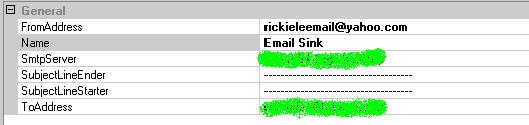
Enterprise_Logging_EmailSink.jpg


另外,在
Categories节点下添加新的Category并命名为EmailNotification。然后,在EmailNotification目录下添加新的Destination,并设置相应的属性。如下图所示:
Enterprise_Logging_ConfigurateEmailSink.jpg


当然你也可以直接现有的Category下添加上述Destination


2. Demo代码及其界面

1Code Snippet

Enterprise Library: Logging and Instrumentation Application Block数据库接收池(Database Sink)设计向导篇中将日志信息写入Database基本一致,只是简单调整了LogEntry对象的Category属性值。

private void btnEmailNotification_Click(object sender, System.EventArgs e)

{

            try

            {

                        Cursor.Current = Cursors.WaitCursor;

                        LogEntry log = new LogEntry();

                        log.Message = "Hello, Rickie.";

                        log.Priority = 1;

                        log.EventId = 100;

                        log.Severity = Severity.Information;

                        log.Title = "Demo on Logging and Instrumentation Application Block";

                        log.Category = "EmailNotification";

                        Logger.Write(log);


                        txtResults.Text += log.Message + Environment.NewLine;

            }

            finally

            {

                        Cursor.Current = Cursors.Default;

          }

}


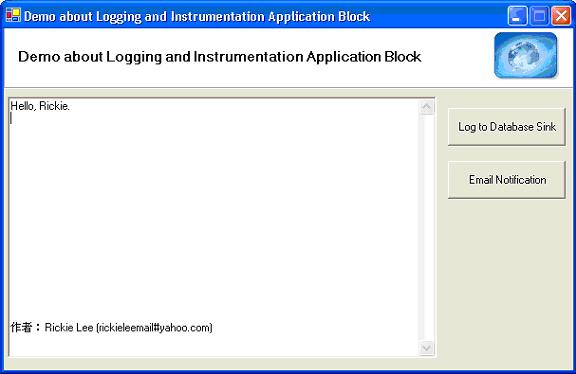
2Demo应用程序界面
Enterprise_Logging_DemoEmailSink.jpg

3. 应注意的问题及其改进

EmailSink调用System.Web.Mail,该Class对调用方有诸多要求,如需要调用本地的SMTP ServiceCDO.Message对象等。

因此,在实际的业务应用开发中,推荐编写自定义的Sink,调用Web Services或采用.Net Remoting技术调用Remote Objects

Custom Sink如下所示:

 [C#]

public class CustomEmailSink : LogSink, IConfigurationProvider


[Visual Basic]

Public Class CustomEmailSink

  Inherits LogSink

  Implements IConfigurationProvider

定制的sink需要实现IConfigurationProvider接口,并继承LogSink抽象类。另外需要增加SendMessageCore方法到定制sink类中,确保实现必要的动作来记录日志信息到定制的sink

***

作者:Rickie Lee (rickieleemail#yahoo.com)

本文参考Microsoft Enterprise LibraryLogging and Instrumentation Application Block文档。


References:

1. Microsoft Enterprise Library: Logging and Instrumentation Application Block.

2. Rickie, Microsoft patterns & practices Enterprise Library January 2005 [中文稿], http://www.cnblogs.com/rickie/archive/2005/01/30/99443.html

3. Rickie, Enterprise Library released! http://www.cnblogs.com/rickie/archive/2005/01/29/99106.html



posted on 2005-02-16 09:16 Rickie 阅读(3191) 评论(2)  编辑 收藏 所属分类: E.Enterprise Library

评论

#1楼  2005-03-16 09:07 hebboy [未注册用户]
如果使用自定义的sink,或者在程序中指定的Category不存在时,如log.Category = "EmailNotification";中故意将EmailNotification写错,则在Windows的“事件查看器”的“应用程序”中总会出现两条错误,分别是:

Failed to create instances of performance counter 'Client: # of Logs Written/Sec' - 请求的性能计数器不是自定义计数器,它必须初始化为只读。

Failed to create instances of performance counter 'Distributor: # of Logs Distributed/Sec' - 请求的性能计数器不是自定义计数器,它必须初始化为只读。

不知这两个错误如何消除?
  回复  引用    

#2楼  2006-04-10 22:34 cowbird      
我使用Email Sink的时候,怎么也无法通过,错误如下,不知道如何处理?
我的MSN:cowbird2002@hotmail.com

An error occurred while the Distributor was processing the message. Please check your configuration files for errors or typos. Verify that your sinks are reachable (queues exist, permissions are set, database exists, etc...)

Sink failed because: System.IO.FileNotFoundException: 找不到指定的模块。
at System.RuntimeType.CreateInstanceImpl(Boolean publicOnly)
at System.Activator.CreateInstance(Type type, Boolean nonPublic)
at System.Activator.CreateInstance(Type type)
at System.Web.Mail.LateBoundAccessHelper.CreateInstance()
at System.Web.Mail.CdoSysHelper.Send(MailMessage message)
at System.Web.Mail.SmtpMail.Send(MailMessage message)
at Microsoft.Practices.EnterpriseLibrary.Logging.Sinks.EmailMessage.SendMessage(MailMessage message)
at Microsoft.Practices.EnterpriseLibrary.Logging.Sinks.EmailMessage.Send()
at Microsoft.Practices.EnterpriseLibrary.Logging.Sinks.EmailSink.EmailLogEntry(LogEntry logEntry, ILogFormatter formatter)
at Microsoft.Practices.EnterpriseLibrary.Logging.Sinks.EmailSink.SendMessageCore(LogEntry log).

Message:
Timestamp: 2006-04-10 22:29:37
Message: Hello, Rickie.
Category: Email
Priority: 1
EventId: 100
Severity: Information
Title:Demo on Logging and Instrumentation Application Block
Machine: ZHOUQUN
App Domain: LoggingTest.exe
ProcessId: 4352
Process Name: D:\Documents and Settings\zhou_qun\My Documents\Desktop\[S]学习项目\[E]企业应用库\LoggingQuickStart\LoggingTest\bin\Debug\LoggingTest.exe
Thread Name:
Win32 ThreadId:3944
Extended Properties:


另外一个错误就是:
Error logging with 'Email Sink' sink from configuration. The default log sink will be used instead to process the message.


Summary for Enterprise Library Distributor Service:
======================================
-->
Message:
Timestamp: 2006-04-10 22:29:37
Message: Hello, Rickie.
Category: Email
Priority: 1
EventId: 100
Severity: Information
Title:Demo on Logging and Instrumentation Application Block
Machine: ZHOUQUN
App Domain: LoggingTest.exe
ProcessId: 4352
Process Name: D:\Documents and Settings\zhou_qun\My Documents\Desktop\[S]学习项目\[E]企业应用库\LoggingQuickStart\LoggingTest\bin\Debug\LoggingTest.exe
Thread Name:
Win32 ThreadId:3944
Extended Properties:
--> MachineName: ZHOUQUN
--> TimeStamp: 2006-04-10 14:29:37
--> FullName: Microsoft.Practices.EnterpriseLibrary.Common, Version=1.1.0.0, Culture=neutral, PublicKeyToken=null
--> AppDomainName: LoggingTest.exe
--> WindowsIdentity: ZHOUQUN\Administrator

Exception Information Details:
======================================
Exception Type: System.IO.FileNotFoundException
Message: 找不到指定的模块。
FileName: NULL
FusionLog: NULL
TargetSite: System.Object CreateInstanceImpl(Boolean)
HelpLink: NULL
Source: mscorlib

StackTrace Information Details:
======================================
at System.RuntimeType.CreateInstanceImpl(Boolean publicOnly)
at System.Activator.CreateInstance(Type type, Boolean nonPublic)
at System.Activator.CreateInstance(Type type)
at System.Web.Mail.LateBoundAccessHelper.CreateInstance()
at System.Web.Mail.CdoSysHelper.Send(MailMessage message)
at System.Web.Mail.SmtpMail.Send(MailMessage message)
at Microsoft.Practices.EnterpriseLibrary.Logging.Sinks.EmailMessage.SendMessage(MailMessage message)
at Microsoft.Practices.EnterpriseLibrary.Logging.Sinks.EmailMessage.Send()
at Microsoft.Practices.EnterpriseLibrary.Logging.Sinks.EmailSink.EmailLogEntry(LogEntry logEntry, ILogFormatter formatter)
at Microsoft.Practices.EnterpriseLibrary.Logging.Sinks.EmailSink.SendMessageCore(LogEntry log)
at Microsoft.Practices.EnterpriseLibrary.Logging.Sinks.LogSink.SendMessage(LogEntry entry)
at Microsoft.Practices.EnterpriseLibrary.Logging.Distributor.LogDistributor.DistributeLogEntry(LogEntry log, CategoryData category)


  回复  引用  查看    


标题  
姓名  
主页
Email (只有博主才能看到) 
验证码 *  看不清,换一张 [登录][注册]
内容(请不要发表任何与政治相关的内容)  
  登录  使用高级评论  新用户注册  返回页首  恢复上次提交      
该文被作者在 2005-02-16 13:57 编辑过


相关链接: