
[翻译]Visual Studio2008的新功能:代码度量
 (译注:作为微软预览Visual Studio 2007(Orcas)新功能之一的程序复杂度度量(Code Metrics)这一新功能,今天偶尔看到,却不知列出的指标为何,又是如何计算,在园子里找了一下,虽然文章过时但好像还没有发过,msdn有篇中文:VS 2008 - 如何使用 Code Metrics,但介绍过于简单,由其最后一句:如上圖所視,這個功能目前計算 5 個指標:Maintainability Index, Cyclomatic Complexity, Depth of Inheritance, Class Coupling, and Lines of Code。這些值的意義稍後會再討論。
于是找来英文介绍,译之。
这个功能的调用非常简单,在您的解决方案上点击右键,约中间位置会出现“计算代码度量值”,点击即可。
(译注:作为微软预览Visual Studio 2007(Orcas)新功能之一的程序复杂度度量(Code Metrics)这一新功能,今天偶尔看到,却不知列出的指标为何,又是如何计算,在园子里找了一下,虽然文章过时但好像还没有发过,msdn有篇中文:VS 2008 - 如何使用 Code Metrics,但介绍过于简单,由其最后一句:如上圖所視,這個功能目前計算 5 個指標:Maintainability Index, Cyclomatic Complexity, Depth of Inheritance, Class Coupling, and Lines of Code。這些值的意義稍後會再討論。
于是找来英文介绍,译之。
这个功能的调用非常简单,在您的解决方案上点击右键,约中间位置会出现“计算代码度量值”,点击即可。
原文发表地址:Visual Studio 2008 Code Metrics Saves you Money
原文发表时间:Wednesday, October 03, 2007 7:00 AM
原作者:David M. Kean
While we've already briefly spoken about Code Metrics when we announced it, I thought I would discuss it in a little more depth, in particular the metrics it provides.As mentioned previously, Code Metrics is a new tool window that helps users find and act upon complex and un maintainable areas within an application.
我们已经在这篇文章简要的介绍了关于代码度量功能的信息,我认为应该在这里更深入的讨论一下,特别是它提供的度量标准。
就像之前提到的一样,代码度量功能是一个新的工具窗口,它帮助用户在里面查找到复杂和不可维护的区域。
The following shows the results of running Code Metrics over a fictional business application:

下面这张图片显示一个虚构的商业项目应用执行了代码度量的结果(译注:我拿自己的一个项目抓个图,方便使用简体中文版的朋友进行对比):
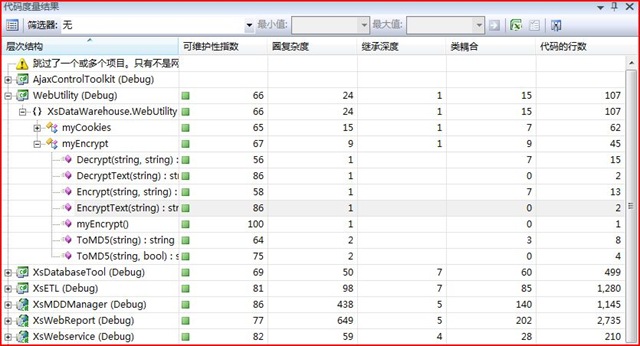
As you can see from above, for Visual Studio 2008, we're providing five metrics. These are detailed below.
就像你在上面看到的,我们为Visual Studio 2008 提供了5个度量值,以下是它们的详细信息及计算方法:
Class Coupling
At each level, this indicates the total number of dependencies that the item has on other types. This number excludes primitive and built-in types such as Int32, String and Object. The higher this number, the more likely changes in other types will ripple though this item. A lower value at the type level can indicate candidates for possible reuse.
The following shows how coupling is calculated:
类耦合
在每个级别上,它表明了类对其它类型的依赖总数。这个数字不包括基类(原始类型)比如Int32,String和Object,这个数字越大,表明改动它时对其它类型的影响就越大。如果这个值比较低则表明它的代码重用的可能性越高。
下面这张图耦合值是如何被计算出来的:(译注:说白了就是没有这个类,会有几个类会挂掉。)

For example, as you can see above, Account is coupled to two other types, Address and Order, whereas Country is not dependent on any other type.
以上面的图为例Account 和两个其它类型耦合,Address 和Order,然而Country 没有依赖于任何类型。
Depth of Inheritance
At the type level, depth of inheritance indicates the number of types that are above the type in the inheritance tree. For example, a type that derives directly from Object would have a depth of inheritance of 1. At the namespace and project level, this indicates the highest depth of inheritance of all the types contained within it. This number does not take into consideration the depth of any implemented interfaces. Deep inheritance trees can indicate an over-engineering of a problem and can increase the complexity of testing and maintaining an application.
继承深度
在这个度量值级别上,继承深度指这个类型在继承树上的有多少类型。例如,一个类型直接从Object上继承的话,它的深度就是1。在命名空间和项目中,它表明所有类型(包括自身)的最大的深度值。这个数字不考虑任何应用接口。深度继承树可以在维护一个应用程序表现出过度设计和增加测试复杂度的问题。
The following shows how depth is calculated:
下面展示了深度是如何被计算的:

For example, in the above inheritance hierarchy, ListControl and Label have a depth of inheritance of 3, whereas Component has a depth of inheritance of 1.
以上图的继承层次为例,ListControl 和Label 位于继承的第3层,然而Component 的深度为1.
Cyclomatic Complexity
At each level, this measures the total number of individual paths through the code. This is basically calculated by counting the number of decision points (such as if blocks, switch cases, and do, while, foreach and for loops) and adding 1. This number is also a good indication on the number of unit tests it will take to achieve full line coverage. Lower is typically better.
圈复杂度
在每个级别上,它代表了代码段的单独路径总数。它基本上是由判断点的个数来计算得出的(例如if块,switch块和do,while,foreach和for的循环)每个判断点累加1。这个数字也很好的表明了单元测试的个数,将覆盖整行。它的数值低表明好一些。
The following shows how complexity is calculated:
下面这张图展示了复杂度是如何被计算的:

Lines of Code
At each level, this is a measure of the total number of executable lines of code. This excludes white space, comments, braces and the declarations of members, types and namespaces themselves. Lower is typically better.
代码行数
在每一个级别上,这是一个可执行代码的总行数。它不包括空白,注解,花括号,成员、类、命名空间的声名。数值低代表好一些。
The following shows how the lines are calculated:
下面这张图显示了代码行数是如何被计算的:

Maintainability Index
At the member and type level, this is an index from 0 to 100 indicating the overall maintainability of the member or type. At the namespace and assembly level, this is an average of the maintainability index of all types contained within it. This index is based on several other metrics, including Halstead Volume (which factors in the number and use of operands and operators), Cyclomatic Complexity and Lines of Code. A low number indicates code that is complex and hard to maintain.
可维护性指数
在成员的级别上,这个指数是从0到100的,表明了成员或者类的大致的可维护性。在命名空间级别,这是其所包含的所有的类型的可维护性的平均值。这个数是基于多个指标,包括Halstead Volume(操作数和运算符和指数因素),圈复杂度和代码行数。指数较低表明代码复杂和难以维护。
The Maintainability Index column also includes a icon that gives a quick indication as to the overall maintainability and complexity of a particular item. The following table shows the range at which an icon is shown:
| Icon | Level | Range |
 |
High Maintainability | Between 20 and 100 inclusive |
 |
Moderate Maintainability | Between 10 and 19 inclusive |
 |
Low Maintainability | Between 0 and 9 inclusive |
These icons allow you to see at a glance any trouble spots that you should start to focusing on or filling bugs against.
可维护性指数的列也包括了一个图标,它可以直观的表示出可维护性的总体指数,或是某复杂度很高的部分。下面的表格显示了每个图标指示的范围:
| 图标 | 级别 | 范围 |
|
高可维护性 | 在20 到100 之间 |
|
中等可维护性 | 在10 到19 之间 |
|
低可维护性 | 在0 到9 之间 |
这些图标可以让你迅速浏览并找到问题所在。
Conclusion
Now that you know what these metrics measure, and how they are calculated, the next thing you'll want to know is what you should do when you start to see some red in your application. In a future post, I will cover why should should care about each metric, and how to go about fixing some of the common issues that cause particular metrics to high (or low in the case of Maintainability Index).
小结
现在我们知道这些度量的尺度、以及它们如何被计算出来,下面你可能想知道当你在你的应用程序中看到一些红色的图标应该如何做。在将来的文章中,我将告诉大家为什么应该关注每个度量,以及如何来修复一些引起特别度量值太高的问题(或者在可维护性中的值太低)。
(译注:作为微软预览Visual Studio 2007(Orcas)新功能之一的程序复杂度度量(Code Metrics)这一新功能,今天偶尔看到,却不知列出的指标为何,又是如何计算,在园子里找了一下,虽然文章过时但好像还没有发过,msdn有篇中文:VS 2008 - 如何使用 Code Metrics,但介绍过于简单,由其最后一句:如上圖所視,這個功能目前計算 5 個指標:Maintainability Index, Cyclomatic Complexity, Depth of Inheritance, Class Coupling, and Lines of Code。這些值的意義稍後會再討論。
于是找来英文介绍,译之。
这个功能的调用非常简单,在您的解决方案上点击右键,约中间位置会出现“计算代码度量值”,点击即可。
vs2005好像有第三方插件可以做到:
这里有另外的文章也许可以参考:
Visual Studio 2008 Code Metrics Saves you Money
希望能对您有所帮助
祝编程愉快!)
风海迷沙

 浙公网安备 33010602011771号