
.NET模板引擎 EFPlatform.CodeGenerator (代码生成器 静态页生成 生成HTML 模板)
这个东东是去年我看着ASP:标记突发奇想花4天时间设计编写的类库, 原名叫 HtmlGenerator, 最近发现PHP和JAVA有很多类似的项目, 但是都设计的很渣(不同意的表打我@_@), 于是把 HtmlGenerator 重构了一下, 改叫 CodeGenerator. 配合我的数据库迁移工具和数据库实体类生成品..... 好像跑题了 -____-
CodeGenerator 的特点:
1. 标记简结实用, 所有网页美工都能在一分钟内掌握. 而且不与HTML标准冲突, 模板页可用任何WYSIWYG工具编辑, 和编辑普通HTML网完全相同.
2. 标记只与表示层相关, 不包括任何业务逻辑, 丝毫不影响你应用多层结构.
3. 标记到后台被解析成了生成器对象, 完全面向对象, 不像绝大多数生成器要死嗑字符串.
4. 生成器对象使用DataSource属性取得数据, DataSource可以为 简单值类型(如 int, DateTIme), 也可以为简单数组(如 decimal[], string[]), 还可以为ADO.NET数据集(如DataTable), 甚至单个对象实体或对象集合或列表(如 SomeClassCollection, List<SomeClass>), 所有数据源类型通吃! 哈哈, 比ASP.NET带的数据控件支持的类型还多.
5. 标记的Name直接与数据源的列名ColumnName或属性名PropertyName, 好处不言而喻了吧.
6. 说到这里好了, 留一手先. 呵呵
演示程序下载地址: https://files.cnblogs.com/ericfine/Demo.rar
EFPlatform.CodeGenerator 源代码下载地址: https://files.cnblogs.com/ericfine/EFPlatform.CodeGenerator.rar (过时了)
EFPlatform.TemplateEngine 源代码下载地址: https://files.cnblogs.com/ericfine/EFPlatform.TemplateEngine.rar (其实就是CodeGenerator的优化版:))
应用项目:
http://portray.mz99.com/
http://music.mz99.com/
http://joke.mz99.com/
http://www.mcuol.com/
应用流程:
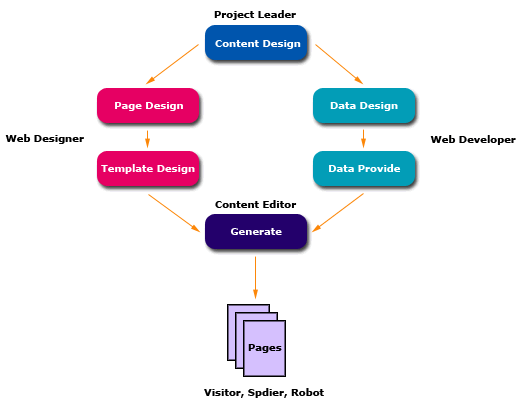
Default.aspx.cs:
 using System;using System.Collections.Generic;using System.Configuration;using System.Data;using System.Data.Common;using System.IO;using System.Text;using System.Web;using System.Web.UI;using System.Web.UI.WebControls;using EFPlatform.TemplateEngine;public partial class _Default : Page
 {
{

 private string outputPath; private string categoryFileName; private string productFileName; private static DbProviderFactory dbFactory; private DbConnection connection; protected void Page_Load(object sender, EventArgs e)
 { outputPath = Server.MapPath("./"); categoryFileName = string.Format(@"{0}\Template\Category.html", outputPath); productFileName = string.Format(@"{0}\Template\Product.html", outputPath); string currentConnection = ConfigurationManager.AppSettings["Connection"]; ConnectionStringSettings css = ConfigurationManager.ConnectionStrings[currentConnection]; this.GetConnection(css);
 } private void GenerateCategory() { string template = Helper.ReadTextFile(categoryFileName); Generator gen = new Generator(template); gen.ParseTemplate(); Region rgnTitle = gen.GetRegion("Title"); Region rgnCategory = gen.GetRegion("Category"); Region rgnProducts = gen.GetRegion("Products"); Region rgnNavigator = gen.GetRegion("Navigator"); if(rgnTitle == null || rgnCategory == null || rgnProducts == null || rgnNavigator == null) { Response.Write("Missing region."); return; } int categoryId; string outputFileName; DataView dvCategory = this.GetCategoryTable().DefaultView; Pager pgrCategory = new Pager(1, dvCategory.Count); for(int i = 0; i < pgrCategory.PageCount; i++) { rgnTitle.DataSource = (string)dvCategory[i]["CategoryName"]; //Use a string as data source rgnCategory.DataSource = dvCategory[i]; //Use a DataRowView object as data source pgrCategory.CurrentPage = i + 1; rgnNavigator.DataSource = pgrCategory; //Use a Pager object as data source categoryId = (int)dvCategory[i]["CategoryID"]; rgnProducts.DataSource = this.GetProductTable(categoryId); //Use a DataTable object as data souce outputFileName = string.Format(@"{0}\Html\Category{1}.html", outputPath, categoryId); Helper.WriteTextFile(outputFileName, gen.Generate()); } } private void GenerateProduct() { string template = Helper.ReadTextFile(productFileName); Generator gen = new Generator(template); gen.ParseTemplate(); Region rgnTitle = gen.GetRegion("Title"); Region rgnProduct = gen.GetRegion("Product"); Region rgnNavigator = gen.GetRegion("Navigator"); if(rgnTitle == null || rgnProduct == null || rgnNavigator == null) { Response.Write("Missing region."); return; } string outputFileName; List<Product> productList = this.GetProductList(); Pager pgrProduct = new Pager(1, productList.Count); for(int i = 0; i < pgrProduct.PageCount; i++) { rgnTitle.DataSource = productList[i].CategoryName; //Use a string as data source rgnProduct.DataSource = productList[i]; //Use a Product object as data source pgrProduct.CurrentPage = i + 1; rgnNavigator.DataSource = pgrProduct; //Use a Pager object as data source outputFileName = string.Format(@"{0}\Html\Product{1}.html", outputPath, productList[i].ProductID); Helper.WriteTextFile(outputFileName, gen.Generate()); } }
 DataSourcePreparing protected void Button1_Click(object sender, EventArgs e) { this.GenerateCategory(); } protected void Button2_Click(object sender, EventArgs e) { this.GenerateProduct(); }
 }
}
Web.config:
<configuration>
<system.web>
<compilation debug="true" />
<authentication mode="Windows" />
<customErrors mode="Off" defaultRedirect="GenericErrorPage.htm">
<error statusCode="403" redirect="NoAccess.htm" />
<error statusCode="404" redirect="FileNotFound.htm" />
</customErrors>
</system.web>
<connectionStrings>
<add name="Access" providerName="System.Data.OleDb" connectionString="Provider=Microsoft.Jet.OLEDB.4.0;Data Source=|DataDirectory|Northwind.mdb"/>
<add name="SqlExpress" providerName="System.Data.SqlClient" connectionString="Data Source=.\SQLExpress;Integrated Security=True;User Instance=True;Database=Northwind;AttachDBFilename=|DataDirectory|Northwind.mdf"/>
</connectionStrings>
<appSettings>
<add key="Connection" value="Access"/>
</appSettings>
</configuration>

 浙公网安备 33010602011771号