深入理解CSS的inline-block属性
非原创,来源网络,网路原文地址:http://www.impressivewebs.com/inline-block/

If you've been developing with CSS for some time now, you're certainly familiar with the inline-block value for the display property. The most common use for this property/value pair is when getting IE6's margins to behave. To briefly explain what I'm talking about, if you float an element in IE6 and give it a margin setting on the same side as the direction of the float, the margin will (strangely) be doubled. You could fix this with an IE6 hack with a margin setting that's half the value of the original, or you could (in many cases) give the element's display property a value of inline-block (again in an IE6-only hack or stylesheet). This will resolve the issue in most, if not all circumstances. Although this IE6 workaround for floated elements has probably been the most useful way to implement the inline-block value, it could serve a much more legitimate purpose if the value itself is better understood.
How is it Defined?
Here are some definitions for the inline-block value, as taken from some noteworthy sites:
According to Sitepoint's CSS Reference:
inline-block makes the element generate a block box that's laid out as if it were an inline box.
According to QuirksMode:
An inline block is placed inline (ie. on the same line as adjacent content), but it behaves as a block.
According to Robert Nyman:
Basically, it's a way to make elements inline, but preserving their block capabilities such as setting width and height, top and bottom margins and paddings etc.
I think I like Nyman’s definition best, because it makes the value seem much more practical.
A Demonstration
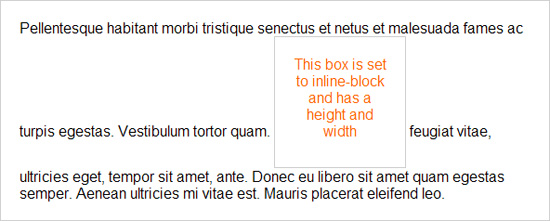
Here is an image demonstrating inline-block, so you can see exactly how it would behave:
inline-block
How Can it Be Used?
Here are some reasons you might want to use inline-block:
- To fix the IE6 double-margin bug on floated elements (as described above)
- To place block-like elements on the same horizontal line without floating them
- To allow an inline element to have width and/or height while still remaining inline
- To allow an inline element to have padding or margins
Some Things to Note
If you use inline-block there are some important factors and drawbacks to keep in mind. An inline-block element is white-space dependent, so if you display list items using inline-block (in a navigation bar, for example), the list items will have unwanted space next to each other. To remove the space, you’ll have to remove from your HTML code any whitespace that occurs in between the list items. So your list item code would look like this:
<ul>
<li>Item One</li><li>Item Two</li><li>Item Three</li><li>Item Four</li><li>Item Five</li>
</ul>
Or even worse:
<ul>
<li>Item One</li>
<li>Item Two</li>
<li>Item Three</li>
<li>Item Four</li>
<li>Item Five</li>
</ul>
That issue could evidently be resolved by adding font-size: 0 to the <ul> element, or something similar, then increasing the font size for the list items. But those solutions are messy, so I would recommend instead trying a solution that doesn’t use inline-block.
Also, if you declare a number of elements using inline-block and the elements have varying heights, you will probably have to add something like vertical-align: top to ensure their alignments are not staggered. Here is an interesting page that displays some of these and other quirks that occur with inline-block in different circumstances.
Finally, I found in my experiments that inline-block didn’t work exactly the same when the inline-block element occurred inside of text that was inside of a paragraph element.
Is it Cross-Browser?
It shouldn’t surprise you to learn that inline-block works the same in all browsers except IE6 and IE7. But it’s not too difficult an issue to deal with in those versions. To get an element to accept the value inline-block for IE6 and IE7 you just need to reset the display property to inline then give the element layout. Just make sure that the inline value appears after inline-block in your CSS, and hide the inline value from other browsers. You may also have to fix the vertical alignment for IE6 and IE7.

 浙公网安备 33010602011771号