

【企业级项目实操指南1】结合已有代码和MPJ实现统一的数据统计接口(1)
[声明]企业级项目实操指南系列笔记是萌狼蓝天再企业中完成开发任务后做的记录,出于保密需求,部分代码将不会展示,因此仅供参考。
业务需求
-
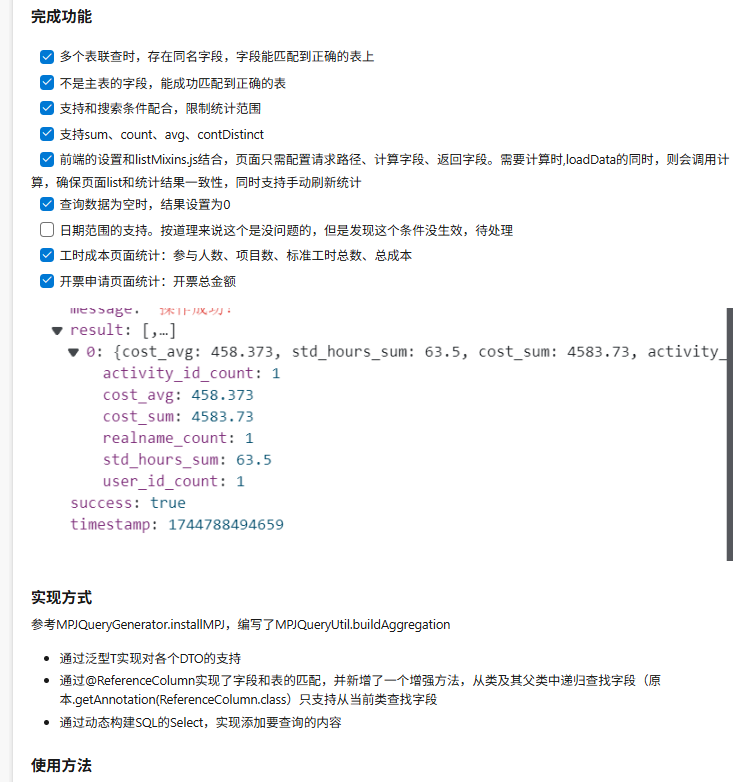
ERP系统需要为每个页面都增加统计功能。统计字段、统计方式(sum、avg、count等)由前端指定,同时,统计范围和页面搜索结果的范围有关。
-
不能前端统计,由于数据量过大,前端加载的数据是分页的结果,并不是完整数据
-
为了提高效率,统计方式只能通过数据库直接统计(利用sum、avg、count等函数)
-
要支持限制统计范围,就利用页面已经有的搜索栏,同样的要支持模糊、时间范围等搜索方式
设计思路
- 范围限制和查询的范围限制是一样的,可以把已有的代码利用起来,做一个结合
- 由于查询采用的都是MPJ,因此完成这个需求,也围绕MPJ
- 关于多表联查问题、表由同名字段问题、字段不在主表问题,解决字段和表的表的关联可以采用注解的方式
后端
controller层
    @ApiOperation("数据统计")
    @RequestMapping(value = "/stat", method = RequestMethod.POST)
    /**
     * statFields:列表项由{"columnName":xxx,"calcType":xxx组成}  calcType:sum,avg,max,min,count,countDistinct
     */
    public Result<List<Map<String, Object>>> stat(
            @RequestBody AggregationData<DTO对象> aggregationData,
            HttpServletRequest req) {
        return Result.ok(issuedInvoiceService.statWithJoin(aggregationData.getEntity(), req.getParameterMap(), aggregationData.getParams()));
    }
service层
@Service
public class ContractService extends MPJBaseServiceImpl<ContractMapper, Contract>
    public List<Map<String, Object>> statWithJoin(DTO对象 entity, Map<String, String[]> queryParams, List<StatParam> calcParams) {
        MPJLambdaWrapper<Contract> mpjLW = new MPJLambdaWrapper<>(Contract.class)
                .leftJoin(实体对象1.class, 实体对1::getId, 实体对象1::getProjectId)
                .leftJoin(实体对象2.class, 实体对象2::getId, 实体对象1t::getTheirOrgId)
                .leftJoin(实体对象3.class, 实体对象3::getId, 实体对象1::getCreateBy);

        MPJQueryGenerator.installMPJ(mpjLW, entity,  queryParams);
        MPJCalcUtil.buildAggregation(mpjLW, DTO对象.class ,calcParams);

        return this.selectJoinMaps(mpjLW);
    }
installMPJ
这个方法是对查询条件的处理,结合自己业务去处理即可。和查询的处理方式是一样的。
在这里需要这个的原因,是为了 能直接使用List查询的搜索条件限制数据统计范围,只要能达到这个效果就行
MPJCalcUtil
这个是核心了,直接上代码。
后期可能会继续做优化,请关注本合集的后续内容
package com.bytz.modules.erp.utils;

import com.bytz.modules.erp.dto.StatParam;
import com.github.yulichang.wrapper.MPJLambdaWrapper;
import org.jeecg.common.system.query.MPJQueryGenerator;
import org.jeecg.common.system.query.ReferenceColumn;

import java.lang.reflect.Field;
import java.util.List;
import java.util.Objects;

public class MPJQueryUtil {
    public static <T> void buildAggregation(MPJLambdaWrapper<T> mpjLW, Class<?> entityClass, List<StatParam> calcColumns) {
        // 解析统计内容
        calcColumns.forEach(calcColumn -> {
            Field field = null;
            String sql = "";
            field = getFieldFromHierarchy(entityClass,calcColumn.getColumnName());
            if(field!=null){
                if (field.isAnnotationPresent(ReferenceColumn.class)) {
                    ReferenceColumn annotation = field.getAnnotation(ReferenceColumn.class);
                    String columnName = annotation.fieldName(); // 数据库字段名
                    String tColumn = MPJQueryGenerator.buildReferenceColumn(annotation, mpjLW);

                    String calcType = calcColumn.getCalcType();
                    if(Objects.equals(calcType, "countDistinct")){
                        sql = "COUNT(DISTINCT "+ tColumn +") AS "+columnName+"_count";
                    }else{
                        sql = calcType.toUpperCase()+"(t."+ tColumn +") AS "+columnName+"_"+calcType.toLowerCase();
                    }
                    mpjLW.select(sql);
                    return;
                }
            }

            String calcType = calcColumn.getCalcType();
            String columnName = camelToUnderline(calcColumn.getColumnName());
            if (Objects.equals(calcType, "countDistinct")) {
                sql = "COUNT(DISTINCT t." + columnName + ") AS " + columnName + "_count" ;
            } else {
                sql = calcType.toUpperCase() + "(t." + columnName + ") AS " + columnName + "_" + calcType.toLowerCase();
            }
            mpjLW.select(sql);

        });
    }

    /**
     * 小驼峰转下划线
     * @param str
     * @return
     */
    public static String camelToUnderline(String str) {
        if (str == null || str.isEmpty()) return str;
        // 处理首字母为大写的情况,避免前置下划线
        String converted = str.replaceAll("([A-Z])", "_$1").toLowerCase();
        return converted.startsWith("_") ? converted.substring(1) : converted;
    }

    /**
     * 从类及其父类中递归查找字段
     */
    private static Field getFieldFromHierarchy(Class<?> clazz, String fieldName) {
        while (clazz != null && !clazz.equals(Object.class)) {
            try {
                return clazz.getDeclaredField(fieldName);
            } catch (NoSuchFieldException e) {
                clazz = clazz.getSuperclass(); // 递归查找父类
            }
        }
        return null; // 如果未找到字段,返回 null
    }
}
AggregationData
@Data
public  class AggregationData<T> {
    private T entity;
	private List<StatParam> params;
StatParam
@Data
public class StatParam {
    private String columnName;
    private String calcType;
}
前端
首先,api写的是通用api
const calcData = (url, queryParam, CalcParams) => postAction(url, {
  entity: queryParam,
  params: CalcParams
});
页面显示
<div class="statistics-info">
<span>参与人数:{{ calcResult.user_id_count }} | 项目数:{{ calcResult.activity_id_count }} | 标准工时{{ calcResult.std_hours_sum }}小时 | ¥{{ calcResult.cost_sum }} </span>
<a-button type="link" @click="calc">
刷新统计
</a-button>
</div>
style样式
.statistics-info {
  margin-left: 20px;
  padding: 4px 12px;
  box-sizing: border-box;
  border-radius: 4px;
  float:right;

  span {
    margin-right: 10px;
  }
}
其它代码的话,先给出一个旧版本的前端使用方法,这个方法没使用listMixins.js可能更通用一些
Old Vsersion
  calcResult: {
        "std_hours_sum": 0,
        "cost_sum": 0,
        "user_id_count": 0,
        "activity_id_count": 0
      }
 calc() {
      const calcParam = [
        {
          "columnName": "cost",
          "calcType": "SUM"
        }, {
          "columnName": "stdHours",
          "calcType": "SUM"
        },
        {
          "columnName": "userId",
          "calcType": "countDistinct"
        },
        {
          "columnName": "activityId",
          "calcType": "countDistinct"
        },
        {
          "columnName": "realname",
          "calcType": "countDistinct"
        }
      ];
      calcData("/erp/tsm/stat", this.getQueryParams(), calcParam).then(res => {
        if (res.code === 200) {
          const data = res.result[0];
          this.calcResult = data;
        }
      });
    },
结合 listMixins.js
每个项目的listMixns.js多多少少有点差别,请结合自己需求来
在List页面只需要定义三个东西
请求地址、要统计的内容,返回结果
例如
      calcUrl: "/erp/issuedInvoice",
      calcParam: [
        {
          "columnName": "invoiceAmount",
          "calcType": "SUM"
        }
      ],
      calcResult: {
        invoice_amount_sum: 0
      }
然后listMixs.js就添加一个计算方法
 calc() {
      // 说明有需要统计的内容
      calcData(this.calcUrl + "/stat", this.getQueryParams(), this.calcParam).then(res => {
        if (res.code === 200) {
          if (res.result[0] !== null) {
            this.calcResult = res.result[0];
          } else {
            // 如果没有数据,将 this.calcResult 的所有字段值设置为 0
            Object.keys(this.calcResult).forEach(key => {
              this.calcResult[key] = 0;
            });
          }
        }
      });
    },
为了确保查询数据的同时,执行计算,因此可以在查询的loadData(args)里面写一个判断
// 统计
      if (this.calcUrl) {
        this.calc();
      }
基本就是这样。 之后有变更优化的话,可以关注本合集的后续文章
版 权 声 明

 浙公网安备 33010602011771号