

Android生命周期总结
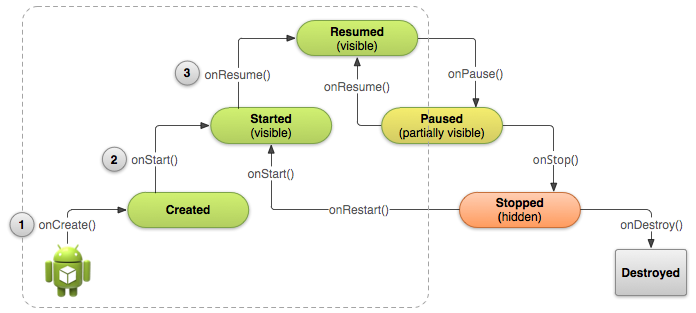
1.当onStart方法被调用时,用户已经可以看到activity ,但是onResume很快就被调用并把onStart方法覆盖。并一直保持该状态,除非外力的改变
2.Resume状态处于android生命周期金字塔的顶端,只有处于该状态,才是既可见又可操作(用户输入)的状态。
3.resume,pause,stop是持久化的状态。其他的oncreat,onstart,onrestart,ondestory是瞬时状态。可以根据它们不同的属性进行相应的操作
4.处于paused状态的activity,如果是在半透明或者没有被完全遮挡的情况下,一直保持该状态,但是不可以与用户交互。可直接变为onResume()状态继续执行。
5.可以在onDestory()方法中调用android.os.Debug.stopMethodTracing()方法,作用:在oncreate()方法执行前关闭所有方法。
6.onDestory()方法通常是在onStop()方法执行后执行,除非用户直接调用finish()方法,可以不经过onStop()方法。
(即:finish后直接调用ondestory)
7.onPause()是用户要离开你的Activity第一个知道的方法,它的下一层永远是onResume或者onStop方法。
8.super.onXXXX()方法要写在第一行
9.如果onPause的下一个被调用的方法是onStop,通常可以在onPause中作如下操作:
(1)停止当前的动画效果或者其他消耗CPU的行为
(2)提交为保存的修改,但前提是用户希望被永久修改(eg:未发送的邮件)
(3)释放系统资源,eg:broadCatdReceivers,GPS,以及一切会影响你电量和CPU的操作,前提是接下来的操作你的用户不再需要它们
10.在onPause中进行释放系统资源的操作,要避免一些太消耗CPU的操作。
eg:数据库的写操作,因为它会让你Activity的操作变慢,这些操作应该放在onStop中(避免资源的浪费和数据的丢失)。
11.有些操作必须在onPause中终止,所以在onResume中必须判断并重新初始化他们:
//在onPause中判断相机是否开启,如果已经开启,就把它关闭
@Override
public void onPause() {
    super.onPause();  // Always call the superclass method first
    // Release the Camera because we don't need it when paused
    // and other activities might need to use it.
    if (mCamera != null) {
        mCamera.release()
        mCamera = null;
    }
}
//在onResume中判断相机是否开启,如果没开启,就初始化它。
public void onResume() {
    super.onResume();  // Always call the superclass method first
    // Get the Camera instance as the activity achieves full user focus
    if (mCamera == null) {
        initializeCamera(); // Local method to handle camera init
    }
}

12.onStop之前都会调用onPause。
13.onstop的Activity一定是不可见的,而且要在该方法中释放系统资源,因为有些时候系统不会通过调用onDestory方法杀死你的Activity,所以要在onStop中就进行资源的释放,防止内存泄漏
14.onRestart之前的方法一定是onstop,可以在onRestart中做一些恢复工作,比如恢复一些在onStop中被清理的数据
15.onRestart可以用来判断该Activity是第一次被打开还是之前打开过,因为onStart方法都会被经过,可以在onRestart中放一个全局变量,在onStart中进行判断。
16.按Back键or调用finish()方法or已经处于stop状态并且长时间未用or前台的Activity需要很多的系统资源,而必须杀死一些后台资源。你的Activity会死去
17。当屏幕旋转时,你显示的Activity将会被销毁和重新创建,因为屏幕配置被改变啦,Activity需要重新得到变化后的资源(eg:layout)


需要重写onSaveInstance(Bundle outState)方法去保存一些数据到Bundle对象中,因为该方法会在程序被destory之前被调用
再下次启动的时候,oncreate方法会把该Bundle对象传入onRestoreInstanceState(Bundle saveInstance)方法中
从而完成数据的恢复
所以必须重写onSaveInstance(Bundle outState)方法来进行保存

static final String STATE_SCORE = "playerScore";
static final String STATE_LEVEL = "playerLevel";
...

@Override
public void onSaveInstanceState(Bundle savedInstanceState) {
    // Save the user's current game state
    savedInstanceState.putInt(STATE_SCORE, mCurrentScore);
    savedInstanceState.putInt(STATE_LEVEL, mCurrentLevel);

    // Always call the superclass so it can save the view hierarchy state
    super.onSaveInstanceState(savedInstanceState);
}
@Override
protected void onCreate(Bundle savedInstanceState) {
    super.onCreate(savedInstanceState); // Always call the superclass first

    // Check whether we're recreating a previously destroyed instance
    if (savedInstanceState != null) {
        // Restore value of members from saved state
        mCurrentScore = savedInstanceState.getInt(STATE_SCORE);
        mCurrentLevel = savedInstanceState.getInt(STATE_LEVEL);
    } else {
        // Probably initialize members with default values for a new instance
    }
    ...
}
public void onRestoreInstanceState(Bundle savedInstanceState) {
    // Always call the superclass so it can restore the view hierarchy
    super.onRestoreInstanceState(savedInstanceState);
    // Restore state members from saved instance
    mCurrentScore = savedInstanceState.getInt(STATE_SCORE);
    mCurrentLevel = savedInstanceState.getInt(STATE_LEVEL);
}
onCreate()和onRestoreInstanceState()回调方法接收相同的Bundle对象
onCreate()方法必须判断Bundle对象是否为空
onRestoreInstanceState()(必须重写)方法不需要判断,因为只有再reCreate(比如屏幕翻转了)的时候才会去调用它,去调用它的时候,已经是有Bundle对象了。

 浙公网安备 33010602011771号