
爬虫(五)数据清洗-xpath、BeautifulSoup模块
xpath介绍和lxml安装
xpath表达式
如果正则表达式用的不好,处理html文档很累,有没有其他的方法?
有!就是用xpath,我们可以先将html文件转成xml文档,然后用xpath查找html节点或元素
我们需要安装lxml模块来支持xpath的操作
安装依赖
pip install lxml
解析字符串形式html
text = '''
<div>
    <ul>
        <li class="item-0"><a href="link1.html">张三</a></li>
        <li class="item-1"><a href="link2.html">李四</a></li>
        <li class="item-inactive"><a href="link3.html">王五</a></li>
        <li class="item-1"><a href="link4.html">赵六</a></li>
        <li class="item-0"><a href="link5.html">老七</a></li>
    </ul>
</div>
'''

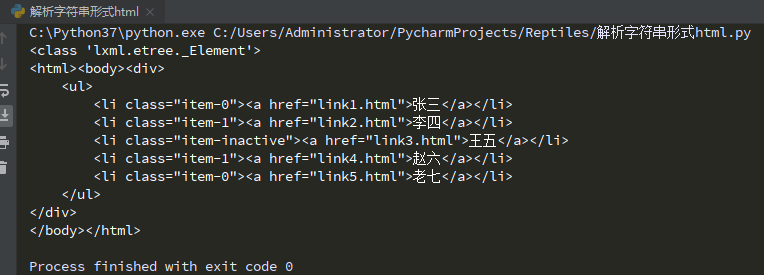
from lxml import etree

# etree.HTML()将字符串解析成了特殊的html对象
html = etree.HTML(text)

print(type(html))

# 将html对象转成字符串
result = etree.tostring(html,encoding="utf-8").decode()

print(result)
解析本地html
解析本地html
爬虫中网页处理方式
在爬虫中,数据获取和数据清洗一体,HTML()
数据获取和数据清洗分开,parse()
from lxml import etree

#  获取本地html文档
html = etree.parse(r'C:\Users\Administrator\PycharmProjects\Reptiles\a.html')

result = etree.tostring(html,encoding="utf-8").decode()

print(result)

获取一类标签
from lxml import etree

html = etree.parse(r'C:\Users\Administrator\PycharmProjects\Reptiles\a.html')

result = html.xpath('//a')  # 获取所有a标签的信息

print(result)

print(result[3].text)

获取指定属性的标签
from lxml import etree

html = etree.parse(r'C:\Users\Administrator\PycharmProjects\Reptiles\a.html')

result1 = html.xpath('//li[@class="item-1"]/span')  # 获取所有span标签的信息
result2 = html.xpath('//li[@class="item-100"]/a')  # 获取指定a标签的信息

print(result1[0].text)

print(result2[0].text)

获取标签的属性
from lxml import etree

html = etree.parse(r'C:\Users\Administrator\PycharmProjects\Reptiles\a.html')

result1 = html.xpath('//li/@class')  # 获取所有li标签的属性信息
result2 = html.xpath('//li[@class="item-100"]/a/@href')  # 获取指定a标签的属性信息

print(result1)

print(result2)

获取子标签
<div>
    <ul>
        <li class="item-0"><a href="link1.html">张三</a></li>
        <li class="item-11">
            <a href="link2.html">
                <span class="nnpp">李四</span>
            </a>
            <span>好人</span>
        </li>
        <li class="item-1"><span>小正正</span></li>
        <li class="item-inactive">
            <a href="link3.html">
                <span class="nppp">王五</span>
            </a>
        </li>
        <li class="item-100"><a href="link4.html">赵六</a></li>
        <li class="item-0"><a href="link5.html">老七</a></li>
    </ul>
</div>
from lxml import etree

html = etree.parse(r'C:\Users\Administrator\PycharmProjects\Reptiles\a.html')

result1 = html.xpath('//li/a')  # 获取所有li标签下的a标签
result2 = html.xpath('//li//span')  # 获取所有符合条件的子标签

print(result1)

print(result2[0].text)

# 获取li标签里所有的class
result3 = html.xpath("//li//a//@class")

print(result3)

获取标签内容和标签名
from lxml import etree

html = etree.parse(r'C:\Users\Administrator\PycharmProjects\Reptiles\a.html')

# 获取倒数第二个li元素下a标签的内容
result1 = html.xpath('//li[last()-1]/a')

print(result1[0].text)

result2 = html.xpath('//li/a')

print(result2[-2].text)

# 获取 class 值为bold的标签名
result3 = html.xpath("//*[@class='bold']")

print(result3[1].tag)  # tag表示获取标签名

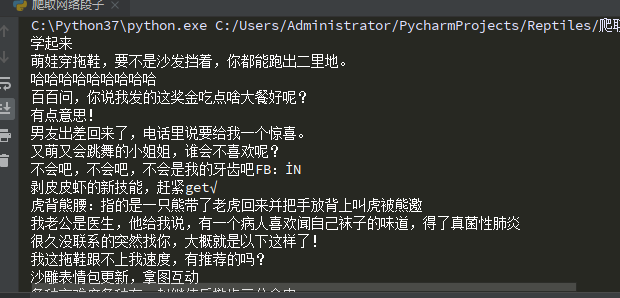
爬取网络段子
import requests
from lxml import etree

url = 'https://www.qiushibaike.com/'

header = {
    'User-Agent':'Mozilla/5.0 (Windows NT 10.0; Win64; x64) AppleWebKit/537.36 (KHTML, like Gecko) Chrome/84.0.4147.105 Safari/537.36 Edg/84.0.522.58',
    'Accept-Language':'zh-CN,zh;q=0.9,en;q=0.8,en-GB;q=0.7,en-US;q=0.6'
}

response = requests.get(url,headers=header).text

html = etree.HTML(response)

result1 = html.xpath('//div//a[@class="recmd-content"]/@href') # 获取div下的所有a标签href属性信息

for site in result1:
    xurl = "https://www.qiushibaike.com" + site
    response2 = requests.get(xurl,headers=header).text
    html2 = etree.HTML(response2)
    result2 = html2.xpath("//div[@class='content']")
    print(result2[0].text)
爬取贴吧图片
# 图片爬虫
import urllib
import urllib.request
from lxml import etree


class Spider(object):
    def __init__(self):
        self.tiebaName = "车模"
        self.beginPage = 1
        self.endPage = 3
        self.url = "http://tieba.baidu.com/f?"
        self.ua_header = {"User-Agent": "Mozilla/5.0 (compatible; MSIE 9.0; Windows NT 6.1 Trident/5.0;"}
        self.fileName = 1

    # 构造url
    def tiebaSpider(self):
        for page in range(self.beginPage, self.endPage + 1):
            pn = (page - 1) * 50
            wo = {'pn': pn, 'kw': self.tiebaName}
            word = urllib.parse.urlencode(wo)
            myurl = self.url + word
            self.loadPage(myurl)

    # 爬取页面内容
    def loadPage(self, url):
        req = urllib.request.Request(url, headers=self.ua_header)
        data = urllib.request.urlopen(req).read()

        html = etree.HTML(data)
        links = html.xpath('//div[@class="threadlist_lz clearfix"]/div/a/@href')

        for link in links:
            link = "http://tieba.baidu.com" + link
            self.loadImages(link)

    # 爬取帖子详情页,获得图片的链接
    def loadImages(self, link):
        req = urllib.request.Request(link, headers=self.ua_header)
        data = urllib.request.urlopen(req).read()
        html = etree.HTML(data)
        links = html.xpath('//img[@class="BDE_Image"]/@src')
        for imageslink in links:
            self.writeImages(imageslink)

    # 通过图片所在链接,爬取图片并保存图片到本地:
    def writeImages(self, imagesLink):
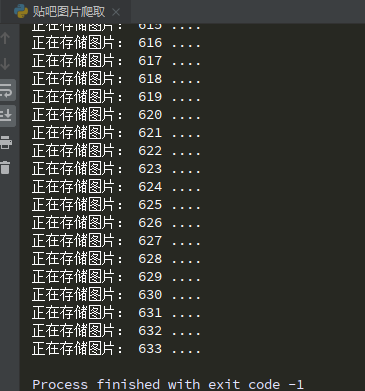
        print("正在存储图片:", self.fileName, "....")

        image = urllib.request.urlopen(imagesLink).read()

        # 保存图片到本地
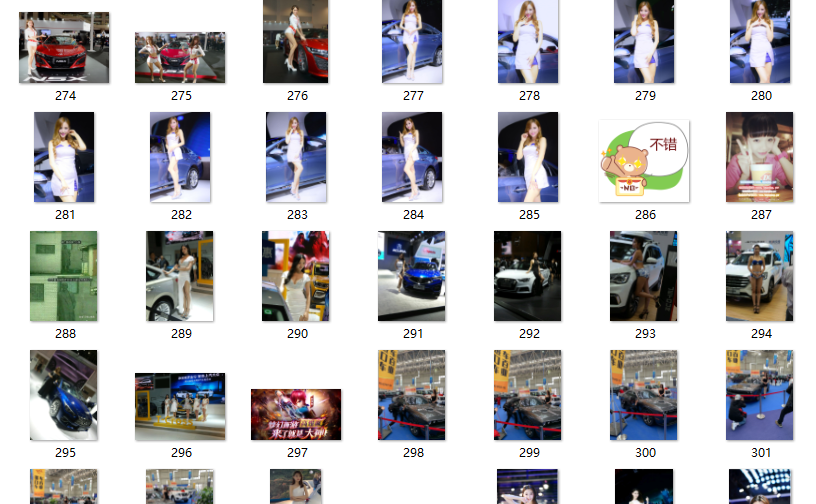
        file = open(r"C:\\Users\\Administrator\\Desktop\\贴吧图片\\" + str(self.fileName) + ".jpg", "wb")
        file.write(image)

        file.close()

        self.fileName += 1


if __name__ == '__main__':
    mySpider = Spider()

    mySpider.tiebaSpider()
BeautifulSoup简介和安装
安装BeautifulSoup
pip install beautifulsoup4
CSS 选择器:beautifulsoup4
- 和lxml 一样,beautifulsoup 也是一个HTML/XML的解析器
- 主要的功能也是如何解析和提取HTML/XML 数据
from bs4 import BeautifulSoup

html = """
<html><head><title>The Dormouse's story</title></head>
<body>
<p class="title" name="dromouse"><b>The Dormouse's story</b></p>
<p class="story">Once upon a time there were three little sisters; and their names were
<a href="http://example.com/elsie" class="sister" id="link1"><!-- Elsie --></a>,
<a href="http://example.com/lacie" class="sister" id="link2">Lacie</a> and
<a href="http://example.com/tillie" class="sister" id="link3">Tillie</a>;
and they lived at the bottom of a well.</p>
<p class="story">...</p>
"""

# 解析字符串形式的html
soup = BeautifulSoup(html,"lxml")

# 解析本地html文件
# soup2 = BeautifulSoup(open('index.html'))

# print(soup)

# prettify 格式化输出soup对象(美化)
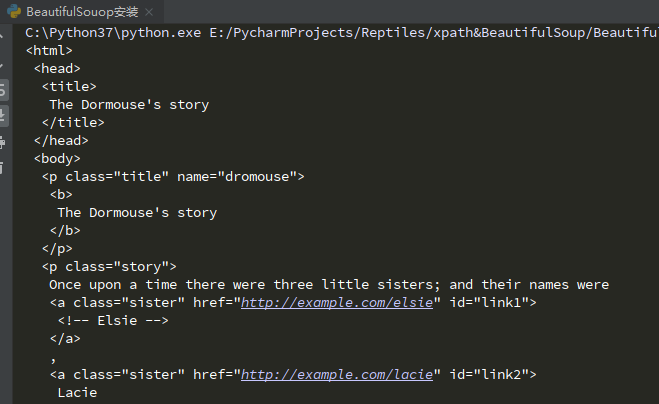
print(soup.prettify()) # prettify是用来美化代码
获取标签信息
from bs4 import BeautifulSoup

html = """
<html><head><title>The Dormouse's story</title></head>
<body>
<p class="title" name="dromouse"><b>The Dormouse's story</b></p>
<p class="story">Once upon a time there were three little sisters; and their names were
<a href="http://example.com/elsie" class="sister" id="link1"><!-- Elsie --></a>,
<a href="http://example.com/lacie" class="sister" id="link2">Lacie</a> and
<a href="http://example.com/tillie" class="sister" id="link3">Tillie</a>;
and they lived at the bottom of a well.</p>
<p class="story">...</p>
"""

# 解析字符串形式的html
soup = BeautifulSoup(html,"lxml")

# 根据标签名获取标签信息 soup、标签名
print(soup.title)
print(soup.title.string) # 标签里面的内容

# 获取标签名
print(soup.title.name)

# 获取标签内所有属性
print(soup.p.attrs['name']) # 获取p标签内name属性值

# 获取直接子标签,结果是一个列表
print(soup.head.contents)

# 获取直接子标签,结果是一个生成器
print(soup.head.children)

# 获取所有的子标签
print(soup.descendants)

for i in soup.p.descendants: # 打印所有p标签信息,标签内的信息又会独立作为一个信息展示
    print(i)

搜索文档树
文档树,即:所有标签
# 搜索文档树 find_all()

from bs4 import BeautifulSoup

html = """
<html><head><title>The Dormouse's story</title></head>
<body>
<p class="title" name="dromouse"><b>The Dormouse's story</b></p>
<p class="story">Once upon a time there were three little sisters; and their names were
<a href="http://example.com/elsie" class="sister" id="link1"><!-- Elsie --></a>,
<a href="http://example.com/lacie" class="sister" id="link2">Lacie</a> and
<a href="http://example.com/tillie" class="sister" id="link3">Tillie</a>;
and they lived at the bottom of a well.</p>
<p class="story">...</p>
"""

# 解析字符串形式的html
soup = BeautifulSoup(html,"lxml")

# 根据标签名获取标签信息 soup、标签名
print(soup.title)
print(soup.title.string) # 标签里面的内容

# 根据字符串查找所有的a标签,返回一个结果集,里面装的是标签对象
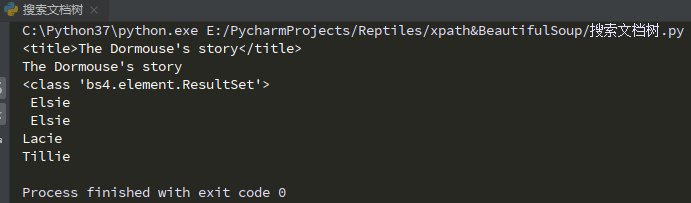
data = soup.find_all("a")
print(type(data)) # <class 'bs4.element.ResultSet'>集合
print(data[0].string)
for i in data:
    print(i.string)
# 搜索文档树 find_all()

from bs4 import BeautifulSoup
import re

html = """
<html><head><title>The Dormouse's story</title></head>
<body>
<p class="title" name="dromouse"><b>The Dormouse's story</b></p>
<p class="story">Once upon a time there were three little sisters; and their names were
<a href="http://example.com/elsie" class="sister" id="link1"><!-- Elsie --></a>,
<a href="http://example.com/lacie" class="sister" id="link2">Lacie</a> and
<a href="http://example.com/tillie" class="sister" id="link3">Tillie</a>;
and they lived at the bottom of a well.</p>
<p class="story">...</p>
"""

# 解析字符串形式的html
soup = BeautifulSoup(html,"lxml")

# 根据标签名获取标签信息 soup、标签名
# print(soup.title)
# print(soup.title.string) # 标签里面的内容

# 方式一
# 根据字符串查找所有的a标签,返回一个结果集,里面装的是标签对象
data = soup.find_all("a")
# print(type(data)) # <class 'bs4.element.ResultSet'>集合
# print(data[0].string)
# for i in data:
#     print(i.string)

# 方式二
# 根据正则表达式查找标签
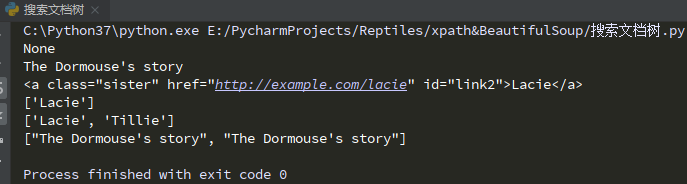
data2 = soup.find_all(re.compile("^b"))
for i in data2:
    print(i.string)

# 方式三
# 根据属性查找标签
data3 = soup.find_all(id="link2")
for i in data3:
    print(i)

# 方式四
# 根据标签内容获取标签内容
data4 = soup.find_all(text="Lacie")
data5 = soup.find_all(text=['Lacie','Tillie'])
data6 = soup.find_all(text=re.compile("Do")) # 查找包含Do文本的数据
print(data4)
print(data5)
print(data6)
CSS选择器
CSS选择器 - 通过select来查找
根据样式表来查找标签
CSS选择器类型:标签选择器、class选择器、id选择器
# 搜索文档树 find_all()

from bs4 import BeautifulSoup
import re

html = """
<html><head><title>The Dormouse's story</title></head>
<body>
<p class="title" name="dromouse"><b>The Dormouse's story</b></p>
<p class="story">Once upon a time there were three little sisters; and their names were
<a href="http://example.com/elsie" class="sister" id="link1"><!-- Elsie --></a>,
<a href="http://example.com/lacie" class="sister" id="link2">Lacie</a> and
<a href="http://example.com/tillie" class="sister" id="link3">Tillie</a>;
and they lived at the bottom of a well.</p>
<p class="story">...</p>
"""

# 解析字符串形式的html
soup = BeautifulSoup(html,"lxml")

# CSS选择器类型:标签选择器、class选择器、id选择器

# 通过标签名获取标签
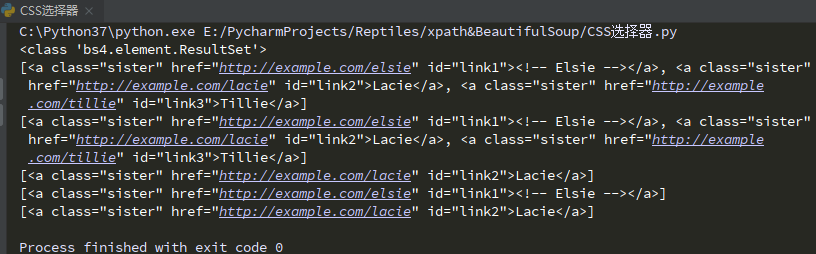
data = soup.select('a')
print(type(data)) # <class 'bs4.element.ResultSet'>集合
print(data)

# 通过class名来查找
data2 = soup.select(".sister")
print(data2)

# 通过id来查找
data3 = soup.select("#link2")
print(data3)

# 通过组合查找
data4 = soup.select("p #link1") # p标签下面id为link1的标签
print(data4)

# 通过其他属性查找
data5 = soup.select('a[href="http://example.com/lacie"]')
print(data5)
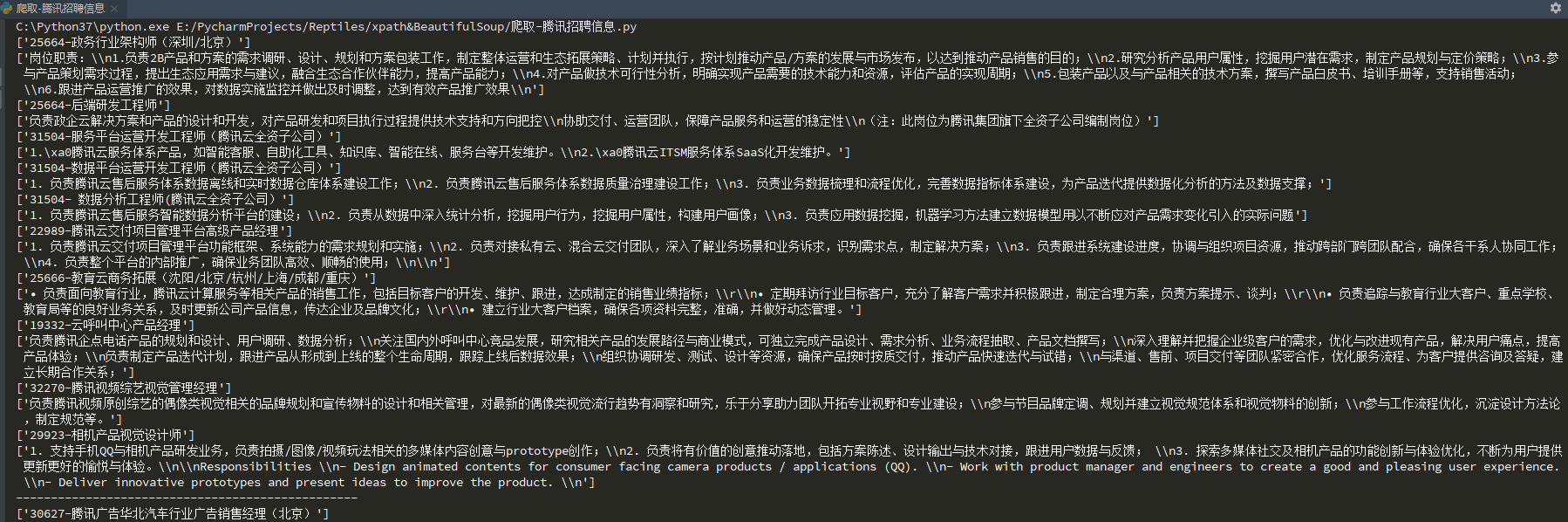
实战-爬取腾讯招聘信息
在爬取腾讯招聘信息前先分析url
import urllib.request
import time
import re

headers = {"User-Agent": "Mozilla/5.0 (Windows NT 10.0; Win64; x64) AppleWebKit/537.36 (KHTML, like Gecko) Chrome/84."
                         "0.4147.125 Safari/537.36 Edg/84.0.522.59"}

timestamp = int(time.time())
# print(timestamp)

for x in range(1, 3):
    page = x
    url = "https://careers.tencent.com/tencentcareer/api/post/Query?timestamp=" + str(timestamp) + "&pageIndex=" + str(page) + "&pageSize=10"
    # print(url)

    req = urllib.request.Request(url, headers=headers)
    data = urllib.request.urlopen(req).read().decode()
    # print(data)

    part = r'PostId":"(.*?)",'
    pattern = re.compile(part)

    data1 = pattern.findall(data)

    # print(data1)

    for x in data1:
        myurl = "https://careers.tencent.com/tencentcareer/api/post/ByPostId?timestamp=" + str(timestamp) + "&postId=" + str(x) + "&language=zh-cn"
        # print(myurl)
        req2 = urllib.request.Request(myurl,headers=headers)
        data3 = urllib.request.urlopen(req2).read().decode()

        # print(data3)

        part2 = r'RecruitPostName":"(.*?)",'
        pattern2 = re.compile(part2)
        name = pattern2.findall(data3)

        part3 = r'Responsibility":"(.*?)",'
        pattern3 = re.compile(part3)
        text = pattern3.findall(data3)

        print(name)
        print(text)


    print("-------------------------------------------------")

 浙公网安备 33010602011771号