

【Java】数组
前言
1.之前学过,因此本文是个人复习笔记,为视频的总结以及个人思考,可能不是很详细。
2.教程是b站黑马程序员的JAVASE基础课程,笔记中的大部分图片来自于视频中的PPT截图。
3.Java环境为Java SE 17.0.3.1,IntelliJ IDEA版本为2025.2
https://www.bilibili.com/video/BV1Cv411372m/?vd_source=3b69b85b41f42a9e26b3a8a195228a36
内容概览
1.本文内容主要包括数组的基本使用与操作
2.笔记对应视频46-53节
更新记录
无
数组的创建
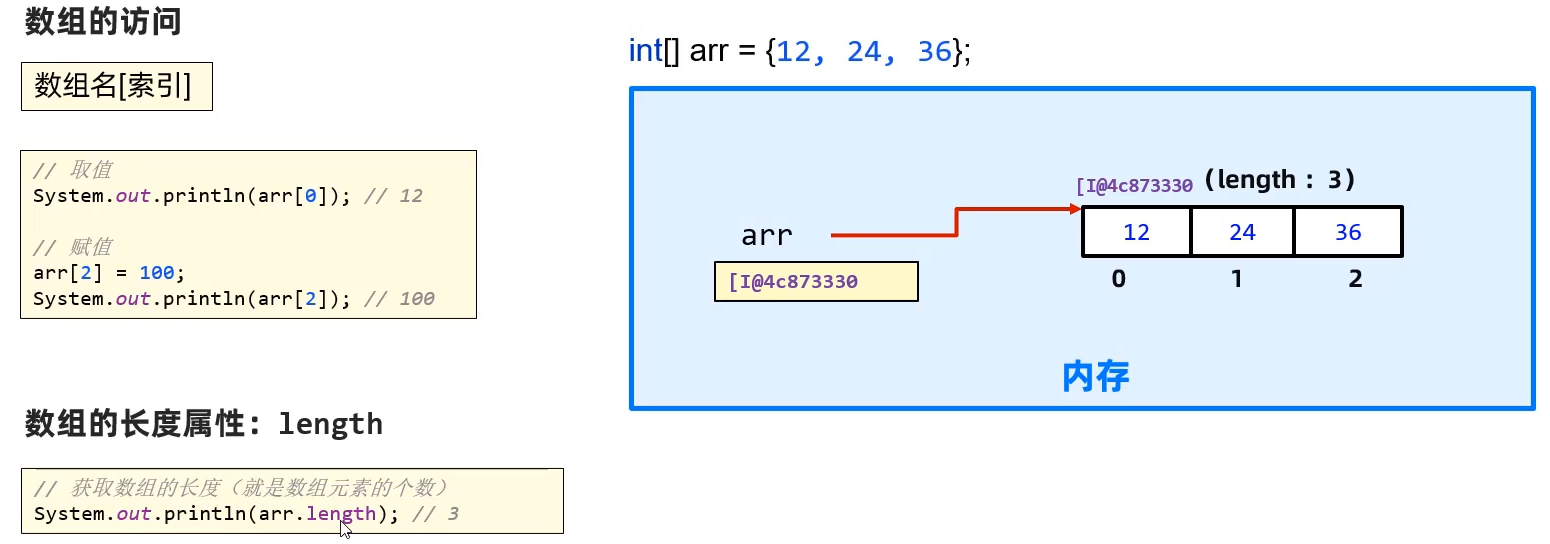
数组是一个容器,用来存储一批同种类型的数据。数组是对象,其变量名中存储的数组在内存中的地址,因此数组是一种引用数据类型。
1.静态数组
数据类型[] 数组名 = new 数据类型[]{元素1, 元素2, 元素3}
数据类型[] 数据名 = {元素1, 元素2, 元素3}
数据类型 数组名[] = {元素1, 元素2, 元素3}
package com.zbhgis.array;

import java.sql.SQLOutput;

public class ArrayDemo1 {
    public static void main(String[] args) {
        int[] ages = new int[]{1, 2, 4};
        int[] ages2 = {1,2,4};
        int ages3[] = {1,2,4};
        for (int i = 0; i < ages.length; i++) {
            System.out.print(ages[i] + " ");
        }
        System.out.println();
        for (int i = 0; i < ages2.length; i++) {
            System.out.print(ages2[i] + " ");
        }
        System.out.println();
        for (int i = 0; i < ages3.length; i++) {
            System.out.print(ages3[i] + " ");
        }
        System.out.println();
    }
}
打印结果
1 2 4
1 2 4
1 2 4
2.动态数组
数据类型[] 数组名 = new 数据类型[3]
package com.zbhgis.array;

public class ArrayDemo2 {
    public static void main(String[] args) {
        int[] ages = new int[3];
        ages[0] = 1;
        ages[1] = 10;
        ages[2] = 100;
        for (int i = 0; i < ages.length; i++) {
            System.out.print(ages[i] + " ");
        }
        System.out.println();
    }
}
打印结果
1 10 100
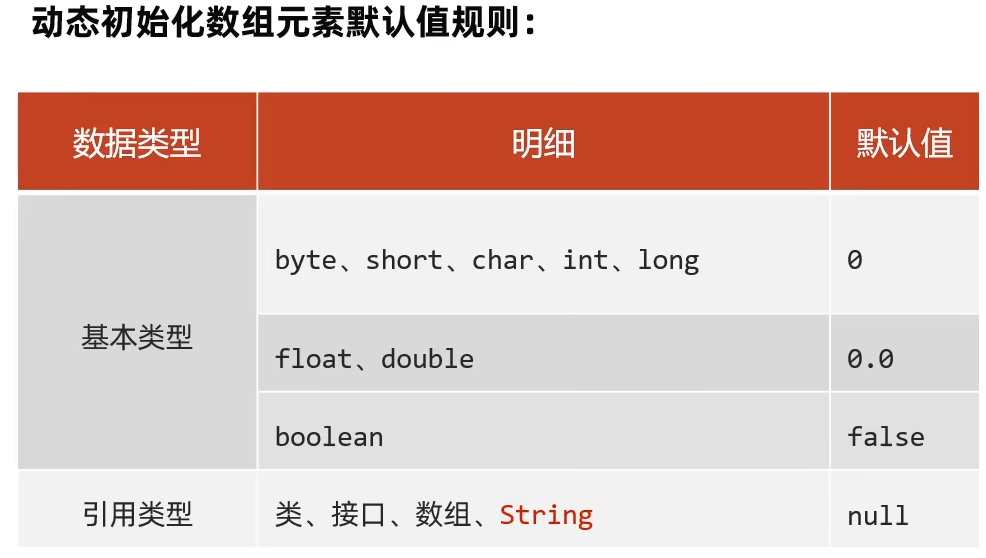
动态初始化数组的默认值
package com.zbhgis.array;

public class ArrayDemo3 {
    public static void main(String[] args) {
        byte[] arr1 = new byte[3];
        short[] arr2 = new short[3];
        char[] arr3 = new char[3];
        int[] arr4 = new int[3];
        long[] arr5 = new long[3];
        float[] arr6 = new float[3];
        double[] arr7 = new double[3];
        boolean[] arr8 = new boolean[3];
        int[][] arr9 = new int[3][];
        String[] arr10 = new String[3];

        for (int i = 0; i < 3; i++) {
            System.out.print(arr1[0] + " ");
            System.out.print(arr2[0] + " ");
            // 转为int类型可在控制台正常显示
            System.out.print((int) arr3[0] + " ");
            System.out.print(arr4[0] + " ");
            System.out.print(arr5[0] + " ");
            System.out.print(arr6[0] + " ");
            System.out.print(arr7[0] + " ");
            System.out.print(arr8[0] + " ");
            System.out.print(arr9[0] + " ");
            System.out.print(arr10[0] + " ");
            System.out.println();
        }
    }
}
打印结果
0 0 0 0 0 0.0 0.0 false null null
0 0 0 0 0 0.0 0.0 false null null
0 0 0 0 0 0.0 0.0 false null null
数组的访问与修改
1.遍历查询
2.获取数组的长度,array.length
3.修改数组的元素,array[i]= ;
数组本身的特点
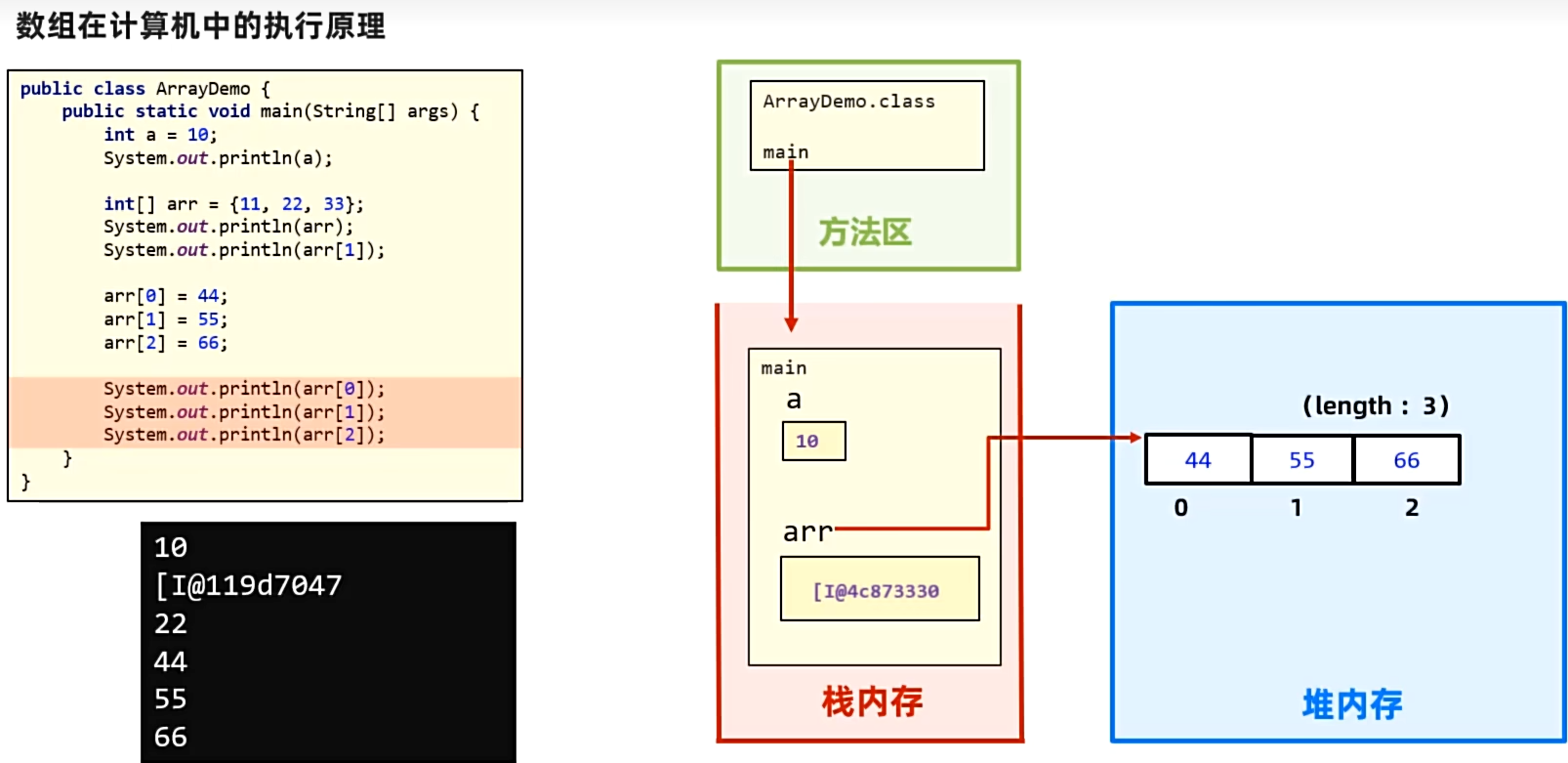
1.直接打印数组,结果是其地址
ArrayDemo.class文件先加载到方法区,其中的main方法运行时进入栈内存,存储a和arr变量,但是由于arr是被赋值为new出来的数组,因此需要先将数组存储到堆内存中,并且将其在堆内存中的地址传递给arr变量,因此arr变量中存储的是数组在堆内存中的地址。此时即使改变arr变量中数组的元素,其地址不变。
package com.zbhgis.array;

public class ArrayDemo4 {
    public static void main(String[] args) {
        int a = 10;
        System.out.println(a);

        int[] arr = {11, 22, 33};
        // 打印地址
        System.out.println(arr);
        // 打印第一个元素
        System.out.println(arr[1]);

        arr[0] = 44;
        arr[1] = 55;
        arr[2] = 66;

        System.out.println(arr[0]);
        System.out.println(arr[1]);
        System.out.println(arr[2]);
        // 地址仍不变
        System.out.println(arr);
    }
}
打印结果
10
[I@776ec8df
22
44
55
66
[I@776ec8df
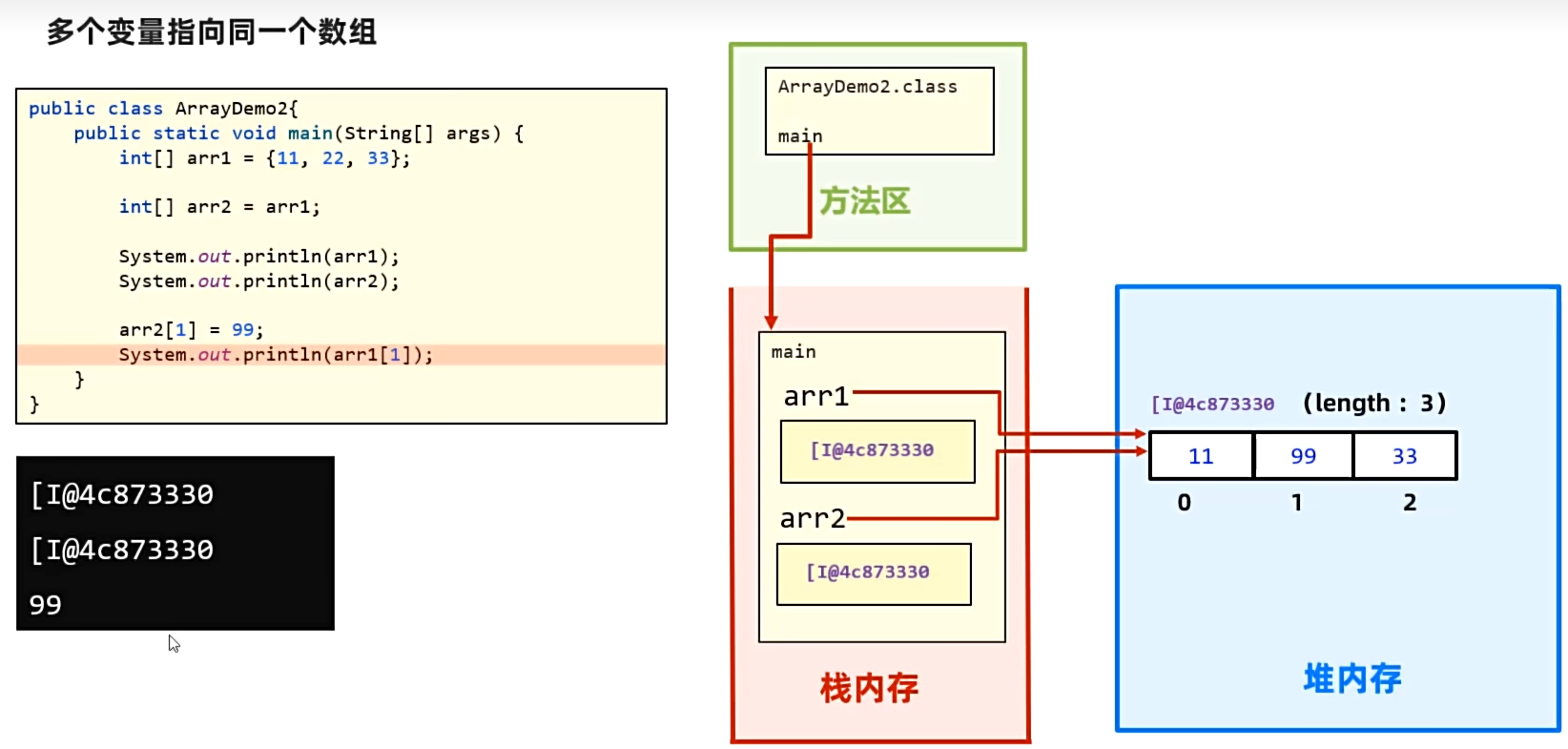
2.多个变量指向同一数组,其内容保持同步
ArrayDemo2.class文件先加载到方法区,其中的main方法运行时进入栈内存,存储arr1和arr2变量,但是由于arr1是被赋值为new出来的数组,因此arr1变量中存储的是数组在堆内存中的地址。接着将arr1中的地址赋值给arr2变量,arr2变量通过地址就可以获取堆内存中的数组,因此修改arr2中的元素是在修改堆内存中数组的元素,即arr2与arr1修改的是同一数组元素。
package com.zbhgis.array;

public class ArrayDemo5 {
    public static void main(String[] args) {
        int[] arr1 = {11, 22, 33};
        // arr2被赋值为数组的地址
        int[] arr2 = arr1;
        System.out.println(arr1);
        System.out.println(arr2);

        // 修改的是共享数组的元素
        arr2[1] = 99;
        System.out.println(arr1[1]);
        System.out.println(arr2[1]);
    }
}
打印结果
[I@776ec8df
[I@776ec8df
99
99
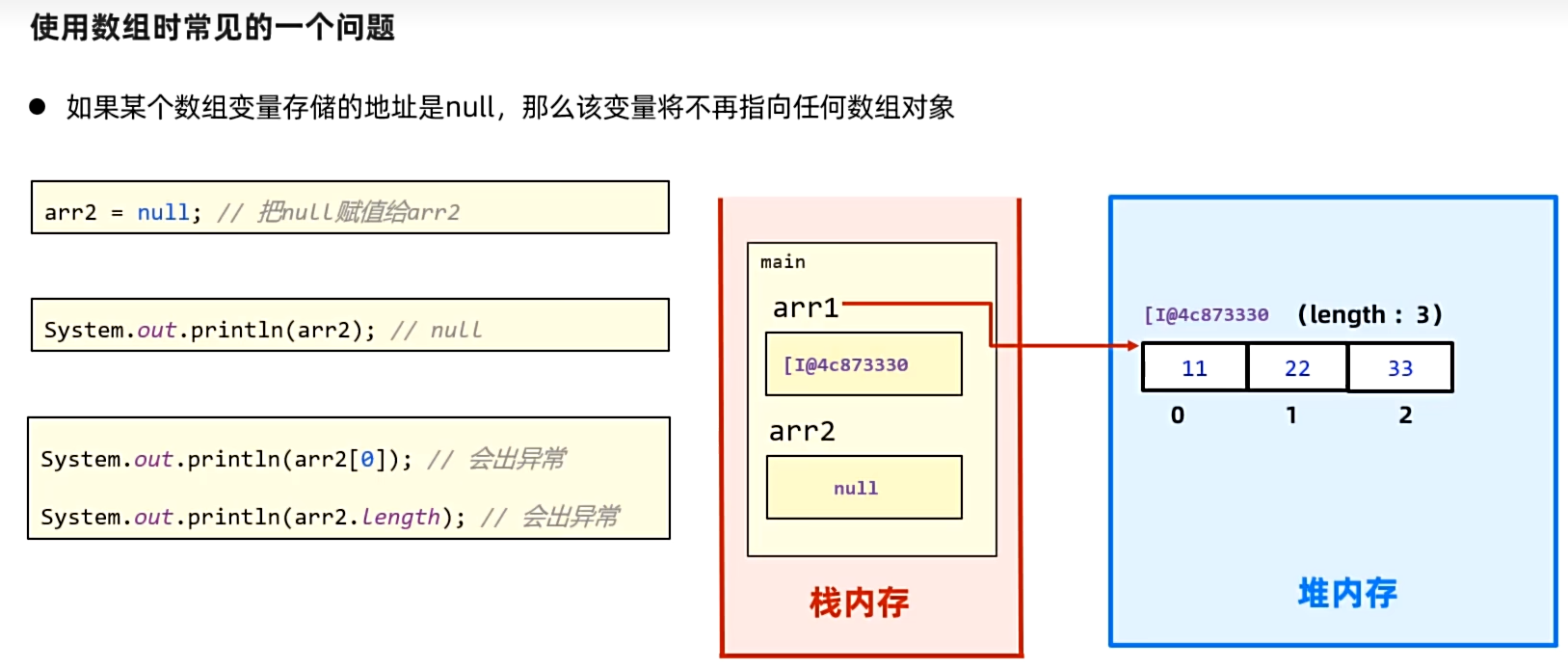
3.数组为null时,不可访问数组的元素和长度
如果数组变量存储的地址是null,那该变量不再指向任何数组对象。因此此时访问数据的某个元素或长度时,编译结果会报空指针异常。
package com.zbhgis.array;

public class ArrayDemo6 {
    public static void main(String[] args) {
        int[] arr1 = {11, 22, 33};
        int[] arr2 = null;
        System.out.println(arr2);

        // 以下会报错
        System.out.println(arr2[0]);
        System.out.println(arr2.length);
    }
}
打印结果
null
Exception in thread "main" java.lang.NullPointerException: Cannot load from int array because "arr2" is null
        at com.zbhgis.array.ArrayDemo6.main(ArrayDemo6.java:10)
数组的其他常见操作
1.求极值、累计值、总数
package com.zbhgis.array;

public class ArrayDemo7 {
    public static void main(String[] args) {
        int[] scores = {1, 10, 3, -6, 3, -1, 10, -3, 10};
        int max = scores[0];
        int min = scores[0];
        int sum = 0;
        int product = 1;
        int count = 1;

        for (int i = 0; i < scores.length; i++) {
            if(scores[i] > max) max = scores[i];
            if(scores[i] < min) min = scores[i];
            sum += scores[i];
            product *= scores[i];
            count ++;
        }

        System.out.println("max: "+ max);
        System.out.println("min: " + min);
        System.out.println("sum: " + sum);
        System.out.println("product: " + product);
        System.out.println("count: " + count);
    }
}
打印结果
max: 10
min: -6
sum: 27
product: -162000
count: 10
2.求极值及其索引
package com.zbhgis.array;

import java.util.ArrayList;

public class ArrayDemo8 {
    public static void main(String[] args) {
        int[] scores = {1, 10, 3, -6, 3, -1, 10, -3, 10};
        int max = scores[0];
        int maxIndexFisrt = 0;
        int maxIndexLast = 0;
        int maxCount = 1;
        ArrayList<Integer> maxIndices = new ArrayList<>();

        int min = scores[0];
        int minIndexFirst = 0;
        int minIndexLast = 0;
        int minCount = 1;
        ArrayList<Integer> minIndices = new ArrayList<>();

        int sum = 0;
        int product = 1;
        int count = 1;

        for (int i = 0; i < scores.length; i++) {
            if (scores[i] > max) {
                max = scores[i];
                maxIndexFisrt = i;
                maxIndexLast = i;
                maxCount = 1;
                maxIndices.clear();
                maxIndices.add(i);
            } else if (scores[i] == max) {
                maxIndexLast = i;
                maxCount++;
                maxIndices.add(i);
            }

            if (scores[i] < min) {
                min = scores[i];
                minIndexFirst = i;
                minIndexLast = i;
                minCount = 1;
                minIndices.clear();
                minIndices.add(i);
            } else if (scores[i] == min) {
                minIndexLast = i;
                minCount++;
                minIndices.add(i);
            }
            sum += scores[i];
            product *= scores[i];
            count++;
        }
        System.out.println("max: " + max);
        System.out.println("maxIndexFirst: " + maxIndexFisrt);
        System.out.println("maxIndexLast: " + maxIndexLast);
        System.out.println("maxCount: " + maxCount);
        System.out.println("maxIndices: " + maxIndices);
        System.out.println();

        System.out.println("min: " + min);
        System.out.println("minIndexFirst: " + minIndexFirst);
        System.out.println("minIndexLast: " + minIndexLast);
        System.out.println("minCount: " + minCount);
        System.out.println("minIndices: " + minIndices);
        System.out.println();

        System.out.println("sum: " + sum);
        System.out.println("product: " + product);
        System.out.println("count: " + count);
    }
}
打印结果
max: 10
maxIndexFirst: 1
maxIndexLast: 8
maxCount: 3
maxIndices: [1, 6, 8]

min: -6
minIndexFirst: 3
minIndexLast: 3
minCount: 1
minIndices: [3]

sum: 27
product: -162000
count: 10
3.求数组反转
package com.zbhgis.array;

public class ArrayDemo9 {
    public static void main(String[] args) {
        int[] scores = {1, 2, 3, 4, 5, 6};
        int finalIndex = scores.length - 1;
        for (int i = 0; i < scores.length / 2; i++) {
            int temp = scores[i];
            scores[i] = scores[finalIndex - i];
            scores[finalIndex - i] = temp;
        }
        System.out.print("[");
        for (int i = 0; i < scores.length; i++) {
            System.out.print(i == finalIndex ? scores[i] + "]" : scores[i] + ", ");
        }

        System.out.println();

        for (int i = 0, j = finalIndex; i < j; i++, j--) {
            int temp = scores[i];
            scores[i] = scores[j];
            scores[j] = temp;
        }
        System.out.print("[");
        for (int i = 0; i < scores.length; i++) {
            System.out.print(i == finalIndex ? scores[i] + "]" : scores[i] + ", ");
        }
    }
}
打印结果
[6, 5, 4, 3, 2, 1]
[1, 2, 3, 4, 5, 6]
4.数组打乱顺序
package com.zbhgis.array;

import java.util.Random;

public class ArrayDemo10 {
    public static void main(String[] args) {
        int[] nums = {1,2,3,4,5};
        Random r = new Random();
        for (int i = 0; i < nums.length; i++) {
            int index = r.nextInt(nums.length);
            int temp = nums[index];
            nums[index] = nums[i];
            nums[i] = temp;
        }
        for (int i = 0; i < nums.length; i++) {
            System.out.println(nums[i]);
        }
    }
}
打印结果
1
3
5
2
4
总结
1.数组变量中存储的是数组在堆内存中的地址,通过索引可以访问某个元素。
2.当多个变量指向同一数组对象时,存储的是相同的地址,因此访问和修改的也是同一数组对象。
3.当数据变量存储的是null时,此时没有指向某个数组对象,因此访问和修改会报空指针异常。

 浙公网安备 33010602011771号