
ESXI 6.0 安装
研华主板MIO-5271 安装 VMware ESXI 6.0 识别不到msata
Create Customized ISO with ESXi-Customizer by v-front.de
ESXi-Customizer is a user-friendly program thats can be used to customize the original ESXi installation media with drivers that are not originally included. The script runs entirely on Windows. The required drivers are dependent on your Intel NUC Generation.
- Download required Files (To download .vib files: Right click -> Save target as)
– ESXi 5.1 U1 ISO image (VMware-VMvisor-Installer-5.1.0.update01-1065491.x86_64.iso)
– ESXi 5.5 U2 ISO image (VMware-ESXi-5.5U2-RollupISO2.iso)
– ESXi-Customizer (ESXi-Customizer-v2.7.1.exe)
– Intel Driver (net-e1001e-1.0.0.x86_64.vib) (3rd Gen NUC)
– Intel Driver (net-e1000e-2.3.2.x86_64.vib) (4th Gen NUC)
– Intel Driver (e1000e-3.1.0.2-glr.vib) (5th Gen NUC) from GLRoman
– SATA Controller (sata-xahci-1.27-1.x86_64.vib) (4th Gen NUC) from v-front.de - Run ESXi-Customizer-v2.7.1.exe to extract the required files
- Run ESXi-Customizer.cmd
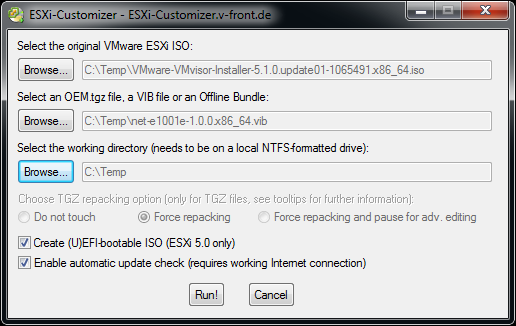
- Select the ESXi Image and VIB File
- Make sure to tick “Create (U)EFI-bootable ISO”
![Intel-NUC-ESXi-Customization]()
- Press Run!
- Repeat Step 2-6 to add all required drivers
- Burn the new created ISO file and use it in your Intel NUC
引用网址:http://www.virten.net/2013/09/esxi-5-x-installation-on-intel-nuc-fails-with-no-network-adapters/

 浙公网安备 33010602011771号