
【代码片段】Qt6.2.4 C++种的信号和槽
参考
注意
对于哪里需要用到指针,哪里需要地址还不是很明白,逻辑可以参考
环境
| 环境 | 版本 |
|---|---|
| windows | 10 |
| QT | 6.2.4 |
| Qt Creator | 8.0.1 (Community) |
| qmake |
项目结构
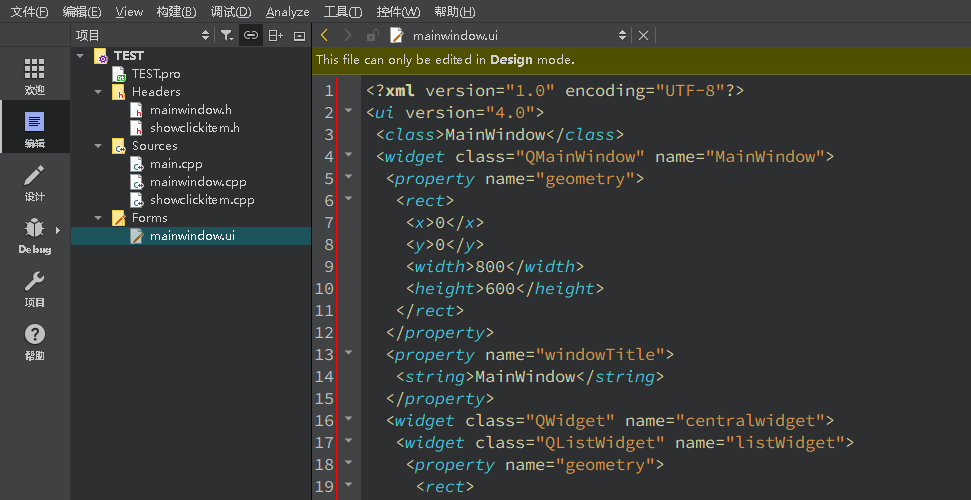
代码思路
mainwindow 调用封装的类的函数,封装的函数处理后会通过发送的信号
通过 connect 方法可以将信号与槽进行连接
- mainwindow.cpp 会调用 showclickitem.cpp 的槽函数
void click();
public slots:
    void click();
- showclickitem.cpp 的槽函数处理结束后会发送信号
void onNotice();
signals:
    void onNotice();
- 在 mainwindow.cpp 的构造函数中连接 showclickitem.cpp 信号
onNotice(),然后调用 mainwindow.cpp 中的槽函数showKeyContent()
connect(&showClickItem, SIGNAL(onNotice()), this, SLOT(showKeyContent()));
完整代码
main.cpp
#include "mainwindow.h"

#include <QApplication>

int main(int argc, char *argv[])
{
    QApplication a(argc, argv);
    MainWindow w;
    w.show();
    return a.exec();
}
mainwindow.h
#ifndef MAINWINDOW_H
#define MAINWINDOW_H

#include "showclickitem.h"

#include <QMainWindow>

QT_BEGIN_NAMESPACE
namespace Ui { class MainWindow; }
QT_END_NAMESPACE

class MainWindow : public QMainWindow
{
    Q_OBJECT

public:
    MainWindow(QWidget *parent = nullptr);
    ~MainWindow();

public slots:
    void on_pushButton_clicked();
    void on_listWidget_clicked(const QModelIndex &index);
    void showKeyContent();

private:
    Ui::MainWindow *ui;
    ShowClickItem showClickItem;
};
#endif // MAINWINDOW_H
mainwindow.cpp
#include "mainwindow.h"
#include "ui_mainwindow.h"
#include <QListWidgetItem>
#include <QMouseEvent>

MainWindow::MainWindow(QWidget *parent)
    : QMainWindow(parent)
    , ui(new Ui::MainWindow)
{
    ui->setupUi(this);

     connect(&showClickItem, SIGNAL(onNotice()), this, SLOT(showKeyContent()));
}

MainWindow::~MainWindow()
{
    delete ui;
}


void MainWindow::on_pushButton_clicked()
{
    ui->listWidget->addItem(ui->lineEdit->text());
}


void MainWindow::on_listWidget_clicked(const QModelIndex &index)
{
    showClickItem.click();

}

void MainWindow::showKeyContent()
{
    QListWidgetItem *item = ui->listWidget->currentItem();
    qDebug()<<item->text();
}
mainwindow.ui
<?xml version="1.0" encoding="UTF-8"?>
<ui version="4.0">
 <class>MainWindow</class>
 <widget class="QMainWindow" name="MainWindow">
  <property name="geometry">
   <rect>
    <x>0</x>
    <y>0</y>
    <width>800</width>
    <height>600</height>
   </rect>
  </property>
  <property name="windowTitle">
   <string>MainWindow</string>
  </property>
  <widget class="QWidget" name="centralwidget">
   <widget class="QListWidget" name="listWidget">
    <property name="geometry">
     <rect>
      <x>270</x>
      <y>200</y>
      <width>256</width>
      <height>192</height>
     </rect>
    </property>
   </widget>
   <widget class="QPushButton" name="pushButton">
    <property name="geometry">
     <rect>
      <x>360</x>
      <y>60</y>
      <width>80</width>
      <height>24</height>
     </rect>
    </property>
    <property name="text">
     <string>追加</string>
    </property>
   </widget>
   <widget class="QLineEdit" name="lineEdit">
    <property name="geometry">
     <rect>
      <x>340</x>
      <y>110</y>
      <width>113</width>
      <height>23</height>
     </rect>
    </property>
   </widget>
  </widget>
  <widget class="QMenuBar" name="menubar">
   <property name="geometry">
    <rect>
     <x>0</x>
     <y>0</y>
     <width>800</width>
     <height>21</height>
    </rect>
   </property>
  </widget>
  <widget class="QStatusBar" name="statusbar"/>
 </widget>
 <resources/>
 <connections/>
</ui>
showclickitem.h
#ifndef SHOWCLICKITEM_H
#define SHOWCLICKITEM_H

#include <QObject>

class ShowClickItem : public QObject
{
    Q_OBJECT
public:
    explicit ShowClickItem(QObject *parent = nullptr);

signals:
    void onNotice();

public slots:
    void click();

};

#endif // SHOWCLICKITEM_H
showclickitem.cpp
#include "showclickitem.h"
#include "QDebug"

ShowClickItem::ShowClickItem(QObject *parent)
    : QObject{parent}
{

}

void ShowClickItem::click()
{
    qDebug() << "处理结束发送信号";
    emit  onNotice();
}
博 主 :夏秋初
地 址 :https://www.cnblogs.com/xiaqiuchu/p/16717448.html
如果对你有帮助,可以点一下 推荐 或者 关注 吗?会让我的分享变得更有动力~
转载时请带上原文链接,谢谢。
地 址 :https://www.cnblogs.com/xiaqiuchu/p/16717448.html
如果对你有帮助,可以点一下 推荐 或者 关注 吗?会让我的分享变得更有动力~
转载时请带上原文链接,谢谢。

 浙公网安备 33010602011771号