


爬虫大作业
1.选一个自己感兴趣的主题(所有人不能雷同)。
对豆瓣图书评论进行抓取,并得出其关键词
2.用python 编写爬虫程序,从网络上爬取相关主题的数据。
利用Requests库的get()爬取网页
使用BeatifulSoup库对爬取网页进行解析。
写入文件
对所爬取字符串分词
利用分词器 jieba ,逐行用jieba分词,单行代码如:
word_list=pseg.cut(subject)
去除停用词
很多如 “的”、“我们”这样的词以及一些符号对主题热点词分析并没有用,所以要删去过滤这些词。代码如:
delWord = {"+", "/", "(", ")", "【", "】", " ", ";", "!", "、"}
选择名词
jieba中的词性标签使用了传统方式,例如’n’是名词,’a’是形容词,’v’是动词。数据中的名词更能代表热点,可以单独选择名词进行后续处理,选择所有的名词放到一个列表中的代码如下:
def changeTitleToDict():
    f = open("youku.txt", "r", encoding='utf-8')
    str = f.read()
    stringList = list(jieba.cut(str))
    delWord = {"+", "/", "(", ")", "【", "】", " ", ";", "!", "、"}
    stringSet = set(stringList) - delWord
    title_dict = {}
    for i in stringSet:
        title_dict[i] = stringList.count(i)
    print(title_dict)
    return title_dict
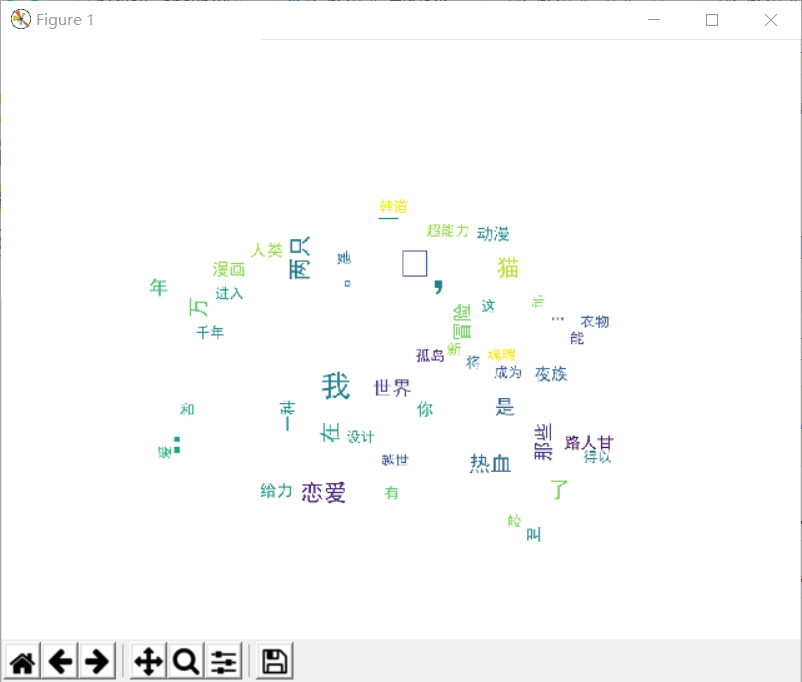
3.对爬了的数据进行文本分析,生成词云。
将所有名词直接作为WordCloud()函数的参数,默认WordCloud内部通过统计词频对词进行排序,font_path传入字体文件,mask表示词云的图像形状,参数传入为一个图像
image= Image.open('./wordcloud.jpg')
graph = np.array(image)
font=r'C:\Windows\Fonts\simhei.TTF'
wc = WordCloud(font_path=font,background_color='White',max_words=50,mask=graph)
wc.generate_from_frequencies(title_dict)
image_color = ImageColorGenerator(graph)
plt.imshow(wc)
plt.axis("off")
plt.show()
4.对文本分析结果进行解释说明。
5.写一篇完整的博客,描述上述实现过程、遇到的问题及解决办法、数据分析思想及结论。
6.最后提交爬取的全部数据、爬虫及数据分析源代码。
import requests
from bs4 import BeautifulSoup
import jieba
from PIL import Image,ImageSequence
import numpy as np
import matplotlib.pyplot as plt
from wordcloud import WordCloud,ImageColorGenerator
for i in range(2294450,2294500):
        pages = i;
        nexturl = 'https://voice.hupu.com/nba/%s.html' % (pages)
        reslist = requests.get(nexturl)
        reslist.encoding = 'utf-8'
        soup_list = BeautifulSoup(reslist.text, 'html.parser')
        for news in soup_list.find_all('div',class_='artical-main-content'):
            print(news.text)
            f = open('youku.txt', 'a', encoding='utf-8')
            f.write(news.text)
            f.close()
def changeTitleToDict():
    f = open("youku.txt", "r", encoding='utf-8')
    str = f.read()
    stringList = list(jieba.cut(str))
    delWord = {"+", "/", "(", ")", "【", "】", " ", ";", "!", "、"}
    stringSet = set(stringList) - delWord
    title_dict = {}
    for i in stringSet:
        title_dict[i] = stringList.count(i)
    print(title_dict)
    return title_dict


# 获取上面保存的字典
title_dict = changeTitleToDict()
graph = np.array(title_dict)
font = r'C:\Windows\Fonts\simhei.ttf'


image= Image.open('./wordcloud.jpg')
graph = np.array(image)
font=r'C:\Windows\Fonts\simhei.TTF'
wc = WordCloud(font_path=font,background_color='White',max_words=50,mask=graph)
wc.generate_from_frequencies(title_dict)
image_color = ImageColorGenerator(graph)
plt.imshow(wc)
plt.axis("off")
plt.show()
结果:

 浙公网安备 33010602011771号