

Vue 使用 Ant-d 简单实现左侧菜单栏和面包屑功能
参考:
https://www.cnblogs.com/wjw1014/p/13925969.html
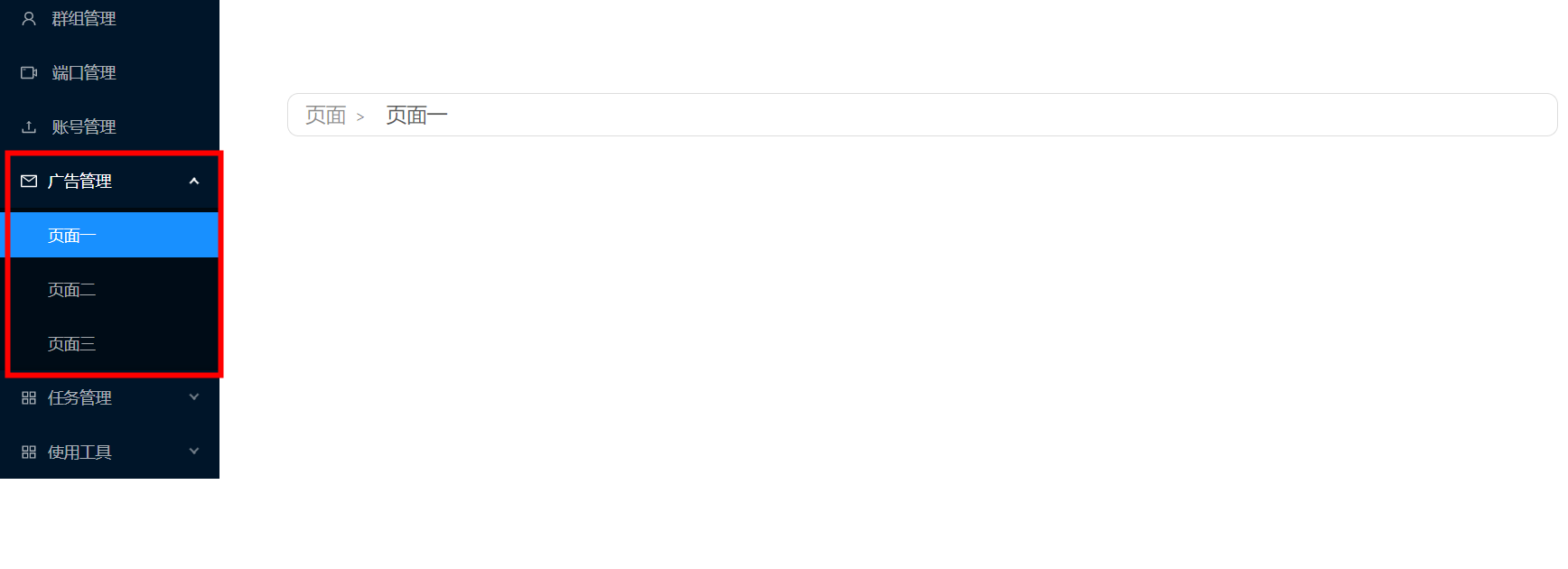
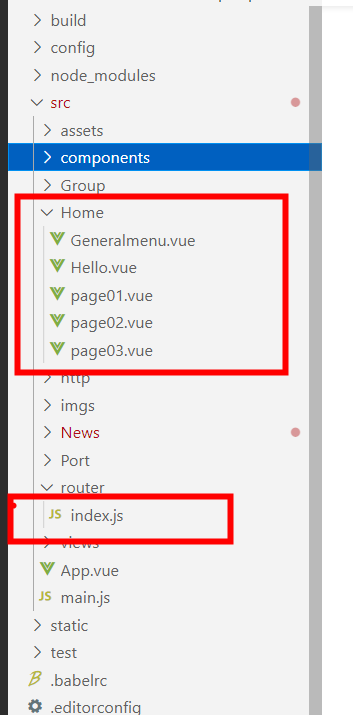
路由调用


import Hello from '@/Home/Hello'


Vue.use(Router)

export default new Router({
  routes: [

    {
      path: "/2",
      name: "Hello",
      component: Hello,
      redirect: '/teacher',
    },


    {
      path: "/teacher",
      component: Hello,
      meta: {title: '页面'},
      redirect: '/teacher/onepage',
      children: [
        {
          path: "onepage",
          name: "one",
          meta: {title: '页面一'},
          component: () => import("../Home/page01.vue")
        },
        {
          path: "twopage",
          name: "two",
          meta: {title: '页面二'},
          component: () => import("../Home/page02.vue")
        },
        {
          path: "threepage",
          name: "three",
          meta: {title: '页面三'},
          component: () => import("../Home/page03.vue")
        },
      ]
    },


  ]


})
父组件
<template>
  <div>
    <!-- <div class="dd">
      <h1 class="hh1">成员管理系统</h1>
      <a-dropdown>
        <a class="ant-dropdown-link">
          你好,王佳伟
          <a-icon type="down" />
        </a>
        <a-menu slot="overlay">
          <a-menu-item>
            <a>修改密码</a>
          </a-menu-item>
          <a-menu-item>
            <a>推出登录</a>
          </a-menu-item>
        </a-menu>
      </a-dropdown>
    </div> -->

    <Generalmenu></Generalmenu>
    <div class="main">
      <!-- <app-mianbao></app-mianbao> -->
      <router-view></router-view>
    </div>
  </div>
</template>

<script>
import Generalmenu from "./Generalmenu";
// import appMianbao from "./miaobao";

export default {
  name: "HelloWorld",
  components: {
    Generalmenu,
    // appMianbao
  },
  props: {
    msg: String
  }
};
</script>

<style scoped>
.dd,
.hh1 {
  background-color: #007acc;
  font-size: 40px;
  color: #fff;
  text-align: center;
  line-height: 80px;
  position: absolute;
  top: 0;
  left: 0;
  width: 100%;
  height: 80px;
  vertical-align: middle;
}
.side {
  position: absolute;
  width: 250px;
  top: 80px;
  left: 0;
  bottom: 0;
}
.main {
  position: absolute;
  top: 80px;
  left: 250px;
  bottom: 0;
  right: 0;
  padding: 10px;
}
.ant-dropdown-trigger {
  position:absolute;
  font-size: 15px;
  color: #fff;
  right: 20px;
}
</style>
子组件
<template>
  <div>
        <div style="width: 256px">
          <a-layout-sider v-model="collapsed" :trigger="null" collapsible>
            <div class="logo" />
            <a-menu theme="dark" mode="inline" :default-selected-keys="['1']">
              <a-menu-item key="1">
                <a-icon type="user" />
                <!-- <span>群组管理</span> -->

                <span>群组管理</span>

              </a-menu-item>
              <a-menu-item key="2">
                <a-icon type="video-camera" />
                <!-- <span>端口管理</span> -->
                <span>端口管理</span>

              </a-menu-item>
              <a-menu-item key="3">
                <a-icon type="upload" />
                <span>账号管理</span>
              </a-menu-item>

            <a-sub-menu key="sub1">
              <span slot="title"><a-icon type="mail" /><span>广告管理</span></span>
              <a-menu-item key="5">
                <router-link to="/teacher/onepage">页面一</router-link>

              </a-menu-item>

              <a-menu-item key="6">
                <router-link to="/teacher/twopage">页面二</router-link>
              </a-menu-item>

            <a-menu-item key="7">
                <router-link to="/teacher/threepage">页面三</router-link>
              </a-menu-item>

            </a-sub-menu>

            <a-sub-menu key="sub2">
              <span slot="title"><a-icon type="appstore" /><span>任务管理</span></span>
              <a-menu-item key="9">

                <span @click="guanzhu">关注</span>
              </a-menu-item>
              <a-menu-item key="10">
                私信
              </a-menu-item>

            </a-sub-menu>
              <a-sub-menu key="sub3">
                <span slot="title"><a-icon type="appstore" /><span>使用工具</span></span>
                <a-menu-item key="11">
                  短链接生成
                </a-menu-item>
              </a-sub-menu>
            </a-menu>
          </a-layout-sider>
        </div>


  </div>
</template>

<script>
export default {
  data() {
    return {
      collapsed: false,
      sId:0
    };
  },

  methods: {
    toggleCollapsed() {
      this.collapsed = !this.collapsed;
    },
    guanzhu(){
      this.$router.push('/details02')
    }


},


};
</script>
<style scoped>

.main_left{
    width: 150px;
    height: 100%;
    float:left;
    background:#c0c0c0;
    cursor:pointer;
}
</style>
页面
<template>

  <div class="bao">


    <a-breadcrumb separator='>'>
      <a-breadcrumb-item v-for="(item,index) of $route.matched" :key="index" style="padding:5px">
        <router-link :to="item.path" style="font-size:18px">{{item.meta.title}}</router-link>
      </a-breadcrumb-item>
    </a-breadcrumb>

  </div>

</template>

<script>
export default {

    watch :{
        '$route':'init'
    },
    mounted(){
        console.log(this.$route)
    },
    methods:{
        init(){
            console.log(this.$route)
        }
    }

};
</script>

<style scoped>
.bao{
   background-color: #fff;
   padding: 5px 0px;
   margin-bottom: 20px;
   border:1px solid #dddddd;
   padding-left: 10px;
   border-radius: 10px;
}
</style>

 浙公网安备 33010602011771号