
doc-llm-autotest 基于大模型的文档自动化测试平台::用户提交文件进行文档测试
一、技术选型与功能设计
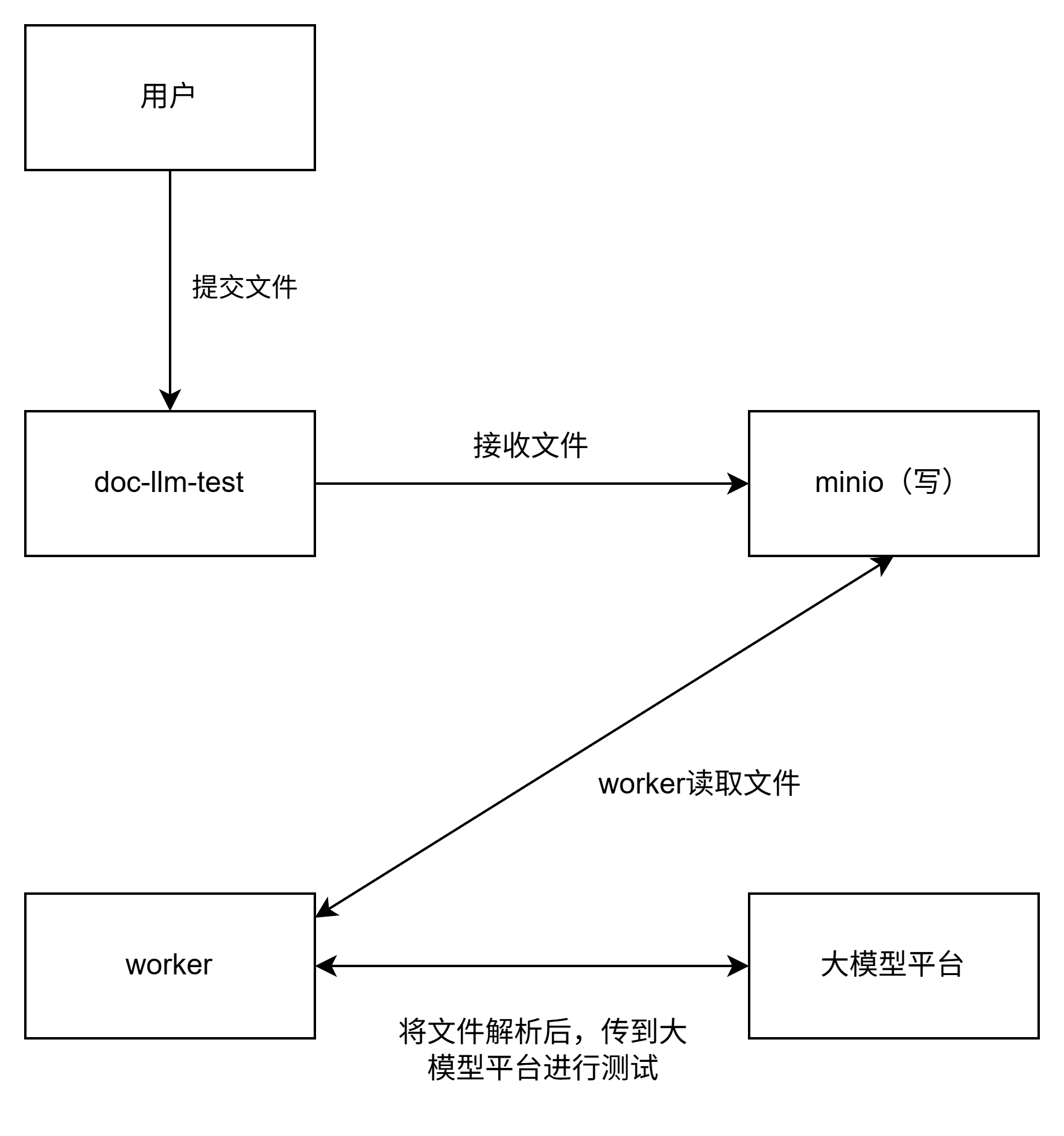
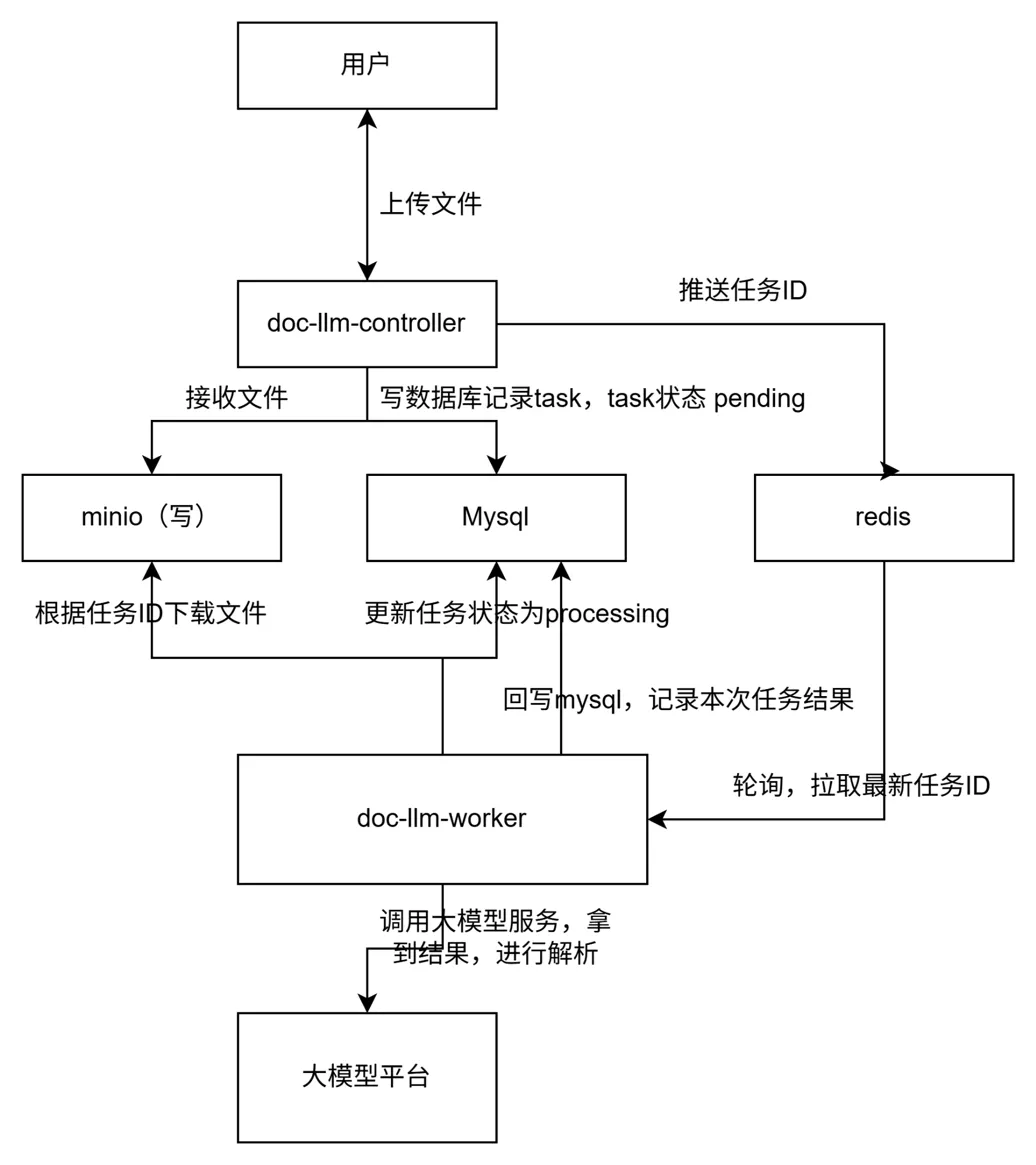
使用minio服务,进行文件的中转与存储。用户提交文件到doc-llm-controller,控制面将文件转存到minio中,关联此次任务id。然后doc-llm-worker轮询redis发现有需要执行的任务,拿到id后,根据id从minio拿取文件,然后将文件解析成结构化信息,再提交到大模型,进行文档测试。
那么此部分功能流程图大致如下:
相对应的,在整体业务流程中补充文件存取步骤,最后如下:
二、minio配置与使用
minio安装部署:我们使用docker镜像来部署minio服务,暴露9000端口提供给我们自己服务使用:
docker run -d --name doc-llm-minio -p 9000:9000 -p 9001:9001 --restart=always -e MINIO_ROOT_USER=root -e MINIO_ROOT_PASSWORD=password -v /home/workspace/minio:/data minio/minio:latest server /data --console-address ":9001"
通过python来调用minio服务:
# minio下载
pip install minio
from minio import Minio
from minio.error import S3Error
import io

# 配置minio
client = Minio(
    "localhost:9000",
    access_key="root",
    secret_key="xiao1234",
    secure=False,
)

bucket_name = "doc-llm-bucket"
try:
    if not client.bucket_exists(bucket_name):
        client.make_bucket(bucket_name)
    else:
        print(f"Bucket '{bucket_name}' already exists.")
except S3Error as e:
    print(f"Error occurred: {e}")

# 通过python上传文件到minio
def upload_file(local_file_path, object_name):
    try:
        client.fput_object(bucket_name, object_name, local_file_path)
        print(f"'{local_file_path}' is successfully uploaded as '{object_name}' to bucket '{bucket_name}'.")
    except S3Error as e:
        print(f"Error occurred while uploading: {e}")


# 文件下载
def download_file(object_name, local_file_path):
    try:
        client.fget_object(bucket_name, object_name, local_file_path)
        print(f"'{object_name}' is successfully downloaded to '{local_file_path}'.")
    except S3Error as e:
        print(f"Error occurred while downloading: {e}")


# 列出所有文件
def list_files():
    try:
        objects = client.list_objects(bucket_name)
        print(f"Objects in bucket '{bucket_name}':")
        for obj in objects:
            print(f"- {obj.object_name} (size: {obj.size} bytes)")
    except S3Error as e:
        print(f"Error occurred while listing objects: {e}")


# 删除指定文件
def delete_file(object_name):
    try:
        client.remove_object(bucket_name, object_name)
        print(f"'{object_name}' is successfully deleted from bucket '{bucket_name}'.")
    except S3Error as e:
        print(f"Error occurred while deleting: {e}")
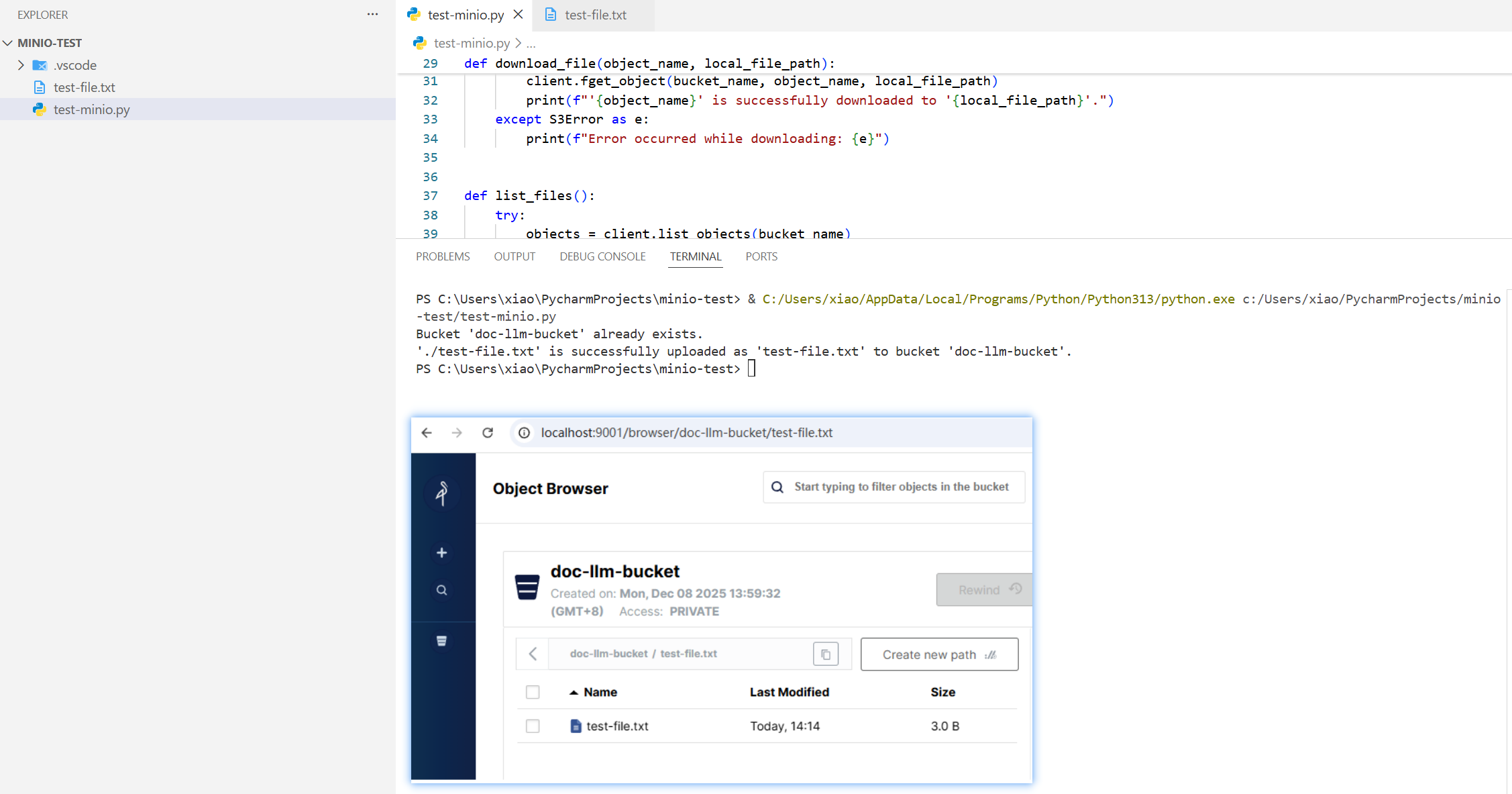
测试效果如下:
三、控制面doc-llm-controller服务适配
总体思路:
接口层接收到带文件的创建任务请求,先新增一条任务数据到mysql,其中doc字段为__PENDING_FILE__。然后拿到任务id后,调用推送文件服务将文件关联任务id一起推送到minio,结束后更新任务信息doc字段为:f"minio://{MINIO_BUCKET}/{object_name}"。
至此控制面业务结束。
services层:
新增file_service.py,提供minio服务的调用
# 代码样例
def _ensure_bucket():
    """确保 bucket 存在"""
    if not _minio_client.bucket_exists(MINIO_BUCKET):
        _minio_client.make_bucket(MINIO_BUCKET)


def save_task_file(task_id: int, file_obj: FileStorage) -> str:
    """
    把用户上传的文件存到 MinIO,文件名格式:{task_id}_{orig_filename}
    返回存入数据库的 doc 字段值,例如:minio://doc-llm-bucket/123_xxx.docx
    ...
   doc_path = f"minio://{MINIO_BUCKET}/{object_name}"
    return doc_path
给doc_check_service, task_service 增加更新doc方法
# doc_check_service
def update_task_doc(task_id: int, doc: str) -> None:
    """更新任务的 doc 字段"""
    task = task_service.get_task_by_id(task_id)
    if not task:
        raise TaskNotFoundError(f"任务 {task_id} 不存在")

    task_service.update_task_doc(task_id, doc)


# task_service
def update_task_doc(task_id: int, doc: str) -> None:
    """更新任务的 doc 字段"""
    with get_session() as session:
        task = session.scalar(
            select(TaskDocLLM).where(TaskDocLLM.task_id == task_id)
        )
        if not task:
            raise ValueError(f"任务 {task_id} 不存在")
        task.doc = doc
更新接口函数,兼容传文本信息、文本文件两种方式:
@bp.route("/tasks/", methods=["POST"])
def create_doc_task():
    # 判断是不是文件上传
    if request.content_type and "multipart/form-data" in request.content_type:
        return _create_task_with_file()

    # 默认走老的 JSON 逻辑
    return _create_task_with_json()


def _create_task_with_json():
    ...
    task_id = doc_check_service.submit_doc_task(task_name, doc, product, feature)
    ...

def _create_task_with_file():
    ....
    try:
        # 1. 先写一条任务,doc 用占位符,保证非空
        placeholder_doc = "__PENDING_FILE__"
        task_id = doc_check_service.submit_doc_task(
            task_name=task_name,
            doc=placeholder_doc,
            product=product,
            feature=feature,
        )
        doc_path = file_service.save_task_file(task_id, file_obj)

        # 3. 回写 doc 字段
        doc_check_service.update_task_doc(task_id, doc_path)
    ...
用postman测试下接口效果,大致是OK的:
接口请求:
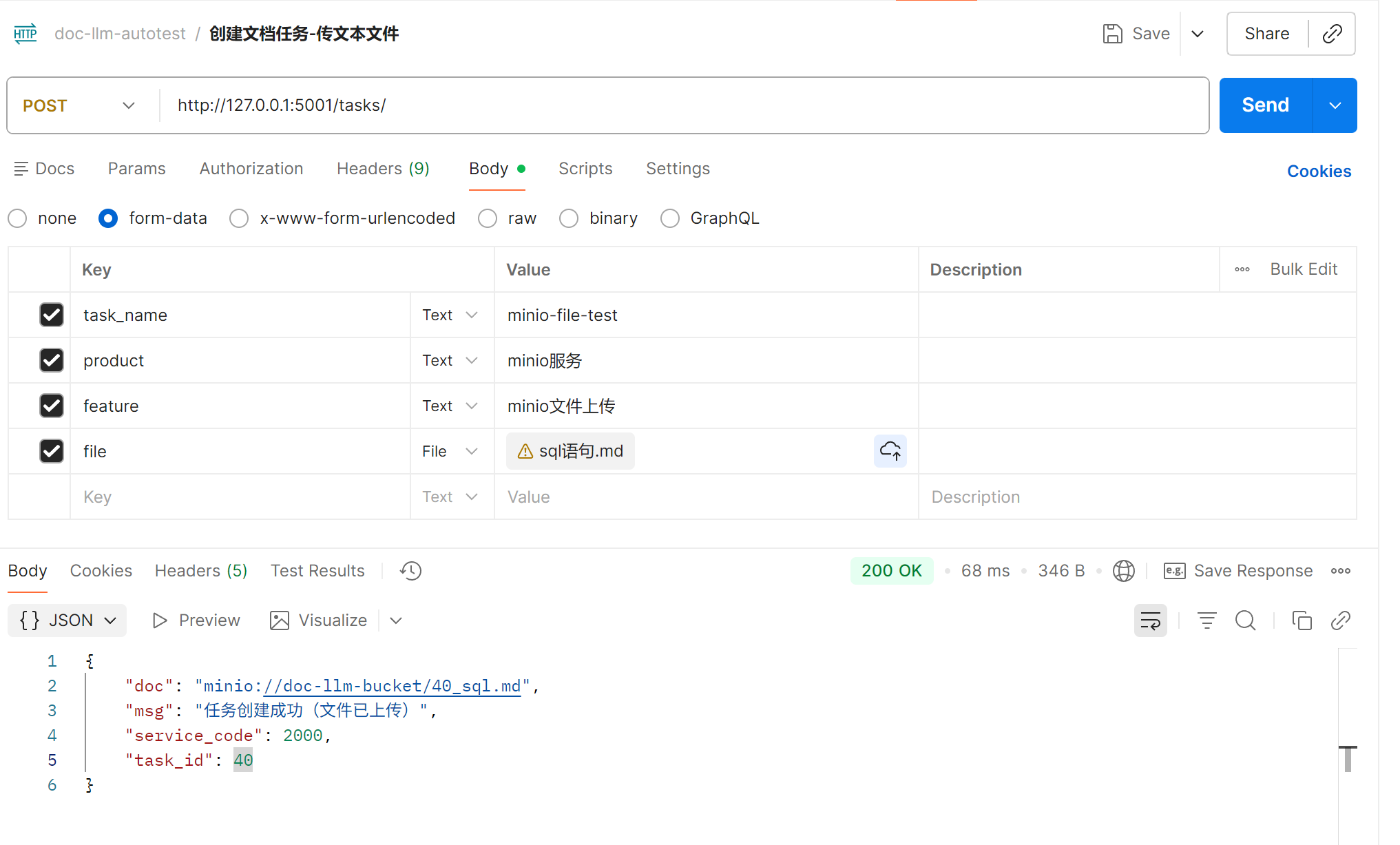
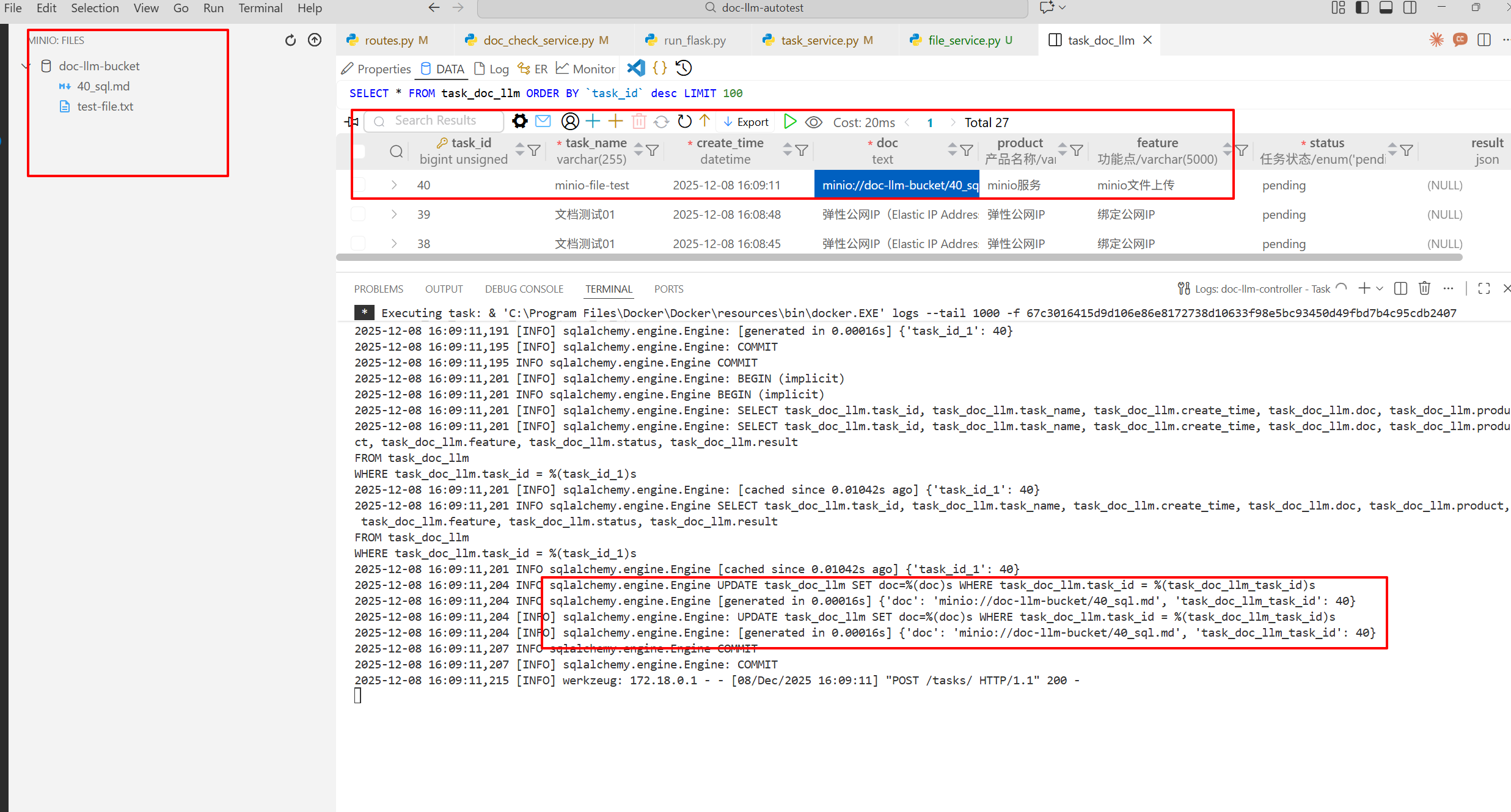
flask这边日志、数据库、minio表现都OK,数据一致性有保障:
四、数据面doc-llm-worker服务适配
当前数据流的流转:从时间先后顺序,最先会写入task到mysql,此时doc字段是pending字样,然后写入task_id到redis,再就是把文件传给minio,最后更新mysql.doc为minio的文件路径。
doc-llm-worker初始逻辑是:读redis队列找到需要执行的任务,读mysql拿到doc文本信息,调用大模型进行测试。因此数据面doc-llm-worker要做一些适配:
1.新增文件任务的下载
从minio下载文件,在file_service层补充函数:
def download_file(bucket: str, object_name: str) -> bytes:
    """
    从 MinIO 下载文件并返回 bytes 内容。

    调用方式:
        content = download_file("doc-llm-bucket", "15_readme.txt")
        text = content.decode("utf-8")
    """
    try:
        response = _minio_client.get_object(bucket, object_name)
        data = response.read()
        return data
    except S3Error as e:
        raise RuntimeError(f"Download from minio failed: {e}") from e
2.将文件解析
其中如果doc是纯文本的话走老逻辑;是minio格式的话,走文件下载,然后解析成文本;是pending的话,等待知道文件上传ok
新增doc_loader.py
# app/worker/doc_loader.py
import logging
from typing import Tuple

from app.services import file_service

PENDING_MARK = "__PENDING_FILE__"

def _is_minio_path(doc: str) -> bool:
    """
    判断 doc 是否为 MinIO 路径:
      - /bucket/object_name
      - minio://bucket/object_name
    """
    ...


def _parse_minio_path(doc: str) -> Tuple[str, str]:
    """解析 doc 字段为 (bucket, object_name)"""
    ...


def load_doc_for_task(task) -> str:
    """
    根据任务对象,返回真正要给 LLM 的 doc 文本(str)
    1. doc == "__PENDING_FILE__"        -> 抛 DocPendingError
    2. doc 是 MinIO 路径 (/bucket/obj)  -> 从 MinIO 下载并 decode
    3. 其他                             -> 当作普通文本直接返回
    """
    doc = (task.doc or "").strip()
    if not doc:
        raise DocPathError(f"task {task.id} doc is empty")

    if doc == PENDING_MARK:
        raise DocPendingError(f"task {task.id} doc is still pending file upload")

    if _is_minio_path(doc):
        bucket, object_name = _parse_minio_path(doc)
        logging.info(
            f"task {task.id} doc is minio path, bucket={bucket}, object={object_name}"
        )
        content_bytes = file_service.download_file(bucket, object_name)
        return content_bytes.decode("utf-8", errors="replace")

    return doc
3.worker的处理
读redis队列,根据任务id找到这条task,但当文件任务doc字段还是"__PENDING_FILE__"时,做阻塞等待,直到doc字段更新为"minio://{bucket}/{object_name}",从minio下载文件再处理,适配doc_llm_test_worker
新增阻塞等待函数
def wait_for_doc_ready(task_id: int):
    """
    当 doc == "__PENDING_FILE__" 时,等待 doc 字段被控制面更新。
    超过最大重试次数仍未更新则抛出异常。
    """
    PENDING_RETRY_INTERVAL = 2
    PENDING_RETRY_MAX = 5

    for i in range(PENDING_RETRY_MAX):
        time.sleep(PENDING_RETRY_INTERVAL)
        task = task_service.get_task_by_id(task_id)
        if not task:
            raise RuntimeError(f"task {task_id} disappeared during pending wait")

        doc = (task.doc or "").strip()
        if doc != doc_loader.PENDING_MARK:
            logging.info(f"task {task_id} doc is ready after {i+1} retries: {doc}")
            return task
        logging.info(f"task {task_id} doc still pending (retry {i+1}/{PENDING_RETRY_MAX})")

    raise RuntimeError(f"task {task_id} doc still pending after max retries")
适配文档处理函数process_task
def process_task(task_id: int):
    """处理文档检查任务"""
    logging.info(f"start process task {task_id}")
    ...
    try:
        try:
            doc_text = doc_loader.load_doc_for_task(task)
        except doc_loader.DocPendingError as e:
            logging.info(f"task {task_id} doc pending, waiting...")
            try:
                task = wait_for_doc_ready(task_id)
                doc_text = doc_loader.load_doc_for_task(task)
            except Exception as e2:
                logging.error(f"task {task_id} pending wait failed: {e2}")
                task_service.mark_task_failed(task_id, str(e2))
                return
        except doc_loader.DocPathError as e:
            logging.error(f"task {task_id} invalid doc path: {e}")
            task_service.mark_task_failed(task_id, str(e))
            return
测试效果:
数据库数据

worker处理日志:

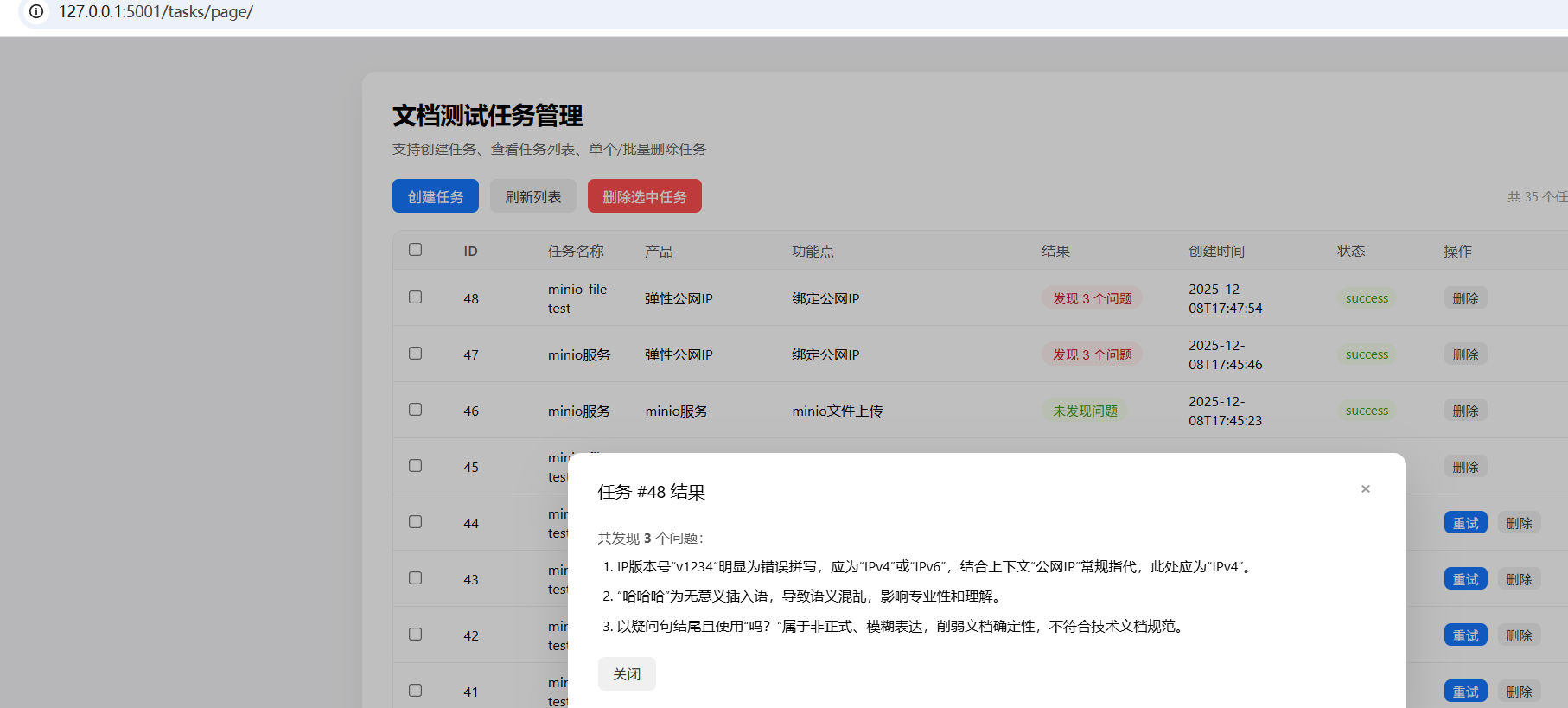
最终效果:
五、前端界面适配接口
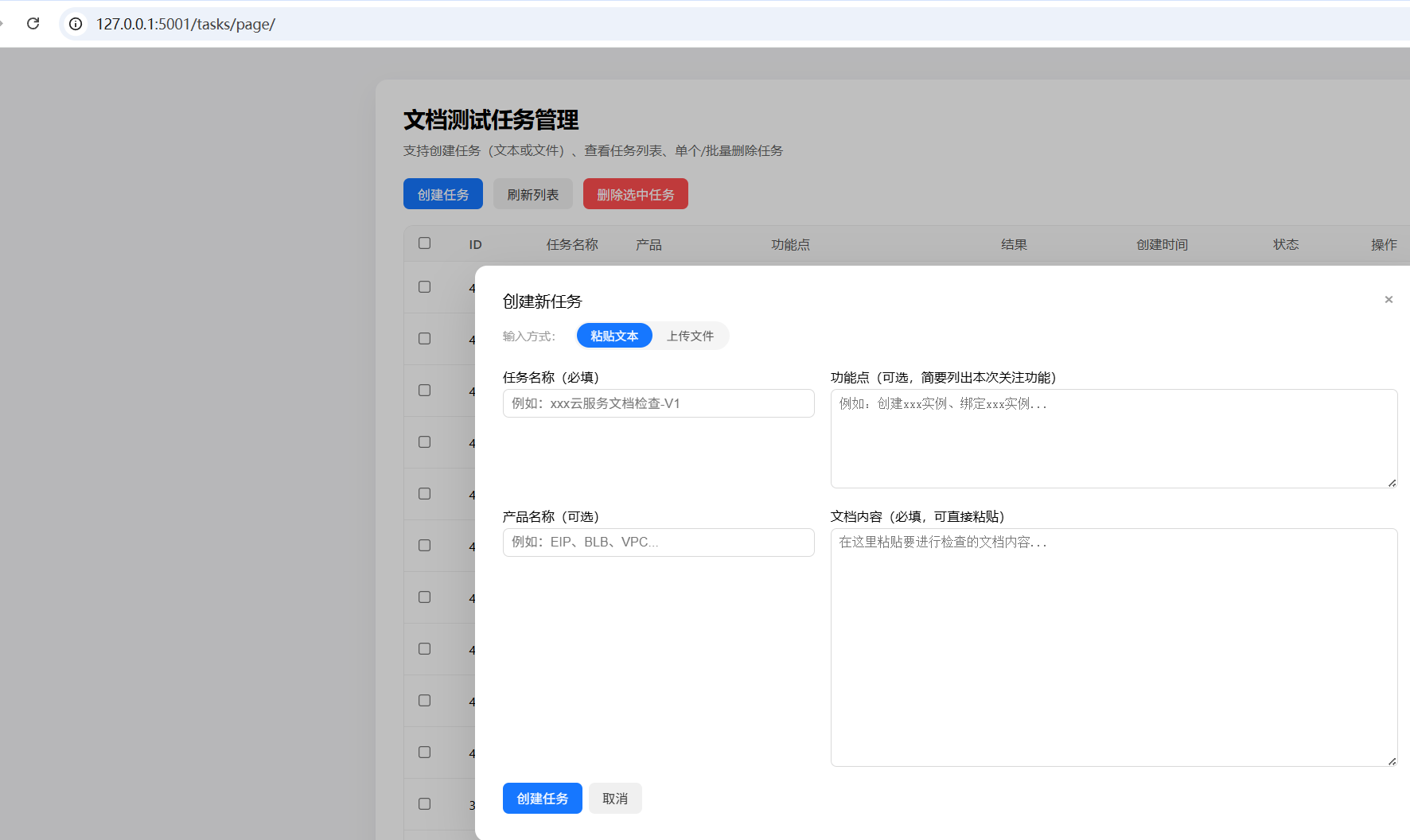
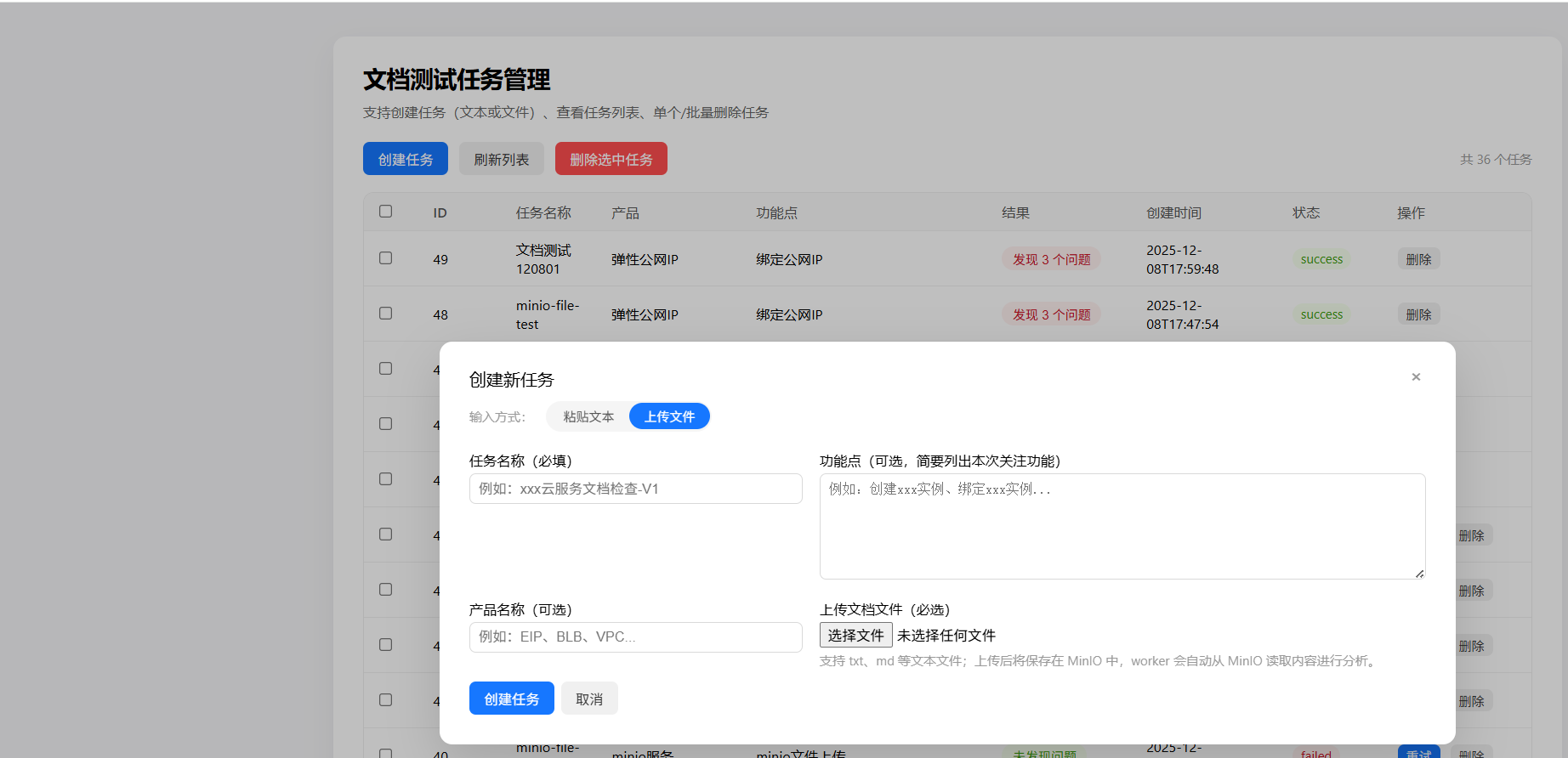
补充文本上传的操作方式,适配
旧的文本输入方式:
新支持的文件输入方式

 浙公网安备 33010602011771号