
Clang IDE的选择在Windows
- OS: Win10 1809+
Clang
C:\msys64\clang64\bin
加到PATH
installation
open "MSYS2 CLANG64" from the Start menu.
- clang
pacman -S mingw-w64-clang-x86_64-toolchain
- cmake
pacman -S mingw-w64-x86_64-cmake
- nija
pacman -S mingw-w64-x86_64-ninja
Clion
Clion bundles a version of the MinGW toolset for quick setup.
The exact version bundled is MinGW-w64 13.1
with posix threads, and seh exceptions.
Upgrade MingW bundled with Clion - option
把x86_64-15.2.0-release-posix-seh-ucrt-rt_v13-rev0.7z覆盖到
<CLion-HOME>\bin\mingw
Toolchain
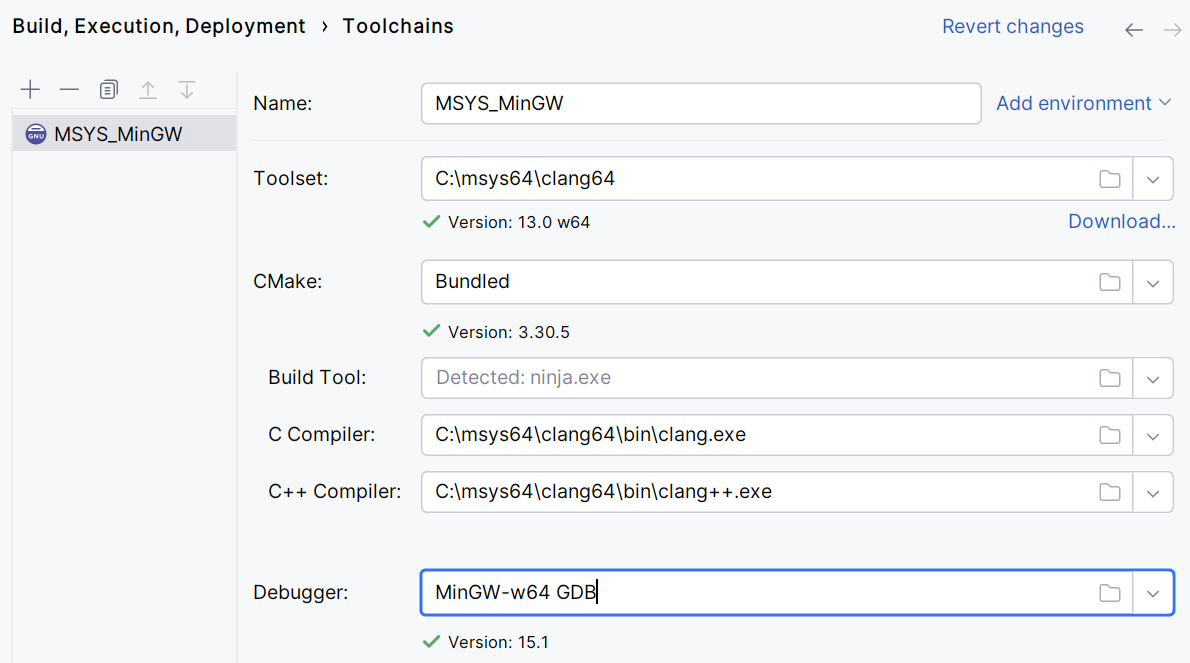
Go to Settings | Build, Execution, Deployment | Toolchains and create a MinGW toolchain
Set the Toolset to C:\msys64\clang64. Set other paths manually in case they are not detected automatically.
- Clion picture
Visual Studio Code
path
把LLVM, CMAKE, ninja 加入到 Path中
MSVC
About: clang-cl is an alternative command-line interface to Clang,
designed for compatibility with the Visual C++ compiler, cl.exe.
Desktop development with C++
- vs2019
MSVC v142 - VS 2019 C++ x64/x86 build tools(Latest) - vs2022
MSVC v143 - VS 2022 C++ x64/x86 build tools(Latest) - vs2026
MSVC v145 - x64/x86 build tools(Latest)
Windows SDK
- Windows 11 SDK (10.0.26100.7705)

 浙公网安备 33010602011771号