



sublime 标题乱码,内容正常
最近发现sublime打开文件中文标题乱码,但是内容确实正常的。一下问解决方法,mark下。
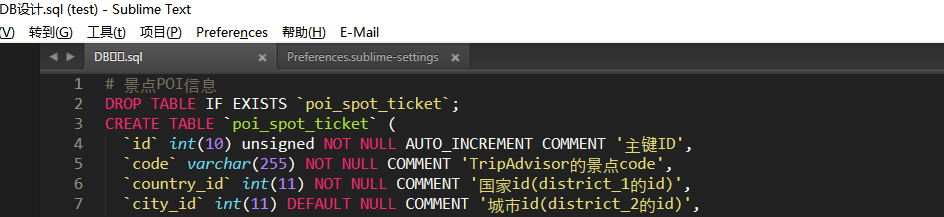
- 首先看下配置文件:
路径 Preferences->Setting-User(设置-用户)
{
	"auto_complete_triggers":
	[
		{
			"characters": " ",
			"selector": "text.html"
		}
	],
	"color_scheme": "Packages/User/Monokai Soda (SL).tmTheme",
	"default_line_ending": "unix",
	"email_account_default_identity": "sublimetext3 <sublimetext3@163.com>",
	"email_account_default_smtp": "smtp://sublimetext3:123456789abc@smtp.163.com:25",
	"font_size": 11,
	"highlight_line": true,
	"highlight_modified_tabs": true,
	"ignored_packages":
	[
		"AngularJS",
		"caniuse_local",
		"CodeComplice",
		"CSS",
		"Git",
		"GoSublime",
		"Insert Nums",
		"LiveStyle",
		"SublimeClang",
		"SVN",
		"Vintage",
		"Vintageous"
	],
	"show_encoding": true,
	"tab_size": 4,
	"theme": "Soda Dark 3.sublime-theme",
	"translate_tabs_to_spaces": true,
	"trim_trailing_white_space_on_save": true,
	"update_check": false,
	"word_wrap": true
}
- 在用户配置文件加上如下一句话,保存
"dpi_scale": 1.0,
然后重新打开就可以了
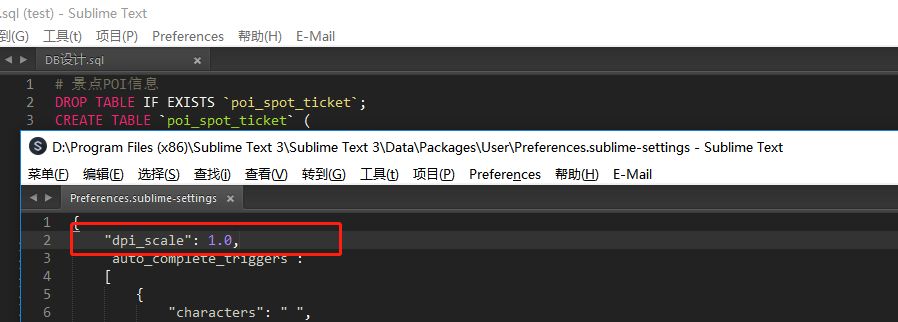
终极原因:原来是我的电脑DPI设置成了125%,现在显示器分辨率基本都是1920*1080的了,默认DPI字太小,一般我都会调大,结果Sublime Text 3却不兼容了,解决方法:覆盖操作系统设置的DPI
不积跬步,无以至千里

 浙公网安备 33010602011771号