
爬取二手房和汽车之家
爬取二手房和汽车之家
豆瓣特殊情况
import requests

proxies = {
    'http': '114.99.223.131:8888',
    'http': '119.7.145.201:8080',
    'http': '175.155.142.28:8080'
}

res = requests.get('https://movie.douban.com/top250',
                   headers={
                       "User-Agent": "Mozilla/5.0 (Windows NT 10.0; Win64; x64) AppleWebKit/537.36 (KHTML, like Gecko) Chrome/93.0.4577.82 Safari/537.36"
                   },
                   proxies=proxies
                   )
# 1.退出账户 返回登录界面 研究登录的地址以及携带的数据 代码发送请求获取cookie
# 2.使用IP代理池访问(不推荐使用)
print(res.text)
1.先研究单页数据的爬取
2.再研究多页数据的爬取
3.最后研究如何写入文件
需求分析
名称 地址 详细信息 关注人数 发布时间 单价 总价
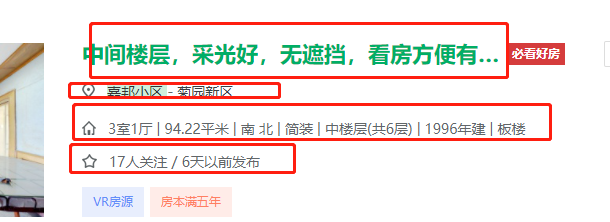
先获取所有的li标签(先整体后局部的思想)
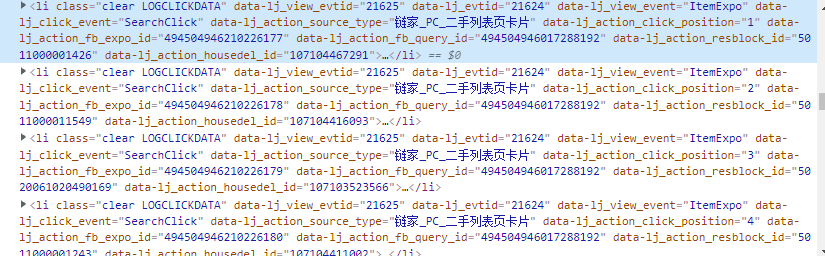
准备工作
import requests
from bs4 import BeautifulSoup
from openpyxl import Workbook

wb = Workbook()
wb1 = wb.create_sheet('二手房数据')
# 先定义表头
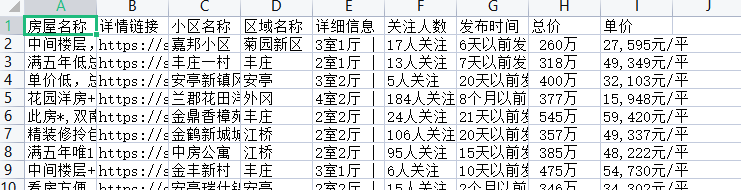
wb1.append(['房屋名称', '详情链接', '小区名称', '区域名称', '详细信息', '关注人数', '发布时间', '总价', '单价'])


def get_info(num):
    # 1.经过分析得知页面数据直接加载
    res = requests.get('https://sh.lianjia.com/ershoufang/pudong/pg%s/' % num)
    # print(res.text)  # 2.查看是否有简单的防爬以及页面编码问题
    # 3.利用解析库筛选数据
    soup = BeautifulSoup(res.text, 'lxml')
筛选数据
li_list = soup.select('ul.sellListContent>li')
    for li in li_list:
    a_tag = li.select('div.title>a')[0]
    title = a_tag.text
    link = a_tag.get('href')
    div_tag = li.select('div.positionInfo')[0]
    address = div_tag.text
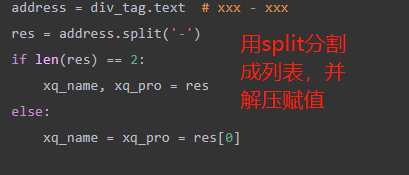
    res = address.split('-')
    if len(res) == 2:
         xq_name, xq_pro = res
    else:
         xq_name = xq_pro = res[0]

    div_tag1 = li.select('div.houseInfo')[0]
    info = div_tag1.text
    div_tag2 = li.select('div.followInfo')[0]
    focus_time = div_tag2.text  # xxx / xxx
        people_num, publish_time = focus_time.split('/')

        div_tag3 = li.select('div.totalPrice')[0]
        # 总价
        total_price = div_tag3.text

        div_tag4 = li.select('div.unitPrice')[0]
        # 单价
        unit_price = div_tag4.text
最后写入数据
     wb1.append(
            [title, link, xq_name.strip(), xq_pro.strip(), info,
     people_num.strip(), publish_time.strip(), total_price,
             unit_price])

# 利用for循环循环写入数据
for i in range(1, 5):
    get_info(i)

wb.save(r'二手房数据.xlsx')
汽车之家新闻数据
需求分析
获取新闻数据
新闻标题 新闻链接 新闻图标 发布时间 新闻简介
特性分析
1.页面数据也存在动态加载 但是该动态加载是由js代码完成
第一次请求数据的时候其实就已经获取到了所有的数据只不过是通过js代码控制展示条数的
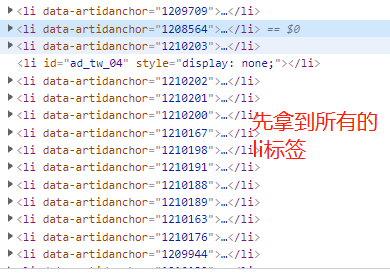
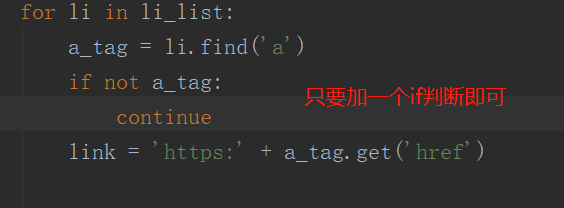
2.页面干扰项
代码演示
准备工作
import requests
from bs4 import BeautifulSoup
from openpyxl import Workbook

res = requests.get('https://www.autohome.com.cn/news/',
                   headers={
                       "User-Agent": "Mozilla/5.0 (Windows NT 10.0; Win64; x64) AppleWebKit/537.36 (KHTML, like Gecko) Chrome/93.0.4577.82 Safari/537.36"
                   }
                   )
res.encoding = 'gbk'
soup = BeautifulSoup(res.text, 'lxml')
筛选数据
# 1.先查找所有的li标签
li_list = soup.select("ul.article>li")
for li in li_list:
    a_tag = li.find('a')
    if not a_tag:
       continue
    link = 'https:' + a_tag.get('href')

    h3_tag = li.find('h3')
    if not h3_tag:
        continue
    title = h3_tag.text

    title = li.find('h3').text

    src = li.find('img').get('src')

    publish_time = li.find('span').text

    desc = li.find('p').text

    watch_num = li.find('em').text

    comment_num = li.find('em', attrs={'data-class': 'icon12
    icon12-infor'}).text

最后再利用openpyxl写入即可


 浙公网安备 33010602011771号