

多表查询练习与pymysql
# 在编写较为复杂的SQL查询时不要想着一口气写完,写一点执行一点再写
# 任何复杂的SQL都是慢慢拼凑起来的
 """在编写复杂SQL的时候可以先写出中文思路 之后再拼凑SQL"""
1、查询所有的课程的名称以及对应的任课老师姓名
第一步:该题目涉及到两张表 course表和teacher表
第二步: 因为查询的数据在不同表中所以考虑多表查询且使用联表操作
select course.cname,teacher.tname from course inner join teacher on course.teacher_id=teacher.tid;
2、查询平均成绩大于八十分的同学的姓名和平均成绩
第一步:需要用到成绩表和学生表两张表
第二步:多表查询 因为是查找不同表中数据考虑用联表操作
第三步:先查找平均成绩大于80的学生id和平均成绩
select student_id,avg(num) from score group by student_id having avg(num)>80;
第四步:将上面的查询结果和学生表连在一起
select student.sname,t1.avg_num from student inner join(select student_id,avg(num)as avg_num from score group by student_id having avg(num)>80)as t1 on t1.student_id=student.sid;
3、查询没有报李平老师课的学生姓名
第一步:该题需要四张表 teacher表 course表 student表 score表
第二步:多表查询 子查询
第三步:先求报了李平老师的id号
select tid from teacher where tname='李平老师';
第四步:根据id号筛选出选课id号
select cid from course where teacher_id=(select tid from teacher where tname='李平老师');
第五步:根据课程id去分数表里筛选出对应的学生id号
select distinct student_id from score where course_id in (select cid from course where teacher_id=(select tid from teacher where tname='李平老师'));
第六步:根据学生id去学生表里筛选出对应的学生姓名并取反
select sname from student where sid not in (select distinct student_id from score where course_id in (select cid from course where teacher_id=(select tid from teacher where tname='李平老师')));
4、查询没有同时选修物理课程和体育课程的学生姓名
第一步:涉及到三张表 course表 student表 score表
第二步:先获取物理和体育的id号
select cid from course where cname in('物理','体育');
第三步:根据课程id号筛选出所有报了物理和体育的学生id
select * from score where course_id in (select cid from course where cname in('物理','体育'));
第四步:根据学生id分组 统计分组下课程数量 数量为1的即可
select student_id from score where course_id in(select cid from course where cname in('物理','体育')) group by student_id having count(course_id)=1;
5、查询挂科超过两门(包括两门)的学生姓名和班级
第一步:需要用到三张表 class表 student表 score表
第二步:先筛选出成绩小于60的数据
select * from score where num<60;
第二步:根据学生id分组 统计出挂科两门以上的
select student_id from score where num<60 group by student_id having count(course_id)>=2;
第三步:再根据学生id筛选出对应的学生姓名和班级号
select sname,class_id from student where sid in (select student_id from score where num<60 group by student_id having count(course_id)>=2);
第四步:再拼接两张表 student表和第三步的表 查找 名字和班级
select class.caption,t1.sname from class inner join (select sname,class_id from student where sid in (select student_id from score where num<60 group by student_id having count(course_id)>=2))as t1 on class.cid = t1.class_id;
python操作MySQL
# python代码操作MySQL需要借助于第三方模块
    第三方模块
      本质也是模块只不过是网络上其他人写的
如果我们想要使用第三方模块需要基于网络先下载
python如何下载模块
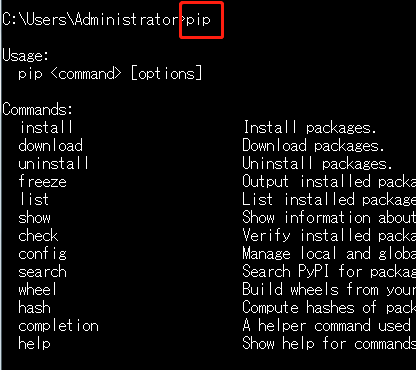
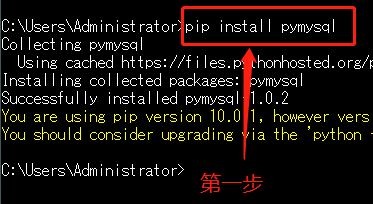
    1.方式1:cmd终端
        pip3 install pymysql
    2.方式2:pycharm终端
        pip3 install pymysql
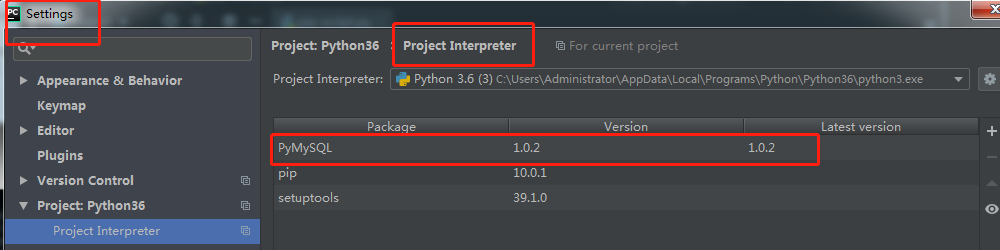
    3.方式3:pycharm快捷方式
        settings>>>...
第一步
打开pycharm
远程仓库
    pip3下载模块的时候默认都是从国外的仓库下载模块数据
        下载的过程有时候会非常的慢,我们可以切换到国内的仓库
    """
    (1)阿里云 http://mirrors.aliyun.com/pypi/simple/
    (2)豆瓣 http://pypi.douban.com/simple/
    (3)清华大学 https://pypi.tuna.tsinghua.edu.cn/simple/
    (4)中国科学技术大学 http://pypi.mirrors.ustc.edu.cn/simple/
    (5)华中科技大学http://pypi.hustunique.com/
    """
    1.命令临时切换
        pip3 install 模块名 -i 仓库地址
    2.pycharm更改仓库地址
        settings 下载模块界面下方点击manage...
    3.永久更改
        需要修改python解释器内置的配置文件
切换pip源下载地址
第一步
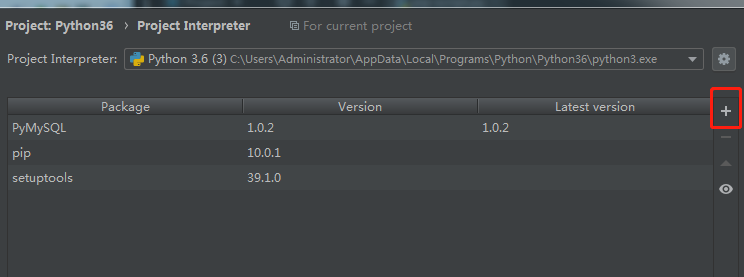
第二步
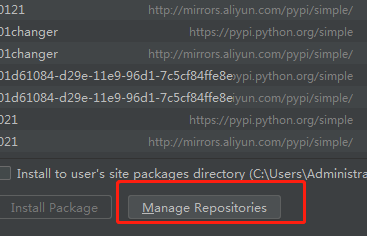
第三步
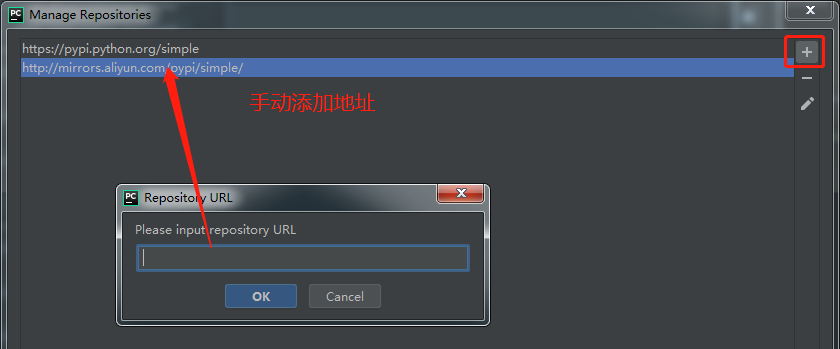
pip3下载模块报错
1.报错信息里面含有timeout关键字
        原因:当前计算机网络不稳定
        措施:多执行几次或者更换网络
2.报错信息里面含有warning警告版本过低
        原因:pip3工具版本过低需要更新
         措施:直接拷贝提示的更新命令更新即可
3.报错信息里面没有任何关键字就是一堆红色字体
        原因:可能是即将下载的模块对计算机环境有要求
         措施:下载之前需要先准备好环境(百度搜一下)
import pymysql
# 创建连接对象
conn = pymysql.connect(
    host = '127.0.0.1',
    port = 3306,
    user ='root',
    password='123',
    database='db6',
    charset = 'utf8'
)
cursor = conn.cursor(cursor=pymysql.cursors.DisctCursor)# 生成游标对象,等待用户输入命令
# 自定义sql语句
sql = 'select * from teacher'
# 执行sql语句
cursor.execute(sql)
# 获取执行的结果
res = cursor.fetchall()
print(res)


 浙公网安备 33010602011771号