
摘要:
``` <!DOCTYPE html .router link active { color: green; font size: 30px; } .box { border: 1px solid black; } nav { border: 1px solid red; } <! router l 阅读全文
posted @ 2019-05-28 23:19
193557749
阅读(231)
评论(0)
推荐(0)
摘要:
``` <!DOCTYPE html Document <! 1. 导航 首页 音乐 <! 2. 容器 // 3. 提供组件 const Home = { template: }; const Detail = { // 渲染动态路由标识id的值 // this.$router.push() // 阅读全文
posted @ 2019-05-28 23:14
193557749
阅读(201)
评论(0)
推荐(0)
摘要:
``` <!DOCTYPE html Document .router link exact active { color: red; } <! 1.设置链接 主页 热点 关于我们 <! 需求: 不想通过router link标签改标识 使用js方法改标识 我是第四个导航 <! 2. 提供容器:将来 阅读全文
posted @ 2019-05-28 23:11
193557749
阅读(196)
评论(0)
推荐(0)
摘要:
``` <!DOCTYPE html Document <! 1.设置链接 主页 <! 需求:点击top 渲染home组件 热点 关于我们 <! 2. 提供容器:将来渲染组件 // 3. 提供要渲染的组件选项(对象) const Home = { template: }; const Top = { 阅读全文
posted @ 2019-05-28 23:07
193557749
阅读(305)
评论(0)
推荐(0)
摘要:
``` <!DOCTYPE html Document <! 1.设置链接 <! to值 字符串 主页 <! to值 变量 热点 <! to值 可以是{path等} 关于我们 <! to值 可以是{name等} AAA <! to值 可以是{params:{参数名:值}} <! <router li 阅读全文
posted @ 2019-05-28 23:02
193557749
阅读(3211)
评论(0)
推荐(0)
摘要:
``` <!DOCTYPE html Document <! 1.设置链接 主页 <! 目的: 点击三个不同的router link 渲染同一个组件 点击 篮球/足球/乒乓球按钮 渲染Ball组件 足球 篮球 乒乓球 <! 2. 提供容器:将来渲染组件 // 3. 提供要渲染的组件选项(对象) co 阅读全文
posted @ 2019-05-28 22:58
193557749
阅读(142)
评论(0)
推荐(0)
摘要:
``` <!DOCTYPE html Document <! 1.设置链接 主页 热点 关于我们 <! 2. 提供容器:将来渲染组件 // 3. 提供要渲染的组件选项(对象) const Home = { template: }; const Top = { template: }; const A 阅读全文
posted @ 2019-05-28 22:55
193557749
阅读(192)
评论(0)
推荐(0)
只有注册用户登录后才能阅读该文。 阅读全文
posted @ 2019-05-28 22:54
193557749
阅读(0)
评论(0)
推荐(0)
摘要:
``` Document AAA BBB CCC DDD ``` 
评论(0)
推荐(0)
摘要:
``` <!DOCTYPE html Document <! 2. 使用组件 赋值 Vue.component("com a", { template: ` <div 我是来自父组件的数据 {{a}} </div `, // 1. 定义一个属性(变量) 此时没值 props: ["a"], meth 阅读全文
posted @ 2019-05-28 22:51
193557749
阅读(183)
评论(0)
推荐(0)
摘要:
``` <!DOCTYPE html Document <! 渲染各个组件的容器 <! <div id="abc" </div <! <child a msgchilda="str" </child a <! <child a :msgchilda="str" </child a // 需求: 想把 阅读全文
posted @ 2019-05-28 22:47
193557749
阅读(250)
评论(0)
推荐(0)
摘要:
``` <!DOCTYPE html Document <! 渲染各个组件的容器 // 需求: 想把根(父)组件的数据data中的某个数据msg传递给子组件child a去使用({{数据}}) Vue.component("child a", { template: `<div 我是子组件 {{co 阅读全文
posted @ 2019-05-28 22:46
193557749
阅读(162)
评论(0)
推荐(0)
摘要:
``` <!DOCTYPE html Document <! 这个位置是组件的视图内容< 选项template com a child c parent a Vue.component("child a", { template: }); Vue.component("child b", { tem 阅读全文
posted @ 2019-05-28 22:42
193557749
阅读(136)
评论(0)
推荐(0)
摘要:
``` <!DOCTYPE html Document new Vue({ el: ' app', data: { }, // 选项 // 1. 定义 // 2. 组件选项(template/data/methods等(除了el)) // 3. 使用 自定义标签名 components: { // 阅读全文
posted @ 2019-05-28 22:38
193557749
阅读(149)
评论(0)
推荐(0)
摘要:
``` Document 首页 用户管理 权限管理 商品管理 ``` 
评论(0)
推荐(0)
摘要:
需要安装包: moment.js axios.js vue.js 1.把db.json数据复制到db.json数据里面,开启db.json服务器 2.把html代码复制到html里面 html内容 阅读全文
posted @ 2019-05-28 22:28
193557749
阅读(1092)
评论(0)
推荐(0)
摘要:
``` <!DOCTYPE html Document // 两类+三步 // 全局 // 1. 定义 (组件名,组件选项所在对象) // 注意: 组件名命名, abc childA child a // 2. 写选项 // 注意: template 一个根元素 + data的值必须return{} 阅读全文
posted @ 2019-05-28 22:24
193557749
阅读(187)
评论(0)
推荐(0)
摘要:
``` <!DOCTYPE html Document // 封装 组件 // Vue.filter(); // Vue.directive(); // newVue Vue.component('span d', { template: ` <div <span {{count}}</span < 阅读全文
posted @ 2019-05-28 22:23
193557749
阅读(104)
评论(0)
推荐(0)
摘要:
``` Document {{msg}} ``` 阅读全文
posted @ 2019-05-28 22:18
193557749
阅读(225)
评论(0)
推荐(0)
摘要:
``` Document ``` 阅读全文
posted @ 2019-05-28 22:16
193557749
阅读(429)
评论(0)
推荐(0)
摘要:
1.把下面的数据放在 db.json文件里面 2.在db.json 同目录下 打开cmd,在命令窗口输入 json server watch db.json 开启服务器 以下是db.json 阅读全文
posted @ 2019-05-28 22:09
193557749
阅读(204)
评论(0)
推荐(0)
摘要:
``` Document methods中的方法 {{fn1()}} {{fn1()}} {{fn1()}} computed中的方法 {{fn2}} {{fn2}} {{fn2}} ... 阅读全文
posted @ 2019-05-28 22:06
193557749
阅读(241)
评论(0)
推荐(0)
摘要:
``` Document {{b}} {{d}} ``` 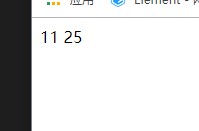 阅读全文
posted @ 2019-05-28 22:03
193557749
阅读(164)
评论(0)
推荐(0)
摘要:
添加 搜索 删除 阅读全文
posted @ 2019-05-28 21:58
193557749
阅读(245)
评论(0)
推荐(0)
摘要:
``` Document ``` 阅读全文
posted @ 2019-05-28 21:53
193557749
阅读(568)
评论(0)
推荐(0)
摘要:
``` Document aaaaaaa ``` 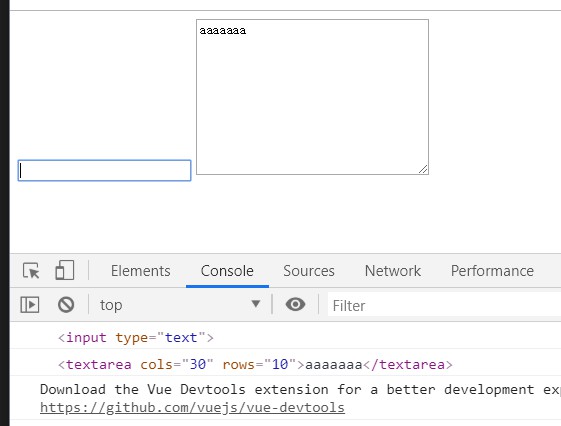 阅读全文
posted @ 2019-05-28 21:51
193557749
阅读(792)
评论(0)
推荐(0)
摘要:
``` Document pppppppp aaaaaaaa ``` 
评论(0)
推荐(0)
摘要:
``` Document {{count | a("元")}} -----111---- {{count | aFilter("元") | bFilter}} ``` 
评论(0)
推荐(0)
摘要:
``` Document 处理前 {{str}} 处理后 {{str | toUpper}} ``` 
评论(0)
推荐(0)
摘要:
``` Document 处理前 {{msg}} 处理后 {{msg | toUpper}} ``` 
评论(0)
推荐(0)
摘要:
``` Document {{msg}} ``` 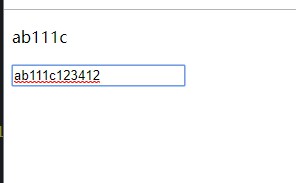 阅读全文
posted @ 2019-05-28 21:13
193557749
阅读(326)
评论(0)
推荐(0)
摘要:
``` Document {{msg}} aawesdfwesd这个位置是无效代码 ------------------1111111--------------------- ... 阅读全文
posted @ 2019-05-28 21:12
193557749
阅读(229)
评论(0)
推荐(0)
摘要:
``` Document 1. 给vue管理的容器标签div#app添加v-cloak 2. 样式代码中,选中拥有v-cloak属性的元素,设置样式display:none --> {{msg}} {{msg}} ... 阅读全文
posted @ 2019-05-28 21:12
193557749
阅读(348)
评论(0)
推荐(0)
摘要:
``` Document {{msg}} 需求-> 使用vue学过的知识实现v-model的效果(假设没有v-model) 1. 学过哪些知识->复习 2. v-model效果 2.1 运行文件->va... 阅读全文
posted @ 2019-05-28 21:04
193557749
阅读(306)
评论(0)
推荐(0)
摘要:
``` Document {{msg}} {{str}} ``` 
评论(0)
推荐(0)
摘要:
``` Document 内容 ``` 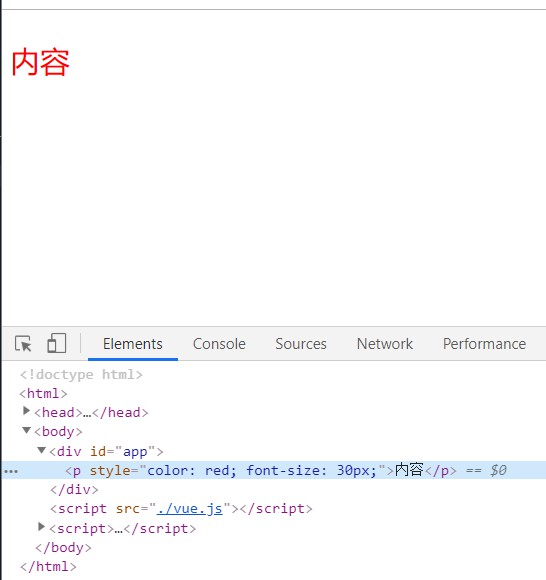 阅读全文
posted @ 2019-05-28 21:02
193557749
阅读(352)
评论(0)
推荐(0)
摘要:
``` Document data中的数据--> 内容 啦啦 蓝色的吗 噢噢噢噢 -----------------11111111111111--------------------------- ... 阅读全文
posted @ 2019-05-28 21:01
193557749
阅读(157)
评论(0)
推荐(0)
摘要:
``` Document 内容 -------------111111111-------------------------------------- apps内容111 apps内容2... 阅读全文
posted @ 2019-05-28 20:58
193557749
阅读(294)
评论(0)
推荐(0)
摘要:
``` Document 内容 ``` 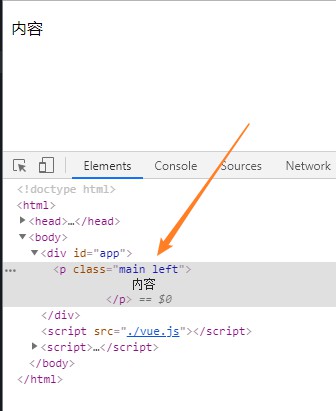 阅读全文
posted @ 2019-05-28 20:53
193557749
阅读(171)
评论(0)
推荐(0)
摘要:
``` 品牌名称: 品牌名称: ... 阅读全文
posted @ 2019-05-28 20:50
193557749
阅读(118)
评论(0)
推荐(0)
摘要:
``` Document {{msg}} 输入新值->value-> msg发生变化--> 数据msg = e.target.value --> --> ``` ... 阅读全文
posted @ 2019-05-28 20:48
193557749
阅读(164)
评论(0)
推荐(0)
摘要:
``` Document 内容 --> 内容 --> --> --> 内容 左边 ``` 
评论(0)
推荐(0)
摘要:
``` Document 速度快 --> {{v}} -------------111111--------------------- {{v}} -------------222222-------------------... 阅读全文
posted @ 2019-05-28 20:45
193557749
阅读(345)
评论(0)
推荐(0)
摘要:
``` Document 键值对中的值value 2. v-for="(v,k) in data中的对象per" v->键值对中的值value k->key 3. v-for="(v,k,i) in data中的对象per" v->键值对中的值value k->key i->索引--> {{v}} -->... 阅读全文
posted @ 2019-05-28 20:42
193557749
阅读(281)
评论(0)
推荐(0)
摘要:
``` Document 索引 --> {{v}} ---------111--------------- {{v}}---{{i}} ---------222-------------- {{b}}---{... 阅读全文
posted @ 2019-05-28 20:41
193557749
阅读(433)
评论(0)
推荐(0)
摘要:
``` Document 索引 --> {{v}} ---------111--------------- {{v}}---{{i}} ---------222-------------- {{b}}---{... 阅读全文
posted @ 2019-05-28 20:23
193557749
阅读(142)
评论(0)
推荐(0)
摘要:
``` Document 1 内容: 内容 2 100: {{'100'}} 3 v-text: 4 v-html: asdasdsad 5 v-html: 6 {{str}} 7 v-... 阅读全文
posted @ 2019-05-28 20:22
193557749
阅读(182)
评论(0)
推荐(0)
摘要:
``` Document 内容 --> 点击 内容 插入元素 false->移除 v-show true->display不为none false->dislplay为none --> v-... 阅读全文
posted @ 2019-05-28 20:22
193557749
阅读(183)
评论(0)
推荐(0)
摘要:
``` Document 内容 ```  阅读全文
posted @ 2019-05-28 20:19
193557749
阅读(188)
评论(0)
推荐(0)
摘要:
``` Document {{msg}} --> b ? 10:20 --> 18?'成年':'未成年'}} --> ``` 阅读全文
posted @ 2019-05-28 20:18
193557749
阅读(299)
评论(0)
推荐(0)
摘要:
``` Document {{count}} --> {{fn1()}} --> --> 按钮1 --> 按钮1 --> ``` 阅读全文
posted @ 2019-05-28 20:17
193557749
阅读(174)
评论(0)
推荐(0)
摘要:
``` Document {{msg}} --> {{count}} ``` 阅读全文
posted @ 2019-05-28 20:16
193557749
阅读(196)
评论(0)
推荐(0)
摘要:
``` Document {{str}} ``` 阅读全文
posted @ 2019-05-28 20:14
193557749
阅读(121)
评论(0)
推荐(0)
摘要:
``` Document {{msg}} {{msg}} {{msg}} {{msg}} --> ``` 阅读全文
posted @ 2019-05-28 20:11
193557749
阅读(199)
评论(0)
推荐(0)
 浙公网安备 33010602011771号