
cursor搭配Dify-DSL使用
参考:传送门
dify插件市场地址:https://cloud.dify.ai/plugins
@
概要
最近打算试试dify,这个可以说是n8n的基础版,不会代码的人也可以使用,入门流程已经走过了,看了个不错的文章尝试自己走了一遍,记录下
第一步
将Dify-DSL文档给cursor阅读,将https://docs.dify.ai/zh-hans/guides/application-orchestrate/creating-an-application设置到docs
第二步
跟cursor对话,对话内容如下
你是一个工作经验丰富的资深Dify工作流大师,请帮我开发一个`专业翻译助手`Dify工作流,请根据我的要求完成Dify工作流的设计和开发。
1. 自动识别输入语言,将用户语言转为一位东北老大爷的口气说出来
2. 模型使用`gpt-3.5-turbo`
## 限制
- 确保准确、自然、地道
- 如果遇到不确定的内容,在翻译后用括号标注说明
随后使用claude-4-sonnet生成了如下内容
app:
  description: 东北老大爷翻译助手 - 自动识别语言并用东北老大爷的口气说出来
  icon: 👴
  icon_background: '#FFF3E0'
  mode: workflow
  name: 东北老大爷翻译助手
  use_icon_as_answer_icon: false
dependencies:
- current_identifier: null
  type: marketplace
  value:
    marketplace_plugin_unique_identifier: langgenius/gemini:0.1.3@04d2d9177e7ac037ab9d2ecc2ab63b1bf9f81e4a862aa9bf3ac3165b436d182c
kind: app
version: 0.1.5
workflow:
  conversation_variables: []
  environment_variables: []
  features:
    file_upload:
      enabled: false
    opening_statement: '👴 嘿,小伙子!我是东北老大爷翻译助手,啥语言我都能给你整成地道的东北话!你甭管说啥语言,我都能给你翻译得明明白白的,保准让你听得舒坦!'
    retriever_resource:
      enabled: false
    sensitive_word_avoidance:
      enabled: false
    speech_to_text:
      enabled: false
    suggested_questions:
    - text: 今天天气真不错
    - text: 我很高兴见到你
    - text: 这个东西真好用
    - text: 工作顺利吗
    - text: 吃饭了吗
    suggested_questions_after_answer:
      enabled: true
    text_to_speech:
      enabled: false
      language: ''
      voice: ''
  graph:
    edges:
    - data:
        isInIteration: false
        isInLoop: false
        sourceType: start
        targetType: parameter-extractor
      id: 1744200001001-source-1744200001002-target
      source: '1744200001001'
      sourceHandle: source
      target: '1744200001002'
      targetHandle: target
      type: custom
      zIndex: 0
    - data:
        isInIteration: false
        isInLoop: false
        sourceType: parameter-extractor
        targetType: llm
      id: 1744200001002-source-1744200001003-target
      source: '1744200001002'
      sourceHandle: source
      target: '1744200001003'
      targetHandle: target
      type: custom
      zIndex: 0
    - data:
        isInIteration: false
        isInLoop: false
        sourceType: llm
        targetType: end
      id: 1744200001003-source-1744200001004-target
      source: '1744200001003'
      sourceHandle: source
      target: '1744200001004'
      targetHandle: target
      type: custom
      zIndex: 0
    nodes:
    - data:
        desc: '接收用户输入的任意语言文本'
        selected: false
        title: 开始
        type: start
        variables:
        - label: 输入文本(任意语言)
          max_length: 2000
          options: []
          required: true
          type: text-input
          variable: input_text
      height: 90
      id: '1744200001001'
      position:
        x: 80
        y: 282
      positionAbsolute:
        x: 80
        y: 282
      selected: false
      sourcePosition: right
      targetPosition: left
      type: custom
      width: 244
    - data:
        desc: '识别输入语言类型'
        instruction: '请分析用户输入的文本,识别其语言类型。返回结果格式:{"language": "语言名称", "confidence": "置信度"}'
        model:
          completion_params:
            temperature: 0.1
          mode: chat
          name: gpt-3.5-turbo
          provider: openai
        parameters:
        - name: detected_language
          type: string
          description: '检测到的语言名称'
          required: true
        - name: confidence_level
          type: string
          description: '语言检测的置信度'
          required: true
        query:
        - '请识别以下文本的语言类型:'
        - ''
        - '{{#1744200001001.input_text#}}'
        - ''
        - '请返回语言名称和置信度(高/中/低)。'
        reasoning_mode: 'function_call'
        selected: false
        title: 语言识别
        type: parameter-extractor
      height: 90
      id: '1744200001002'
      position:
        x: 384
        y: 282
      positionAbsolute:
        x: 384
        y: 282
      selected: false
      sourcePosition: right
      targetPosition: left
      type: custom
      width: 244
    - data:
        context:
          enabled: true
          variable_selector:
          - '1744200001001'
          - input_text
        desc: '用东北老大爷的口气翻译内容'
        model:
          completion_params:
            temperature: 0.7
          mode: chat
          name: gpt-3.5-turbo
          provider: openai
        prompt_template:
        - id: system_prompt_001
          role: system
          text: '你是一位地道的东北老大爷,说话幽默风趣,有着浓厚的东北方言特色。你的任务是用东北老大爷的口气重新表达用户输入的内容。

## 表达要求:
1. 首先准确理解原文含义
2. 如果是外语则翻译成中文,如果是中文则直接转换成东北话
3. 专业术语要准确把握
4. 用东北老大爷的说话方式表达,包含:
   - 东北方言词汇(如:整、咋、嘛、呗、咋整、老铁等)
   - 亲切的称呼(如:小伙子、闺女、老弟、兄弟等)
   - 幽默诙谐的语调
   - 适当的感叹词(如:嘿、哎呀、我滴妈呀等)

## 输出格式:
**检测到的语言:** [语言名称]
**东北老大爷版:** [内容]

## 注意事项:
- 如果遇到不确定的专业术语,在后面用括号标注说明
- 保持东北老大爷的人设,但不要过度夸张
- 确保准确性的同时增加趣味性'
        - id: user_prompt_001
          role: user
          text: '请将以下文本用东北老大爷的口气表达:

原文:{{#1744200001001.input_text#}}

语言识别结果:{{#1744200001002.detected_language#}}(置信度:{{#1744200001002.confidence_level#}})'
        selected: false
        title: 东北老大爷翻译
        type: llm
        variables: []
        vision:
          enabled: false
      height: 90
      id: '1744200001003'
      position:
        x: 688
        y: 282
      positionAbsolute:
        x: 688
        y: 282
      selected: false
      sourcePosition: right
      targetPosition: left
      type: custom
      width: 244
    - data:
        desc: '输出翻译结果'
        outputs:
        - value_selector:
          - '1744200001003'
          - text
          variable: translation_result
        selected: false
        title: 结束
        type: end
      height: 90
      id: '1744200001004'
      position:
        x: 992
        y: 282
      positionAbsolute:
        x: 992
        y: 282
      selected: false
      sourcePosition: right
      targetPosition: left
      type: custom
      width: 244
    viewport:
      x: 0
      y: 0
      zoom: 1
第三步
在Dify的“工作室”导入刚刚生成的yml文件
第四步
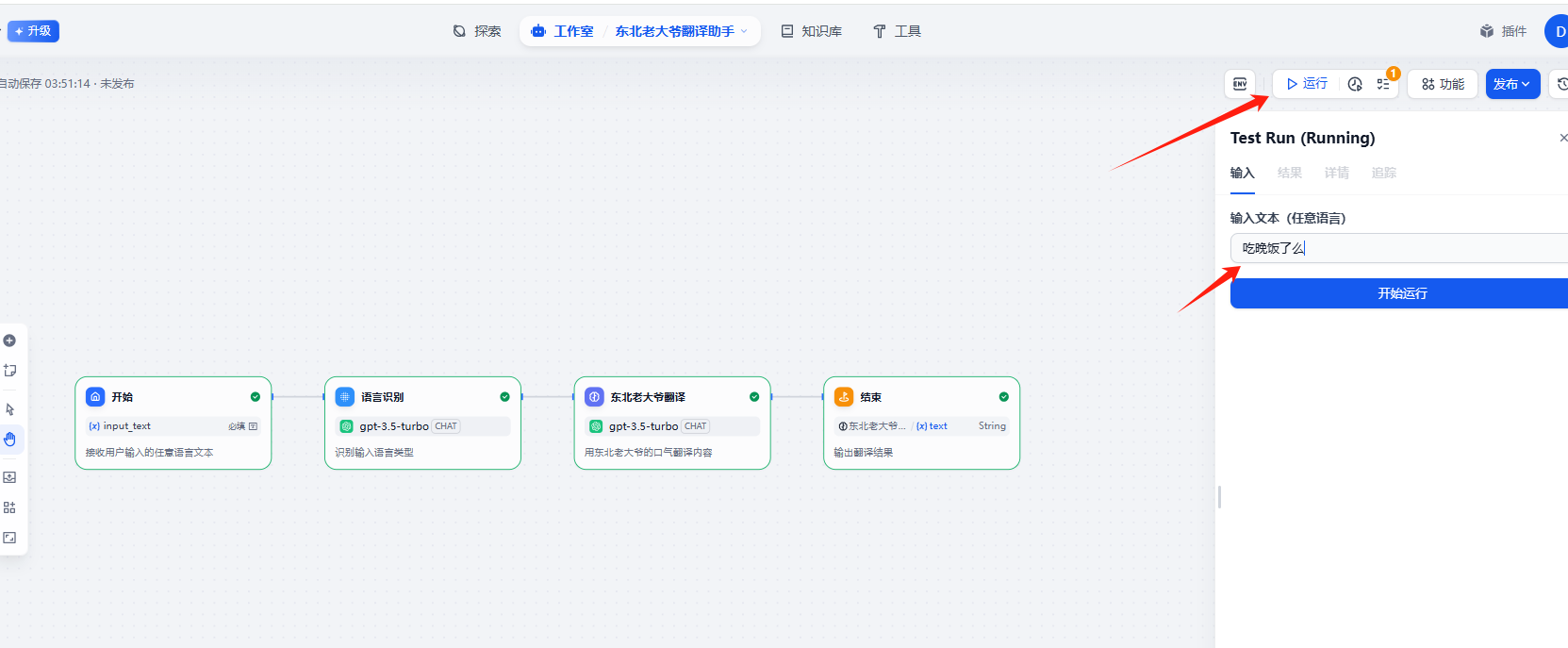
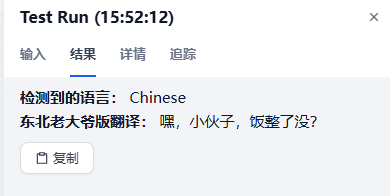
测试流程,如下图
小结
使用cursor生成其实就是为了看下里面的结构内容和充分阅读docs,其实也可以使用其他ai模型

 浙公网安备 33010602011771号