

OAuth2 密码模式下结合JWT
OAuth2 密码模式下结合JWT
前言
还记得在OAuth2概念的这张图吗?
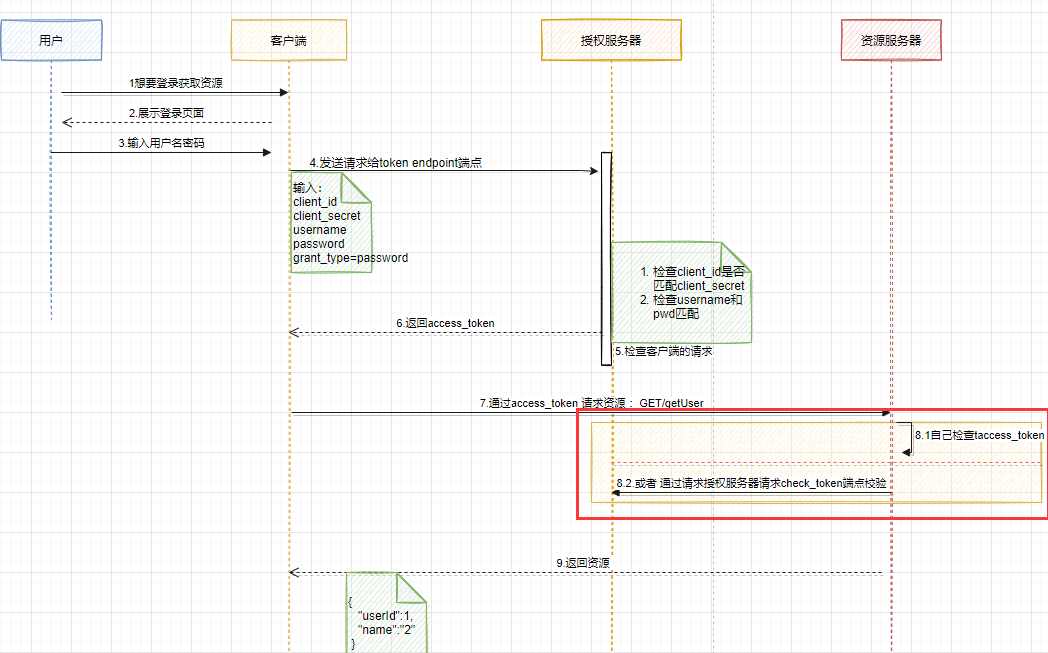
看到红框里面的,前面在写的代码是通过远程调用check_token 来进行校验access_token的,但是如果每次校验都交给授权服务器的话,会加重授权服务器的重担,所以资源服务器其实是可以自己校验的(图中8.1小点),例如通过JWT,(jwt相关的知识可以参考:jwt概念 jwt的生成)
一般来讲token的存储可以有如下几种:
- InMemoryTokenStore
- JdbcTokenStore
- JwtTokenStore
- RedisTokenStore
同样,代码先行的方式介绍Oauth2结合jwt
首先还是准备两个服务

授权服务
- SpringSecurity配置
@Configuration
public class SecurityConfig extends WebSecurityConfigurerAdapter {

    //密码管理器,可以认为是时间戳加盐的一种方式
    @Bean
    public PasswordEncoder passwordEncoder() {
        return new BCryptPasswordEncoder();
    }

    @Bean
    public AuthenticationManager authenticationManager() throws Exception {
        return super.authenticationManager();
    }


//    @Bean
//    public UserDetailsService userDetailsService(){
//        return this.userDetailsService();
//    }

    /**
     * 配置authenticationManager->providerManager->authenticationProvider->UserdetailServices->userDetails(存放的是用户信息)-》最终设置到
     * SpringSecurityContextHolder
     * 所以我们可以通过UserDetailService来得到用户信息,也可以将用信息存储在内存中,
     * 像下面这样:可以在这里配置一些用户名和密码,以及用户所对应的权限
     *
     * @param auth
     * @throws Exception
     */
    @Override
    protected void configure(AuthenticationManagerBuilder auth) throws Exception {
        auth.inMemoryAuthentication().
                withUser("hxx").
                password(passwordEncoder().encode("123456")).authorities(Collections.emptyList())
                .and().
                withUser("wm").
                password(passwordEncoder().encode("123456")).
                authorities(new ArrayList<>(0));
    }

    //配置http
    @Override
    protected void configure(HttpSecurity http) throws Exception {
        //任何请求都需要验证
        http.authorizeRequests().anyRequest().authenticated();
    }

    //配置web资源
    @Override
    public void configure(WebSecurity web) throws Exception {
        super.configure(web);
    }
}
- 授权服务配置,授权服务配置对比之前的配置就加了jwtTokenStore和jwtAccessTokenConverter
@Configuration
@EnableAuthorizationServer
public class AuthorizationServerConfig extends AuthorizationServerConfigurerAdapter {

    @Autowired
    private AuthenticationManager authenticationManager;

    @Autowired
    private PasswordEncoder passwordEncoder;

//    @Autowired
//    private UserDetailsService userDetailsService;

    //配置客户端
    @Override
    public void configure(ClientDetailsServiceConfigurer clients) throws Exception {
        clients.inMemory().
                withClient("client1"). //客户端id
                secret(passwordEncoder.encode("client_secret"))    //客户端密码
                .scopes("all")
                .authorizedGrantTypes("password"); // 密码模式
    }

    //配置安全约束
    @Override
    public void configure(AuthorizationServerSecurityConfigurer security) throws Exception {
        security.checkTokenAccess("permitAll()").//<1> 访问check_token  不需要认证
                tokenKeyAccess("permitAll()") //<2> 访问 token端点 不需要认证
                .allowFormAuthenticationForClients();
    }

    //配置授权端点等配置
    @Override
    public void configure(AuthorizationServerEndpointsConfigurer endpoints) throws Exception {
        endpoints.authenticationManager(authenticationManager)
                .tokenStore(jwtTokenStore())
                .accessTokenConverter(jwtAccessTokenConverter());
    }

    @Bean
    public JwtAccessTokenConverter jwtAccessTokenConverter(){
        JwtAccessTokenConverter converter = new JwtAccessTokenConverter();
        converter.setSigningKey("hxx_key"); //<3> 设置 sign_key
        return converter;
    }

    @Bean
    public TokenStore jwtTokenStore(){
        return new JwtTokenStore(jwtAccessTokenConverter());
    }

}
资源服务
资源服务配置,对比之前的资源服务配置,也只是多了jwtTokenStore和jwtAccessTokenConverter
@Configuration
@EnableResourceServer
public class ResourcesServerConfig extends ResourceServerConfigurerAdapter {


    // 配置资源服务的安全约束
    @Override
    public void configure(ResourceServerSecurityConfigurer resources) throws Exception {
        //配置和授权服务器一样的tokenStore
       resources.tokenStore(jwtTokenStore());
    }

    @Bean
    public JwtTokenStore jwtTokenStore(){
        return new JwtTokenStore(jwtAccessTokenConverter());
    }

    @Bean
    public JwtAccessTokenConverter jwtAccessTokenConverter(){
        JwtAccessTokenConverter converter = new JwtAccessTokenConverter();
        converter.setSigningKey("hxx_key");
        return converter;
    }

    @Override
    public void configure(HttpSecurity http) throws Exception {
        //任何请求都需要认证
        http.authorizeRequests().anyRequest().authenticated();
    }
}
测试
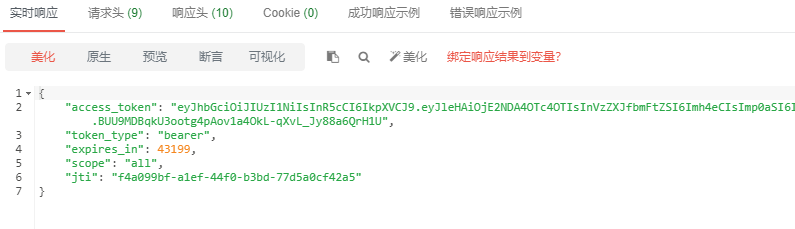
- 请求/oauth/token
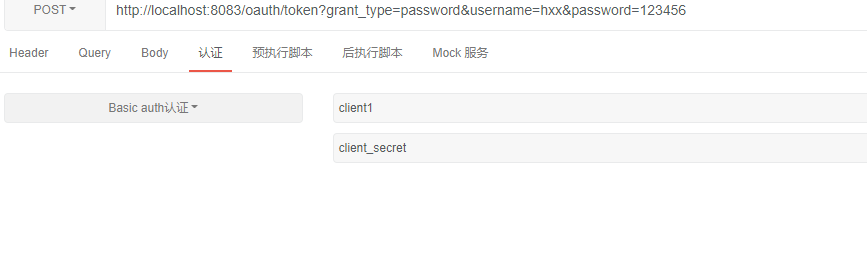
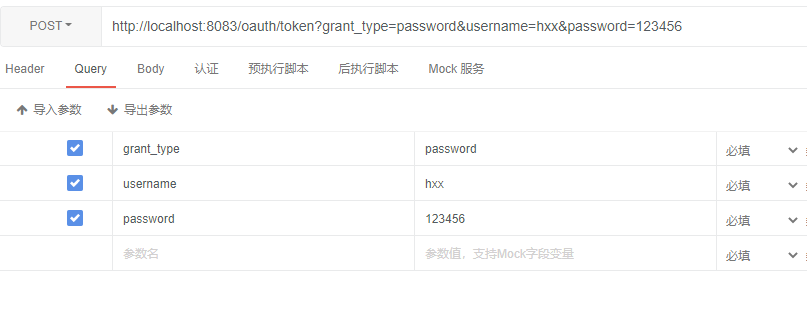
返回
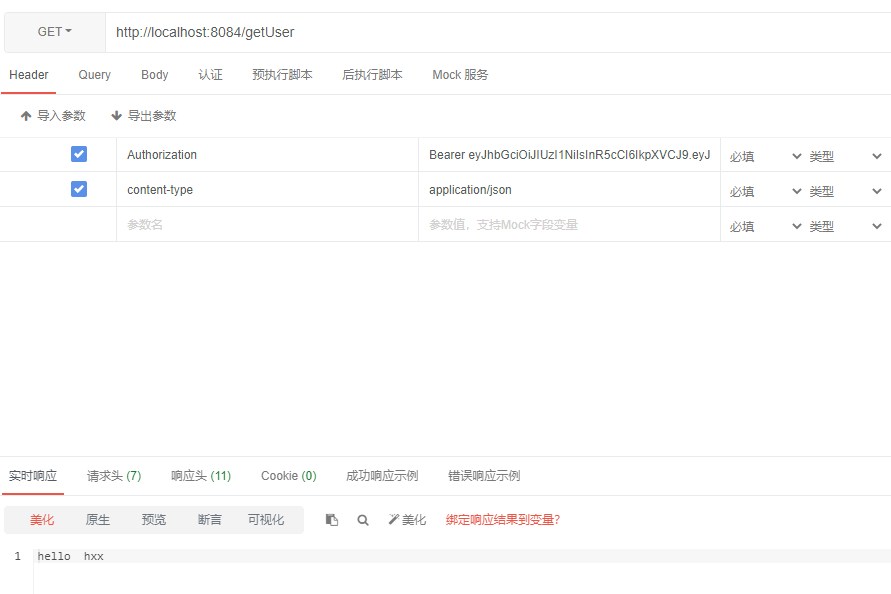
- 请求资源
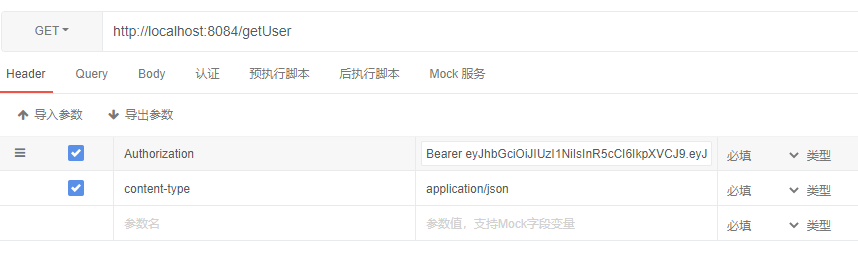
返回hello hxx
源码分析
请求/oauth/token
主要分析的是为什么通过jwtTokenStore就实现了生成token,和校验token的过程
生成token和之前在OAuth2 密码模式分析/oauth/token这一部分源码差不多,再认证成功后,看一下后面生成access_token的方法,重点看看DefaulTokenService的createAccessToken方法
public class DefaultTokenServices implements AuthorizationServerTokenServices, ResourceServerTokenServices,
		ConsumerTokenServices, InitializingBean {
...//省略

	private TokenStore tokenStore;

	private ClientDetailsService clientDetailsService;

	private TokenEnhancer accessTokenEnhancer;

	private AuthenticationManager authenticationManager;

	/**
	 * Initialize these token services. If no random generator is set, one will be created.
	 */
	public void afterPropertiesSet() throws Exception {
		Assert.notNull(tokenStore, "tokenStore must be set");
	}

	@Transactional
	public OAuth2AccessToken createAccessToken(OAuth2Authentication authentication) throws AuthenticationException {

		OAuth2AccessToken existingAccessToken = tokenStore.getAccessToken(authentication);
		OAuth2RefreshToken refreshToken = null;
		if (existingAccessToken != null) {
			if (existingAccessToken.isExpired()) {
				if (existingAccessToken.getRefreshToken() != null) {
					refreshToken = existingAccessToken.getRefreshToken();
					// The token store could remove the refresh token when the
					// access token is removed, but we want to
					// be sure...
					tokenStore.removeRefreshToken(refreshToken);
				}
				tokenStore.removeAccessToken(existingAccessToken);
			}
			else {
				// Re-store the access token in case the authentication has changed
				tokenStore.storeAccessToken(existingAccessToken, authentication);
				return existingAccessToken;
			}
		}

		// Only create a new refresh token if there wasn't an existing one
		// associated with an expired access token.
		// Clients might be holding existing refresh tokens, so we re-use it in
		// the case that the old access token
		// expired.
		if (refreshToken == null) {
			refreshToken = createRefreshToken(authentication);
		}
		// But the refresh token itself might need to be re-issued if it has
		// expired.
		else if (refreshToken instanceof ExpiringOAuth2RefreshToken) {
			ExpiringOAuth2RefreshToken expiring = (ExpiringOAuth2RefreshToken) refreshToken;
			if (System.currentTimeMillis() > expiring.getExpiration().getTime()) {
				refreshToken = createRefreshToken(authentication);
			}
		}

		OAuth2AccessToken accessToken = createAccessToken(authentication, refreshToken);//<1>
		tokenStore.storeAccessToken(accessToken, authentication); //<2>
		// In case it was modified
		refreshToken = accessToken.getRefreshToken();
		if (refreshToken != null) {
			tokenStore.storeRefreshToken(refreshToken, authentication);
		}
		return accessToken;

	}
            ...//省略

   }
<1>通过DefaultTokenService 生成accessToken;
<2>通过JwtTokenStore存储token,但是实际上JwtTokenStore并不存储token,下面storeAccessToken实际上是一个空方法
@Override
public void storeAccessToken(OAuth2AccessToken token, OAuth2Authentication authentication) {
}
仔细看下DefaultTokenService#createAccessToken
private OAuth2AccessToken createAccessToken(OAuth2Authentication authentication, OAuth2RefreshToken refreshToken) {
    DefaultOAuth2AccessToken token = new DefaultOAuth2AccessToken(UUID.randomUUID().toString());
    int validitySeconds = getAccessTokenValiditySeconds(authentication.getOAuth2Request());
    if (validitySeconds > 0) {
        token.setExpiration(new Date(System.currentTimeMillis() + (validitySeconds * 1000L)));
    }
    token.setRefreshToken(refreshToken);
    token.setScope(authentication.getOAuth2Request().getScope());

    return accessTokenEnhancer != null ? accessTokenEnhancer.enhance(token, authentication) : token;
}
因为在授权配置里面配置了相应的accessTokenConverter :
@Bean
public JwtAccessTokenConverter jwtAccessTokenConverter(){
    JwtAccessTokenConverter converter = new JwtAccessTokenConverter();
    converter.setSigningKey("hxx_key"); //<3> 设置 sign_key
    return converter;
}
所以token的生成会由这个accessTokenEnhancer.enhance(token, authentication)来创建,具体看看acessTokenEnhancer.enhance()这个方法
public class JwtAccessTokenConverter implements TokenEnhancer, AccessTokenConverter, InitializingBean {

	...//省略

    public OAuth2AccessToken enhance(OAuth2AccessToken accessToken, OAuth2Authentication authentication) {
		DefaultOAuth2AccessToken result = new DefaultOAuth2AccessToken(accessToken);
		Map<String, Object> info = new LinkedHashMap<String, Object>(accessToken.getAdditionalInformation());
		String tokenId = result.getValue();
		if (!info.containsKey(TOKEN_ID)) {
			info.put(TOKEN_ID, tokenId);
		}
		else {
			tokenId = (String) info.get(TOKEN_ID);
		}
		result.setAdditionalInformation(info);
		result.setValue(encode(result, authentication)); // <1>
		OAuth2RefreshToken refreshToken = result.getRefreshToken();
		if (refreshToken != null) {
			DefaultOAuth2AccessToken encodedRefreshToken = new DefaultOAuth2AccessToken(accessToken);
			encodedRefreshToken.setValue(refreshToken.getValue());
			// Refresh tokens do not expire unless explicitly of the right type
			encodedRefreshToken.setExpiration(null);
			try {
				Map<String, Object> claims = objectMapper
						.parseMap(JwtHelper.decode(refreshToken.getValue()).getClaims());
				if (claims.containsKey(TOKEN_ID)) {
					encodedRefreshToken.setValue(claims.get(TOKEN_ID).toString());
				}
			}
			catch (IllegalArgumentException e) {
			}
			Map<String, Object> refreshTokenInfo = new LinkedHashMap<String, Object>(
					accessToken.getAdditionalInformation());
			refreshTokenInfo.put(TOKEN_ID, encodedRefreshToken.getValue());
			refreshTokenInfo.put(ACCESS_TOKEN_ID, tokenId);
			encodedRefreshToken.setAdditionalInformation(refreshTokenInfo);
			DefaultOAuth2RefreshToken token = new DefaultOAuth2RefreshToken(
					encode(encodedRefreshToken, authentication));
			if (refreshToken instanceof ExpiringOAuth2RefreshToken) {
				Date expiration = ((ExpiringOAuth2RefreshToken) refreshToken).getExpiration();
				encodedRefreshToken.setExpiration(expiration);
				token = new DefaultExpiringOAuth2RefreshToken(encode(encodedRefreshToken, authentication), expiration);
			}
			result.setRefreshToken(token);
		}
		return result;
	}
   ...//省略
}
<1>result.setValue(encode(result, authentication)), 这个就是来设置access_token的值的,通过JwtHelper工具类来生成这个access_token(这样就完成了对access_token的加密)。后面我们调用来验证前端传递的access_token的时候,是靠什么来校验的呢?
protected String encode(OAuth2AccessToken accessToken, OAuth2Authentication authentication) {
    String content;
    try {
        content = objectMapper.formatMap(tokenConverter.convertAccessToken(accessToken, authentication));
    }
    catch (Exception e) {
        throw new IllegalStateException("Cannot convert access token to JSON", e);
    }
    String token = JwtHelper.encode(content, signer).getEncoded();
    return token;
}
其实看到前面的关于Jwt的文章可以知道,它最终是靠JwtHelper.decodeAndVerify()方法解密的,解析access_token
protected Map<String, Object> decode(String token) {
    try {
        Jwt jwt = JwtHelper.decodeAndVerify(token, verifier);
        String claimsStr = jwt.getClaims();
        Map<String, Object> claims = objectMapper.parseMap(claimsStr);
        if (claims.containsKey(EXP) && claims.get(EXP) instanceof Integer) {
            Integer intValue = (Integer) claims.get(EXP);
            claims.put(EXP, new Long(intValue));
        }
        this.getJwtClaimsSetVerifier().verify(claims);
        return claims;
    }
    catch (Exception e) {
        throw new InvalidTokenException("Cannot convert access token to JSON", e);
    }
}
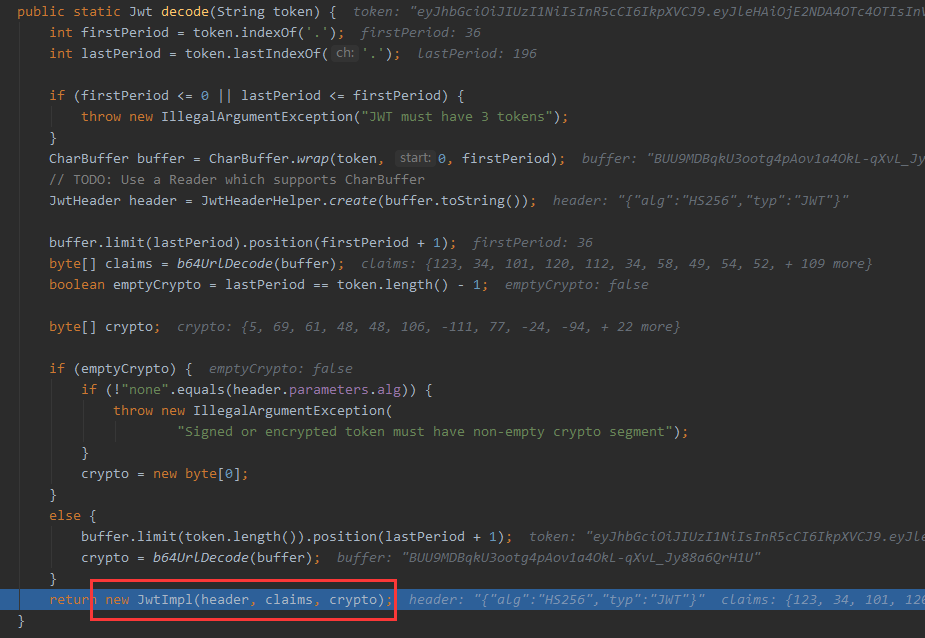
然后再通过生成的jwt里面的crypto和计算出的signingInput() 进行比对:verifier.verify(signingInput(), crypto);
public static Jwt decodeAndVerify(String token, SignatureVerifier verifier) {
		Jwt jwt = decode(token); // <1> 解析计算出jwt,三个部分都计算出来,并给crypto赋值,crypto可以认为就是
    签名signature部分
		jwt.verifySignature(verifier); // <2> 校验比对签名

		return jwt;
	}
@Override
public void verifySignature(SignatureVerifier verifier) {
    verifier.verify(signingInput(), crypto);
}
private byte[] signingInput() {
		return concat(b64UrlEncode(header.bytes()), JwtHelper.PERIOD,
				b64UrlEncode(content));
}
请求资源 GET: /getUser header: Authorization Bearer access_token
我们知道在SpringSecurity中,任何请求都逃不过OAuth2AuthenticationProcessingFilter过滤器,任何请求都经过它,
public class OAuth2AuthenticationProcessingFilter implements Filter, InitializingBean {
	...//省略
    public void doFilter(ServletRequest req, ServletResponse res, FilterChain chain) throws IOException,
			ServletException {

		final boolean debug = logger.isDebugEnabled();
		final HttpServletRequest request = (HttpServletRequest) req;
		final HttpServletResponse response = (HttpServletResponse) res;

		try {

			Authentication authentication = tokenExtractor.extract(request);

			if (authentication == null) {
				if (stateless && isAuthenticated()) {
					if (debug) {
						logger.debug("Clearing security context.");
					}
					SecurityContextHolder.clearContext();
				}
				if (debug) {
					logger.debug("No token in request, will continue chain.");
				}
			}
			else {
				request.setAttribute(OAuth2AuthenticationDetails.ACCESS_TOKEN_VALUE, authentication.getPrincipal());
				if (authentication instanceof AbstractAuthenticationToken) {
					AbstractAuthenticationToken needsDetails = (AbstractAuthenticationToken) authentication;
					needsDetails.setDetails(authenticationDetailsSource.buildDetails(request));
				}
				Authentication authResult = authenticationManager.authenticate(authentication);

				if (debug) {
					logger.debug("Authentication success: " + authResult);
				}

				eventPublisher.publishAuthenticationSuccess(authResult);
				SecurityContextHolder.getContext().setAuthentication(authResult);

			}
		}
		catch (OAuth2Exception failed) {
			SecurityContextHolder.clearContext();

			if (debug) {
				logger.debug("Authentication request failed: " + failed);
			}
			eventPublisher.publishAuthenticationFailure(new BadCredentialsException(failed.getMessage(), failed),
					new PreAuthenticatedAuthenticationToken("access-token", "N/A"));

			authenticationEntryPoint.commence(request, response,
					new InsufficientAuthenticationException(failed.getMessage(), failed));

			return;
		}

		chain.doFilter(request, response);
	}
    ...// 省略
}
看看tokenExtractor#extract 方法,就是用它来进行解析我们前端的access_token 。
public class BearerTokenExtractor implements TokenExtractor {

	private final static Log logger = LogFactory.getLog(BearerTokenExtractor.class);

	@Override
	public Authentication extract(HttpServletRequest request) {
		String tokenValue = extractToken(request);
		if (tokenValue != null) {
			PreAuthenticatedAuthenticationToken authentication = new PreAuthenticatedAuthenticationToken(tokenValue, "");
			return authentication;
		}
		return null;
	}

	protected String extractToken(HttpServletRequest request) {
		// first check the header...
		String token = extractHeaderToken(request);

		// bearer type allows a request parameter as well
		if (token == null) {
			logger.debug("Token not found in headers. Trying request parameters.");
			token = request.getParameter(OAuth2AccessToken.ACCESS_TOKEN);
			if (token == null) {
				logger.debug("Token not found in request parameters.  Not an OAuth2 request.");
			}
			else {
				request.setAttribute(OAuth2AuthenticationDetails.ACCESS_TOKEN_TYPE, OAuth2AccessToken.BEARER_TYPE);
			}
		}

		return token;
	}

	/**
	 * Extract the OAuth bearer token from a header.
	 *
	 * @param request The request.
	 * @return The token, or null if no OAuth authorization header was supplied.
	 */
	protected String extractHeaderToken(HttpServletRequest request) {
		Enumeration<String> headers = request.getHeaders("Authorization");
		while (headers.hasMoreElements()) { // typically there is only one (most servers enforce that)
			String value = headers.nextElement();
			if ((value.toLowerCase().startsWith(OAuth2AccessToken.BEARER_TYPE.toLowerCase()))) {
				String authHeaderValue = value.substring(OAuth2AccessToken.BEARER_TYPE.length()).trim();
				// Add this here for the auth details later. Would be better to change the signature of this method.
				request.setAttribute(OAuth2AuthenticationDetails.ACCESS_TOKEN_TYPE,
						value.substring(0, OAuth2AccessToken.BEARER_TYPE.length()).trim());
				int commaIndex = authHeaderValue.indexOf(',');
				if (commaIndex > 0) {
					authHeaderValue = authHeaderValue.substring(0, commaIndex);
				}
				return authHeaderValue;
			}
		}

		return null;
	}

}
如果我们是头部放了access_token,就会用这个extractHeaderToken方法来解析了,不过这段代码也很简单就是通过header来获取accessToken 然后返回这个access_token字符串而已。
获取到access_token成功后,通过Authentication类封装,然后交由SpringSecurity去校验真伪:authenticationManager.authenticate(authentication);

这样后面会写到SpringSecurity相关的内容,推荐江南一点雨关于SpringSecurity的文章

 浙公网安备 33010602011771号