
随笔分类 - C#
C#
摘要:C# 使用SqlDataAdapter和DataSet来访问数据库 实体 namespace VipSoft.Entity { [Table(Name = "PH_Prescription")] public class Prescription : Web.Core.Orm.Entity { [C
阅读全文
摘要:ASP.NET MVC WebApi 接口返回 JOSN 日期格式化 date format 全局配置 WebApiConfig public static class WebApiConfig { public static void Register(HttpConfiguration conf
阅读全文
摘要:C# Newtonsoft.Json.Formatting DateTime 日期格式化 List<Record> list = new List<Record>(); for (int i = 0; i < 10; i++) { Record item = new Record(); item.N
阅读全文
摘要:Java C# md5 加密值保持一致,一般是编码不一致造成的值不同 JAVA (加密:123456) C#(加密:123456) UTF-8 e10adc3949ba59abbe56e057f20f883e UTF8 e10adc3949ba59abbe56e057f20f883e UTF-16L
阅读全文
摘要:WPF 异步执行 Action<> Func<> https://www.cnblogs.com/vipsoft/p/4535037.html C# 异步 this.BeginInvoke 、Task.Run 或 Thread: https://www.cnblogs.com/vipsoft/p/1
阅读全文
摘要:C# 使用 DbDataReader 来访问数据库 使用SqlDataAdapter和DataSet来访问数据库 报:已有打开的与此 Command 相关联的 DataReader,必须首先将它关闭 解决方法,使用 using 包住 connection using System; using Sy
阅读全文
摘要:/// <summary> /// 当前时间是否是值班时间 /// </summary> private bool IsDutyTime { get { var dutyTime = "23:00-07:00"; if (!string.IsNullOrEmpty(dutyTime)) { var
阅读全文
摘要:.NET Core 在其上下文中,该请求的地址无效。 看了端口,发现没被占用,后来发现是IP地址变了 改成正确的IP就可以了。
阅读全文
摘要:没成功,只是做个记录,后面再研究 希望将第三方的 HandyControl.dll 嵌入到 exe 中,这样不用发多个文件给别人 ,用的时候挺舒服,缓解吧,不过治标不治本。 注意休息,加强锻炼非常有必要,每工作1小时,休息10分
阅读全文
摘要:[TOC] 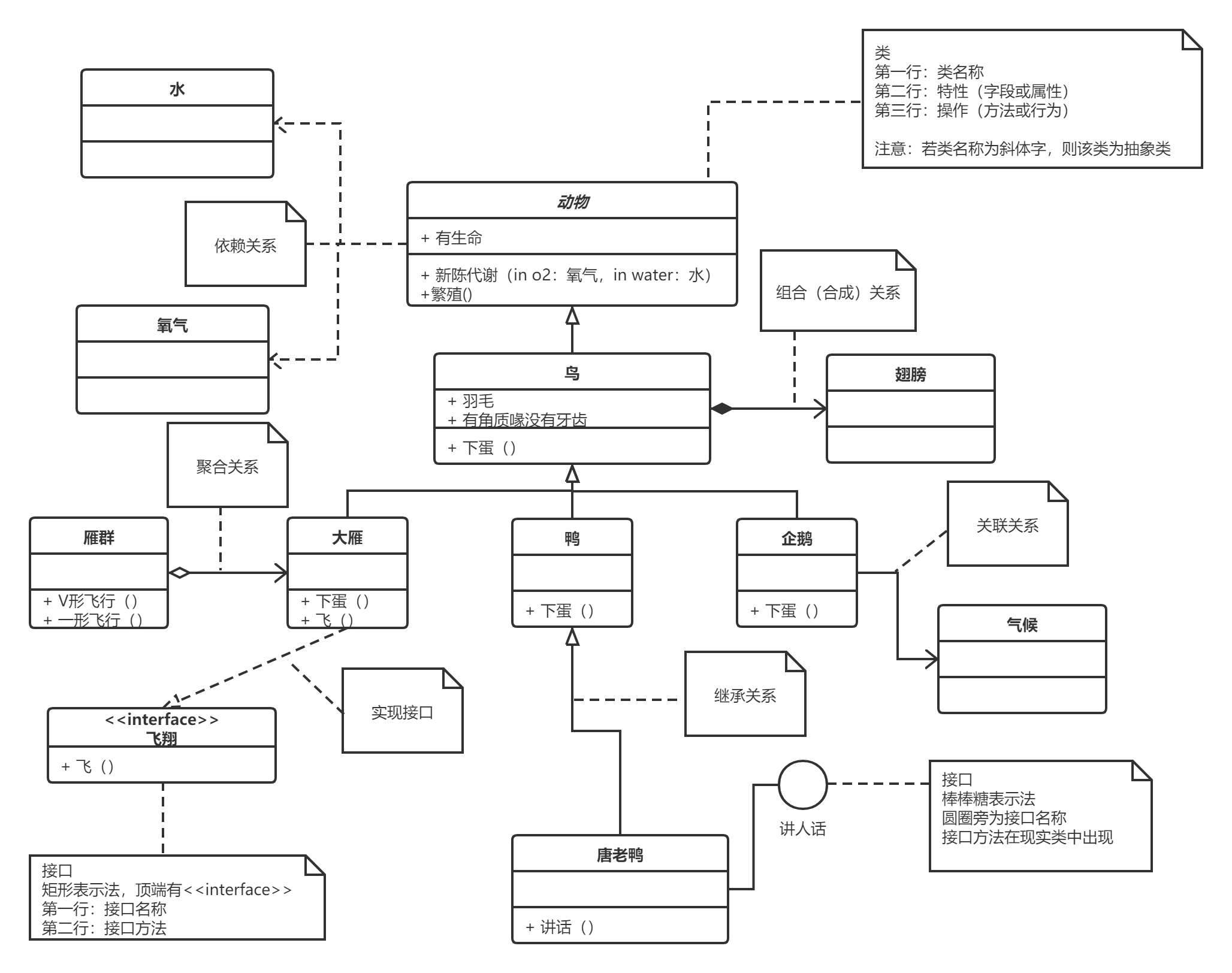 ## 类的表示(Class) 第一层:显示类的名称,如果是抽象类,则就用斜体显示。 第二层:是类的
阅读全文
摘要:Visual Studio 为多环境配置 Web.config 不同的环境,存在不同的配置,如:数据库连接字符串,通过多配置,方便做环境切换,配置的修改
阅读全文
摘要:说明: 在处理向该请求提供服务所需的配置文件时出错。请检查下面的特定错误详细信息并适当地修改配置文件。 分析器错误消息: 未能找到 CodeDom 提供程序类型“Microsoft.CodeDom.Providers.DotNetCompilerPlatform.CSharpCodeProvider
阅读全文
摘要:静态资源( StaticResource )指的是在程序载入内存时对资源的一次性使用,之后就不再访问这个资源了;动态资源(DynamicResource)使用指的是在程序运行过程中然会去访问资源。 简单的可以理解为,如果换皮肤而不重启程序,就需要用 DynamicResource <Window x
阅读全文
摘要:画一个 Border 对边框进行投影 <Window x:Class="WpfApp1.MainWindow" xmlns="http://schemas.microsoft.com/winfx/2006/xaml/presentation" xmlns:x="http://schemas.micr
阅读全文
摘要:要注意,拖拽的地方,需要加背景色,否则 DrageMove 将无效 MainWindows.xaml <Window x:Class="Report.MainWindow" xmlns="http://schemas.microsoft.com/winfx/2006/xaml/presentatio
阅读全文
摘要:C# //创建一个长度为10的byte数组,并且其中每个byte的值为0x08. byte[] myByteArray = Enumerable.Repeat((byte)0x08, 10).ToArray(); byte[] res= Enumerable.Range(1, 1000).Selec
阅读全文
摘要:常用方法: public class FileHelper { /// <summary> /// 用得比较多 /// </summary> /// <param name="msg"></param> public static void WriteAppend(string msg) { Sys
阅读全文
摘要:C# 和 java 基本数据类型 C#类型 java类型 描述 默认值 bool boolean 布尔值 False byte byte 8 位无符号整数 0 char char 16 位 Unicode 字符 '\0' decimal BigDecimal(非基本) 128 位精确的十进制值,28
阅读全文
摘要:在DataGrid中实现Button Command绑定 Command="{Binding editCommand}" 会默认查找UserList中对象的属性,而你的UserList中对象应该不包括editCommand属性;可以尝试:Command="{Binding DataContext.e
阅读全文
 浙公网安备 33010602011771号