
背包系统一
一、创建物品类以及物品类型属性
1.如图所示
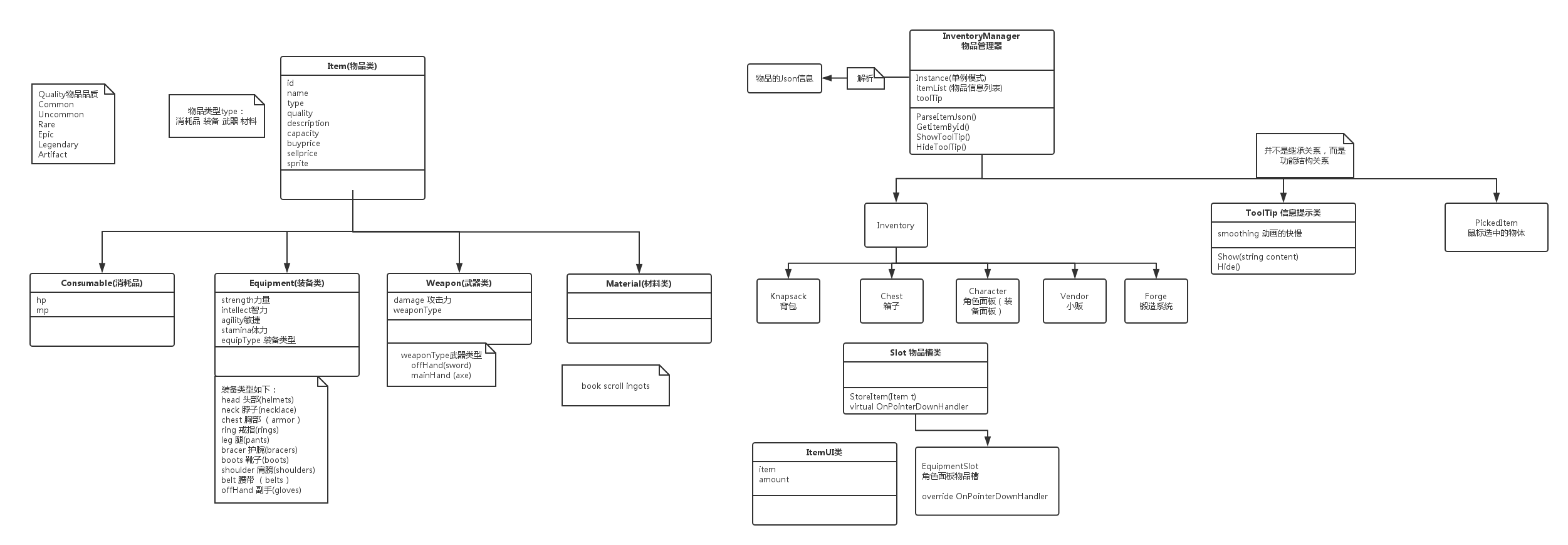
2.创建脚本Item类
/// <summary>
/// 物品基类
/// </summary>
public class Item  {

    public int ID { get; set; }//ID
    public string Name { get; set; }//名字
    public ItemType Type { get; set; }//类型
    public ItemQuality Quality { get; set; }//质量
    public string Description { get; set; }//描述
    public int Capacity { get; set; }//容量
    public int BuyPrice { get; set; }//购买价格
    public int SellPrice { get; set; }//售卖价格
    public string Sprite { get; set; }//物品图片

    public Item()
    {
        this.ID = -1;
    }
    //构造函数
    public Item(int id, string name, ItemType type, ItemQuality quality, string des, int capacity, int buyPrice, int sellPrice,string sprite)
    {
        this.ID = id;
        this.Name = name;
        this.Type = type;
        this.Quality = quality;
        this.Description = des;
        this.Capacity = capacity;
        this.BuyPrice = buyPrice;
        this.SellPrice = sellPrice;
        this.Sprite = sprite;
    }

    /// <summary>
    /// 物品类型
    /// </summary>
    public enum ItemType
    {
        Consumable,//消耗品
        Equipment,//装备
        Weapon,//武器
        Material//材料
    }
    /// <summary>
    /// 品质
    /// </summary>
    public enum ItemQuality
    {
        Common,//普通
        Uncommon,//不普通
        Rare,//稀有
        Epic,//史诗般
        Legendary,//传奇
        Artifact//古老
    }

    /// <summary>
    /// 得到提示面板应该显示什么样的内容
    /// </summary>
    /// <returns></returns>
    public virtual string GetToolTipText()
    {
        string color = "";
        switch (Quality)
        {
            case ItemQuality.Common:
                color = "white";
                break;
            case ItemQuality.Uncommon:
                color = "lime";
                break;
            case ItemQuality.Rare:
                color = "navy";
                break;
            case ItemQuality.Epic:
                color = "magenta";
                break;
            case ItemQuality.Legendary:
                color = "orange";
                break;
            case ItemQuality.Artifact:
                color = "red";
                break;
        }
        string text = string.Format("<color={4}>{0}</color>\n<size=10><color=green>购买价格:{1} 出售价格:{2}</color></size>\n<color=yellow><size=10>{3}</size></color>", Name, BuyPrice, SellPrice, Description, color);
        return text;
    }
}
消耗品类
/// <summary>
/// 消耗品类
/// </summary>
public class Consumable : Item {

    public int HP { get; set; }//血量
    public int MP { get; set; }//蓝量

    public Consumable(int id, string name, ItemType type, ItemQuality quality, string des, int capacity, int buyPrice, int sellPrice ,string sprite,int hp,int mp)
        :base(id,name,type,quality,des,capacity,buyPrice,sellPrice,sprite)
    {
        this.HP = hp;
        this.MP = mp;
    }

    public override string GetToolTipText()
    {
        string text = base.GetToolTipText();

        string newText = string.Format("{0}\n\n<color=blue>加血:{1}\n加蓝:{2}</color>", text, HP, MP);

        return newText;
    }

    public override string ToString()
    {
        string s = "";
        s += ID.ToString();
        s += Type;
        s += Quality;
        s += Description;
        s += Capacity;
        s += BuyPrice;
        s += SellPrice;
        s += Sprite;
        s += HP;
        s += MP;
        return s;
    }
}
装备类
public class Equipment : Item
{
    /// <summary>
    /// 力量
    /// </summary>
    public int Strength { get; set; }
    /// <summary>
    /// 智力
    /// </summary>
    public int Intellect { get; set; }
    /// <summary>
    /// 敏捷
    /// </summary>
    public int Agility { get; set; }
    /// <summary>
    /// 体力
    /// </summary>
    public int Stamina { get; set; }
    /// <summary>
    /// 装备类型
    /// </summary>
    public EquipmentType EquipType { get; set; }

    public Equipment(int id, string name, ItemType type, ItemQuality quality, string des, int capacity, int buyPrice, int sellPrice, string sprite,
        int strength, int intellect, int agility, int stamina, EquipmentType equipType)
        : base(id, name, type, quality, des, capacity, buyPrice, sellPrice, sprite)
    {
        this.Strength = strength;
        this.Intellect = intellect;
        this.Agility = agility;
        this.Stamina = stamina;
        this.EquipType = equipType;
    }

    public enum EquipmentType
    {
        None,
        Head,
        Neck,
        Chest,
        Ring,
        Leg,
        Bracer,
        Boots,
        Shoulder,
        Belt,
        OffHand
    }

    public override string GetToolTipText()
    {
        string text = base.GetToolTipText();
        string equipTypeText = "";
        switch (EquipType)
        {
            case EquipmentType.Head:
                equipTypeText = "头部";
                break;
            case EquipmentType.Neck:
                equipTypeText = "脖子";
                break;
            case EquipmentType.Chest:
                equipTypeText = "胸部";
                break;
            case EquipmentType.Ring:
                equipTypeText = "戒指";
                break;
            case EquipmentType.Leg:
                equipTypeText = "腿部";
                break;
            case EquipmentType.Bracer:
                equipTypeText = "护腕";
                break;
            case EquipmentType.Boots:
                equipTypeText = "靴子";
                break;
            case EquipmentType.Shoulder:
                equipTypeText = "护肩";
                break;
            case EquipmentType.Belt:
                equipTypeText = "腰带";
                break;
            case EquipmentType.OffHand:
                equipTypeText = "副手";
                break;
        }
        string newText = string.Format("{0}\n\n<color=blue>装备类型:{1}\n力量:{2}\n智力:{3}\n敏捷:{4}\n体力:{5}</color>", text, equipTypeText, Strength, Intellect, Agility, Stamina);
        return newText;
    }
}
武器类
/// <summary>
/// 武器
/// </summary>
public class Weapon : Item {

    public int Damage { get; set; }

    public WeaponType WpType { get; set; }

    public Weapon(int id, string name, ItemType type, ItemQuality quality, string des, int capacity, int buyPrice, int sellPrice,string sprite,
       int damage,WeaponType wpType)
        : base(id, name, type, quality, des, capacity, buyPrice, sellPrice,sprite)
    {
        this.Damage = damage;
        this.WpType = wpType;
    }
    public enum WeaponType
    {
        None,
        OffHand,
        MainHand
    }
    public override string GetToolTipText()
    {
        string text = base.GetToolTipText();

        string wpTypeText = "";

        switch (WpType)
        {
            case WeaponType.OffHand:
                wpTypeText = "副手";
                break;
            case WeaponType.MainHand:
                wpTypeText = "主手";
                break;
        }
        string newText = string.Format("{0}\n\n<color=blue>武器类型:{1}\n攻击力:{2}</color>", text, wpTypeText, Damage);
        return newText;
    }
}
材料类
/// <summary>
/// 材料类
/// </summary>
public class Material : Item {

    public Material(int id, string name, ItemType type, ItemQuality quality, string des, int capacity, int buyPrice, int sellPrice,string sprite)
        : base(id, name, type, quality, des, capacity, buyPrice, sellPrice,sprite)
    {
    }
}
二、UI搭建
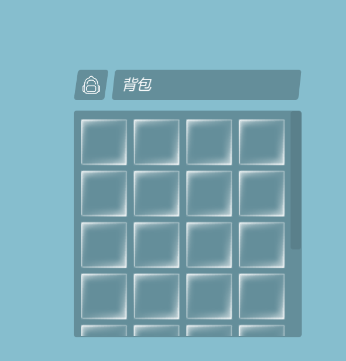
1.创建一个BagPanel,在其下面创建Scroll View,可以滑动的包,
2.在Content下创建空对象BagGridPanel,并添加组件GridLayoutGroup、Canvas Group。GridLayoutGroup组件Cell Size设置80X80,Spacing:10X8。添加脚本knapsack
3.在BagGridPanel下创建BagFrame物品槽,添加脚本Slot。并拖成预制体
4.在BagFrame下创建itemsprite(Imge)和ItemAmount(Text),添加脚本ItemUI,并拖成预制体
三、编写Json文件
1.https://www.bejson.com/jsoneditoronline/这个网址可以在线编写Json文件
[
    {
        "id": 1,
        "name": "血瓶",
        "type": "Consumable",
        "quality": "Common",
        "description": "这个是用来加血的",
        "capacity": 10,
        "buyPrice": 10,
        "sellPrice": 5,
        "hp": 10,
        "mp": 0,
        "sprite": "Sprites/Items/hp"
    },
    {
        "id": 2,
        "name": "蓝瓶",
        "type": "Consumable",
        "quality": "Common",
        "description": "这个是用来加蓝的",
        "capacity": 10,
        "buyPrice": 10,
        "sellPrice": 5,
        "hp": 0,
        "mp": 10,
        "sprite": "Sprites/Items/mp"
    },
    {
        "id": 3,
        "name": "胸甲",
        "type": "Equipment",
        "quality": "Rare",
        "description": "这个胸甲很牛B",
        "capacity": 1,
        "buyPrice": 20,
        "sellPrice": 10,
        "sprite": "Sprites/Items/armor",
		"strength":10,
		"intellect":4,
		"agility":9,
		"stamina":1,
		"equipType":"Chest"
    },
    {
        "id": 4,
        "name": "皮腰带",
        "type": "Equipment",
        "quality": "Epic",
        "description": "这个腰带可以加速",
        "capacity": 1,
        "buyPrice": 20,
        "sellPrice": 10,
        "sprite": "Sprites/Items/belts",
		"strength":1,
		"intellect":6,
		"agility":10,
		"stamina":10,
		"equipType":"Belt"
    },
    {
        "id": 5,
        "name": "靴子",
        "type": "Equipment",
        "quality": "Legendary",
        "description": "这个靴子可以加速",
        "capacity": 1,
        "buyPrice": 20,
        "sellPrice": 10,
        "sprite": "Sprites/Items/boots",
		"strength":10,
		"intellect":5,
		"agility":0,
		"stamina":10,
		"equipType":"Boots"
    },
    {
        "id": 6,
        "name": "护腕",
        "type": "Equipment",
        "quality": "Rare",
        "description": "这个护腕可以增加防御",
        "capacity": 1,
        "buyPrice": 20,
        "sellPrice": 10,
        "sprite": "Sprites/Items/bracers",
		"strength":1,
		"intellect":2,
		"agility":3,
		"stamina":4,
		"equipType":"Bracer"
    },
    {
        "id": 7,
        "name": "神启手套",
        "type": "Equipment",
        "quality": "Common",
        "description": "很厉害的手套",
        "capacity": 1,
        "buyPrice": 10,
        "sellPrice": 5,
        "sprite": "Sprites/Items/gloves",
		"strength":2,
		"intellect":3,
		"agility":4,
		"stamina":4,
		"equipType":"OffHand"
    },
    {
        "id": 8,
        "name": "头盔",
        "type": "Equipment",
        "quality": "Artifact",
        "description": "很厉害的头盔",
        "capacity": 1,
        "buyPrice": 10,
        "sellPrice": 5,
        "sprite": "Sprites/Items/helmets",
		"strength":2,
		"intellect":3,
		"agility":4,
		"stamina":4,
		"equipType":"Head"
    },
    {
        "id": 9,
        "name": "项链",
        "type": "Equipment",
        "quality": "Rare",
        "description": "很厉害的项链",
        "capacity": 1,
        "buyPrice": 10,
        "sellPrice": 5,
        "sprite": "Sprites/Items/necklace",
		"strength":2,
		"intellect":3,
		"agility":4,
		"stamina":4,
		"equipType":"Neck"
    },
    {
        "id": 10,
        "name": "戒指",
        "type": "Equipment",
        "quality": "Common",
        "description": "很厉害的戒指",
        "capacity": 1,
        "buyPrice": 20,
        "sellPrice": 20,
        "sprite": "Sprites/Items/rings",
		"strength":20,
		"intellect":3,
		"agility":4,
		"stamina":4,
		"equipType":"Ring"
    },
    {
        "id": 11,
        "name": "裤子",
        "type": "Equipment",
        "quality": "Uncommon",
        "description": "很厉害的裤子",
        "capacity": 1,
        "buyPrice": 40,
        "sellPrice": 20,
        "sprite": "Sprites/Items/pants",
		"strength":20,
		"intellect":30,
		"agility":40,
		"stamina":40,
		"equipType":"Leg"
    },
    {
        "id": 12,
        "name": "护肩",
        "type": "Equipment",
        "quality": "Legendary",
        "description": "很厉害的护肩",
        "capacity": 1,
        "buyPrice": 100,
        "sellPrice": 20,
        "sprite": "Sprites/Items/shoulders",
		"strength":2,
		"intellect":3,
		"agility":4,
		"stamina":4,
		"equipType":"Shoulder"
    },
    {
        "id": 13,
        "name": "开天斧",
        "type": "Weapon",
        "quality": "Rare",
        "description": "渔翁移山用的斧子",
        "capacity": 1,
        "buyPrice": 50,
        "sellPrice": 20,
        "sprite": "Sprites/Items/axe",
		"damage":100,
		"weaponType":"MainHand"
    },
    {
        "id": 14,
        "name": "阴阳剑",
        "type": "Weapon",
        "quality": "Rare",
        "description": "非常厉害的剑",
        "capacity": 1,
        "buyPrice": 15,
        "sellPrice": 5,
        "sprite": "Sprites/Items/sword",
		"damage":20,
		"weaponType":"OffHand"
    },
    {
        "id": 15,
        "name": "开天斧的锻造秘籍",
        "type": "Material",
        "quality": "Artifact",
        "description": "用来锻造开天斧的秘籍",
        "capacity": 2,
        "buyPrice": 100,
        "sellPrice": 99,
        "sprite": "Sprites/Items/book"
    },
    {
        "id": 16,
        "name": "头盔的锻造秘籍",
        "type": "Material",
        "quality": "Common",
        "description": "用来锻造头盔的秘籍",
        "capacity": 2,
        "buyPrice": 50,
        "sellPrice": 10,
        "sprite": "Sprites/Items/scroll"
    },
    {
        "id": 17,
        "name": "铁块",
        "type": "Material",
        "quality": "Common",
        "description": "用来锻造其他东西的必备材料",
        "capacity": 20,
        "buyPrice": 5,
        "sellPrice": 4,
        "sprite": "Sprites/Items/ingots"
    }
]
四、解析Json文件
1.Json文件放在Resources文件夹下
2.创建厂库管理对象脚本InventoryManager
public class InventoryManager : MonoBehaviour
{

    #region 单例模式
    private static InventoryManager _instance;
    public static InventoryManager Instance
    {
        get
        {
            if (_instance == null)
            {
                //下面的代码只会执行一次
                _instance = GameObject.Find("InventoryManager").GetComponent<InventoryManager>();
            }
            return _instance;
        }
    }
    #endregion

    /// <summary>
    ///  物品信息的列表(集合)
    /// </summary>
    private List<Item> itemList;
 void Awake()
    {
        ParseItemJson();
    }
  /// <summary>
    /// 解析物品信息
    /// </summary>
    void ParseItemJson()
    {
        itemList = new List<Item>();
        //文本为在Unity里面是 TextAsset类型
        TextAsset itemText = Resources.Load<TextAsset>("Items");
        string itemsJson = itemText.text;//物品信息的Json格式
        JSONObject j = new JSONObject(itemsJson);
        foreach (JSONObject temp in j.list)
        {
            string typeStr = temp["type"].str;
            Item.ItemType type= (Item.ItemType)System.Enum.Parse(typeof(Item.ItemType), typeStr);

            //下面的事解析这个对象里面的公有属性
            int id = (int)(temp["id"].n);
            string name = temp["name"].str;
            Item.ItemQuality quality = (Item.ItemQuality)System.Enum.Parse(typeof(Item.ItemQuality), temp["quality"].str);
            string description = temp["description"].str;
            int capacity = (int)(temp["capacity"].n);
            int buyPrice = (int)(temp["buyPrice"].n);
            int sellPrice = (int)(temp["sellPrice"].n);
            string sprite = temp["sprite"].str;

            Item item = null;
            switch (type)
            {
                case Item.ItemType.Consumable:
                    int hp = (int)(temp["hp"].n);
                    int mp = (int)(temp["mp"].n);
                    item = new Consumable(id, name, type, quality, description, capacity, buyPrice, sellPrice, sprite, hp, mp);
                    break;
                case Item.ItemType.Equipment:
                    //
                    int strength = (int)temp["strength"].n;
                    int intellect = (int)temp["intellect"].n;
                    int agility = (int)temp["agility"].n;
                    int stamina = (int)temp["stamina"].n;
                    Equipment.EquipmentType equipType = (Equipment.EquipmentType) System.Enum.Parse( typeof(Equipment.EquipmentType),temp["equipType"].str );
                    item = new Equipment(id, name, type, quality, description, capacity, buyPrice, sellPrice, sprite, strength, intellect, agility, stamina, equipType);
                    break;
                case Item.ItemType.Weapon:
                    //
                    int damage = (int) temp["damage"].n;
                    Weapon.WeaponType wpType = (Weapon.WeaponType)System.Enum.Parse(typeof(Weapon.WeaponType), temp["weaponType"].str);
                    item = new Weapon(id, name, type, quality, description, capacity, buyPrice, sellPrice, sprite, damage, wpType);
                    break;
                case Item.ItemType.Material:
                    //
                    item = new Material(id, name, type, quality, description, capacity, buyPrice, sellPrice, sprite);
                    break;
            }
            itemList.Add(item);
        }
    }
五、Inventory背包获取物品并进行存储
1.BagPanel
public class Knapsack : Inventory
{

    #region 单例模式
    private static Knapsack _instance;
    public static Knapsack Instance
    {
        get
        {
            if (_instance == null)
            {
                _instance =  GameObject.Find("BagGridPanel").GetComponent<Knapsack>();
            }
            return _instance;
        }
    }
    #endregion
}
2.InventoryManager
//通过ID获取物品
    public Item GetItemById(int id)
    {
        foreach (Item item in itemList)
        {
            if (item.ID == id)
            {
                return item;
            }
        }
        return null;
    }
3.Inventory
public class Inventory : MonoBehaviour {

    protected Slot[] slotList;//物品槽数组

    private float targetAlpha = 1;
    private float smoothing = 4;
    private CanvasGroup canvasGroup;

	public virtual void Start ()
    {
        slotList = GetComponentsInChildren<Slot>();
        canvasGroup = GetComponent<CanvasGroup>();
	}
    public bool StoreItem(int id)
    {
        Item item = InventoryManager.Instance.GetItemById(id);//通过ID获取物品
        return StoreItem(item);
    }
    public bool StoreItem(Item item)
    {
        if (item == null)
        {
            Debug.LogWarning("要存储的物品的id不存在");
            return false;
        }
        if (item.Capacity == 1)
        {
            Slot slot = FindEmptySlot();
            if (slot == null)
            {
                Debug.LogWarning("没有空的物品槽");
                return false;
            }
            else
            {
                slot.StoreItem(item);//把物品存储到这个空的物品槽里面
            }
        }
        else
        {
            Slot slot = FindSameIdSlot(item);
            if (slot != null)
            {
                slot.StoreItem(item);
            }
            else
            {
                Slot emptySlot = FindEmptySlot();
                if (emptySlot != null)
                {
                    emptySlot.StoreItem(item);
                }
                else
                {
                    Debug.LogWarning("没有空的物品槽");
                    return false;
                }
            }
        }
        return true;
    }

    /// <summary>
    /// 这个方法用来找到一个空的物品槽
    /// </summary>
    /// <returns></returns>
    private Slot FindEmptySlot()
    {
        foreach (Slot slot in slotList)
        {
            if (slot.transform.childCount == 0)
            {
                return slot;
            }
        }
        return null;
    }

    //找相同的物品槽
    private Slot FindSameIdSlot(Item item)
    {
        foreach (Slot slot in slotList)
        {
            if (slot.transform.childCount >= 1 && slot.GetItemId() == item.ID && slot.IsFilled() == false)
            {
                return slot;
            }
        }
        return null;
    }
4.Slot物品槽
/// <summary>
/// 物品槽
/// </summary>
public class Slot : MonoBehaviour{

    public GameObject itemPrefab;//物品预制体
    /// <summary>
    /// 把item放在自身下面
    /// 如果自身下面已经有item了,amount++
    /// 如果没有 根据itemPrefab去实例化一个item,放在下面
    /// </summary>
    /// <param name="item"></param>
    public void StoreItem(Item item)
    {
        if (transform.childCount == 0)
        {
            GameObject itemGameObject = Instantiate(itemPrefab) as GameObject;
            itemGameObject.transform.SetParent(this.transform);
            itemGameObject.transform.localScale = Vector3.one;
            itemGameObject.transform.localPosition = Vector3.zero;
            itemGameObject.GetComponent<ItemUI>().SetItem(item);
        }
        else
        {
            transform.GetChild(0).GetComponent<ItemUI>().AddAmount();
        }
    }
  /// <summary>
    /// 得到物品的id
    /// </summary>
    /// <returns></returns>
    public int GetItemId()
    {
        return transform.GetChild(0).GetComponent<ItemUI>().Item.ID;
    }
    //是否填满
    public bool IsFilled()
    {
        ItemUI itemUI = transform.GetChild(0).GetComponent<ItemUI>();
        return itemUI.Amount >= itemUI.Item.Capacity;//当前的数量大于等于容量
    }
5.ItemUI
public class ItemUI : MonoBehaviour
{

    #region Data
    public Item Item { get; private set; }//物品
    public int Amount { get; private set; }//物品数量
    #endregion

    #region UI Component
    private Image itemImage;//物品图片
    private Text amountText;//物品数量文本

    //获得物品图片组件
    private Image ItemImage
    {
        get
        {
            if (itemImage == null)
            {
                itemImage = GetComponent<Image>();
            }
            return itemImage;
        }
    }
    //获得物品数量文本组件
    private Text AmountText
    {
        get
        {
            if (amountText == null)
            {
                amountText = GetComponentInChildren<Text>();
            }
            return amountText;
        }
    }
    #endregion

    private float targetScale = 1f;

    private Vector3 animationScale = new Vector3(1.4f, 1.4f, 1.4f);

    private float smoothing = 4;
  //更新UI
    public void SetItem(Item item,int amount = 1)
    {
        transform.localScale = animationScale;
        this.Item = item;
        this.Amount = amount;
        // update ui
        ItemImage.sprite = Resources.Load<Sprite>(item.Sprite);
        if (Item.Capacity > 1)
            AmountText.text = Amount.ToString();
        else
            AmountText.text = "";
    }
    //增加物品数量
    public void AddAmount(int amount=1)
    {
        transform.localScale = animationScale;
        this.Amount += amount;
        //update ui
        if (Item.Capacity > 1)
            AmountText.text = Amount.ToString();
        else
            AmountText.text = "";
    }
6.测试脚本Player
void Update () {
        //G 随机得到一个物品放到背包里面
        if (Input.GetKeyDown(KeyCode.G))
        {
            int id = Random.Range(1, 18);
            Knapsack.Instance.StoreItem(id);
        }

 浙公网安备 33010602011771号