

uniapp App端输入框加表情(vue2)
用的renderjs
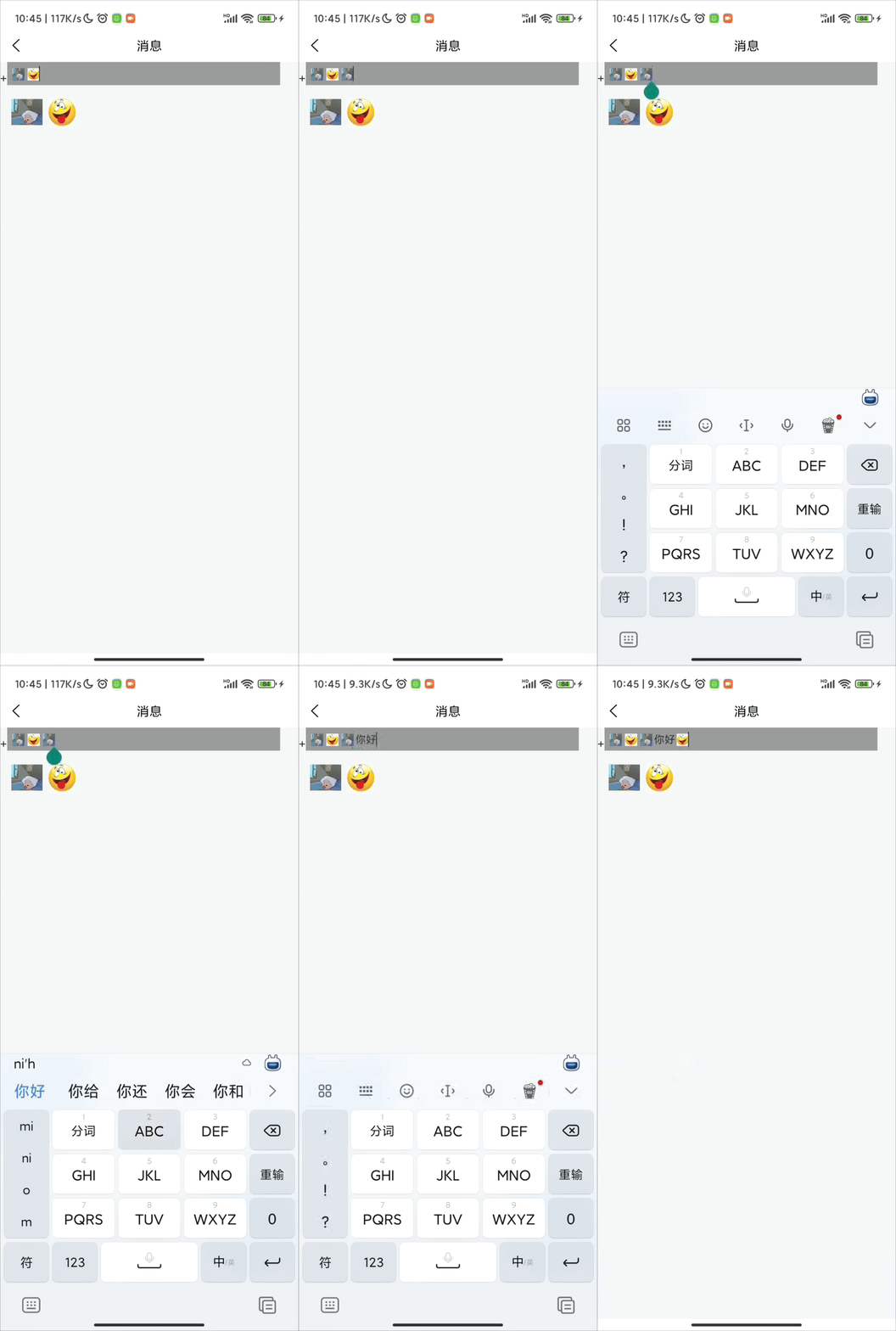
这个输入框组件
<template>
    <view class="my-content" @click="inputChange()">
        <view class="chat-placeholder" :style="{ 'line-height': lineHeight + 'px' }" v-if="!content && placeholder">
            {{ placeholder }}
        </view>
        <view ref="editableDiv" :operation="operation" :change:operation="editorRender.insertOperation" :focus="focus"
            :change:focus="editorRender.insertFocus" @blur="blurEvent" @focus="focusEvent" class="editor"
            contenteditable="true"
            :style="{ 'line-height': lineHeight + 'px', 'max-height': lineNumber * lineHeight + 'px', 'min-height': lineHeight + 'px' }">
        </view>
    </view>
</template>

<script>
export default {
    props: {
        placeholder: {
            type: String,
            default: '',
        },
        lineHeight: {
            type: Number,
            default: 15,
        },
        lineNumber: {
            type: Number,
            default: 5,
        },
    },
    data() {
        return {
            focus: false,
            content: '',
            operation: '',
        };
    },
    onLoad() {},
    methods: {
        /**
         * 添加图片
         * @param url
         */
        addImages(url) {
            const options = {
                type: 'images',
                value: url,
            };
            this.operationInput(options);
        },
        // 清空输入框(一般是发送完消息调用)
        clearInput() {
            this.operationInput({
                type: 'clear',
            });
        },
        // 删除
        deleteInput() {
            const options = {
                type: 'delete',
            };
            this.operationInput(options);
        },
        /**
         * 操作输入框
         */
        operationInput(options) {
            // {type:'',value:''}
            // type:'images' | 'clear' | 'delete'
            this.operation = options;
        },
        /**
         * 使input聚焦
         */
        onFocus() {
            this.focus = true;
        },
        blurEvent() {
            this.focus = false;
        },

        focusEvent() {},
        inputContent(e) {
            console.log(e.content);
            this.content = e.content == '<br>' ? '' : e.content;
            this.$emit('change', this.content);
            this.operation = '';
        },
        inputChange() {
            this.$emit('clickInput');
        },
    },
};
</script>
<script module="editorRender" lang="renderjs">
export default {
    name: "o-editor",
    data() {
        return {
            enterFlag: 2
        };
    },
    mounted() {
        let editor = document.querySelector(".editor");
        editor.addEventListener("keydown", this.keydownEvent);
        editor.addEventListener("keyup", this.keyupEvent);
        editor.addEventListener("click", this.clickInput);
    },
    methods: {
        /**
         * 聚焦
         */
        insertFocus(value) {
            if (!value) return;
            const editor = document.querySelector(".editor");
            const range = document.createRange();
            const selection = window.getSelection();
            selection.removeAllRanges();
            // 选择编辑器内容,然后折叠到末尾
            range.selectNodeContents(editor);
            range.collapse(false); // false 表示折叠到末尾,true 表示折叠到开始
            selection.addRange(range);
            editor.focus();
        },
        /**
         * 清空
         */
        clearContent() {
            let editor = document.querySelector(".editor");
            editor.innerHTML = "";
            this.insertFocus(true);
            this.keyupEvent();
        },
        keydownEvent(e) {
            // if (e.keyCode === 13) {
            //     if (++this.enterFlag < 2) {
            //         e.preventDefault();
            //         return false;
            //     }
            //     this.enterFlag = -1;
            //     return false;
            // }
        },
        keyupEvent(e) {
            let editor = document.querySelector(".editor");
            let content = editor.innerHTML;
            if (e && e.keyCode === 13) {
                let range = window.getSelection().getRangeAt(0);
                range.endContainer.setAttribute("name", "o---input---div---")
            }
            this.callMethod('inputContent', content)
        },
        callMethod(methodName, value) {
            this.$ownerInstance.callMethod(methodName, {
                content: value
            })
        },
        /**
         * 操作input
         */
        insertOperation(options) {
            if (!options) return;
            if (options.type === 'images') {
                this.insertImage(options);
            }
            if (options.type === 'clear') {
                this.clearContent();
            }
            if (options.type === 'delete') {
                this.deleteRenderInput()
            }
        },
        async insertImage(options) {
            if (!options) return;
            const {
                value,
                type
            } = options;
            let img = document.createElement("img");
            img.src = value;
            img.setAttribute("style",
                'width:24px; height: 24px;vertical-align:middle; margin: 0 1px;display: inline-block;');
            img.setAttribute("alt", '');
            img.setAttribute("class", 'emoji');
            // 节点上增加标签
            // const data = {name:'图片的名字'};
            // await this.serialization(data, img);
            this.insertImg(img);
        },
        insertImg(el) {
            const editor = document.querySelector(".editor");
            var selection = window.getSelection(); // 获取光标
            if ( // 如果没有焦点或者焦点不在输入框内,聚焦到输入框
                selection.anchorNode !== editor &&
                !editor.contains(selection.anchorNode)
            ) {
                // 聚焦到输入框
                selection.removeAllRanges();
                editor.focus();
                if (editor.lastChild)
                    selection.getRangeAt(0).setStartAfter(editor.lastChild);
                selection.collapseToEnd();
            }

            let range = selection.getRangeAt(0);
            range.deleteContents();

            range.insertNode(el);
            range = range.cloneRange();
            range.setStartAfter(el);
            range.collapse();
            selection.removeAllRanges();
            selection.addRange(range);
            this.keyupEvent();
            this.scrollToBottom();
        },
        /**
         * 删除
         */
        deleteRenderInput() {
            this.handleBackspace();
            this.keyupEvent();
        },
        handleBackspace() {
            const selection = window.getSelection();
            if (!selection.rangeCount) return;

            const range = selection.getRangeAt(0);
            const editor = range.startContainer.parentNode; // 获取编辑器容器

            // 检查光标是否在编辑器的末尾
            if (range.startOffset === 0 && range.startContainer === editor) {
                // 如果光标在编辑器开始位置,尝试删除最后一个子节点
                if (editor.lastChild) {
                    this.deleteNode(editor.lastChild);
                    return;
                }
            }

            // 如果光标在文本节点中
            if (range.startContainer.nodeType === 3) {
                const textNode = range.startContainer;
                const offset = range.startOffset;

                // 如果光标不在文本开始位置
                if (offset > 0) {
                    const text = textNode.textContent;
                    textNode.textContent = text.substring(0, offset - 1) + text.substring(offset);
                    range.setStart(textNode, offset - 1);
                    range.collapse(true);
                } else {
                    // 光标在文本开始位置,删除前一个兄弟节点
                    this.deletePreviousSibling(textNode);
                }
            } else {
                // 光标在元素节点中(如div、span等容器)
                // 检查是否有子节点,如果有,删除最后一个
                if (range.startContainer.childNodes.length > 0 && range.startOffset > 0) {
                    const nodeToDelete = range.startContainer.childNodes[range.startOffset - 1];
                    this.deleteNode(nodeToDelete);
                } else if (range.startContainer !== editor) {
                    // 如果光标在某个元素的开始位置,删除该元素前的兄弟节点
                    this.deletePreviousSibling(range.startContainer);
                }
            }

            // 更新选择
            selection.removeAllRanges();
            selection.addRange(range);
        },

        deleteNode(node) {
            if (node.nodeType === 3) { // 文本节点
                const text = node.textContent;
                if (text.length > 0) {
                    node.textContent = text.slice(0, -1);
                }
                // 如果文本节点变为空,则删除它
                if (node.textContent.length === 0) {
                    node.parentNode.removeChild(node);
                }
            } else { // 元素节点(如图片)
                node.parentNode.removeChild(node);
            }
        },

        deletePreviousSibling(node) {
            const previousSibling = node.previousSibling;
            if (previousSibling) {
                this.deleteNode(previousSibling);
            }
        },
        // 在插入图片后调用此方法
        scrollToBottom() {
            // 方法一:使用 scrollTop
            const container = document.querySelector('.editor'); // 替换为您的容器选择器
            container.scrollTop = container.scrollHeight;
        },
        // 序列化字符串:key=value;key=value
        serialization(data, el) {
            return new Promise((resovle) => {
                if (data instanceof Object) {
                    let str = "";
                    const keys = Object.keys(data);
                    if (!keys || keys.length == 0) {
                        return '';
                    }
                    for (const key of keys) {
                        el.setAttribute(key, data[key]);
                    }
                }
                resovle(true)
            })
        },
        // 点击输入框内容是设置光标
        clickInput(e) {
            if (!(e.target instanceof HTMLImageElement)) {
                return;
            }

            let target = e.target;
            // 获取点击图片的中心位置
            let targetX = target.x + Math.floor(target.width / 2);

            let selection = window.getSelection(); // 获取光标
            let range = selection.getRangeAt(0);

            range = range.cloneRange();
            if (e.x < targetX) {
                range.setStartBefore(target);
                range.setEndBefore(target);
            } else {
                range.setStartBefore(target);
                range.setEndAfter(target);
            }

            range.collapse();
            selection.removeAllRanges();
            selection.addRange(range);
        }
    }
};
</script>

<style>
.editor {
    overflow-y: auto;
    width: 100%;
    outline: none;
    position: relative;
}

.editor:focus {
    outline: none;
    border: none;
}

.my-content {
    display: flex;
    flex-direction: column;
    align-items: center;
    justify-content: center;
    flex: 1;
    position: relative;
}

.chat-placeholder {
    width: 100%;
    position: absolute;
    color: #999;
}
</style>
API
| 属性名 | 类型 | 默认值 | 说明 |
| placeholder | string | 输入框的提示文字 | |
|
lineHeight
|
number | 15 | 输入框的行高 |
|
lineNumber
|
number | 5 | 最多显示几行 |
Methods
通过$refs 调用
| 名称 | 说明 | 参数 |
| addImages | 往输入框插入图片 | Function(images) |
| clearInput | 清空输入框,一般是发送之后清空 | |
| deleteInput | 向前删除 | |
| onFocus | 输入框聚焦 |
Events
| 属性名 | 说明 |
| @change | 输入框里面的内容的回调 |
父组件 使用
父组件自己修改一下样式啥的
<template>
    <view class="view">
        <view>
            <view class="input-box">
                <view>+</view>
                <view class="chart-input">
                    <sdChatInput ref="chatInput" :lineHeight="20" @change="changeInput"></sdChatInput>
                </view>
                <view class="iconfont sdkj-biaoqing-copy expression-icon" :style="{ height: '20px' }" @click="onChangeImages()"></view>
            </view>
            <view class="input-footer">
                <view class="expression">
                    <view class="expression-item" v-for="(item, index) in imageList" @click="onHandleImage(item)">
                        <image :src="item.url" mode="aspectFit" class="expression-img"></image>
                    </view>
                </view>
            </view>
        </view>
    </view>
</template>
<script>
import sdChatInput from '@/components/base/sd-chat-input/index.vue';
export default {
    components: { sdChatInput },
    data() {
        return {
            // 表情图标列表
            imageList: [
                { name: 'name', url: 'https://lrwuyu.shenduxr.com/10001/20230605/ceb77ce688ea9556f40a46d02268e5ff.jpg' },
                { name: 'uu', url: 'https://img0.baidu.com/it/u=1395880520,3007226753&fm=253&fmt=auto&app=138&f=JPEG?w=475&h=521' },
            ],
        };
    },
    onLoad(options) {},
    methods: {
        // 点击选择你的表情,将url传入
        onHandleImage(item) {
            this.$refs.chatInput.addImages(item.url);
        },
        // 输入框内容改变
        changeInput(e) {
            console.log(e);
        },
        onChangeImages() {
            this.$refs.chatInput.onFocus();
        },
    },
    onShareAppMessage() {},
    onShareTimeline() {},
};
</script>
<style lang="scss">
.input-box {
    display: flex;
    align-items: flex-end;
    .chart-input {
        background-color: #999;
        flex: 1;
        padding: 10rpx;
    }
}
.expression {
    padding: 30rpx;
    display: grid;
    grid-template-columns: repeat(8, 1fr);
    gap: 10rpx;
    .expression-item {
        width: 80rpx;
        height: 80rpx;
        .expression-img {
            width: 100%;
            height: 100%;
        }
    }
}
.expression-icon {
    width: 50rpx;
    height: 50rpx;
    display: flex;
    justify-content: center;
    align-items: center;
}
</style>

 浙公网安备 33010602011771号