springboot入门-搭建web服务
作为如今java EE 主流开发框架,了解springboot 的开发规则,对我们进行代码审计工作具有重要意义。
一、springboot 搭建基本web服务
1、idea创建springboot项目
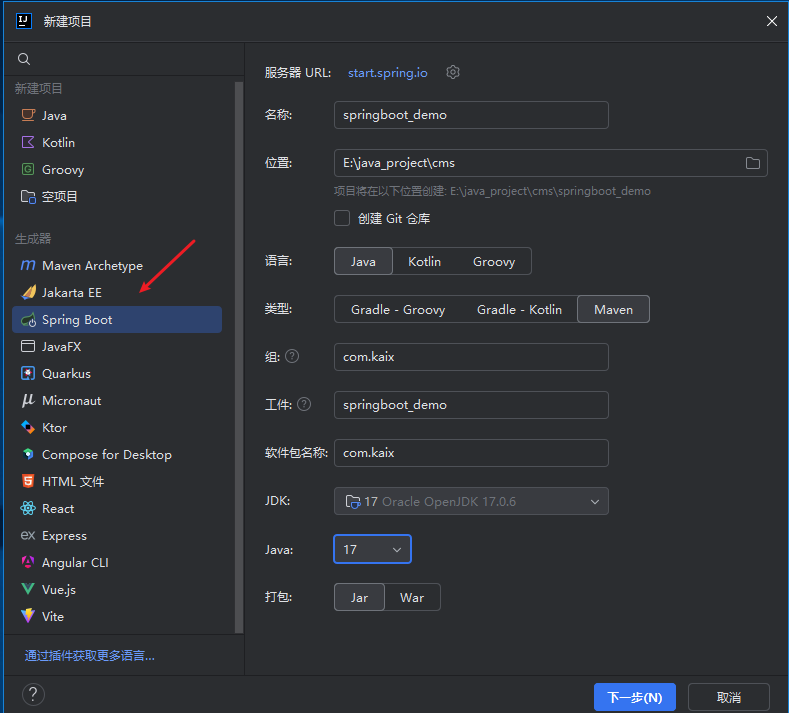
目前springboot 项目通过官网生成的项目,最低要求jdk版本17
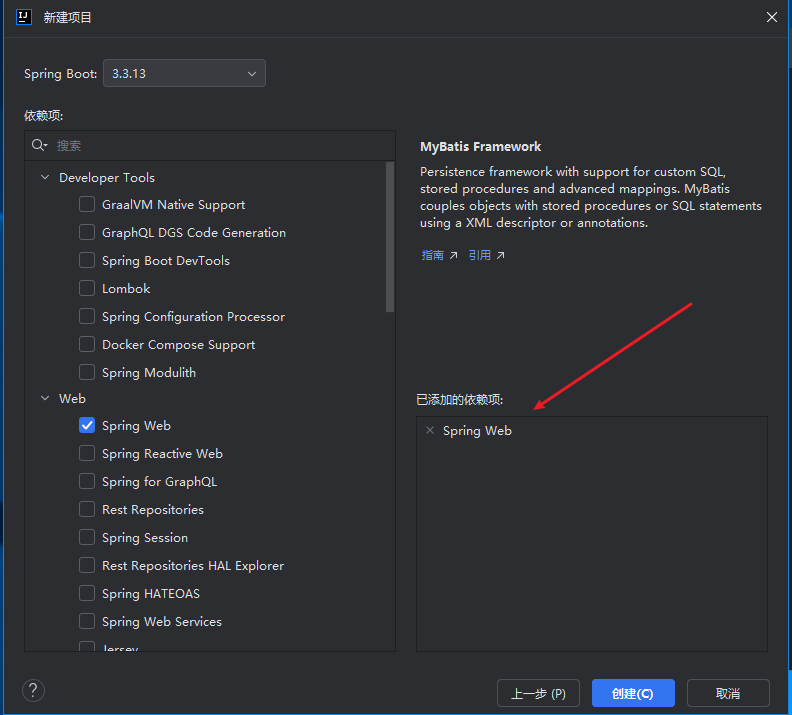
理论上这里我们可以先不添加任何依赖,等项目搭建起来也可以添加依赖。
创建即可:

可以删除无关项,一个最简单的springboot - web开发项目就搭建起来了

2、maven 和 jdk 设置
maven 版本要高一点

jdk 版本至少是17


3、启动
application.properties
spring.application.name=springboot_demo
server.port=8081
写一个基本的controller
package com.kaix.controller;


import org.springframework.web.bind.annotation.GetMapping;
import org.springframework.web.bind.annotation.RequestMapping;
import org.springframework.web.bind.annotation.RequestParam;
import org.springframework.web.bind.annotation.RestController;

@RestController
@RequestMapping("/test")
public class TestController {


    @GetMapping("/index")
    public String index(@RequestParam String param) {

        return "参数是: " + param;
    }


}
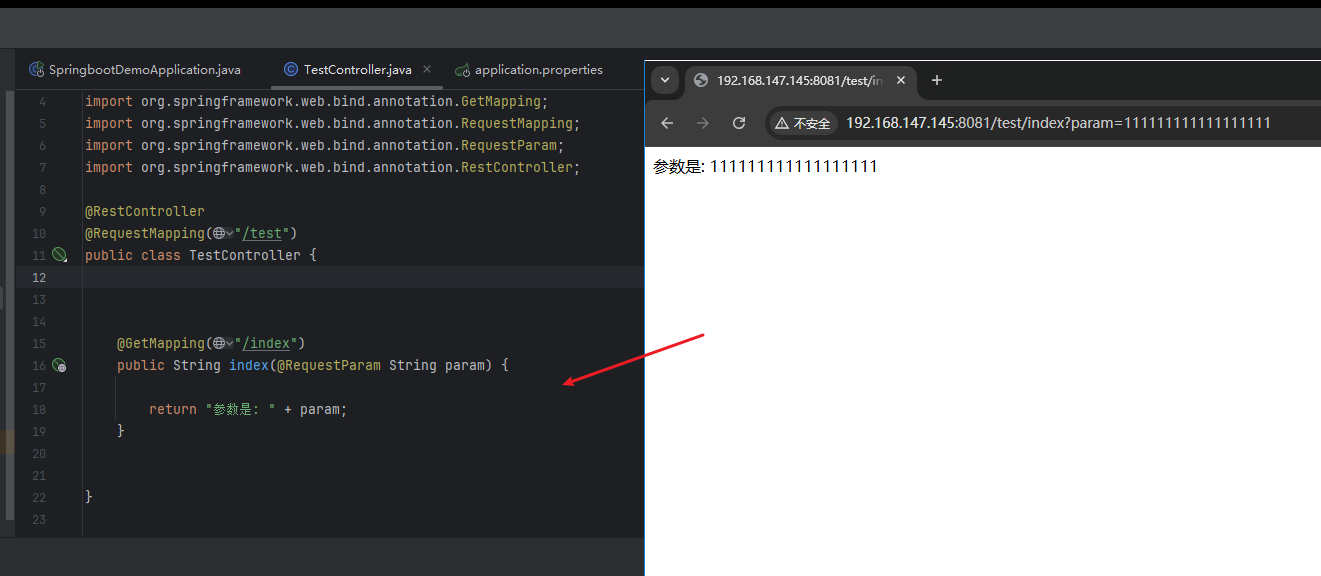
启动:


访问controller 定义好的路径:
二、Service + Dao

1、Service
添加service 层代码
package com.kaix.service;

public interface TestService {

    public String test(String param);

}
实现类
package com.kaix.service.impl;

import com.kaix.service.TestService;
import org.springframework.stereotype.Service;

@Service
public class TestServiceImpl implements TestService {

    @Override
    public String test(String param) {
        return "server 方法执行: hello: " + param;
    }

}
controller
package com.kaix.controller;


import com.kaix.service.TestService;
import org.springframework.beans.factory.annotation.Autowired;
import org.springframework.web.bind.annotation.GetMapping;
import org.springframework.web.bind.annotation.RequestMapping;
import org.springframework.web.bind.annotation.RequestParam;
import org.springframework.web.bind.annotation.RestController;

@RestController
@RequestMapping("/test")
public class TestController {

    @Autowired
    private TestService testService;


    @GetMapping("/index")
    public String index(@RequestParam String param) {

        return "参数是: " + param;
    }

    // 测试 testService
    @GetMapping("/index1")
    public String index1(@RequestParam String param) {

        return testService.test(param);
    }


}

2、Dao
这里数据库交互使用的mybatis
application.yml配置mysql
spring:
  datasource:
    driver-class-name: com.mysql.cj.jdbc.Driver
    url: jdbc:mysql://127.0.0.1:3306/demo
    username: root
    password: root
接口:
package com.kaix.dao;

import com.kaix.domain.User;
import org.apache.ibatis.annotations.Mapper;
import org.apache.ibatis.annotations.Select;

@Mapper
public interface UserDao {


    @Select("select * from user where id = #{id}")
    public User queryById(Integer id);

}
实体类:
package com.kaix.domain;

public class User {

    private int id;
    private String name;
    private String sex;

    public int getId() {
        return id;
    }

    public void setId(int id) {
        this.id = id;
    }

    public String getName() {
        return name;
    }

    public void setName(String name) {
        this.name = name;
    }

    public String getSex() {
        return sex;
    }

    public void setSex(String sex) {
        this.sex = sex;
    }

    @Override
    public String toString() {
        return "Test{" +
                "id=" + id +
                ", name='" + name + '\'' +
                ", sex='" + sex + '\'' +
                '}';
    }
}
使用测试单元测试:

测试类
    @Autowired
    private UserDao userDao;

    @Test
    void queryById() {

        User user1 = userDao.queryById(1);
        System.out.println(user1);
    }
三、springboot常用注解
1、springboot 基础注解
| 注解 | 说明 |
|---|---|
@SpringBootApplication |
项目启动入口注解,等同于 @Configuration + @EnableAutoConfiguration + @ComponentScan |
@RestController |
标注为 REST 控制器,返回 JSON 数据(一般都使用这个,因为不用视图) |
@Controller |
标注为普通控制器(返回视图) |
@Service |
标注服务类(业务逻辑层) |
@Component |
标注通用组件类(通常用于工具类、配置类) |
@Repository |
标注持久层类(如 DAO,带异常转换) |
@Autowired |
自动注入 Bean |
2、Controller 相关
| 注解 | 说明 |
|---|---|
@RequestMapping |
请求映射,可以标注类或方法 |
@GetMapping / @PostMapping 等 |
请求方式简化版注解 |
@RequestParam |
获取 URL 中的参数,如 ?id=1 |
@PathVariable |
获取路径中的参数,如 /user/{id} |
@RequestBody |
获取请求体中的 JSON 数据并自动转换为对象 |
@ResponseBody |
表示返回内容为响应体(@RestController 自动包含它) |
3、mybatis 相关
| 注解 | 说明 |
|---|---|
@Mapper |
标记-接口-为 MyBatis 的 Mapper(Spring Boot 自动识别) |
@Select |
编写查询 SQL |
@Insert |
编写插入 SQL |
@Update |
编写更新 SQL |
@Delete |
编写删除 SQL |
@Results, @Result, @One, @Many |
复杂结果映射关系(例如手动映射列到字段) |

 浙公网安备 33010602011771号