



 “一步登天做不到,但一步一个脚印能做到。一鸣惊人不好做,但一股劲做好一件事,可以做。一下成为天才不可能,但每天进步一点点有可能”
判断某程序是64位还是32位(转)
判断某程序是64位还是32位
1. 用代码判断本身
if (IntPtr.Size == 4)
{
// 32-bit
}
else if (IntPtr.Size == 8)
{
// 64-bit
}2. 用代码判断正在运行的其他进程
3. 不用代码判断任意exe,看第二个回复 http://blogs.technet.com/b/windowshpc/archive/2009/03/27/how-to-tell-if-a-exe-file-is-a-32-bit-or-64-bit-application-using-dumpbin.aspx
If you have a hex editor program, just open your file with it and shortly after the standard header intro stuff (like "This program cannot be run in DOS mode...") you will see either
"PE..L" (hex code: 504500004C) = 32 bit
or
"PE..d†" (hex code: 504500006486) = 64 bit其实普通文本编辑器就行(比如notepad),打开之后搜索PE就会得到类似下面的结果
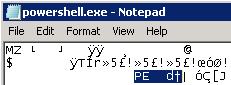 (64位)
(64位) (32位)
(32位)
 浙公网安备 33010602011771号