ESP32-LVGL 开发笔记(三):性能监控
目标
这一次的任务就比较简单了😚,目标只有一个🤓🤓,那就是
- 开启性能检测
系统监视器介绍
lvgl 提供了实时的系统监控功能,可以在屏幕上显示 帧率、CPU利用率等系统信息,当然,也可以利用串口打印
官方文档说明:
配置
准备工作
开启系统监控只需要开启几个配置,添加几行代码即可
配置模板路径:
managed_components\lvgl__lvgl\lv_conf_template.h
copy 模板至 main 文件夹下,重命名为 lv_conf.h
- 启用配置文件
#if 1 /* Set this to "1" to enable content */
-
使能
lv_conf.h配置
esp-idf 默认不会使用lv_conf.h中的配置,要想我们的配置生效,需要修改 sdkconfig 中的配置
点击下方 status bar 的⚙,滚动至下方 lvgl 的配置
![[ESP32-LVGL 开发笔记(三):性能监控-1763020276487.png|443x51]]
![ESP32-LVGL 开发笔记(三):性能监控-1763020276487]()
-
添加编译路径

/*
 * Copy this file as `lv_conf.h`
 * 1. simply next to `lvgl` folder
 * 2. or to any other place and
 *    - define `LV_CONF_INCLUDE_SIMPLE`;
 *    - add the path as an include path.
 */
根据注释说明,我们把 lv_conf.h 直接放在 lvgl__lvgl 文件夹下,但是这样的话一旦 clean 清除,我们的配置也会消失,所以选择第二种方法
在项目根目录下的 CMakeLists.txt 中添加编译选项,完整内容如下:
# The following lines of boilerplate have to be in your project's
# CMakeLists in this exact order for cmake to work correctly
cmake_minimum_required(VERSION 3.16)

# 添加编译选项
add_compile_options(-DLV_CONF_PATH=\"${CMAKE_SOURCE_DIR}/main/lv_conf.h\")

include($ENV{IDF_PATH}/tools/cmake/project.cmake)
project(03_system_monitor)
这个配置,我是参考了下面这个帖子
开启系统监控配置
结合 文档 说明,开启系统监控配置
#define LV_USE_LABEL      1

/** 1: Enable an observer pattern implementation */
#define LV_USE_OBSERVER 1

// 启用系统监控组件
/** 1: Enable system monitor component */
#define LV_USE_SYSMON   1

/* Main sysmon enable */
#define LV_USE_SYSMON 1

// 性能监控
/* Performance monitor (CPU% and FPS) */
#define LV_USE_PERF_MONITOR 1

// 内存监控
/* Memory monitor (used + fragmentation) */
#define LV_USE_MEM_MONITOR 1

// 控制台输出,暂不开启
/* Optional: log to console instead of screen */
#define LV_USE_PERF_MONITOR_LOG_MODE 0
接着在 main.c 的 app_main_display 中添加监控组件,完整代码如下:
static void app_main_display(void)
{
    /* Task lock */
    lvgl_port_lock(0);

    /* Your LVGL objects code here .... */
    // lv_example_get_started_1();
    // lv_example_get_started_2();
    lv_example_get_started_4();

    /* Create generic monitor */
    lv_sysmon_create(lv_display_get_default());

    /* Create performance monitor */
    lv_sysmon_show_performance(NULL); /* NULL = default display */

    /* Create memory monitor */
    lv_sysmon_show_memory(NULL);

    /* Task unlock */
    lvgl_port_unlock();
}
效果展示
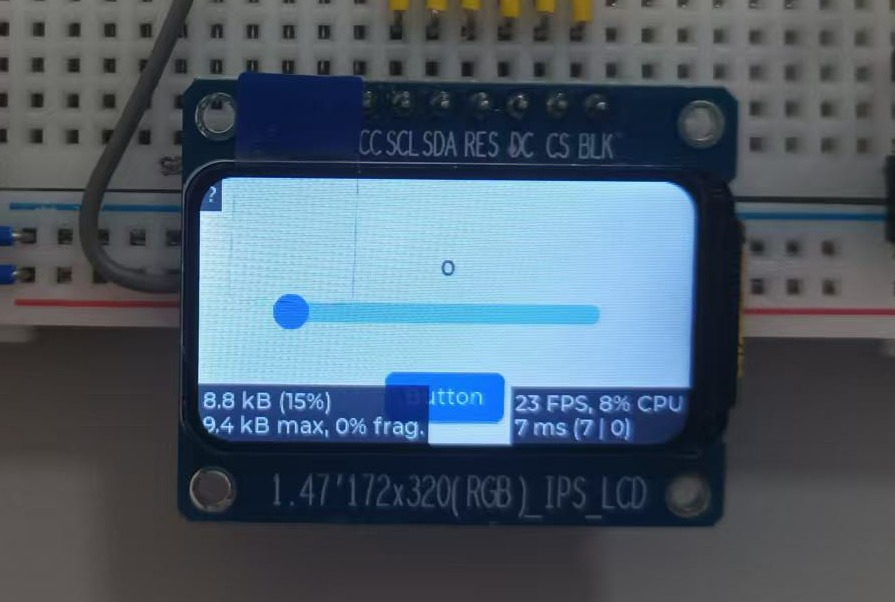
左下角是内存信息,右下角是性能信息。屏幕比较小,可以选择在左上角选择展示内存西信息

可以自行尝试修改配置查看效果,至此性能监控的内容就结束了🥳🥳🥳

 浙公网安备 33010602011771号