NetBeans6.8 Struts2.2 HelloWorld
初学 JAVA 入门,记录下来
1、下载struts http://struts.apache.org/
NetBeans新建项目

2、工具>> 库 >> 新建库

3、左侧项目 >> 库 >> 添加库 选择刚才添加的STRUTS2库

4、双击左侧 WEB.xml 编辑
新建过滤器
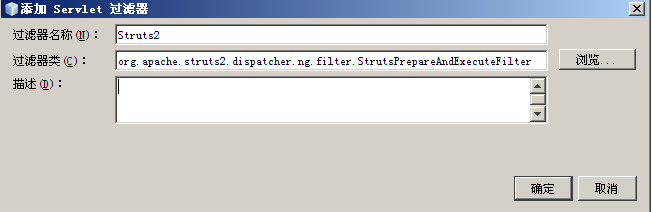
过滤器类为 org.apache.struts2.dispatcher.ng.filter.StrutsPrepareAndExecuteFilter
新建过滤器映射
最终WEB.XML内容为
 代码
代码

<?xml version="1.0" encoding="UTF-8"?>
<web-app version="2.5" xmlns="http://java.sun.com/xml/ns/javaee" xmlns:xsi="http://www.w3.org/2001/XMLSchema-instance" xsi:schemaLocation="http://java.sun.com/xml/ns/javaee http://java.sun.com/xml/ns/javaee/web-app_2_5.xsd">
<filter>
<filter-name>Struts2</filter-name>
<filter-class>org.apache.struts2.dispatcher.ng.filter.StrutsPrepareAndExecuteFilter</filter-class>
</filter>
<filter-mapping>
<filter-name>Struts2</filter-name>
<url-pattern>*.do</url-pattern>
</filter-mapping>
<welcome-file-list>
<welcome-file>index.html</welcome-file>
</welcome-file-list>
</web-app>
<web-app version="2.5" xmlns="http://java.sun.com/xml/ns/javaee" xmlns:xsi="http://www.w3.org/2001/XMLSchema-instance" xsi:schemaLocation="http://java.sun.com/xml/ns/javaee http://java.sun.com/xml/ns/javaee/web-app_2_5.xsd">
<filter>
<filter-name>Struts2</filter-name>
<filter-class>org.apache.struts2.dispatcher.ng.filter.StrutsPrepareAndExecuteFilter</filter-class>
</filter>
<filter-mapping>
<filter-name>Struts2</filter-name>
<url-pattern>*.do</url-pattern>
</filter-mapping>
<welcome-file-list>
<welcome-file>index.html</welcome-file>
</welcome-file-list>
</web-app>
5、左侧项目 >> 源包 >> 缺省包 右键选择新建XML文档
--- struts.xml
代码
<?xml version="1.0" encoding="UTF-8"?>
<!DOCTYPE struts PUBLIC
"-//Apache Software Foundation//DTD Struts Configuration 2.0//EN"
"http://struts.apache.org/dtds/struts-2.0.dtd">
<struts>
<constant name="struts.action.extension" value="do" />
<include file="example.xml"/>
<package name="default" namespace="/" extends="struts-default">
<default-action-ref name="index" />
<action name="index">
<result type="redirectAction">
<param name="actionName">HelloWorld</param>
<param name="namespace">/example</param>
</result>
</action>
</package>
</struts>
<!DOCTYPE struts PUBLIC
"-//Apache Software Foundation//DTD Struts Configuration 2.0//EN"
"http://struts.apache.org/dtds/struts-2.0.dtd">
<struts>
<constant name="struts.action.extension" value="do" />
<include file="example.xml"/>
<package name="default" namespace="/" extends="struts-default">
<default-action-ref name="index" />
<action name="index">
<result type="redirectAction">
<param name="actionName">HelloWorld</param>
<param name="namespace">/example</param>
</result>
</action>
</package>
</struts>
--- example.xml
代码
<?xml version="1.0" encoding="UTF-8"?>
<!DOCTYPE struts PUBLIC
"-//Apache Software Foundation//DTD Struts Configuration 2.0//EN"
"http://struts.apache.org/dtds/struts-2.0.dtd">
<struts>
<package name="example" namespace="/example" extends="struts-default">
<action name="HelloWorld" class="example.HelloWorld">
<result>/example/HelloWorld.jsp</result>
</action>
<action name="*" class="example.ExampleSupport">
<result>/example/{1}.jsp</result>
</action>
</package>
</struts>
<!DOCTYPE struts PUBLIC
"-//Apache Software Foundation//DTD Struts Configuration 2.0//EN"
"http://struts.apache.org/dtds/struts-2.0.dtd">
<struts>
<package name="example" namespace="/example" extends="struts-default">
<action name="HelloWorld" class="example.HelloWorld">
<result>/example/HelloWorld.jsp</result>
</action>
<action name="*" class="example.ExampleSupport">
<result>/example/{1}.jsp</result>
</action>
</package>
</struts>
6、创建java类
---- ExampleSupport类 所属包 example
package example;
import com.opensymphony.xwork2.ActionSupport;
public class ExampleSupport extends ActionSupport {
}
import com.opensymphony.xwork2.ActionSupport;
public class ExampleSupport extends ActionSupport {
}
---- HelloWorld 类 所属包 example
代码
package example;
public class HelloWorld extends ExampleSupport {
public static final String MESSAGE = "HelloWorld";
public String execute() throws Exception {
setMessage(MESSAGE);
return SUCCESS;
}
private String message;
public String getMessage() {
return message;
}
public void setMessage(String message) {
this.message = message;
}
}
public class HelloWorld extends ExampleSupport {
public static final String MESSAGE = "HelloWorld";
public String execute() throws Exception {
setMessage(MESSAGE);
return SUCCESS;
}
private String message;
public String getMessage() {
return message;
}
public void setMessage(String message) {
this.message = message;
}
}
7、创建网页文件
--- index.html
代码
<!DOCTYPE HTML PUBLIC "-//W3C//DTD HTML 4.01 Transitional//EN">
<html>
<head>
<title></title>
<meta http-equiv="Content-Type" content="text/html; charset=UTF-8">
</head>
<body>
<a href="example/HelloWorld.do">HelloWorld</a>
</body>
</html>
<html>
<head>
<title></title>
<meta http-equiv="Content-Type" content="text/html; charset=UTF-8">
</head>
<body>
<a href="example/HelloWorld.do">HelloWorld</a>
</body>
</html>
新建example文件夹,在example文件夹下新建HelloWorld.jsp文件
代码
<%@ page contentType="text/html; charset=UTF-8" %>
<%@ taglib prefix="s" uri="/struts-tags" %>
<html>
<head>
<title>HelloWorld</title>
</head>
<body>
<h2><s:property value="message"/></h2>
</body>
</html>
<%@ taglib prefix="s" uri="/struts-tags" %>
<html>
<head>
<title>HelloWorld</title>
</head>
<body>
<h2><s:property value="message"/></h2>
</body>
</html>
最终结构,库文件里面多出来一个 javassist-3.7.ga.jar,不知道其他人如何,每次我不加这个包,程序不能正常启动,这个包在struts2的 blank war包里面包含了


 浙公网安备 33010602011771号