
Vue学习之路第十六篇:车型列表的添加、删除与检索项目
又到了大家最喜欢的项目练习阶段,学以致用,今天我们要用前几篇的学习内容实现列表的添加与删除。
学前准备:
①:JavaScript中的splice(index,i)方法:从已知数组的index下标开始,删除i个元素。
②:JavaScript中的findIndex() 方法:为数组中的每个元素都调用一次函数执行。
- 当数组中的元素在测试条件时返回 true 时, findIndex() 返回符合条件的元素的索引位置,之后的值不会再调用执行函数。
- 如果没有符合条件的元素返回 -1。
③:箭头函数(=>)是在ECMAScript6 中添加的一种规范,相当于匿名函数, 简化了函数的定义。如:x => x * x 相当于 function(x){ return x*x }
④:filter() 方法创建一个新的数组,新数组中的元素是数组中符合条件的所有元素组合而成的。
⑤:includes() 方法用来判断一个数组或字符串中是否包含一个指定的值,如果是返回 true,否则false。
1、直接上代码
<!DOCTYPE html>
<html lang="en">
<head>
    <meta charset="UTF-8">
    <meta name="viewport" content="width=device-width, initial-scale=1.0">
    <meta http-equiv="X-UA-Compatible" content="ie=edge">
    <title>删除添加</title>
    <link rel="stylesheet" type="text/css" href="css/bootstrap.min.css">
    <script type="text/javascript" src="js/vue.min.js"></script>
</head>
<body>
    <div id="app">
        <div class="panel panel-primary" style="margin-bottom: 0px">
            <div class="panel-heading">
                <h3 class="panel-title">车型列表项目</h3>
            </div>
            <div class="panel-body form-inline" style="text-align:center">
                 序号:<input type="text" class="form-control" v-model="id"/>
                 车型:<input type="text" class="form-control" v-model="name"/>
                 <input type="button" class="btn btn-primary" value="添加" @click="add()"/>
                 搜索:<input type="text" class="form-control" v-model="searchKey"/>

            </div>
        </div>
        <table class="table table-bordered table-hover" style="text-align: center">
            <header>
                <tr>
                    <td>序号</td>
                    <td>车型</td>
                    <td>添加时间</td>
                    <td>操作</td>
                </tr>
            </header>
        <tbody>
            <tr v-for="item in search(searchKey)" :key="item.id">
                <td>{{ item.id }}</td>
                <td>{{ item.name }}</td>
                <td>{{ item.time }}</td>
                <td><a href="" @click.prevent="del(item.id)">删除</a></td>
            </tr>
        </tbody>
      </table>
    </div>

    <script type="text/javascript">
        var vm = new Vue({
            el : "#app",
            data:{
                id:'',
                name:'',
                searchKey:'',
                list:[
                    {id:1,name:'奥迪',time:new Date()},
                    {id:2,name:'宝马',time:new Date()},
                    {id:3,name:'奔驰',time:new Date()},
                    {id:4,name:'保时捷',time:new Date()}
                ]
            },
            methods:{
                add(){
                    var car = {
                            id:this.id,
                            name:this.name,
                            time:new Date()
                        };
                    this.list.push(car);
                    this.id = this.name = '';
                },
                del(id){
                    var index = this.list.findIndex( item => {
                        if(id == item.id){
                            return true;
                        }
                    });
                    this.list.splice(index,1);
                },
                search(searchKey){
                    return this.list.filter(item => {
                        if(item.name.includes(searchKey)){
                            return item;
                        }
                    });
                }
            }
        })
    </script>
</body>
</html>
运行效果图:

2、车型添加功能
这里我们定义了一个list集合,通过在input框中输入内容,执行add()方法把新的车型添加到list集合中并显示在页面上(这在上一篇v-for指令中已经举例说明过了),并在添加完之后自动清空输入栏中的内容。为了让样式更加美观,这里我们引入使用了Bootstrap的CSS样式文件。在数据展示的时候,遍历的数组是通过search方法动态获取的,其参数为搜索栏里的内容,当我们执行添加操作时由于参数为空字符串,而任何字符串都包含空字符串,所以通过filter()方法过滤之后获取了全部list数组的数据。
3、删除功能页面实现:
点击删除按钮之后 ,会把当前元素的id作为参数,以此为凭据来找到该元素并删除该元素。“删除”操作的元素为一个a链接,为了防止页面的跳转,这里加了事件修饰符“.prevent”来阻止页面的跳转。删除函数里用了findIndex和splice两个函数,其作用功能在开篇已经介绍了。
4、检索功能页面:
当在搜索框中输入内容之后,因为使用了v-model指令,数据是双向绑定的,输入完之后search方法会自动执行过滤方法获取新的数组信息,然后再把数据重新渲染在页面上。我们先添加一个赤兔马,然后在搜索框中输入“马”,看看运行结果:
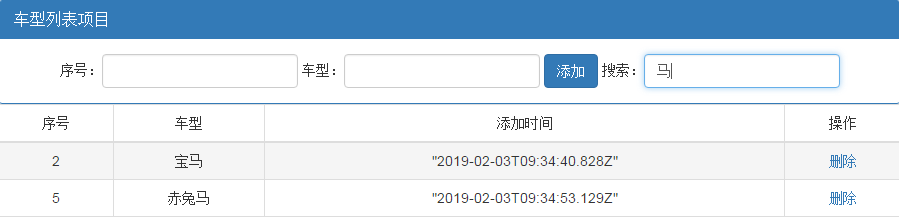
至此,该项目已经实现了我们工作中常见的添加、删除和搜索功能。该项目主要是为了整合之前用到的知识,达到巩固的目的,实际工作中的借鉴作用还是蛮大的,算是入门级别的吧。
每天进步一点点!
posted on 2019-02-03 14:51 Devil'soul 阅读(928) 评论(0) 收藏 举报

 浙公网安备 33010602011771号