![]()
![]()
![]()
![]()
![]()
![]()
   import xlsxwriter
 2     # Create an new Excel file and add a worksheet.
 3     workbook = xlsxwriter.Workbook('demo.xlsx')
 4     worksheet = workbook.add_worksheet()
 5     # Widen the first column to make the text clearer.
 6     worksheet.set_column('A:A', 20)
 7     # Add a bold format to use to highlight cells.
 8     bold = workbook.add_format({'bold': True})
 9     # Write some simple text.
10     worksheet.write('A1', 'Hello')
11     # Text with formatting.
12     worksheet.write('A2', 'World', bold)
13     # Write some numbers, with row/column notation.
14     worksheet.write(2, 0, 123) # 第二3行第1列
15     worksheet.write(3, 0, 123.456) # 第四行第1列
16     # Insert an image.
17     worksheet.insert_image('B5', 'logo.png')
18     workbook.close()
![]()
1     import xlwt
 2     from datetime import datetime
 3     style0 = xlwt.easyxf('font: name Times New Roman, color-index red, bold on',
 4       num_format_str='#,##0.00')
 5     style1 = xlwt.easyxf(num_format_str='D-MMM-YY')
 6     wb = xlwt.Workbook()
 7     ws = wb.add_sheet('A Test Sheet')
 8     ws.write(0, 0, 1234.56, style0)
 9     ws.write(1, 0, datetime.now(), style1)
10     ws.write(2, 0, "hello world")
11     ws.write(3, 0, 1)
12     ws.write(3, 1, 3)
13     ws.write(3, 2, xlwt.Formula("A4+B4"))
14     wb.save('example.xls')
![]()
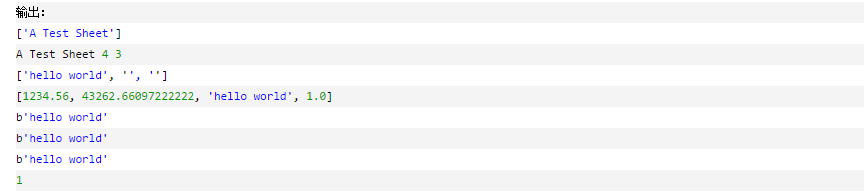
 1     import xlrd
 2     # 打开文件
 3     workbook = xlrd.open_workbook('example.xls')
 4     sheet2_name = workbook.sheet_names() # 获取所有sheet名称
 5     print(sheet2_name)
 6     # 根据sheet索引或者名称获取sheet内容
 7     sheet1 = workbook.sheet_by_index(0) # sheet索引从0开始
 8     # sheet1 = workbook.sheet_by_name('sheet2')
 9     # sheet1的名称,行数,列数
10     print(sheet1.name, sheet1.nrows, sheet1.ncols)
11     # 获取整行和整列的值(数组)
12     rows = sheet1.row_values(2) # 获取第三行内容
13     cols = sheet1.col_values(0) # 获取第1列内容
14     print(rows)
15     print(cols)
16     # 获取单元格内容
17     print(sheet1.cell(2, 0).value.encode('utf-8'))
18     print(sheet1.cell_value(2, 0).encode('utf-8'))
19     print(sheet1.row(2)[0].value.encode('utf-8'))
20     # 获取单元格内容的数据类型
21     print(sheet1.cell(2, 0).ctype)
![]()
![]()
 from openpyxl import Workbook
    wb = Workbook()
    # grab the active worksheet
    ws = wb.active
    # Data can be assigned directly to cells
    ws['A1'] = 42
    # Rows can also be appended
    ws.append([1, 2, 3])
    # Python types will automatically be converted
    import datetime
    ws['A2'] = datetime.datetime.now()
    # Save the file
    wb.save("sample.xlsx")
![]()
from openpyxl import Workbook
from openpyxl.compat import range
from openpyxl.utils import get_column_letter
wb = Workbook()
dest_filename = 'book.xlsx'
ws1 = wb.active
ws1.title = "range names"
for row in range(1, 5):
ws1.append(range(0, 10))
ws2 = wb.create_sheet(title="Pi")
ws2['F5'] = 3.14
ws3 = wb.create_sheet(title="Data")
for row in range(2, 10):
for col in range(27, 40):
_ = ws3.cell(column=col, row=row, value="{0}".format(get_column_letter(col)))
wb.save(filename=dest_filename)
![]()
1     from openpyxl import load_workbook
2     wb = load_workbook(filename='book.xlsx')
3     sheet_ranges = wb['range names']
4     print(sheet_ranges['D2'].value)
![]()
![]()
1     import pyexcel as p # make sure you had pyexcel-xls installed
 2     a_list_of_dictionaries = [
 3     {
 4     "Name": 'Adam',
 5     "Age": 28
 6     },
 7     {
 8     "Name": 'Beatrice',
 9     "Age": 29
10     },
11     {
12     "Name": 'Ceri',
13     "Age": 30
14     },
15     {
16     "Name": 'Dean',
17     "Age": 26
18     }
19     ]
20     pyexcel.save_as(records=a_list_of_dictionaries, dest_file_name="your_file.xls")
![]()
1     import pyexcel as p # make sure you had pyexcel-xls installed
2     records = p.iget_records(file_name="your_file.xls")
3     for record in records:
4     print("%s is aged at %d" % (record['Name'], record['Age']))
5     p.free_resources()
![]()










 浙公网安备 33010602011771号