

Week05 Day02
Week05 Day02
- re模块补充
- collection模块
- time模块
- 时间类型的转换
- datetime模块
- random模块
re模块补充
import re
- findall默认是分组优先展示
正则表达式中如果有括号分组 那么在展示匹配结果的时候
默认只演示括号内正则表达式匹配到的内容!!!
res = re.findall('csb', 'nscsbcsbsnsbsb')
res1 = re.findall('cs(b)', 'nscsbcsbsnsbsb')
res2 = re.findall('(c)(s)(b)', 'nscsbcsbsnsbsb')
print(res)      # ['csb', 'csb']
print(res1)     # ['b', 'b']
print(res2)     # [('c', 's', 'b'), ('c', 's', 'b')]
也可以取消分组有限展示的机制
(?: ) 括号前面加问号冒号
res3 = re.findall('cs(?:b)', 'nscsbcsbsnsbsb')
res4 = re.findall('(c)(?:s)(?:b)', 'nscsbcsbsnsbsb')
print(res3)     # ['csb', 'csb']
print(res4)     # ['c', 'c']
- 可以通过索引的方式单独获取分组内匹配到的数据
res5 = re.search('csb', 'nscsbcsbsnsbsb')
res6 = re.search('c(s)(b)', 'nscsbcsbsnsbsb')
# print(res5)
# print(res6)
print(res5.group())     # csb
print(res6.group())     # csb
print(res6.group(1))    # s
print(res6.group(2))    # b
'''针对search和match有几个分组 group方法括号内最大就可以写几'''
- 分组之后还可以给组起别名
res7 = re.search('c(?P<sss>s)(?P<bbb>b)', 'nscsbcsbsnsbsb')
print(res7.group('sss'))  # s
print(res7.group('bbb'))  # b
collections模块
计数器(Counter)
双端队列(deque)
默认字典(defaultdict)
有序字典(OrderedDict)
具名元组(namedtuple)
计数器(Counter)
res = 'RUN FAST, HIT FAST, WIN FAST'
统计字符串中所有字符的出现次数
- 传统写法
new_dict = {}
for i in res:
    if i not in new_dict:
        new_dict[i] = 1
    else:
        new_dict[i] += 1
print(new_dict)

 # {'R': 1, 'U': 1, 'N': 2, ' ': 5, 'F': 3, 'A': 3, 'S': 3, 'T': 4, ',': 2, 'H': 1, 'I': 2, 'W': 1}
- Counter
from collections import Counter
r = Counter(res)
print(r)
# Counter({' ': 5, 'T': 4, 'F': 3, 'A': 3, 'S': 3, 'N': 2, ',': 2, 'I': 2, 'R': 1, 'U': 1, 'H': 1, 'W': 1})
print(r.get('F'))   # 5 可以当成字典使用
双端队列(deque)
队列:     先进先出   默认是只有一端只能进另外一端只能出
双端队列:  两端都可以进出
- 队列
import queue
q = queue.Queue(3)  # 指定最大存放元素个数 3
# 存放元素
q.put(111)
q.put(222)
q.put(333)
# q.put(444)    # 如果队列满了 继续添加则原地等待 相当于一直等待不往下运行
# 获取元素
print(q.get())
print(q.get())
print(q.get())
# print(q.get())  # 如果队列空了 继续获取则原地等待 相当于一直等待不往下运行
- 双端队列
from collections import deque
d = deque([1, 2, 3])
d.append(4)
print(d)    # deque([1, 2, 3, 4])
d.appendleft(0)	# 从左加
print(d)    # deque([0, 1, 2, 3, 4])

print(d.pop())  # 4  默认从右弹出元素
print(d.popleft())  # 0  从左弹出元素
默认字典(defaultdict)
有如下值集合 [11,22,33,44,55,67,77,88,99],
将所有大于 66 的值保存至字典的第一个key中,将小于 66 的值保存至第二个key的值中。
- 普通字典
l1 = [11, 22, 33, 44, 55, 66, 77, 88, 99]
new_dict = {'k1': [], 'k2': []}
for i in l1:
    if i > 66:
        new_dict['k1'].append(i)
    else:
        new_dict['k2'].append(i)
print(new_dict)
# {'k1': [77, 88, 99], 'k2': [11, 22, 33, 44, 55, 66]}
- 默认字典
from collections import defaultdict
l2 = [11, 22, 33, 44, 55, 66, 77, 88, 99]
new_dict2 = defaultdict(list)   # 字典所有的值默认都是列表{'': [], '': []}
for i in l2:
    if i > 66:
        new_dict2['k1'].append(i)
    else:
        new_dict2['k2'].append(i)
print(new_dict2)
# defaultdict(<class 'list'>, {'k2': [11, 22, 33, 44, 55, 66], 'k1': [77, 88, 99]})
有序字典(OrderedDict)
- 普通字典:内部是无序的
d1 = dict([('k1', 'v1'), ('k2', 'v2'), ('k3', 'v3')])
print(d1)
# {'k2': 'v2', 'k1': 'v1', 'k3': 'v3'}
# 内部无序 每次打印顺序都可能与上一次不同
print(d1.keys())
# dict_keys(['k1', 'k2', 'k3'])
- 有序字典
from collections import OrderedDict
d2 = OrderedDict([('k1', 'v1'), ('k2', 'v2'), ('k3', 'v3')])
print(d2)
# OrderedDict([('k1', 'v1'), ('k2', 'v2'), ('k3', 'v3')])
d2['k1'] = 111
print(d2)
# OrderedDict([('k1', 111), ('k2', 'v2'), ('k3', 'v3')])
print(d2.keys())
# odict_keys(['k1', 'k2', 'k3'])
具名元组(namedtuple)
# 生成可以使用名字来访问元素内容的tuple
from collections import namedtuple
# 1.先产生一个元组对象模板
point = namedtuple('长宽高', 'x, y, z')
# 2.创建数据
p1 = point('5cm', '1cm', '4cm')
p2 = point(7, 8, 9)
print(p1, p2)
# 长宽高(x='5cm', y='1cm', z='4cm') 长宽高(x=7, y=8, z=9)
print(p1.x)         # 5cm
print(p1.y)         # 1cm
time模块
time模块的常用方法:
    1.time.sleep(secs)
	推迟指定的时间运行,单位为秒
    2.time.time()
        获取当前时间戳
三种用于表示时间的格式(彼此之间可以转换)
- 时间戳
距离1970年1月1日0时0分0秒至此相差的秒数
    time.time()
- 结构化时间
该时间类型主要是给计算机看的
    time.localtime()
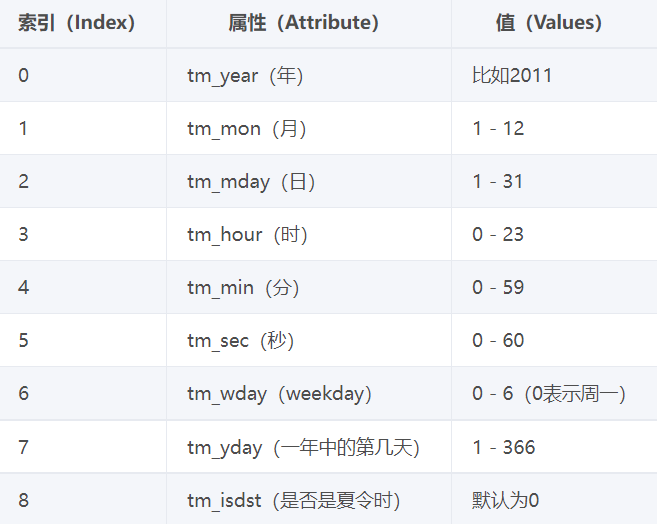
- 格式化时间
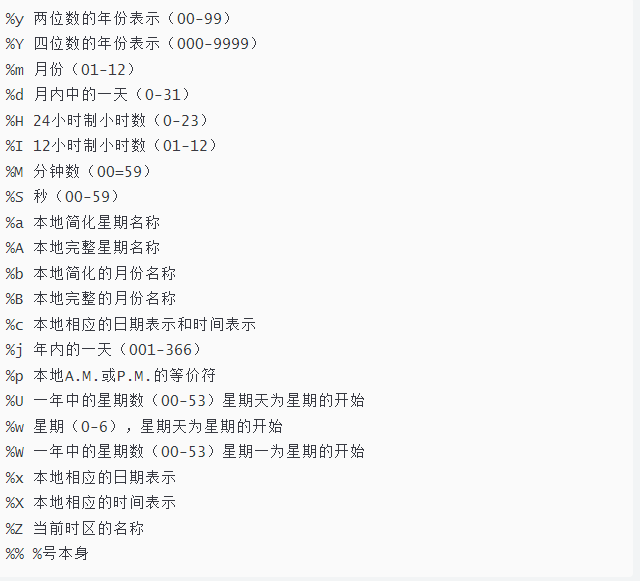
3.格式化时间
  	人最容易接收的一种时间格式  2000/1/21 11:11:11
     time.strftime()
-
时间类型的转换
格式化时间	<==> 结构化时间 <==>	 时间戳

# 时间戳<-->结构化时间
	gmtime
        localtime
# 结构化时间<-->格式化时间
	strftime
	strptime
  	time.strptime("2017-03-16","%Y-%m-%d")
    time.strptime("2017/03","%Y/%m")  前后必须一致
ps:UTC时间比我所在的区域时间早八个小时(时区划分)
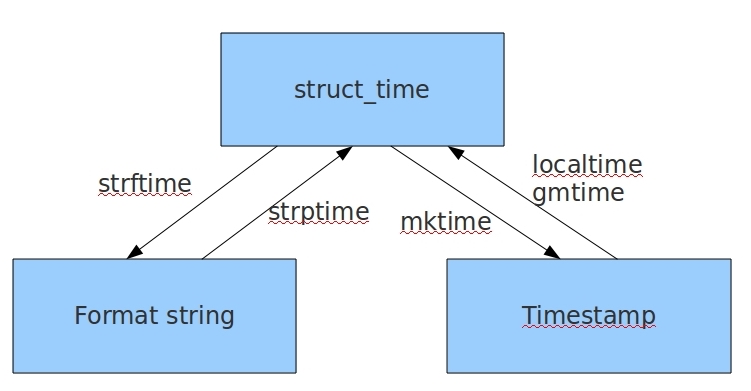
# 时间字符串
print(time.strftime('%Y-%m-%d %X'))
print(time.strftime("%Y-%m-%d %H-%M-%S"))

# 时间元组:localtime将一个时间戳转换为当前时区的struct_time
print(time.localtime())
# print(time.gmtime())
# time.struct_time(tm_year=2022, tm_mon=3, tm_mday=29, tm_hour=19, tm_min=18, tm_sec=47, tm_wday=1, tm_yday=88, tm_isdst=0)

# 时间戳-->结构化时间
time.localtime()
time.gmtime()

# 结构化时间-->时间戳
time_tuple = time.localtime(20000000000)
print(time.mktime(time_tuple))

# 结构化时间-->字符串时间
# time.strftime("格式定义","结构化时间")  结构化时间参数若不传,则显示当前时间
print(time.strftime("%Y-%m-%d %X"))
'2022-03-29 19:32:13'
print(time.strftime("%Y-%m-%d", time.localtime(2000000000)))
'2033-05-18'

# 字符串时间-->结构化时间
#time.strptime(时间字符串,字符串对应格式)
print(time.strptime("2022-03-29", "%Y-%m-%d"))
'time.struct_time(tm_year=2022, tm_mon=3, tm_mday=29, tm_hour=0, tm_min=0, tm_sec=0, tm_wday=1, tm_yday=88, tm_isdst=-1)'
print(time.strptime("03/29/2022", "%m/%d/%Y"))
'time.struct_time(tm_year=2022, tm_mon=3, tm_mday=29, tm_hour=0, tm_min=0, tm_sec=0, tm_wday=1, tm_yday=88, tm_isdst=-1)'
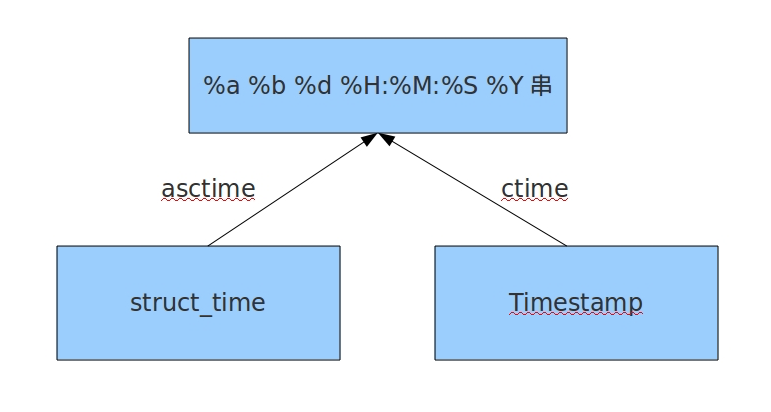
# 结构化时间 --> %a %b %d %H:%M:%S %Y串
# time.asctime(结构化时间) 如果不传参数,直接返回当前时间的格式化串
print(time.asctime(time.localtime(200000000)))  # Tue May  4 03:33:20 1976
print(time.asctime())   # Tue Mar 29 19:42:59 2022

# 时间戳 --> %a %b %d %H:%M:%S %Y串
# time.ctime(时间戳)  如果不传参数,直接返回当前时间的格式化串
print(time.ctime(200000000))   # Tue May  4 03:33:20 1976
print(time.ctime())     # Tue Mar 29 19:45:21 2022
datetime模块
import datetime

print(datetime.date.today())    # 2022-03-29
print(datetime.datetime.today())    # 2022-03-29 19:49:46.418044
print(datetime.datetime.utcnow())   # 获取的是世界时间 格林威治时间
"""
date                意思就是年月日
datetime            意思就是年月日 时分秒
"""

res = datetime.datetime.today()
print(res.year)
print(res.month)
print(res.day)
print(res.hour)
print(res.minute)
print(res.second)
print(res.weekday())    # 1   星期0-6
print(res.isoweekday()) # 2   星期1-7

# 时间差
ctime = datetime.datetime.today()
time_tel = datetime.timedelta(days=3)
print(ctime)    # 2022-03-29 20:04:15.002104
print(ctime + time_tel)     # 2022-04-01 20:04:15.002104
"""
针对时间计算的公式
    日期对象 = 日期对象 +/- timedelta对象
    timedelta对象 = 日期对象 +/- 日期对象
"""
# 练习
'''
将以下字符串转换成datetime类型:

'2017/9/30'
'2017年9月30日星期六'
'2017年9月30日星期六8时42分24秒'
'9/30/2017'
'9/30/2017 8:42:50'

'''
from datetime import datetime
d1 = datetime.strptime('2017/9/30', '%Y/%m/%d')
print(d1)
d2 = datetime.strptime('2017年9月30日星期六', '%Y年%m月%d日星期六')
print(d2)
d3 = datetime.strptime('2017年9月30日星期六8时42分24秒', '%Y年%m月%d日星期六%H时%M分%S秒')
print(d3)
d4 = datetime.strptime('9/30/2017', '%m/%d/%Y')
print(d4)
d5 = datetime.strptime('9/30/2017 8:42:50', '%m/%d/%Y %H:%M:%S')
print(d5)


'''
将以下datetime类型转换成字符串:

2017年9月28日星期4,10时3分43秒
Saturday, September 30, 2017
9/30/2017 9:22:17 AM
September 30, 2017
'''


d6 = datetime(2017,9,28,10,3,43)
print(d6.strftime('%Y年%m月%d日%A,%H时%M分%S秒'))
d7 = datetime(2017,9,30)
print(d7.strftime('%A,%B %d,%Y'))
d8 = datetime(2017,9,30,9,22,17)
print(d8.strftime('%m/%d/%Y %H:%M:%S %p'))
d9=datetime(2017,9,30)
print(d9.strftime('%B %d,%Y'))


'''
用系统时间输出以下字符串:

今天是2017年9月30日
今天是这周的第?天
今天是今年的第?天
今周是今年的第?周
今天是当月的第?天
'''
# 获取当前系统时间
m=datetime.now()
print(m.strftime('今天是%Y年%m月%d日'))
print(m.strftime('今天是这周的第%w天'))
print(m.strftime('今天是今年的第%j天'))
print(m.strftime('今周是今年的第%W周'))
print(m.strftime('今天是当月的第%d天'))
random模块
import random

print(random.random())       # 随机产生一个小数 0 ≤ n < 1.0
print(random.uniform(1, 3))  # 随机产生一个小数 1.0 ≤ n ≤ 3.0

print(random.randint(1, 9))  # 随机产生一个整数 1 ≤ n ≤ 9
print(random.randrange(1, 10, 2))   # 随机产生一个奇数 1 ≤ n ≤ 9


l = [1, 2, 3, 4, 5, 6, 7, 8, 9]

random.shuffle(l)  # 打乱顺序
print(l)

print(random.choice(l))  # 随机单选

print(random.sample(l, 2))  # 随机多选 第二个参数控制个数
随机生成验证码功能
点击查看代码
# 随机验证码
def random_code(n=4):
    r_code = ''
    for i in range(n):
        r_nums = str(random.randint(0, 9))
        r_upper = chr(random.randint(65, 90))
        r_lower = chr(random.randint(97, 122))
        res = random.choice([r_nums, r_upper, r_lower])
        r_code += res
    return r_code


print(random_code(6))
print(random_code(8))

 浙公网安备 33010602011771号