
vue实现下拉加载更多
1、首先下载插件 npm install better-scroll
2、循环列表的上级,上上级分别添加属性,如图:

3、data里面添加字段
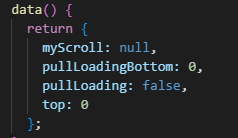
data() {
    return {
      myScroll: null,
      pullLoadingBottom: 0,
      pullLoading: false,
      top: 0
    };
  },
4、methods定义方法
eventMove() {
      document.addEventListener("touchend", () => {
        this.top = this.$refs.bsCon.getBoundingClientRect().top;
    });
 },
load() {
    this.pullLoading = true;
    if (this.page >= this.lastpage) {
    this.toast = this.$createToast({
       txt: "已加载完成",
       type: "txt"
     }).show();
    } else {
      if (this.lastpage == 1) {
      } else if (this.lastpage >= 2) {
        this.page += 1;
        this.getContractData();//接口数据调用拼接
      }
    }
  },
5、mounted调用及配置
    this.eventMove();
    this.myScroll = new BScroll(this.$refs.bsWrap, {
      probeType: 1,
      scrollY: true,
      click: true,
      mouseWheel: true,
      pullUpLoad: {
        threshold: -30
      }
    });
    this.myScroll.on("pullingUp", () => {
      this.pullLoadingBottom = ".1rem";
      if (this.page < this.lastpage && !this.pullLoading) {
        this.load();
      } else if (this.page >= this.lastpage) {
        this.pullLoading = false;
      }
      this.myScroll.finishPullUp();
    });
6、数据更新后调用updated
updated() {
   this.myScroll.refresh();
}
综上流程,数据就可以更新下载啦^_^

 浙公网安备 33010602011771号