使用Springboot结合mybatis搭建最简单的操作mysql教程
废话不说,上代码
pom文件,如果是jdk1.8,请使用如下的SpringBoot版本号
<?xml version="1.0" encoding="UTF-8"?>
<project xmlns="http://maven.apache.org/POM/4.0.0" xmlns:xsi="http://www.w3.org/2001/XMLSchema-instance"
	xsi:schemaLocation="http://maven.apache.org/POM/4.0.0 https://maven.apache.org/xsd/maven-4.0.0.xsd">
	<modelVersion>4.0.0</modelVersion>
	<parent>
		<groupId>org.springframework.boot</groupId>
		<artifactId>spring-boot-starter-parent</artifactId>
		<version>2.7.14</version>
		<relativePath/> <!-- lookup parent from repository -->
	</parent>
	<groupId>com.mybatis</groupId>
	<artifactId>mybatis-service</artifactId>
	<version>0.0.1-SNAPSHOT</version>
	<name>mybatis-service</name>
	<description>Demo project for Spring Boot</description>
	<properties>
		<java.version>1.8</java.version>
	</properties>
	<dependencies>
		<dependency>
			<groupId>org.springframework.boot</groupId>
			<artifactId>spring-boot-starter-web</artifactId>
		</dependency>
		<dependency>
			<groupId>org.mybatis.spring.boot</groupId>
			<artifactId>mybatis-spring-boot-starter</artifactId>
			<version>2.3.1</version>
		</dependency>

		<dependency>
			<groupId>com.mysql</groupId>
			<artifactId>mysql-connector-j</artifactId>
			<scope>runtime</scope>
		</dependency>
		<dependency>
			<groupId>org.springframework.boot</groupId>
			<artifactId>spring-boot-starter-test</artifactId>
			<scope>test</scope>
		</dependency>
		<dependency>
			<groupId>org.mybatis.spring.boot</groupId>
			<artifactId>mybatis-spring-boot-starter-test</artifactId>
			<version>2.3.1</version>
			<scope>test</scope>
		</dependency>
	</dependencies>

	<build>
		<plugins>
			<plugin>
				<groupId>org.springframework.boot</groupId>
				<artifactId>spring-boot-maven-plugin</artifactId>
			</plugin>
		</plugins>
	</build>

</project>
项目整体结构
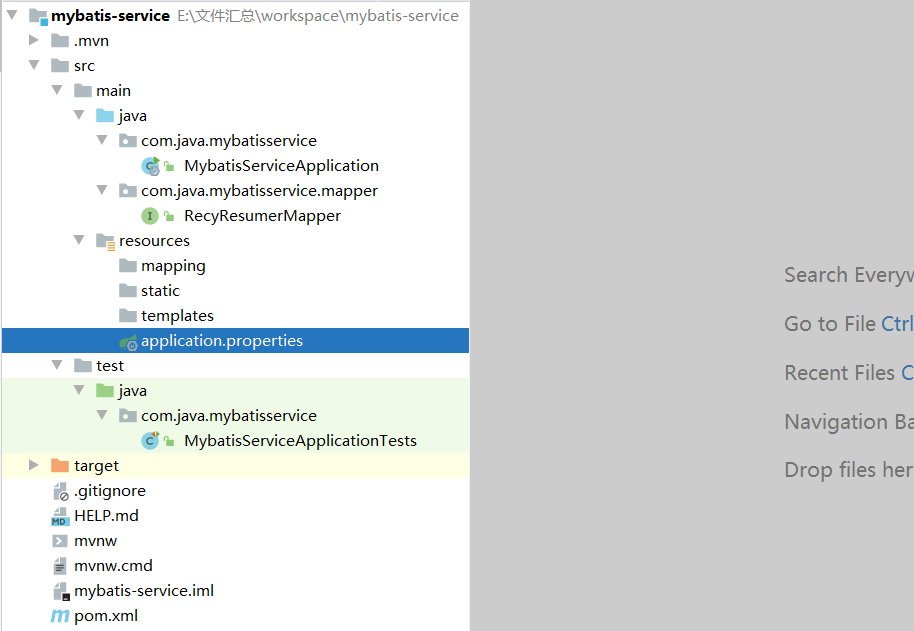
配置文件
logging.level.com.java=debug
logging.level.web=debug
spring.devtools.add-properties=false

ip.port=127.0.0.1:3306

spring.datasource.driver-class-name=com.mysql.jdbc.Driver
spring.datasource.url=jdbc:mysql://${ip.port}/yourheart?useUnicode=true&characterEncoding=utf-8&useSSL=false
spring.datasource.username=root
spring.datasource.password=root
#客户端从连接池等待连接的最大毫秒数
spring.datasource.hikari.connection-timeout=20000
#配置最大连接池数大小
spring.datasource.hikari.maximum-pool-size=10
#连接池中维护的最小空闲连接数
spring.datasource.hikari.minimum-idle=10
mybatis.mapper-locations=classpath:mapping/*.xml
mybatis.configuration.map-underscore-to-camel-case=true
java代码
package com.java.mybatisservice;

import org.springframework.boot.SpringApplication;
import org.springframework.boot.autoconfigure.SpringBootApplication;

@SpringBootApplication
public class MybatisServiceApplication {

	public static void main(String[] args) {
		SpringApplication.run(MybatisServiceApplication.class, args);
	}

}


package com.java.mybatisservice.mapper;

import org.apache.ibatis.annotations.Mapper;
import org.apache.ibatis.annotations.Select;

import java.util.List;
import java.util.Map;

/**
 * @Description:
 * @Author: 喵星人
 * @Create: 2023/11/10 10:47
 */
@Mapper
public interface RecyResumerMapper {


    @Select("SELECT  *  FROM  recy_bank_resume  ORDER  BY update_resume_times DESC")
    List<Map<String,Object>> recyResumeList();

}
测试类
package com.java.mybatisservice;

import com.java.mybatisservice.mapper.RecyResumerMapper;
import org.junit.jupiter.api.Test;
import org.springframework.beans.factory.annotation.Autowired;
import org.springframework.boot.test.context.SpringBootTest;

@SpringBootTest
public class MybatisServiceApplicationTests {

	@Autowired
	private RecyResumerMapper recyResumerMapper;

	@Test
	public void contextLoads() {
		recyResumerMapper.recyResumeList();
	}

}
运行成功后效果图


 浙公网安备 33010602011771号