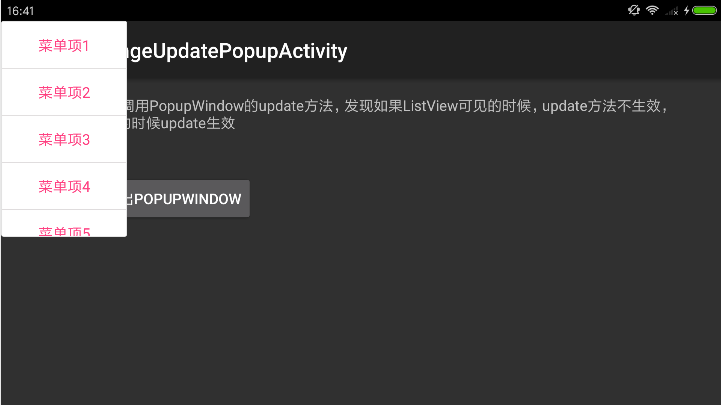
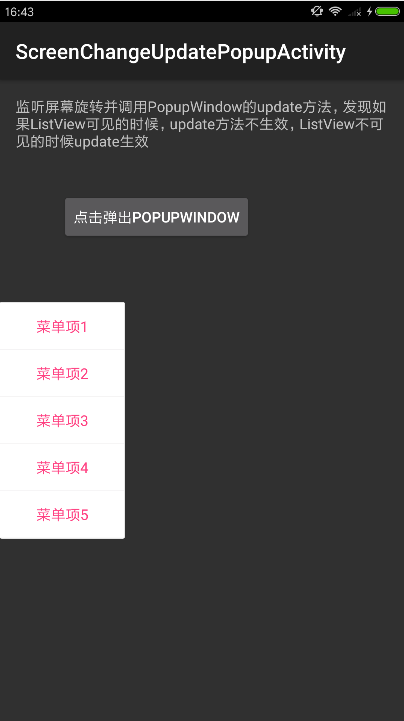
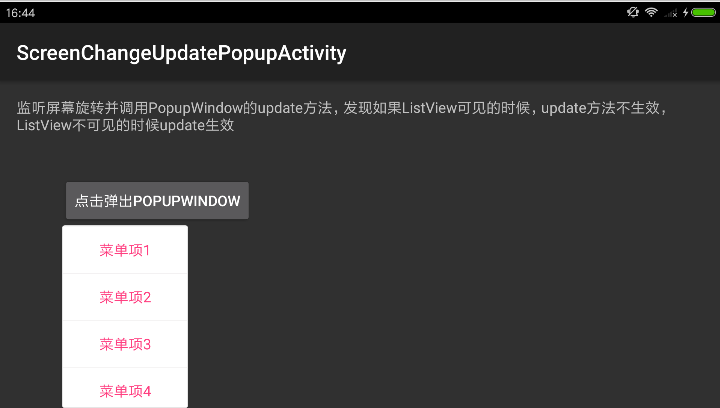
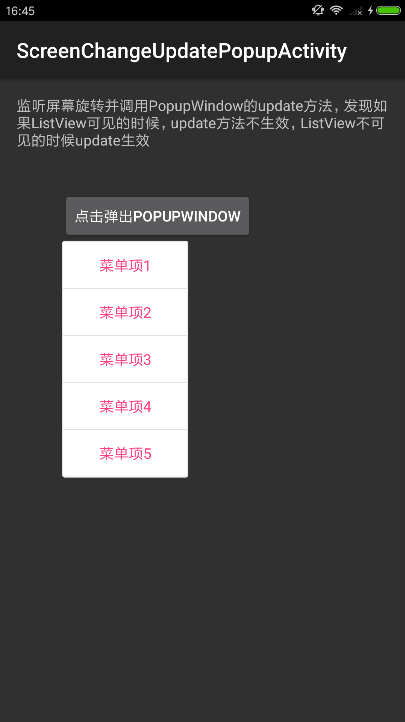
接到一个博友的反馈,在屏幕旋转时调用 PopupWindow 的 update 方法失效。使用场景如下:在一个 Activity 中监听屏幕旋转事件,在Activity主布局文件中有个按钮点击弹出一个 PopupWindow,另外在主布局文件中有个 ListView。测试结果发现:如果 ListView 设置为可见(visibile)的话,屏幕旋转时调用的 update 方法无效,如果 ListView 设置为不可见(gone)或者直接删除的话,屏幕旋转时调用的update方法就生效。下面先展示两种情况的效果图对比。
Activity代码如下(onConfigurationChanged中根据屏幕方向调用update方法) public class ScreenChangeUpdatePopupActivity extends Activity { private Button mAnchorBtn; private PopupWindow mPopupWindow = null; @Override protected void onCreate(Bundle savedInstanceState) { super.onCreate(savedInstanceState); setContentView(R.layout.activity_screen_change_update_popup); mAnchorBtn = (Button) findViewById(R.id.anchor_button); mAnchorBtn.setOnClickListener(new OnClickListener() { @Override public void onClick(View arg0) { View contentView = LayoutInflater.from(getApplicationContext()). inflate(R.layout.popup_content_layout, null); mPopupWindow = new PopupWindow(contentView, ViewGroup.LayoutParams.WRAP_CONTENT, ViewGroup.LayoutParams.WRAP_CONTENT); mPopupWindow.setFocusable(true); mPopupWindow.setOutsideTouchable(true); mPopupWindow.setBackgroundDrawable(new ColorDrawable()); mPopupWindow.showAsDropDown(mAnchorBtn, 0, 0); } }); } public void onConfigurationChanged(Configuration newConfig) { super.onConfigurationChanged(newConfig); // 转屏时调用update方法更新位置,现象如下 // 1. 如果R.layout.activity_screen_change_update_popup中的ListView可见,则update无效 // 2. 如果R.layout.activity_screen_change_update_popup中的ListView不可见,则update有效 final int typeScreen = newConfig.orientation; if (typeScreen == ActivityInfo.SCREEN_ORIENTATION_USER || typeScreen == ActivityInfo.SCREEN_ORIENTATION_LANDSCAPE) { mPopupWindow.update(0, 0, -1, -1); } else if (typeScreen == ActivityInfo.SCREEN_ORIENTATION_PORTRAIT) { mPopupWindow.update(0, 800, -1, -1); } } } 效果图也看了,代码也看了,感觉代码本身没什么毛病,引起这个问题的导火索却是一个ListView,怎么办?当然一开始肯定要不停的尝试新的写法,看看是不是布局文件本身有什么问题。如果怎么尝试都解决不了的时候,这个时候可能已经踩到系统的坑了,可是怎么确定?去看看源码,然后调试一下看看。首先源码要确定是哪个版本的,发现这个问题的 Android 版本是6.0(其实这个是个普遍的问题,应该不是特有的,看后面的源码分析),那就找个api = 23的(平时空闲的时候再 Android studio 上把各种版本的 api 源码全部下载下来吧,方便直接调试和查看)。 准备好源码和调试环境之后,准备先看下源码(从哪儿开始看?) 我们之前发现的现象是 update 方法失效,准确的说是update的前两个参数 x,y 坐标失效,高度和宽度是可以的。那我们就看开 update 方法的前面两个参数怎么使用的。 public void update(int x, int y, int width, int height, boolean force) { if (width >= 0) { mLastWidth = width; setWidth(width); } if (height >= 0) { mLastHeight = height; setHeight(height); } if (!isShowing() || mContentView == null) { return; } // 这里拿到了 mDecorView 的布局参数 WindowManager.LayoutParams p final WindowManager.LayoutParams p = (WindowManager.LayoutParams) mDecorView.getLayoutParams(); boolean update = force; final int finalWidth = mWidthMode < 0 ? mWidthMode : mLastWidth; if (width != -1 && p.width != finalWidth) { p.width = mLastWidth = finalWidth; update = true; } final int finalHeight = mHeightMode < 0 ? mHeightMode : mLastHeight; if (height != -1 && p.height != finalHeight) { p.height = mLastHeight = finalHeight; update = true; } // 这里把x,y分别赋值给 WindowManager.LayoutParams p if (p.x != x) { p.x = x; update = true; } if (p.y != y) { p.y = y; update = true; } final int newAnim = computeAnimationResource(); if (newAnim != p.windowAnimations) { p.windowAnimations = newAnim; update = true; } final int newFlags = computeFlags(p.flags); if (newFlags != p.flags) { p.flags = newFlags; update = true; } if (update) { setLayoutDirectionFromAnchor(); // 这里把 WindowManager.LayoutParams p 设置给了 mDecorView mWindowManager.updateViewLayout(mDecorView, p); } } 里面的几个注释是本人加的,仔细看这个方法好像没什么毛病。但是这个时候还是要坚信代码里面存在真理,它不会骗人。这里其实可以靠猜,是不是可能存在调用了多次update,本来设置好的又被其他地方调用update给覆盖了。但是猜是靠经验的,一般不好猜,还是笨方法吧,在 update 方法开头打个断点,看看代码怎么执行的。 万能的Debug,找准位置打好断点,开始调试 先把弹窗弹出来,然后打上断点,绑定调试的进程,转屏之后断点就过来了,如下所示 然后单步调试(AS的F8)完看看各个地方是不是正常的流程。这里会发现整个 update 方法都正常,那我们走完它吧(AS的F9快捷键),奇怪的时候发现update又一次调用进来了,这一次参数有点不一样,看调用堆栈是从一个 onScrollChanged 方法调用过来的,而且参数x,y已经变了,高度宽度还是-1没变(到这里问题已经找到了,就是 update 被其他地方调用把我们设置的值覆盖了,不过都到这里了,肯定想知道为什么吧,继续看吧)。 从上面的调用堆栈,找到了 onScrollChanged 方法,我们查找一下看看,果然不出所料,这个方法改变了 x,y 参数,具体修改的地方是 findDropDownPosition 方法中,想知道怎么改的细节,可以继续断点调试。 继续寻找调用源头,mOnScrollChangedListener 的 onScrollChanged 谁调用? 源码分析找到原因了,有什么解决方案呢? 最后通过源码看到,在调用 showAsDropDown 方法的时候,会调用 registerForScrollChanged 方法,此方法会拿到 anchorView 的 ViewTreeObserver 并添加一个全局的滚动监听事件。至于为什么有 ListView 的时候会触发到这个滚动事件,这个具体也不知道,不过从这里可以推测,可能不仅是ListView会出现这种情况,理论上还有很多其他的写法会导致转屏的时候触发到那个滚动事件,转屏这个操作太重了,什么都可能发生。所以个人推测这是一个普遍存在的问题,只是这种使用场景比较少。所以个人有如下建议: 可以想办法把它注册的那个 OnScrollChangedLister 反注册掉 转屏的时候延迟一下,目的是等它的 OnScrollChangedLister 回调走完,我们再走一次把正确的值覆盖掉,但是延迟时间不好控制。还可以自己也给那个 anchorView 的 ViewTreeObserver 添加一个 OnScrollChangedLister,准确的监听到这个回调之后重新调用update方法设置正确的值,不过这个要和屏幕旋转回调做好配合。 绕过这个坑,用其他的方式实现 第二种方法比较常用,代码如下 public class ScreenChangeUpdatePopupActivity extends Activity { private Button mAnchorBtn; private PopupWindow mPopupWindow = null; private int mCurOrientation = -1; @Override protected void onCreate(Bundle savedInstanceState) { super.onCreate(savedInstanceState); setContentView(R.layout.activity_screen_change_update_popup); mAnchorBtn = (Button) findViewById(R.id.anchor_button); mAnchorBtn.setOnClickListener(new OnClickListener() { @Override public void onClick(View arg0) { View contentView = LayoutInflater.from(getApplicationContext()). inflate(R.layout.popup_content_layout, null); mPopupWindow = new PopupWindow(contentView, ViewGroup.LayoutParams.WRAP_CONTENT, ViewGroup.LayoutParams.WRAP_CONTENT); mPopupWindow.setFocusable(true); mPopupWindow.setOutsideTouchable(true); mPopupWindow.setBackgroundDrawable(new ColorDrawable()); mPopupWindow.showAsDropDown(mAnchorBtn, 0, 0); // showAsDropDown里面注册了一个OnScrollChangedListener,我们自己也注册一个OnScrollChangedListener // 但是要在它的后面,这样系统回调的时候会先做完它的再做我们自己的,就可以用我们自己正确的值覆盖掉它的 initViewListener(); } }); } public void onConfigurationChanged(Configuration newConfig) { super.onConfigurationChanged(newConfig); mCurOrientation = newConfig.orientation; } private void initViewListener() { mAnchorBtn.getViewTreeObserver().addOnScrollChangedListener(new ViewTreeObserver.OnScrollChangedListener() { @Override public void onScrollChanged() { if (mPopupWindow == null || !mPopupWindow.isShowing()) { return; } updatePopupPos(); } }); } private void updatePopupPos() { if (mCurOrientation == ActivityInfo.SCREEN_ORIENTATION_USER || mCurOrientation == ActivityInfo.SCREEN_ORIENTATION_LANDSCAPE) { mPopupWindow.update(0, 0, -1, -1); } else if (mCurOrientation == ActivityInfo.SCREEN_ORIENTATION_PORTRAIT) { mPopupWindow.update(0, 800, -1, -1); } } } Github项目地址 https://github.com/PopFisher/SmartPopupWindow 我的博客即将搬运同步至腾讯云+社区,邀请大家一同入驻:https://cloud.tencent.com/developer/support-plan
public class ScreenChangeUpdatePopupActivity extends Activity { private Button mAnchorBtn; private PopupWindow mPopupWindow = null;
@Override protected void onCreate(Bundle savedInstanceState) { super.onCreate(savedInstanceState); setContentView(R.layout.activity_screen_change_update_popup); mAnchorBtn = (Button) findViewById(R.id.anchor_button); mAnchorBtn.setOnClickListener(new OnClickListener() {
@Override public void onClick(View arg0) { View contentView = LayoutInflater.from(getApplicationContext()). inflate(R.layout.popup_content_layout, null); mPopupWindow = new PopupWindow(contentView, ViewGroup.LayoutParams.WRAP_CONTENT, ViewGroup.LayoutParams.WRAP_CONTENT); mPopupWindow.setFocusable(true); mPopupWindow.setOutsideTouchable(true); mPopupWindow.setBackgroundDrawable(new ColorDrawable()); mPopupWindow.showAsDropDown(mAnchorBtn, 0, 0); } }); }
public void onConfigurationChanged(Configuration newConfig) { super.onConfigurationChanged(newConfig); // 转屏时调用update方法更新位置,现象如下 // 1. 如果R.layout.activity_screen_change_update_popup中的ListView可见,则update无效 // 2. 如果R.layout.activity_screen_change_update_popup中的ListView不可见,则update有效 final int typeScreen = newConfig.orientation; if (typeScreen == ActivityInfo.SCREEN_ORIENTATION_USER || typeScreen == ActivityInfo.SCREEN_ORIENTATION_LANDSCAPE) { mPopupWindow.update(0, 0, -1, -1); } else if (typeScreen == ActivityInfo.SCREEN_ORIENTATION_PORTRAIT) { mPopupWindow.update(0, 800, -1, -1); } } }
效果图也看了,代码也看了,感觉代码本身没什么毛病,引起这个问题的导火索却是一个ListView,怎么办?当然一开始肯定要不停的尝试新的写法,看看是不是布局文件本身有什么问题。如果怎么尝试都解决不了的时候,这个时候可能已经踩到系统的坑了,可是怎么确定?去看看源码,然后调试一下看看。首先源码要确定是哪个版本的,发现这个问题的 Android 版本是6.0(其实这个是个普遍的问题,应该不是特有的,看后面的源码分析),那就找个api = 23的(平时空闲的时候再 Android studio 上把各种版本的 api 源码全部下载下来吧,方便直接调试和查看)。
我们之前发现的现象是 update 方法失效,准确的说是update的前两个参数 x,y 坐标失效,高度和宽度是可以的。那我们就看开 update 方法的前面两个参数怎么使用的。
public void update(int x, int y, int width, int height, boolean force) { if (width >= 0) { mLastWidth = width; setWidth(width); }
if (height >= 0) { mLastHeight = height; setHeight(height); }
if (!isShowing() || mContentView == null) { return; } // 这里拿到了 mDecorView 的布局参数 WindowManager.LayoutParams p final WindowManager.LayoutParams p = (WindowManager.LayoutParams) mDecorView.getLayoutParams();
boolean update = force;
final int finalWidth = mWidthMode < 0 ? mWidthMode : mLastWidth; if (width != -1 && p.width != finalWidth) { p.width = mLastWidth = finalWidth; update = true; }
final int finalHeight = mHeightMode < 0 ? mHeightMode : mLastHeight; if (height != -1 && p.height != finalHeight) { p.height = mLastHeight = finalHeight; update = true; } // 这里把x,y分别赋值给 WindowManager.LayoutParams p if (p.x != x) { p.x = x; update = true; }
if (p.y != y) { p.y = y; update = true; }
final int newAnim = computeAnimationResource(); if (newAnim != p.windowAnimations) { p.windowAnimations = newAnim; update = true; }
final int newFlags = computeFlags(p.flags); if (newFlags != p.flags) { p.flags = newFlags; update = true; }
if (update) { setLayoutDirectionFromAnchor(); // 这里把 WindowManager.LayoutParams p 设置给了 mDecorView mWindowManager.updateViewLayout(mDecorView, p); } }
里面的几个注释是本人加的,仔细看这个方法好像没什么毛病。但是这个时候还是要坚信代码里面存在真理,它不会骗人。这里其实可以靠猜,是不是可能存在调用了多次update,本来设置好的又被其他地方调用update给覆盖了。但是猜是靠经验的,一般不好猜,还是笨方法吧,在 update 方法开头打个断点,看看代码怎么执行的。
先把弹窗弹出来,然后打上断点,绑定调试的进程,转屏之后断点就过来了,如下所示
然后单步调试(AS的F8)完看看各个地方是不是正常的流程。这里会发现整个 update 方法都正常,那我们走完它吧(AS的F9快捷键),奇怪的时候发现update又一次调用进来了,这一次参数有点不一样,看调用堆栈是从一个 onScrollChanged 方法调用过来的,而且参数x,y已经变了,高度宽度还是-1没变(到这里问题已经找到了,就是 update 被其他地方调用把我们设置的值覆盖了,不过都到这里了,肯定想知道为什么吧,继续看吧)。
从上面的调用堆栈,找到了 onScrollChanged 方法,我们查找一下看看,果然不出所料,这个方法改变了 x,y 参数,具体修改的地方是 findDropDownPosition 方法中,想知道怎么改的细节,可以继续断点调试。
继续寻找调用源头,mOnScrollChangedListener 的 onScrollChanged 谁调用?
最后通过源码看到,在调用 showAsDropDown 方法的时候,会调用 registerForScrollChanged 方法,此方法会拿到 anchorView 的 ViewTreeObserver 并添加一个全局的滚动监听事件。至于为什么有 ListView 的时候会触发到这个滚动事件,这个具体也不知道,不过从这里可以推测,可能不仅是ListView会出现这种情况,理论上还有很多其他的写法会导致转屏的时候触发到那个滚动事件,转屏这个操作太重了,什么都可能发生。所以个人推测这是一个普遍存在的问题,只是这种使用场景比较少。所以个人有如下建议:
public class ScreenChangeUpdatePopupActivity extends Activity { private Button mAnchorBtn; private PopupWindow mPopupWindow = null; private int mCurOrientation = -1;
@Override public void onClick(View arg0) { View contentView = LayoutInflater.from(getApplicationContext()). inflate(R.layout.popup_content_layout, null); mPopupWindow = new PopupWindow(contentView, ViewGroup.LayoutParams.WRAP_CONTENT, ViewGroup.LayoutParams.WRAP_CONTENT); mPopupWindow.setFocusable(true); mPopupWindow.setOutsideTouchable(true); mPopupWindow.setBackgroundDrawable(new ColorDrawable()); mPopupWindow.showAsDropDown(mAnchorBtn, 0, 0); // showAsDropDown里面注册了一个OnScrollChangedListener,我们自己也注册一个OnScrollChangedListener // 但是要在它的后面,这样系统回调的时候会先做完它的再做我们自己的,就可以用我们自己正确的值覆盖掉它的 initViewListener(); } }); }
public void onConfigurationChanged(Configuration newConfig) { super.onConfigurationChanged(newConfig); mCurOrientation = newConfig.orientation; }
private void initViewListener() { mAnchorBtn.getViewTreeObserver().addOnScrollChangedListener(new ViewTreeObserver.OnScrollChangedListener() { @Override public void onScrollChanged() { if (mPopupWindow == null || !mPopupWindow.isShowing()) { return; } updatePopupPos(); } }); }
private void updatePopupPos() { if (mCurOrientation == ActivityInfo.SCREEN_ORIENTATION_USER || mCurOrientation == ActivityInfo.SCREEN_ORIENTATION_LANDSCAPE) { mPopupWindow.update(0, 0, -1, -1); } else if (mCurOrientation == ActivityInfo.SCREEN_ORIENTATION_PORTRAIT) { mPopupWindow.update(0, 800, -1, -1); } } }
https://github.com/PopFisher/SmartPopupWindow
我的博客即将搬运同步至腾讯云+社区,邀请大家一同入驻:https://cloud.tencent.com/developer/support-plan


 浙公网安备 33010602011771号