【0090】【项目实战】-【谷歌电子市场】-【02】【ListView封装】【listview增加加载更多布局】【加载更多功能添加】【导入http工具包&相关工具类】【BaseProtocol创建&拼接网络链接】【读写缓存&解析数据】【HomeProtocol实现&Json解析】【加载首页数据】
1. 回顾说明
【说明】Application一定需要在清单配置文件中配置一下,否则无法初始化变量GooglePlayApplication.java中的变量;
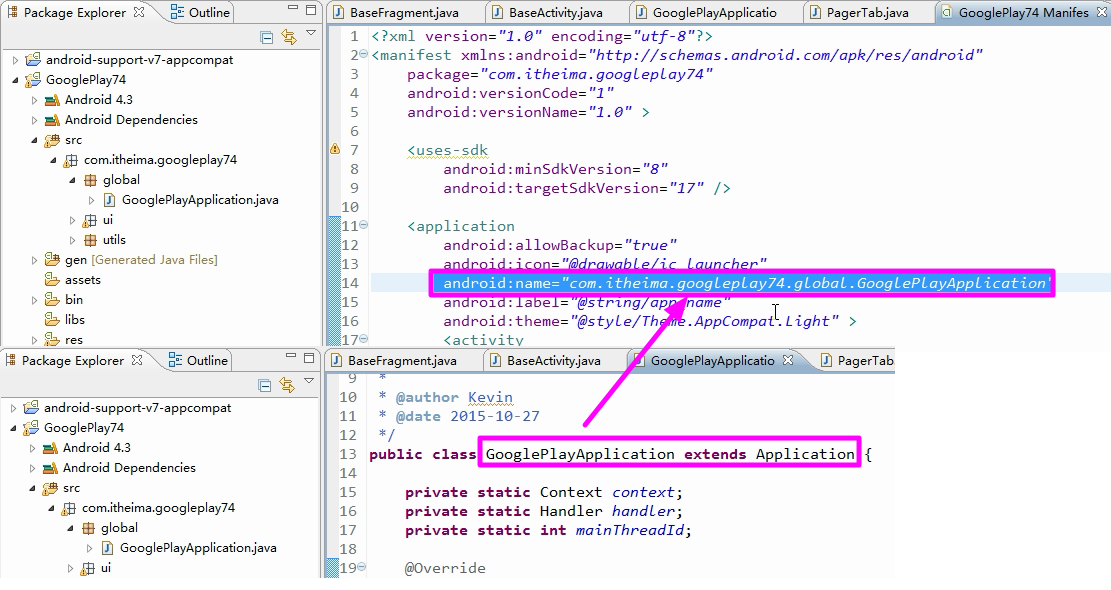
2.ListView第一层封装
【说明】首页中的布局是listView显示;

2.1 最简单的listView的书写
【new 一个listView】


【适配器数据】

【添加假数据】添加假数据,在集合中添加测试数据;


【listView的item的布局】

【ListView的convertView的复用】

【设置适配器】

【效果】

2.2 ListView的简单封装
【说明】
【封转的原因】在每次书写listView的时候总是需要写前面的三个方法,并且内容都基本一致;封装是为了简化代码的书写;

【第一层封装的思路】生成一个类,继承与BaseAdapter,该类实现了前面三个方法;
【类中的泛型的使用】【技巧】在类的定义的时候直接增加泛型;

【简单封装adpter】

【封装之后的使用】需要添加泛型的类型和实现构造方法;


【效果】跟之前的效果一模一样,大大简化了代码,只需要书写adapter中的getView方法即可;

3.ListView第二层封装
【说明】主要是对getView方法的封装;
【说明】getView分解为主要做下面的四件事情;需要ViewHolder的配合;父类完成不了事情让子类完成;

3.1BaseHolder的封装
【说明】BaseHolder主要完成对应的getView中的一些功能;

【BaseHolder的使用】
【说明】因为BaseHolder不能直接new,需要子类实现未实现的方法initView(只有子类才知道自己本身需要初始化哪些布局和控件),因此在此再次书写一个抽象方法,让子类实现;


3.2 【getView使用BaseHolder】


【注销原来的getView方法】

【子类实现加载布局和刷新的方法】

【HomeFragment调用Holder】很简洁,代码量很少;


【bug】返回值有问题,应该返回Holder中的RootView布局;


【效果】跟之前的效果一致;

【说明】listView在项目中使用个情况较多,则需要搭建此此框架,如果仅仅使用一个则不需要搭建框架;
【源码】/GooglePlay74/src/com/itheima/googleplay74/ui/holder/BaseHolder.java
 1 package com.itheima.googleplay74.ui.holder;
 2
 3 import android.view.View;
 4
 5 public abstract class BaseHolder<T> {
 6
 7     private View mRootView;// 一个item的根布局
 8
 9     private T data;
10
11     //当new这个对象时, 就会加载布局, 初始化控件,设置tag
12     public BaseHolder() {
13         mRootView = initView();
14         // 3. 打一个标记tag
15         mRootView.setTag(this);
16     }
17
18     // 1. 加载布局文件
19     // 2. 初始化控件 findViewById
20     public abstract View initView();
21
22     // 返回item的布局对象
23     public View getRootView() {
24         return mRootView;
25     }
26
27     // 设置当前item的数据
28     public void setData(T data) {
29         this.data = data;
30         refreshView(data);
31     }
32
33     // 获取当前item的数据
34     public T getData() {
35         return data;
36     }
37
38     // 4. 根据数据来刷新界面
39     public abstract void refreshView(T data);
40
41 }
【源码】/GooglePlay74/src/com/itheima/googleplay74/ui/holder/HomeHolder.java
 1 package com.itheima.googleplay74.ui.holder;
 2
 3 import android.view.View;
 4 import android.widget.TextView;
 5
 6 import com.itheima.googleplay74.R;
 7 import com.itheima.googleplay74.domain.AppInfo;
 8 import com.itheima.googleplay74.utils.UIUtils;
 9 /**
10  * 首页holder
11  * @author Kevin
12  * @date 2015-10-28
13  */
14 public class HomeHolder extends BaseHolder<AppInfo> {
15
16     private TextView tvContent;
17
18     @Override
19     public View initView() {
20         // 1. 加载布局
21         View view = UIUtils.inflate(R.layout.list_item_home);
22         // 2. 初始化控件
23         tvContent = (TextView) view.findViewById(R.id.tv_content);
24         return view;
25     }
26
27     @Override
28     public void refreshView(AppInfo data) {
29         tvContent.setText(data.name);
30     }
31
32 }

4.listview增加加载更多布局
4.1 效果及思路
【效果】如下,将下拉加载更多封装到listView中;
【说明】之前使用的增加一个脚布局,现在使用的另外一种思路实现,使用listView加载多种布局(安全卫士当中使用过);


4.2 源码实现
【说明】需要重写这两个方法

【增加了一个布局,因此数量增加1】

【定义两种类型】

【局限性】有的页面的布局类型超过了两种,但是下面的写法只支持两种,因此具有局限性;

[此页面具有三种类型]使用的是listView开发的;

[改进]多一个方法,默认值写为TYPE_NORMAL,但是子类可以复写该方法,增加类型,变得灵活了;

【增加加载更多布局】


【加载更多的布局】


【加载布局】

【效果】

5.加载更多布局根据状态刷新页面
5.1 存在的三种状态

【存在的三种状态】

5.2 没有更多数据
【说明】在某些页面是天生没有更多数据的,比如分类,在构造法中直接表明该页面是否具有更多数据


【灵活变通】子类重写方法修改是否可以具有加载更多的属性;


【根据data值refreshView框架】

【将多种布局放在一个xml中】根据情况进行显示或者隐藏;

[源码]/GooglePlay74/res/layout/list_item_more.xml
 1 <?xml version="1.0" encoding="utf-8"?>
 2 <LinearLayout xmlns:android="http://schemas.android.com/apk/res/android"
 3     android:layout_width="match_parent"
 4     android:layout_height="wrap_content"
 5     android:gravity="center"
 6     android:orientation="vertical" >
 7
 8     <LinearLayout
 9         android:id="@+id/ll_load_more"
10         android:layout_width="match_parent"
11         android:layout_height="wrap_content"
12         android:gravity="center"
13         android:orientation="horizontal" >
14
15         <ProgressBar
16             android:id="@+id/progressBar1"
17             android:layout_width="wrap_content"
18             android:layout_height="wrap_content"
19             android:indeterminateDrawable="@drawable/custom_progress" />
20
21         <TextView
22             android:layout_width="wrap_content"
23             android:layout_height="wrap_content"
24             android:layout_marginLeft="5dp"
25             android:text="加载中..."
26             android:textColor="#000"
27             android:textSize="20sp" />
28     </LinearLayout>
29
30     <TextView
31         android:id="@+id/tv_load_error"
32         android:layout_width="wrap_content"
33         android:layout_height="wrap_content"
34         android:paddingTop="10dp"
35         android:paddingBottom="10dp"
36         android:layout_marginLeft="5dp"
37         android:text="加载失败,点击重试"
38         android:textColor="#000"
39         android:textSize="20sp" />
40
41 </LinearLayout>
【根据data值refreshView更改显示隐藏布局】

【效果】隐藏布局

[隐藏布局的调用关系]页面子类重写hasMore()方法,返回值为false;将返回值false传递给父类,然后设置data,然后刷新页面;

6.加载更多数据逻辑
6.1 加载更多数据的逻辑
【框架】请求加载更多的数据框架,需要开辟子线程,请求数据;

【对数据的判断】
[没有更多数据了]

[有更多数据]

[标记的添加]


【将数据追加到当前的listView后面,然后刷新页面】

6.2 加载更多数据的方法的调用时机
【说明】调用加载更多数据的逻辑可以有两种,一种是了listView进行监听,但是比较繁琐,每一个listView可能都需要设置listener事件;
另外一种就是根据搭建的框架,直接在适配器的父类中进行设置,如下面的,根据数据来刷新页面,选择这种方式;


6.3 子类实现加载更多数据的方法
【说明】此方法运行在子线程中,因为被调用是子线程中;

【加载成功效果】测试加载成功的状态

【加载失败的效果】


【没有更多数据的效果】


6.4 注意
【说明】没有整明白为什么需要从0开始;

7.导入http工具包&相关工具类
7.1 【LogUtils工具类的作用】
打印分等级的日志信息,可以在上线之前进行关闭,避免性能的浪费和敏感信息的被捕获;
/GooglePlay74/src/com/itheima/googleplay74/utils//GooglePlay74/src/com/itheima/googleplay74/utils/LogUtils.java
【源码】
 1 package com.itheima.googleplay74.utils;
 2 import android.util.Log;
 3
 4
 5 public class LogUtils {
 6     /** 日志输出级别NONE */
 7     public static final int LEVEL_NONE = 0;
 8     /** 日志输出级别E */
 9     public static final int LEVEL_ERROR =1;
10     /** 日志输出级别W */
11     public static final int LEVEL_WARN = 2;
12     /** 日志输出级别I */
13     public static final int LEVEL_INFO = 3;
14     /** 日志输出级别D */
15     public static final int LEVEL_DEBUG = 4;
16     /** 日志输出级别V */
17     public static final int LEVEL_VERBOSE = 5;
18
19     /** 日志输出时的TAG */
20     private static String mTag = "LogUtils";
21     /** 是否允许输出log */
22     private static int mDebuggable = LEVEL_VERBOSE;  //在上线之前将此处改为:LEVEL_NONE,则可以屏蔽掉所有的打印信息;
23
24     /** 以级别为 d 的形式输出LOG */
25     public static void v(String msg) {
26         if (mDebuggable >= LEVEL_VERBOSE) {
27             Log.v(mTag, msg);
28         }
29     }
30
31     /** 以级别为 d 的形式输出LOG */
32     public static void d(String msg) {
33         if (mDebuggable >= LEVEL_DEBUG) {
34             Log.d(mTag, msg);
35         }
36     }
37
38     /** 以级别为 i 的形式输出LOG */
39     public static void i(String msg) {
40         if (mDebuggable >= LEVEL_INFO) {
41             Log.i(mTag, msg);
42         }
43     }
44
45     /** 以级别为 w 的形式输出LOG */
46     public static void w(String msg) {
47         if (mDebuggable >= LEVEL_WARN) {
48             Log.w(mTag, msg);
49         }
50     }
51
52     /** 以级别为 w 的形式输出Throwable */
53     public static void w(Throwable tr) {
54         if (mDebuggable >= LEVEL_WARN) {
55             Log.w(mTag, "", tr);
56         }
57     }
58
59     /** 以级别为 w 的形式输出LOG信息和Throwable */
60     public static void w(String msg, Throwable tr) {
61         if (mDebuggable >= LEVEL_WARN && null != msg) {
62             Log.w(mTag, msg, tr);
63         }
64     }
65
66     /** 以级别为 e 的形式输出LOG */
67     public static void e(String msg) {
68         if (mDebuggable >= LEVEL_ERROR) {
69             Log.e(mTag, msg);
70         }
71     }
72
73     /** 以级别为 e 的形式输出Throwable */
74     public static void e(Throwable tr) {
75         if (mDebuggable >= LEVEL_ERROR) {
76             Log.e(mTag, "", tr);
77         }
78     }
79
80     /** 以级别为 e 的形式输出LOG信息和Throwable */
81     public static void e(String msg, Throwable tr) {
82         if (mDebuggable >= LEVEL_ERROR && null != msg) {
83             Log.e(mTag, msg, tr);
84         }
85     }
86 }
7.2 【/StringUtils.java类使用的作用】
/GooglePlay74/src/com/itheima/googleplay74/utils/StringUtils.java
【说明】类比于TextUtils.isempty,但是此处判断的更严谨:包括为值不为null,去除了空格之后的大小写和不论大小写的null。都会进入到判断;
 1 package com.itheima.googleplay74.utils;
 2
 3
 4 public class StringUtils {
 5     /** 判断字符串是否有值,如果为null或者是空字符串或者只有空格或者为"null"字符串,则返回true,否则则返回false */
 6     public static boolean isEmpty(String value) {
 7         if (value != null && !"".equalsIgnoreCase(value.trim())
 8                 && !"null".equalsIgnoreCase(value.trim())) {
 9             return false;
10         } else {
11             return true;
12         }
13     }
14 }
7.3 【IOUtils.java类的作用】
/GooglePlay74/src/com/itheima/googleplay74/utils/IOUtils.java
【说明】Closeable指的是可以关闭的一些类,除了stream,还有其他的类型;
包含了异常的捕获;
 1 package com.itheima.googleplay74.utils;
 2
 3 import java.io.Closeable;
 4 import java.io.IOException;
 5
 6 public class IOUtils {
 7     /** 关闭流 */
 8     public static boolean close(Closeable io) {
 9         if (io != null) {
10             try {
11                 io.close();
12             } catch (IOException e) {
13                 LogUtils.e(e);
14             }
15         }
16         return true;
17     }
18 }
7.4 http工具包
【包含的文件】两个HttpHelper.java和HttpClientFactory.java;

【源码】/GooglePlay74/src/com/itheima/googleplay74/http/HttpHelper.java
  1 package com.itheima.googleplay74.http;
  2
  3 import java.io.ByteArrayOutputStream;
  4 import java.io.IOException;
  5 import java.io.InputStream;
  6
  7 import org.apache.http.HttpEntity;
  8 import org.apache.http.HttpResponse;
  9 import org.apache.http.StatusLine;
 10 import org.apache.http.client.HttpClient;
 11 import org.apache.http.client.HttpRequestRetryHandler;
 12 import org.apache.http.client.methods.HttpGet;
 13 import org.apache.http.client.methods.HttpPost;
 14 import org.apache.http.client.methods.HttpRequestBase;
 15 import org.apache.http.entity.ByteArrayEntity;
 16 import org.apache.http.impl.client.AbstractHttpClient;
 17 import org.apache.http.protocol.BasicHttpContext;
 18 import org.apache.http.protocol.HttpContext;
 19 import org.apache.http.protocol.SyncBasicHttpContext;
 20
 21 import android.util.Log;
 22
 23 import com.itheima.googleplay74.utils.IOUtils;
 24 import com.itheima.googleplay74.utils.LogUtils;
 25 import com.itheima.googleplay74.utils.StringUtils;
 26
 27 public class HttpHelper {
 28
 29     public static final String URL = "http://127.0.0.1:8090/";
 30
 31     /** get请求,获取返回字符串内容 */
 32     public static HttpResult get(String url) {
 33         HttpGet httpGet = new HttpGet(url);
 34         return execute(url, httpGet);
 35     }
 36
 37     /** post请求,获取返回字符串内容 */
 38     public static HttpResult post(String url, byte[] bytes) {
 39         HttpPost httpPost = new HttpPost(url);
 40         ByteArrayEntity byteArrayEntity = new ByteArrayEntity(bytes);
 41         httpPost.setEntity(byteArrayEntity);
 42         return execute(url, httpPost);
 43     }
 44
 45     /** 下载 */
 46     public static HttpResult download(String url) {
 47         HttpGet httpGet = new HttpGet(url);
 48         return execute(url, httpGet);
 49     }
 50
 51     /** 执行网络访问 */
 52     private static HttpResult execute(String url, HttpRequestBase requestBase) {
 53         boolean isHttps = url.startsWith("https://");//判断是否需要采用https
 54         AbstractHttpClient httpClient = HttpClientFactory.create(isHttps);
 55         HttpContext httpContext = new SyncBasicHttpContext(new BasicHttpContext());
 56         HttpRequestRetryHandler retryHandler = httpClient.getHttpRequestRetryHandler();//获取重试机制
 57         int retryCount = 0;
 58         boolean retry = true;
 59         while (retry) {
 60             try {
 61                 HttpResponse response = httpClient.execute(requestBase, httpContext);//访问网络
 62                 if (response != null) {
 63                     return new HttpResult(response, httpClient, requestBase);
 64                 }
 65             } catch (Exception e) {
 66                 IOException ioException = new IOException(e.getMessage());
 67                 retry = retryHandler.retryRequest(ioException, ++retryCount, httpContext);//把错误异常交给重试机制,以判断是否需要采取从事
 68                 LogUtils.e(e);
 69             }
 70         }
 71         return null;
 72     }
 73
 74     /** http的返回结果的封装,可以直接从中获取返回的字符串或者流 */
 75     public static class HttpResult {
 76         private HttpResponse mResponse;
 77         private InputStream mIn;
 78         private String mStr;
 79         private HttpClient mHttpClient;
 80         private HttpRequestBase mRequestBase;
 81
 82         public HttpResult(HttpResponse response, HttpClient httpClient, HttpRequestBase requestBase) {
 83             mResponse = response;
 84             mHttpClient = httpClient;
 85             mRequestBase = requestBase;
 86         }
 87
 88         public int getCode() {
 89             StatusLine status = mResponse.getStatusLine();
 90             return status.getStatusCode();
 91         }
 92
 93         /** 从结果中获取字符串,一旦获取,会自动关流,并且把字符串保存,方便下次获取 */
 94         public String getString() {
 95             if (!StringUtils.isEmpty(mStr)) {
 96                 return mStr;
 97             }
 98             InputStream inputStream = getInputStream();
 99             ByteArrayOutputStream out = null;
100             if (inputStream != null) {
101                 try {
102                     out = new ByteArrayOutputStream();
103                     byte[] buffer = new byte[1024 * 4];
104                     int len = -1;
105                     while ((len = inputStream.read(buffer)) != -1) {
106                         out.write(buffer, 0, len);
107                     }
108                     byte[] data = out.toByteArray();
109                     mStr = new String(data, "utf-8");
110                 } catch (Exception e) {
111                     LogUtils.e(e);
112                 } finally {
113                     IOUtils.close(out);
114                     close();
115                 }
116             }
117             return mStr;
118         }
119
120         /** 获取流,需要使用完毕后调用close方法关闭网络连接 */
121         public InputStream getInputStream() {
122             if (mIn == null && getCode() < 300) {
123                 HttpEntity entity = mResponse.getEntity();
124                 try {
125                     mIn = entity.getContent();
126                 } catch (Exception e) {
127                     LogUtils.e(e);
128                 }
129             }
130             return mIn;
131         }
132
133         /** 关闭网络连接 */
134         public void close() {
135             if (mRequestBase != null) {
136                 mRequestBase.abort();
137             }
138             IOUtils.close(mIn);
139             if (mHttpClient != null) {
140                 mHttpClient.getConnectionManager().closeExpiredConnections();
141             }
142         }
143     }
144 }
【源码】/GooglePlay74/src/com/itheima/googleplay74/http/HttpClientFactory.java
 1 package com.itheima.googleplay74.http;
 2
 3 import org.apache.http.HttpVersion;
 4 import org.apache.http.client.params.HttpClientParams;
 5 import org.apache.http.conn.params.ConnManagerParams;
 6 import org.apache.http.conn.params.ConnPerRouteBean;
 7 import org.apache.http.conn.scheme.PlainSocketFactory;
 8 import org.apache.http.conn.scheme.Scheme;
 9 import org.apache.http.conn.scheme.SchemeRegistry;
10 import org.apache.http.conn.ssl.SSLSocketFactory;
11 import org.apache.http.impl.client.DefaultHttpClient;
12 import org.apache.http.impl.conn.tsccm.ThreadSafeClientConnManager;
13 import org.apache.http.params.BasicHttpParams;
14 import org.apache.http.params.HttpConnectionParams;
15 import org.apache.http.params.HttpParams;
16 import org.apache.http.params.HttpProtocolParams;
17 import org.apache.http.protocol.HTTP;
18
19 public class HttpClientFactory {
20     /** http请求最大并发连接数 */
21     private static final int MAX_CONNECTIONS = 10;
22     /** 超时时间 */
23     private static final int TIMEOUT = 10 * 1000;
24     /** 缓存大小 */
25     private static final int SOCKET_BUFFER_SIZE = 8 * 1024; // 8KB
26
27     public static DefaultHttpClient create(boolean isHttps) {
28         HttpParams params = createHttpParams();
29         DefaultHttpClient httpClient = null;
30         if (isHttps) {
31             // 支持http与https
32             SchemeRegistry schemeRegistry = new SchemeRegistry();
33             schemeRegistry.register(new Scheme("http", PlainSocketFactory.getSocketFactory(), 80));
34             schemeRegistry.register(new Scheme("https", SSLSocketFactory.getSocketFactory(), 443));
35             // ThreadSafeClientConnManager线程安全管理类
36             ThreadSafeClientConnManager cm = new ThreadSafeClientConnManager(params, schemeRegistry);
37             httpClient = new DefaultHttpClient(cm, params);
38         } else {
39             httpClient = new DefaultHttpClient(params);
40         }
41         return httpClient;
42     }
43
44     private static HttpParams createHttpParams() {
45         final HttpParams params = new BasicHttpParams();
46         // 设置是否启用旧连接检查,默认是开启的。关闭这个旧连接检查可以提高一点点性能,但是增加了I/O错误的风险(当服务端关闭连接时)。
47         // 开启这个选项则在每次使用老的连接之前都会检查连接是否可用,这个耗时大概在15-30ms之间
48         HttpConnectionParams.setStaleCheckingEnabled(params, false);
49         HttpConnectionParams.setConnectionTimeout(params, TIMEOUT);// 设置链接超时时间
50         HttpConnectionParams.setSoTimeout(params, TIMEOUT);// 设置socket超时时间
51         HttpConnectionParams.setSocketBufferSize(params, SOCKET_BUFFER_SIZE);// 设置缓存大小
52         HttpConnectionParams.setTcpNoDelay(params, true);// 是否不使用延迟发送(true为不延迟)
53         HttpProtocolParams.setVersion(params, HttpVersion.HTTP_1_1); // 设置协议版本
54         HttpProtocolParams.setUseExpectContinue(params, true);// 设置异常处理机制
55         HttpProtocolParams.setContentCharset(params, HTTP.UTF_8);// 设置编码
56         HttpClientParams.setRedirecting(params, false);// 设置是否采用重定向
57
58         ConnManagerParams.setTimeout(params, TIMEOUT);// 设置超时
59         ConnManagerParams.setMaxConnectionsPerRoute(params, new ConnPerRouteBean(MAX_CONNECTIONS));// 多线程最大连接数
60         ConnManagerParams.setMaxTotalConnections(params, 10); // 多线程总连接数
61         return params;
62     }
63
64 }
8.BaseProtocol创建&拼接网络链接

【网络封装】主要完成三件事:请求网络获取数据、缓存机制(写缓存和读缓存)、解析数据;

【网络访问地址的拼接】

【实际网址的拼接】实际的网址的拼接比较复杂;其中存在index分页返回的数据页面;

 1     // 从网络获取数据
 2     // index表示的是从哪个位置开始返回20条数据, 用于分页
 3     private String getDataFromServer(int index) {
 4         // http://www.itheima.com/home?index=0&name=zhangsan&age=18
 5         HttpResult httpResult = HttpHelper.get(HttpHelper.URL + getKey()
 6                 + "?index=" + index + getParams());
 7
 8         if (httpResult != null) {
 9             String result = httpResult.getString();
10             System.out.println("访问结果:" + result);
11             // 写缓存
12             if (!StringUtils.isEmpty(result)) {
13                 setCache(index, result);
14             }
15
16             return result;
17         }
18
19         return null;
20     }
9.读写缓存&解析数据
9.1【写缓存】

【增加缓存的有效期】缓存中的数据需要定期刷新;打上时间戳就好;

【写缓存的调用】将取到的数据放入到缓存中;

9.2 读缓存数据
 1     // 读缓存
 2     public String getCache(int index) {
 3         // 以url为文件名, 以json为文件内容,保存在本地
 4         File cacheDir = UIUtils.getContext().getCacheDir();// 本应用的缓存文件夹
 5         // 生成缓存文件
 6         File cacheFile = new File(cacheDir, getKey() + "?index=" + index
 7                 + getParams());
 8
 9         // 判断缓存是否存在
10         if (cacheFile.exists()) {
11             // 判断缓存是否有效
12             BufferedReader reader = null;
13             try {
14                 reader = new BufferedReader(new FileReader(cacheFile));
15                 String deadline = reader.readLine();// 读取第一行的有效期
16                 long deadtime = Long.parseLong(deadline);
17
18                 if (System.currentTimeMillis() < deadtime) {// 当前时间小于截止时间,
19                                                             // 说明缓存有效
20                     // 缓存有效
21                     StringBuffer sb = new StringBuffer();
22                     String line;
23                     while ((line = reader.readLine()) != null) {  //此处已经去掉了原来的时间的数据;
24                         sb.append(line);
25                     }
26
27                     return sb.toString();
28                 }
29
30             } catch (Exception e) {
31                 e.printStackTrace();
32             } finally {
33                 IOUtils.close(reader);
34             }
35
36         }
37
38         return null;
39     }
9.3 缓存数据的使用
 1     // index表示的是从哪个位置开始返回20条数据, 用于分页
 2     public T getData(int index) {
 3         // 先判断是否有缓存, 有的话就加载缓存
 4         String result = getCache(index);
 5
 6         if (StringUtils.isEmpty(result)) {// 如果没有缓存,或者缓存失效
 7             // 请求服务器
 8             result = getDataFromServer(index);
 9         }
10
11         // 开始解析
12         if (result != null) {
13             T data = parseData(result);
14             return data;
15         }
16
17         return null;
18     }
9.4 解析数据的接口
【说明】因为子类的对数据的解析各不同,因此需要放到子类中去实现该方法;


10.HomeProtocol实现&Json解析
10.1.HomeProtocol 子类的建立
【新建子类,继承与父类BaseProtocol】

【泛型的确定】


10.2.json的解析
【json解析可以使用两种方法】一种是使用Gson(比较严格,遇到中括号就是数组,遇到大括号就是对象),另外一种是使用jsonObject(比较随意);
【参考json网址】http://www.json.org/json-zh.html

【泛型的替代使用的是ArrayList<AppInfo>泛型】此处的构造方法的泛型是个集合;

【源码】/GooglePlay74/src/com/itheima/googleplay74/http/protocol/HomeProtocol.java
【解析起来比较繁琐】
 1 package com.itheima.googleplay74.http.protocol;
 2
 3 import java.util.ArrayList;
 4
 5 import org.json.JSONArray;
 6 import org.json.JSONException;
 7 import org.json.JSONObject;
 8
 9 import com.itheima.googleplay74.domain.AppInfo;
10
11 /**
12  * 首页网络数据解析
13  *
14  * @author Kevin
15  * @date 2015-10-28
16  */
17 public class HomeProtocol extends BaseProtocol<ArrayList<AppInfo>> {
18
19     @Override
20     public String getKey() {
21         return "home";
22     }
23
24     @Override
25     public String getParams() {
26         return "";// 如果没有参数,就传空串,不要传null
27     }
28
29     @Override
30     public ArrayList<AppInfo> parseData(String result) {
31         // Gson, JsonObject
32         // 使用JsonObject解析方式: 如果遇到{},就是JsonObject;如果遇到[], 就是JsonArray
33         try {
34             JSONObject jo = new JSONObject(result);
35
36             // 解析应用列表数据
37             JSONArray ja = jo.getJSONArray("list");
38             ArrayList<AppInfo> appInfoList = new ArrayList<AppInfo>();
39             for (int i = 0; i < ja.length(); i++) {
40                 JSONObject jo1 = ja.getJSONObject(i);
41
42                 AppInfo info = new AppInfo();
43                 info.des = jo1.getString("des");
44                 info.downloadUrl = jo1.getString("downloadUrl");
45                 info.iconUrl = jo1.getString("iconUrl");
46                 info.id = jo1.getString("id");
47                 info.name = jo1.getString("name");
48                 info.packageName = jo1.getString("packageName");
49                 info.size = jo1.getLong("size");
50                 info.stars = (float) jo1.getDouble("stars");
51
52                 appInfoList.add(info);
53             }
54
55             // 初始化轮播条的数据
56             JSONArray ja1 = jo.getJSONArray("picture");
57             ArrayList<String> pictures = new ArrayList<String>();
58             for (int i = 0; i < ja1.length(); i++) {
59                 String pic = ja1.getString(i);
60                 pictures.add(pic);
61             }
62
63             return appInfoList;
64
65         } catch (JSONException e) {
66             e.printStackTrace();
67         }
68
69         return null;
70     }
71
72 }
11.加载首页数据
11.1 泛型和首页数据的加载

【泛型替换】


【加载数据】

11.2 加载的校验
【说明】网络请求回来的数据有可能是空值或者是异常的值;
【说明】对于每一个网络数据加载的页面都可以进行数据的校验,因此将校验放在父类当中;


【增加网络权限】

【效果】首页加载了第一页的数据,缺点是没有加载第二页的数据;

【加载第二页的数据】获取页面的数据的大小的时候需要将index放入,index的大小正好是加载到当前集合中数据的多少;


【将获取的数据返回】

【效果】

【查看缓存是否起到了作用】


 浙公网安备 33010602011771号