使用Trae开发一个简单的网页版贪吃蛇游戏
Trae,字节推出的AI IDE,相较于Cursor不菲的价格,Trae目前免费,这大大降低其使用门槛。
认识一个新的工具最好的方式就是使用它,首先下载Trae,地址:https://www.trae.ai

点击DownLoad Trae,下载安装即可。
安装好Trae后,打开,主界面如下:

Trae集成了多种大模型,默认使用Claude-3.5-Sonnet,其他的还有:GPT-4o、DeepSeek-Reasoner(R1)、DeepSeek-V3等。
Trae提供了两种交互模式:Chat和Builder。
- Chat:就是聊天问答模式。
- Builder:就是代理模式,可以通过提示词指令,由Trae自动实现项目创建、文件创建、编辑,生成交互提示,如代码审核、运行等操作。
上述两种模式使用前需要使用账号登录,使用Google、Github等账号均可登录,但是需要**。
登录以后,选择使用Builder模式,通过提示词由Trae来根据任务自动完成技术选型、方案设计、代码编写。补充一句,登录后,使用Chat或Builder不再需要**。
这里,我通过设计实现一个贪吃蛇游戏来体验Trae的功能如何。
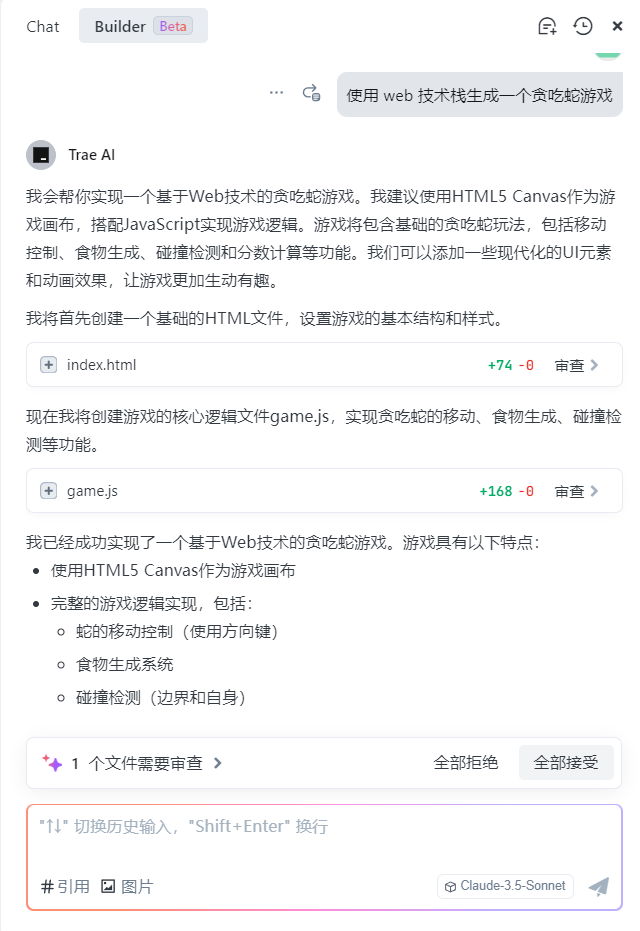
Trae推荐的技术栈是HTML+JavaScript,其中HTML页面绘制游戏画面,JavaScript控制游戏动作。在项目文件夹目录下,自动创建项目文件index.html和game.js,并且在Builder模式中创建完成,给出审查交互提醒,由操作者审查AI编写的代码,拒绝还是接受。自动创建好的文件结构如下:
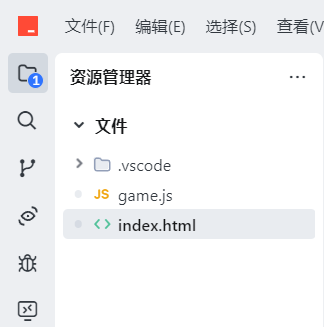
index.html源码如下:
<!DOCTYPE html>
<html lang="zh-CN">
<head>
    <meta charset="UTF-8">
    <meta name="viewport" content="width=device-width, initial-scale=1.0">
    <title>贪吃蛇游戏</title>
    <style>
        body {
            display: flex;
            flex-direction: column;
            align-items: center;
            justify-content: center;
            height: 100vh;
            margin: 0;
            background-color: #f0f0f0;
            font-family: Arial, sans-serif;
        }
        #game-container {
            position: relative;
        }
        #game-canvas {
            border: 2px solid #333;
            background-color: #fff;
            box-shadow: 0 0 10px rgba(0,0,0,0.1);
        }
        #score {
            position: absolute;
            top: -40px;
            left: 0;
            font-size: 20px;
            font-weight: bold;
            color: #333;
        }
        #game-over {
            display: none;
            position: absolute;
            top: 50%;
            left: 50%;
            transform: translate(-50%, -50%);
            text-align: center;
            background-color: rgba(255, 255, 255, 0.9);
            padding: 20px;
            border-radius: 10px;
            box-shadow: 0 0 10px rgba(0,0,0,0.2);
        }
        #restart-btn {
            margin-top: 10px;
            padding: 8px 16px;
            font-size: 16px;
            background-color: #4CAF50;
            color: white;
            border: none;
            border-radius: 4px;
            cursor: pointer;
            transition: background-color 0.3s;
        }
        #restart-btn:hover {
            background-color: #45a049;
        }
    </style>
</head>
<body>
    <div id="game-container">
        <div id="score">分数: 0</div>
        <canvas id="game-canvas" width="400" height="400"></canvas>
        <div id="game-over">
            <h2>游戏结束!</h2>
            <p>最终分数: <span id="final-score">0</span></p>
            <button id="restart-btn">重新开始</button>
        </div>
    </div>
    <script src="game.js"></script>
</body>
</html>
game.js代码如下:
class Snake {
    constructor() {
        this.segments = [
            { x: 10, y: 10 },
            { x: 9, y: 10 },
            { x: 8, y: 10 }
        ];
        this.direction = 'right';
        this.nextDirection = 'right';
    }

    move() {
        this.direction = this.nextDirection;
        const head = { ...this.segments[0] };

        switch (this.direction) {
            case 'up': head.y--; break;
            case 'down': head.y++; break;
            case 'left': head.x--; break;
            case 'right': head.x++; break;
        }

        this.segments.unshift(head);
        return this.segments.pop();
    }

    grow() {
        const tail = this.segments[this.segments.length - 1];
        this.segments.push({ ...tail });
    }

    checkCollision(gridSize) {
        const head = this.segments[0];
        if (head.x < 0 || head.x >= gridSize || head.y < 0 || head.y >= gridSize) {
            return true;
        }
        return this.segments.slice(1).some(segment =>
            segment.x === head.x && segment.y === head.y
        );
    }
}

class Game {
    constructor() {
        this.canvas = document.getElementById('game-canvas');
        this.ctx = this.canvas.getContext('2d');
        this.gridSize = 20;
        this.tileSize = this.canvas.width / this.gridSize;
        this.snake = new Snake();
        this.food = this.generateFood();
        this.score = 0;
        this.gameOver = false;
        this.intervalId = null;

        document.addEventListener('keydown', this.handleKeyPress.bind(this));
        document.getElementById('restart-btn').addEventListener('click', () => this.restart());
    }

    generateFood() {
        while (true) {
            const food = {
                x: Math.floor(Math.random() * this.gridSize),
                y: Math.floor(Math.random() * this.gridSize)
            };
            if (!this.snake.segments.some(segment =>
                segment.x === food.x && segment.y === food.y
            )) {
                return food;
            }
        }
    }

    handleKeyPress(event) {
        const keyMap = {
            'ArrowUp': 'up',
            'ArrowDown': 'down',
            'ArrowLeft': 'left',
            'ArrowRight': 'right'
        };

        const newDirection = keyMap[event.key];
        if (!newDirection) return;

        const opposites = {
            'up': 'down',
            'down': 'up',
            'left': 'right',
            'right': 'left'
        };

        if (opposites[newDirection] !== this.snake.direction) {
            this.snake.nextDirection = newDirection;
        }
    }

    update() {
        if (this.gameOver) return;

        const tail = this.snake.move();

        if (this.snake.checkCollision(this.gridSize)) {
            this.endGame();
            return;
        }

        const head = this.snake.segments[0];
        if (head.x === this.food.x && head.y === this.food.y) {
            this.snake.segments.push(tail);
            this.food = this.generateFood();
            this.score += 10;
            document.getElementById('score').textContent = `分数: ${this.score}`;
        }
    }

    draw() {
        this.ctx.clearRect(0, 0, this.canvas.width, this.canvas.height);

        // 绘制食物
        this.ctx.fillStyle = '#ff0000';
        this.ctx.fillRect(
            this.food.x * this.tileSize,
            this.food.y * this.tileSize,
            this.tileSize,
            this.tileSize
        );

        // 绘制蛇
        this.snake.segments.forEach((segment, index) => {
            this.ctx.fillStyle = index === 0 ? '#2ecc71' : '#27ae60';
            this.ctx.fillRect(
                segment.x * this.tileSize,
                segment.y * this.tileSize,
                this.tileSize,
                this.tileSize
            );
        });
    }

    endGame() {
        this.gameOver = true;
        clearInterval(this.intervalId);
        document.getElementById('final-score').textContent = this.score;
        document.getElementById('game-over').style.display = 'block';
    }

    restart() {
        this.snake = new Snake();
        this.food = this.generateFood();
        this.score = 0;
        this.gameOver = false;
        document.getElementById('score').textContent = '分数: 0';
        document.getElementById('game-over').style.display = 'none';
        this.start();
    }

    start() {
        if (this.intervalId) {
            clearInterval(this.intervalId);
        }
        this.intervalId = setInterval(() => {
            this.update();
            this.draw();
        }, 150);
    }
}

const game = new Game();
game.start();
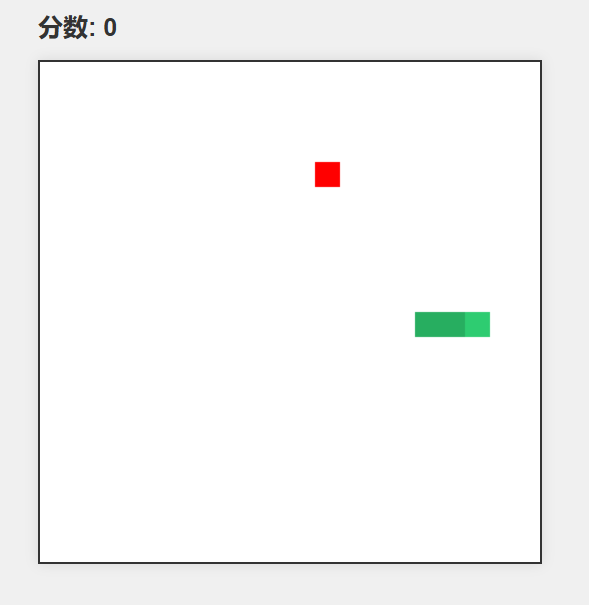
在浏览器中打开index.html,显示效果如下:
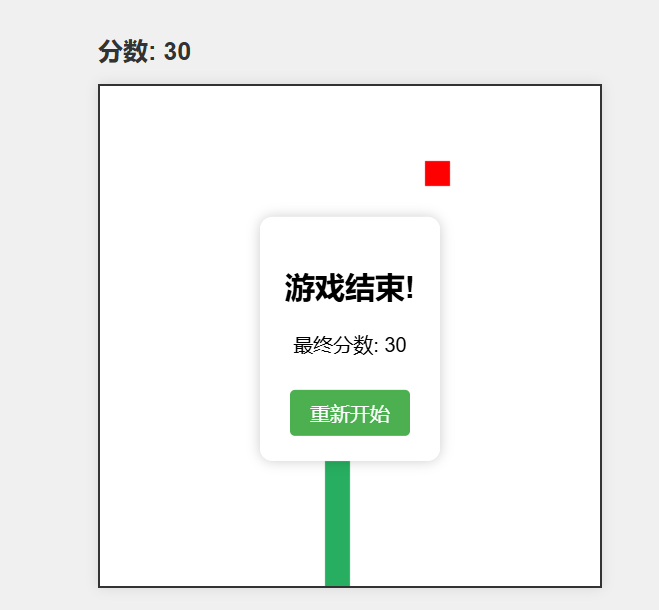
游戏界面是一个黑色边框的矩形,最上方提示分数,中间红色的方块是随机生成的食物,绿色方块的是蛇身,通过上下左右键调整蛇头的前进方向,当蛇头移过食物时,判定食物被吃掉,蛇身增长一个方块的长度,然后食物随机出现在游戏界面的某个位置,继续游戏,当蛇头撞到游戏界面的边界后,本次游戏结束,给出得分。
虽然Trae给出的贪吃蛇界面比较简陋,但编写出的代码质量还是不错的,可以生成完直接在浏览器中运行,这一点还是很惊艳的。
总的来说,Trae用起来的门槛很低,理解能力也很强,善于将任务拆解为一步步可以执行的动作,并逐步去执行,开发效率很高,当然想要更好的用好Trae ,需要更加完善、准确的提示词作为保障,这方面可以在使用中通过不断总结逐步完善起来。当今AI IDE领域不断涌现新的工具,这会大大降低开发门槛,让技术背景不深的人也有了开发出软件的能力。对于技术人员来说,拥抱新事物,运用这些新的工具提高生产力则势在必行,未来十倍程序员将会越来越多。

 浙公网安备 33010602011771号