

Spring AI Alibaba
0.环境
0.1.依赖
<properties>
    <project.build.sourceEncoding>UTF-8</project.build.sourceEncoding>
    <maven.compiler.release>17</maven.compiler.release>
    <maven.compiler.source>8</maven.compiler.source>
    <maven.compiler.target>8</maven.compiler.target>
    <maven.compiler.compilerVersion>8</maven.compiler.compilerVersion>
  </properties>

  <dependencies>
    <!--引入spring-boot-starter-web,支持web开发-->
    <dependency>
      <groupId>org.springframework.boot</groupId>
      <artifactId>spring-boot-starter-web</artifactId>
      <version>3.4.2</version>
    </dependency>
    <dependency>
      <groupId>com.alibaba.cloud.ai</groupId>
      <artifactId>spring-ai-alibaba-starter</artifactId>
      <version>1.0.0-M5.1</version>
    </dependency>
  </dependencies>


  <repositories>
    <repository>
      <id>spring-milestones</id>
      <name>Spring Milestones</name>
      <url>https://repo.spring.io/milestone</url>
      <snapshots>
        <enabled>false</enabled>
      </snapshots>
    </repository>
  </repositories>
0.2.配置文件
spring:
  application:
    name: ai
  ai:
    dashscope:
      api-key: 12345
      chat:
        options:
          model: qwen-max
1.ChatClient
1.1 创建
1.1.1 单聊天自动创建
    public ChatController(ChatClient.Builder builder) {
        this.chatClient = builder.build();
    }

    @GetMapping("/chat")
    public String chat(@RequestBody String input) {
        return this.chatClient.prompt()
                // 设置用户输入
                .user(input)
                // 调用
                .call()
                // 以字符串获取结果
                .content();
    }
2.1.2 多聊天手动创建
- 单一模型类型下的多ChatClient实例
spring:
  ai:
    chat:
      client:
        # 禁用自动创建
        enabled: false
    private final ChatClient customerServiceClient;
    private final ChatClient technicalSupportClient;

    public ChatController(ChatClient.Builder builder) {
        // 客服专用客户端
        this.customerServiceClient = builder
                .build();

        // 技术支持专用客户端
        this.technicalSupportClient = builder
                .build();
    }
- 不同模型类型的 ChatClient 配置
1.2 响应
AI 模型的响应是一种由ChatResponse类型定义的丰富结构。它包含响应生成相关的元数据,同时它还可以包含多个子响应(称为Generation),每个子响应都有自己的元数据。元数据包括用于创建响应的令牌(token)数量信息(在英文中,每个令牌大约为一个单词的 3/4),了解令牌信息很重要,因为 AI 模型根据每个请求使用的令牌数量收费。
        ChatResponse chatResponse = chatClient.prompt()
                .user("Tell me a joke")
                .call()
                .chatResponse();
1.2.1 返回自定义实体
ActorFilms actorFilm = chatClient.prompt()
                .user("Generate the filmography for a random actor.")
                .call()
                .entity(ActorFilms.class);
        System.out.println(actorFilm);

        List<ActorFilms> actorFilms = chatClient.prompt()
                .user("Generate the filmography of 5 movies for Tom Hanks and Bill Murray.")
                .call()
                .entity(new ParameterizedTypeReference<List<ActorFilms>>() {
                });
        actorFilms.stream().forEach(System.out::println);
1.2.2 流式响应
    @GetMapping("/streamChat")
    public Flux<String> streamChat(){
        return chatClient.prompt()
                .user("Tell me a joke")
                .stream()
                .content();
    }
1.3 方法返回值
1.3.1 call()
- content():返回响应的字符串内容
- chatResponse():返回ChatResponse包含多个代以及有关响应的元数据的对象,例如,使用了多少个令牌来创建响应。
- entity: 返回 Java 类型
entity(ParameterizedTypeReference type):用于返回实体类型的集合。
entity(Class type): 用于返回特定的实体类型。
entity(StructuredOutputConverter structuredOutputConverter): 用于指定一个实例 StructuredOutputConverter,将 String 转换为实体类型。
1.3.2 stream()
- Flux
content():返回由AI模型生成的字符串的Flux。 - Flux
chatResponse():返回对象的 Flux ChatResponse,其中包含有关响应的附加元数据。
1.4 ChatClient 默认值
- 配置类
@Configuration
public class ChatConfig {

    @Bean
    ChatClient chatClient(ChatClient.Builder builder) {
        return builder.defaultSystem("You are a friendly chat bot that answers question in the voice of a Pirate")
                .build();
    }
}
- 带模版的配置类
@Configuration
public class ChatConfig {

    @Bean
    ChatClient chatClient(ChatClient.Builder builder) {
        return builder.defaultSystem("You are a friendly chat bot that answers question in the voice of a {voice}")
                .build();
    }
}


    @GetMapping("/defaultChat")
    public void defaultChat(){
        chatClient.prompt()
                .system(sp -> sp.param("voice", "Robert DeNiro"))
                .user("Tell me a joke")
                .call()
                .content();
    }
1.5 Advisors
一个常见模式是使用上下文数据附加或扩充 Prompt,最终使用扩充后的 Prompt 与模型交互。
- 自己的数据:这是 AI 模型尚未训练过的数据,如特定领域知识、产品文档等,即使模型已经看到过类似的数据,附加的上下文数据也会优先生成响应。
- 对话历史记录:聊天模型的 API 是无状态的,如果您告诉 AI 模型您的姓名,它不会在后续交互中记住它,每次请求都必须发送对话历史记录,以确保在生成响应时考虑到先前的交互
1.5.1 检索增强生成(RAG)
向量数据库存储的是 AI 模型不知道的数据,当用户问题被发送到 AI 模型时,QuestionAnswerAdvisor 会在向量数据库中查询与用户问题相关的文档。
来自向量数据库的响应被附加到用户消息 Prompt 中,为 AI 模型生成响应提供上下文。
假设您已将数据加载到中 VectorStore,则可以通过向 ChatClient 提供 QuestionAnswerAdvisor 实例来执行检索增强生成 (RAG ) 。
SearchRequest.defaults() 将对 Vector 向量数据库中的所有文档执行相似性搜索。
1.5.2 动态过滤表达式
1.5.3 对话记忆
1.5.4 日志
2.Chat Model对话模型
对话模型(Chat Model)接收一系列消息(Message)作为输入,与模型 LLM 服务进行交互,并接收返回的聊天消息(Chat Message)作为输出。相比于普通的程序输入,模型的输入与输出消息(Message)不止支持纯字符文本,还支持包括语音、图片、视频等作为输入输出。
ChatModel提供模型配置,ChatClient基于模型配置创建实际可用的客户端实例
2.1 chat
@RestController
@RequestMapping("/chatModel")
public class ChatModelController {
    private final ChatModel chatModel;

    public ChatModelController(ChatModel chatModel) {
        this.chatModel = chatModel;
    }

    @RequestMapping("/chat")
    public String chat() {
        ChatResponse response = chatModel.call(new Prompt("tell a joke"));
        return response.getResult().getOutput().getContent();
    }

    @RequestMapping("/streamChat")
    public void streamChat(HttpServletResponse response) throws IOException {
        response.setContentType("text/event-stream");
        response.setCharacterEncoding("UTF-8");

        Prompt prompt = new Prompt("tell a joke");

        // 使用 Flux 处理流式响应
        chatModel.stream(prompt)
                .doOnNext(chunk -> {
                    try {
                        response.getWriter().write("data: " + chunk.getResult().getOutput().getContent() + "\n\n");
                        response.getWriter().flush();
                    } catch (IOException e) {
                        e.printStackTrace();
                    }
                })
                .doOnComplete(() -> {
                    try {
                        response.getWriter().write("event: complete\n\n");
                        response.getWriter().flush();
                    } catch (IOException e) {
                        e.printStackTrace();
                    }
                })
                .subscribe();
    }

    @RequestMapping("/chatWithOptions")
    public String chatWithOptions(String input) {
        ChatOptions options = ChatOptions.builder()
                .temperature(0.7)
                .maxTokens(150)
                .build();
        Prompt prompt = new Prompt(input, options);
        ChatResponse response = chatModel.call(prompt);
        return response.getResult().getOutput().getContent();
    }
}
2.2 文升图
@RestController
@RequestMapping("/chatModel")
public class ChatModelController {

    private final ImageModel imageModel;


    public ChatModelController(ImageModel imageModel) {
        this.imageModel = imageModel;
    }

    @RequestMapping("/image")
    public String image() {
        ImageOptions options = ImageOptionsBuilder.builder()
                .build();
        // 文生图
        ImagePrompt imagePrompt = new ImagePrompt("生成一朵花", options);
        ImageResponse response = imageModel.call(imagePrompt);
        String imageUrl = response.getResult().getOutput().getUrl();

        return "redirect:" + imageUrl;
    }
}
3.嵌入模型 (Embedding Model)
嵌入(Embedding)的工作原理是将文本、图像和视频转换为称为向量(Vectors)的浮点数数组。
@RestController
@RequestMapping("/embeddingModel")
public class EmbeddingModelController {

    private final EmbeddingModel embeddingModel;

    @Autowired
    public EmbeddingModelController(EmbeddingModel embeddingModel) {
        this.embeddingModel = embeddingModel;
    }

    @GetMapping("/ai/embedding")
    public Map embed(@RequestParam(value = "message", defaultValue = "Tell me a joke") String message) {
        EmbeddingResponse embeddingResponse = this.embeddingModel.embedForResponse(List.of(message));
        return Map.of("embedding", embeddingResponse);
    }
}
4.RAG检索增强生成
Retrieval Augmented Generation,检索增强生成,是一种结合信息检索和文本生成的技术范式。
- RagConfig
@Configuration
public class RagConfig {

    @Bean
    ChatClient chatClient(ChatClient.Builder builder) {
        return builder.defaultSystem("你将作为一名机器人产品的专家,对于用户的使用需求作出解答")
                .build();
    }

    @Bean
    VectorStore vectorStore(EmbeddingModel embeddingModel) {
        SimpleVectorStore simpleVectorStore = SimpleVectorStore.builder(embeddingModel)
                .build();

        // 生成一个机器人产品说明书的文档
        List<Document> documents = List.of(
                new Document("产品说明书:产品名称:智能机器人\n" +
                        "产品描述:智能机器人是一个智能设备,能够自动完成各种任务。\n" +
                        "功能:\n" +
                        "1. 自动导航:机器人能够自动导航到指定位置。\n" +
                        "2. 自动抓取:机器人能够自动抓取物品。\n" +
                        "3. 自动放置:机器人能够自动放置物品。\n"));

        simpleVectorStore.add(documents);
        return simpleVectorStore;
    }
}
- RagController
@RestController
@RequestMapping("/rag")
public class RagController {

    @Autowired
    private ChatClient chatClient;

    @Autowired
    private VectorStore vectorStore;

    @PostMapping(value = "/chat")
    public String generation() {
        // 发起聊天请求并处理响应
        return chatClient.prompt()
                .user("机器人有哪些功能?")
                .advisors(new QuestionAnswerAdvisor(vectorStore))
                .call()
                .content();
    }
}
4.1 高级功能
5.聊天记忆
@RestController
@RequestMapping("/chatMemory")
public class ChatMemoryController {

    private final ChatClient chatClient;

    public ChatMemoryController(ChatClient.Builder builder) {
        this.chatClient = builder.build();
    }

    @GetMapping("/chat")
    public void caht() {

        //对话记忆的唯一标识
        String conversantId = UUID.randomUUID().toString();

        ChatResponse response = chatClient
                .prompt()
                .user("我想去新疆")
                .advisors(spec -> spec.param(AbstractChatMemoryAdvisor.CHAT_MEMORY_CONVERSATION_ID_KEY, conversantId)
                        .param(AbstractChatMemoryAdvisor.CHAT_MEMORY_RETRIEVE_SIZE_KEY, 10))
                .call()
                .chatResponse();
        String content = response.getResult().getOutput().getContent();
        System.out.println( content);

        response = chatClient
                .prompt()
                .user("可以帮我推荐一些美食吗")
                .advisors(spec -> spec.param(AbstractChatMemoryAdvisor.CHAT_MEMORY_CONVERSATION_ID_KEY, conversantId)
                        .param(AbstractChatMemoryAdvisor.CHAT_MEMORY_RETRIEVE_SIZE_KEY, 10))
                .call()
                .chatResponse();
        content = response.getResult().getOutput().getContent();
        System.out.println(content);
    }
}
6.Function calling
允许大型语言模型(LLM)在必要时调用一个或多个可用的工具,这些工具通常由开发者定义。工具可以是任何东西:网页搜索、对外部 API 的调用,或特定代码的执行等。
- 配置
@Configuration
public class FunctionConfig {
    @Bean
    @Description("根据用户编号和订单编号查询订单信息")  //function的描述
    public Function<MockOrderService.Request, MockOrderService.Response> getOrderFunction(MockOrderService mockOrderService) {
        return mockOrderService::getOrder;
    }
}
- 逻辑实现
@Service
public class MockOrderService {
    public Response getOrder(Request request) {
        String productName = "尤尼克斯羽毛球拍";
        return new Response(String.format("%s的订单编号为%s, 购买的商品为: %s", request.userId, request.orderId, productName));
    }

    @JsonInclude(JsonInclude.Include.NON_NULL)
    public record Request(
            //这里的JsonProperty将转换为function的parameters信息, 包括参数名称和参数描述等
            /*
             {
                "orderId": {
                    "type": "string",
                    "description": "订单编号, 比如1001***"
                    },
                "userId": {
                    "type": "string",
                    "description": "用户编号, 比如2001***"
                }
            }
            */
            @JsonProperty(required = true, value = "orderId") @JsonPropertyDescription("订单编号, 比如1001***") String orderId,
            @JsonProperty(required = true, value = "userId") @JsonPropertyDescription("用户编号, 比如2001***") String userId) {
    }

    public record Response(String description) {
    }
}
- 调用
@RestController
@RequestMapping("/function")
public class FunctionController {

    private final ChatClient chatClient;

    public FunctionController(ChatClient.Builder builder) {
        this.chatClient = builder.defaultFunctions("getOrderFunction").build();
    }

    @GetMapping("/chat")
    public void test() {

        ChatResponse response = chatClient
                .prompt()
                .user("帮我一下订单, 用户编号为1001, 订单编号为2001")
                .call()
                .chatResponse();

        String content = response.getResult().getOutput().getContent();
        System.out.println(content);
    }
}
7.接入阿里云百炼平台
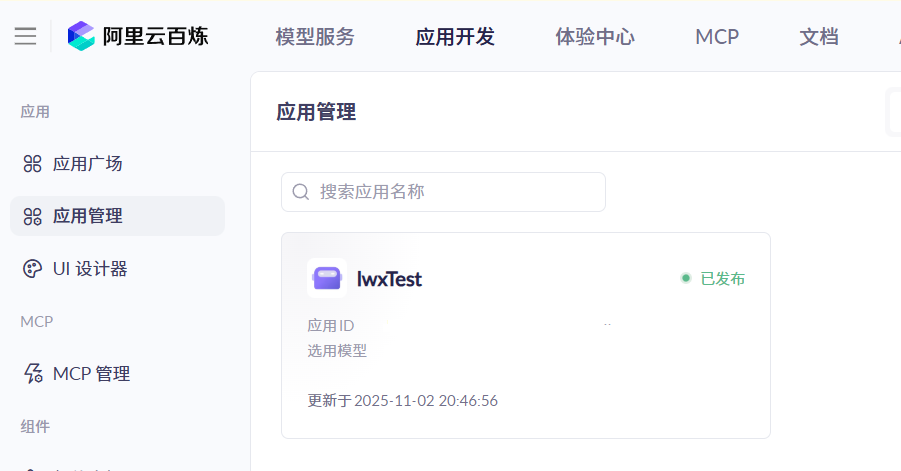
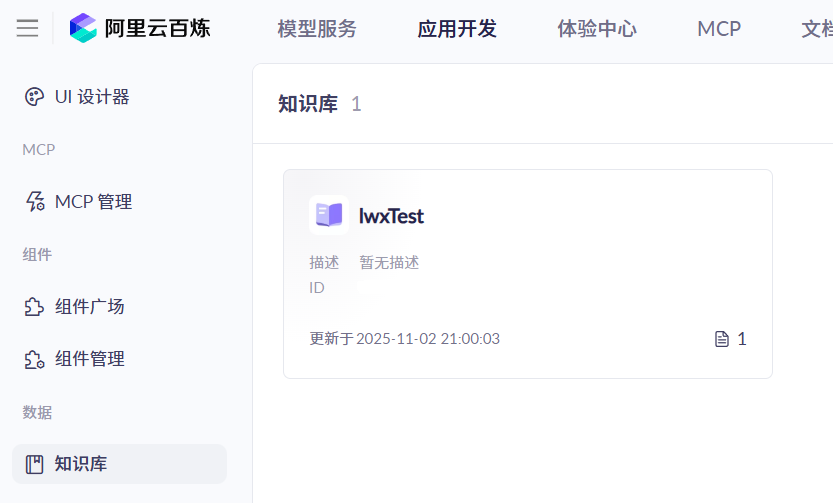
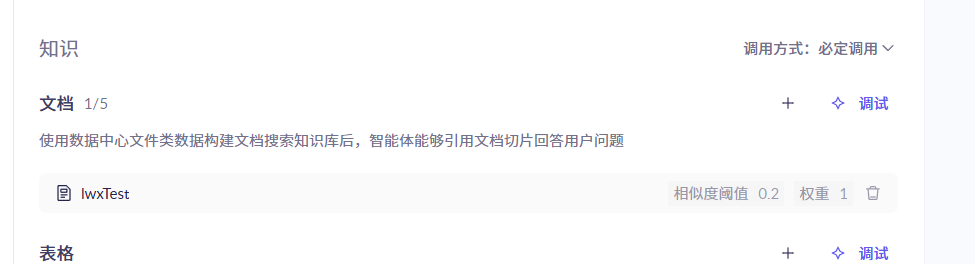
7.1 阿里云百炼发布agent
- 新建agent
![image]()
- 新建知识库
![image]()
- 添加知识库
![image]()
7.2 yml
spring:
  application:
    name: ai
  ai:
    dashscope:
      api-key:
      agent:
        app-id:
7.3 应用
@RestController
@RequestMapping("/agent")
public class BailianAgentRagController {

    private final DashScopeAgent agent;

    @Value("${spring.ai.dashscope.agent.app-id}")
    private String appId;

    public BailianAgentRagController(DashScopeAgentApi dashscopeAgentApi) {
        this.agent = new DashScopeAgent(dashscopeAgentApi);
    }

    @GetMapping("/call")
    public String call() {
        ChatResponse response = agent.call(new Prompt("介绍你自己", DashScopeAgentOptions.builder().withAppId(appId).build()));
        AssistantMessage app_output = response.getResult().getOutput();
        return app_output.getContent();
    }

    @GetMapping("/stream/call")
    public Flux<String> stream() {
        return agent.stream(new Prompt("介绍你自己", DashScopeAgentOptions.builder().withAppId(appId).build())).map(response -> {
            AssistantMessage app_output = response.getResult().getOutput();
            return app_output.getContent();
        });
    }
}

 浙公网安备 33010602011771号